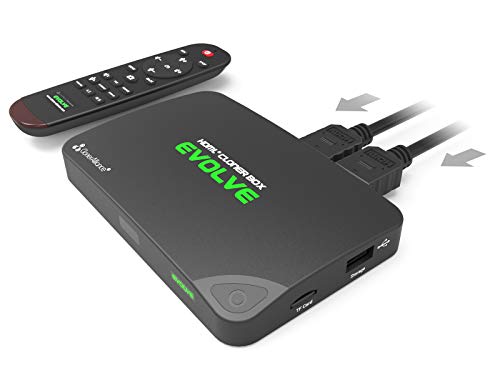
HDML-Cloner Box Evolve, 2 HDMI inputs and 4K Video Input Supported, Capture HDMI Videos and Games to USB Flash Drive/TF MicroSD Card Without PC, Schedule capturing, Remote Control, CEC Supported.


Key features
- •1080p/720p video capture with one click from any video source such as set-top box, video discs and game consoles, no PC required. Simply insert the USB flash drive or TF (Micro SD) card to record videos anytime (H.264 encoding). Quick heat dissipation capability.
- •No Video Split - Manually adjust the recording bitrate to decide whether to save as one complete video or split into several 2GB files.
- •Schedule recording. Record videos automatically at the set time and never miss any wonderful moment while you are away.
- •Dual-HDMI Input Signal Switch, Remote Control, Screenshot Capture, CEC wake-up. Automatic power-off when the no-signal state lasts for about 3 minutes.
- •FREE 16GB USB Flash Drive. Installation CD - Includes software to help HDML-Cloner Box Evolve record videos to PC/laptop. Free bonus MP4 video editing software.
BrandClonerAlliance
HDML-Cloner Box Evolve, 2 HDMI inputs and 4K Video Input Supported, Capture HDMI Videos and Games to USB Flash Drive/TF MicroSD Card Without PC, Schedule capturing, Remote Control, CEC Supported.
List Price: $209.51$188.56DEALYou Save: $20.95 (10%)
Free shippingFree Returns – 30 daysFree Order CancellationSecure Payment2–3 Days DeliveryGet It October 25, 2026In Stock (3)No marketing spamNo account requiredFulfilment by FedEx / Amazon / UPS / ShipwirePayPal / Card Buyer Protection
Customer Reviews
Reviews sourced from verified Amazon purchasers4.1
out of 5
Based on 10 reviews
5★
80%
4★
10%
3★
0%
2★
10%
1★
0%
Not worth the price. Look into other options.
Evelyn Salt•March 15, 2018
This is definitely not worth the price. After reading other reviews, it's hit or miss if the one you receive will work as featured.
I'm using a USB 2.0 flash drive formatted in NTFS and it will work ok, but that's it. I tried numerous other USB 3.0 flash drives(all brands they recommend on cloner-alliance web site) and none of them will record or if they do all files have input/output errors and are unusable. Some reviewers say they are using USB 3.0 drives without issue, but none say which brand/model of USB 3.0 flash drive or USB External HD they are using.
You have to use NTFS to record one big file, else FAT32 gives you multiple 2GB files that have to be stitched together. To do the stitching, they have software you can download. However, this only works on Windows. I am running Arch Linux. Plus, who wants to waste time recording a video and then waste time transferring files to pc to waste time having them stitched together.
There is the option to plug this device directly into computer and record to that vice USB drives, but again you have to use Windows and I wanted the feature to not have my computer on while recording.
You also have to have this cloner box powered on just to watch tv, even if not recording. There is no pure pass through feature. You can always plug/unplug each time you just want to watch tv, but again, it's an inconvenience thing.
After chatting with cloner-alliance cust service and also emailing them, they have decided it's a "compatibility issue" and have offered me a refund once I send my device back in. They have definitely lost a customer and I will not recommend this to my friends who were interested in what experience I had.
I'm using a USB 2.0 flash drive formatted in NTFS and it will work ok, but that's it. I tried numerous other USB 3.0 flash drives(all brands they recommend on cloner-alliance web site) and none of them will record or if they do all files have input/output errors and are unusable. Some reviewers say they are using USB 3.0 drives without issue, but none say which brand/model of USB 3.0 flash drive or USB External HD they are using.
You have to use NTFS to record one big file, else FAT32 gives you multiple 2GB files that have to be stitched together. To do the stitching, they have software you can download. However, this only works on Windows. I am running Arch Linux. Plus, who wants to waste time recording a video and then waste time transferring files to pc to waste time having them stitched together.
There is the option to plug this device directly into computer and record to that vice USB drives, but again you have to use Windows and I wanted the feature to not have my computer on while recording.
You also have to have this cloner box powered on just to watch tv, even if not recording. There is no pure pass through feature. You can always plug/unplug each time you just want to watch tv, but again, it's an inconvenience thing.
After chatting with cloner-alliance cust service and also emailing them, they have decided it's a "compatibility issue" and have offered me a refund once I send my device back in. They have definitely lost a customer and I will not recommend this to my friends who were interested in what experience I had.
I know you might of heard this before, but how did I ever survive with out this capture box?
Guy Tisdale•December 6, 2017
I know you might of heard this before, but how did I ever survive with out this capture box. It captures 1080 p at 60 frames per second nicely on the Micro SD card and when I plug into the USB directly it lags a little bit. Admittingly I do not have it plugged into a USB 2.0 or 3.0 interface so that is more than likely;y the problem. One that I will fix by buying a USB 3.0 card.
The HDMI Capture box has 2 HDMI inputs so that you may switch video feeds, but if you need to switch back and forth on a video feed whilst recording, you will have to stop recording with the device and then switch video feed. To solve this minor inconvenience I bought an HDMI switcher so that while recording I can switch devices back and forth on the fly. I will upload a video into the feed for all to see.
The only nagging problem that I have found is that my HDMI to RGB converter box does not like the video feed coming out from the capture box. Which in reality was no big deal since it was a third party (no-Name) Converter box that probably did not use proper HDMI standards that the Capture Box utilizes. Even with that in mind I still gave it 5 stars, because the two underlying issues really remain in my court and are not the fault of the Capture Box
Will I buy one of these HDMI/HDML capture boxes again. I sure would. I would even give them out as presents to any aspiring youtuber like myself or video blogger.
The HDMI Capture box has 2 HDMI inputs so that you may switch video feeds, but if you need to switch back and forth on a video feed whilst recording, you will have to stop recording with the device and then switch video feed. To solve this minor inconvenience I bought an HDMI switcher so that while recording I can switch devices back and forth on the fly. I will upload a video into the feed for all to see.
The only nagging problem that I have found is that my HDMI to RGB converter box does not like the video feed coming out from the capture box. Which in reality was no big deal since it was a third party (no-Name) Converter box that probably did not use proper HDMI standards that the Capture Box utilizes. Even with that in mind I still gave it 5 stars, because the two underlying issues really remain in my court and are not the fault of the Capture Box
Will I buy one of these HDMI/HDML capture boxes again. I sure would. I would even give them out as presents to any aspiring youtuber like myself or video blogger.
Perfect performance and quality, one of the best purchases Ive made in years! A++ (30+ years experience in digital video)
Program4Food•September 11, 2017
I dont even know where to start, this has been one of the single best purchases Ive made in years! Ive been involved in digital video and digital photography since the 1980's! I used a $500 video capture card to make 320X240 AVI videos, yeah.... been that long ago! Fast forward past all the advances... and you end up at Cloner Alliance! I read all the reviews for several major name brand devices, I was 99% ready to buy from Aver Media.. Ive used there equipment in the past and was pretty satisfied... when I accidentally tripped across the Cloner Alliance brand.
I did some research and read the reviews... I was ready to give it a try, when it came on sale and I bought it by impulse, right away!
I can say without reservation or hesitation, the Evolve performs so great it has exceeded my high expectations! It generates a perfect ISO complaint MP4 file with perfect video and audio sync in true HD 1080 P30! I love this so much, I am buying a second one so I can keep one at the computer for ongoing projects and keep one by the television to record worthy items I wish to archive or view again later.
The included Toshiba Hayabusa thumbdrive works a treat, and was glad to have gotten it. Ive ordered a two pack of the Toshiba 32gig thumbdrives to go with it. Im getting a solid 32mb/s read speed from it on USB 2.0. Its very reliable, is recognized right away by Windows 7 64bit, and ejects quickly and without fail. Ive yet to loose data.
If you are on the fence between a Cloner Alliance and a "major brand", pick the Cloner! I have recorded several hundred hours of video from both HDMI input and composite A/V from VCR before I wrote this review. The device has never choked, never failed, never reset it's self, never glitched and just keeps running and running in perfect form!
I did some research and read the reviews... I was ready to give it a try, when it came on sale and I bought it by impulse, right away!
I can say without reservation or hesitation, the Evolve performs so great it has exceeded my high expectations! It generates a perfect ISO complaint MP4 file with perfect video and audio sync in true HD 1080 P30! I love this so much, I am buying a second one so I can keep one at the computer for ongoing projects and keep one by the television to record worthy items I wish to archive or view again later.
The included Toshiba Hayabusa thumbdrive works a treat, and was glad to have gotten it. Ive ordered a two pack of the Toshiba 32gig thumbdrives to go with it. Im getting a solid 32mb/s read speed from it on USB 2.0. Its very reliable, is recognized right away by Windows 7 64bit, and ejects quickly and without fail. Ive yet to loose data.
If you are on the fence between a Cloner Alliance and a "major brand", pick the Cloner! I have recorded several hundred hours of video from both HDMI input and composite A/V from VCR before I wrote this review. The device has never choked, never failed, never reset it's self, never glitched and just keeps running and running in perfect form!
Husband gave it a 50 star smile! Performs beautifully and brightens our world!
Linda J. Schiller-Hanna•August 8, 2017
My husband wanted this to enhance his ability to record movies for our own use from the TV and store them on his computer. He
absolutely loves it! We were impressed by the fact that even before the item arrived in our mailbox, we received specialized instructions via email
from the vendor as to how to properly set it up. Within minutes of opening, the Evolve box was providing a satisfactory experience for us.
If I could give stars for the size of the smile on my dear husband's face...you'd get about 50!
I am not technologically savvy, but he says it does everything he wants it to do. Enough said!
absolutely loves it! We were impressed by the fact that even before the item arrived in our mailbox, we received specialized instructions via email
from the vendor as to how to properly set it up. Within minutes of opening, the Evolve box was providing a satisfactory experience for us.
If I could give stars for the size of the smile on my dear husband's face...you'd get about 50!
I am not technologically savvy, but he says it does everything he wants it to do. Enough said!
This is an amazing little box and worth every penny
DJR•July 26, 2017
This is an amazing little box and worth every penny! I'll say up front that I did NOT buy the HDML-Cloner Box Evolve to capture games or my own voice while I play (though I've tested it and it easily will) and am not using it as a DVR substitute (though I'd imagine if recording something "live" that again wouldn't be a problem; I can't speak to the timer feature yet seeing as I haven't used it). What I HAVE been using this device for from the moment it arrived is importing family videos. The AV input on the box worked wonderfully for my old VHS tapes (the 4:3 aspect button does just that; it keeps proportions and does more than just "letterbox" a stretched video as some reviews suggest), and seeing as my HDV camcorder has an HDMI output that's been smooth sailing. Video is as clear and crisp as the original quality, I've had ZERO problems with audio/video latency even in captures of more that 2.5 hours, videos are recorded in H.264 and can thus easily be viewed on a variety of devices, and as long as you take two seconds and actually follow their directions (update the firmware, be patient and wait for all of 15 seconds after you stop recording for the device to finalize the video before you unplug) you're golden. I haven't had any reason to contact tech support to date. I'm nothing but pleased with this device and would recommend it (and dare I say their other products) in a heartbeat to anyone looking to easily capture video; make sure you select the device that has all the potential inputs you'll want and you should be set. Fabulous product!
P.S. For those who have wondered about just how much space video takes up, I recorded a 2:45:00 1080i HD video at their 10M setting and the resultant file was 12.1GB. I'd suggest that at that rate the included 16GB flash drive should get you close to 3:30:00 of recording time. Hope that helps!
P.S. For those who have wondered about just how much space video takes up, I recorded a 2:45:00 1080i HD video at their 10M setting and the resultant file was 12.1GB. I'd suggest that at that rate the included 16GB flash drive should get you close to 3:30:00 of recording time. Hope that helps!
Page 1 of 2