Arturia - MiniLab MkII - Portable MIDI Controller for Music Production, with All-in-One Software Package - 25 Keys, 8 Multi-Color Pads


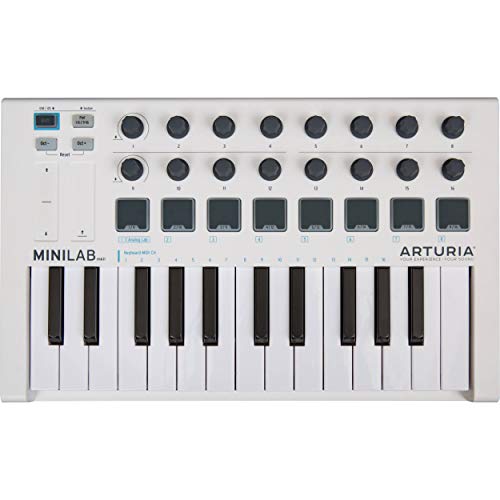



Key features
- •Portable and Compact - MIDI Controller
- •The most responsive keyboard experience in its category
- •500 of the V-Collection 8 presets / 21 Keyboard Instruments and Synthesizers / fully mapped right out of the box
- •The perfect solution to get started with music production
- •16 Assignable Encoders to control your DAW
Arturia - MiniLab MkII - Portable MIDI Controller for Music Production, with All-in-One Software Package - 25 Keys, 8 Multi-Color Pads
List Price: $173.15$155.84DEALYou Save: $17.31 (10%)
Free shippingFree Returns – 30 daysFree Order CancellationSecure Payment2–3 Days DeliveryGet It October 24, 2026In Stock (1)No marketing spamNo account requiredFulfilment by FedEx / Amazon / UPS / ShipwirePayPal / Card Buyer Protection
Customer Reviews
Reviews sourced from verified Amazon purchasers4.7
out of 5
Based on 10 reviews
5★
70%
4★
20%
3★
10%
2★
0%
1★
0%
Great build quality and bundled software, but very frustrating to control VSTs with knobs
Luis Torres•April 6, 2018
I loved
+ the build quality
+ the feel of the keys/knobs/pads
+ the included AnalogLab software (lots of fun sounds!)
I did not like:
- VST control using the endless rotary knobs. This was extremely frustrating.
If you plan to use your MiniLab to modulate settings for non-Arturia VSTs, then I recommend you go with a different midi controller with knobs that have min/max values.
Here are more details about the VST control problems:
There are two main modes for knobs: Absolute and Relative.
Using the knobs in "Absolute" mode is very tricky because, without min/max bounds on the knobs, you don't know what the current value is; so when you change tracks, you either get large jumps in settings or (if you turn on "soft takeover" in your DAW) you have to spin the knob blindly to hunt for the "takeover" point.
Using the knobs in "Relative" mode is also frustrating: instead of just sending one value for "+1" and one value for "-1" when turning the knob in either direction, Arturia uses a special system where the knobs send different values for how fast you spin the knobs. This seems clever, but none of the DAWs that I tried (Ableton Live and Reaper) actually support this. What this means is that, in "Relative" mode, the DAW will only recognize the knob's input if you turn it slowly enough to register +/- 1. There's one way around this: you can turn off "Knob Acceleration", so that no matter how fast you turn the knob, it only returns +/- 1. However, the result of doing this is that the knob is way too slow! For example, I have to turn the knob 5-6 full rotations to move a VST's knob from min to max.
+ the build quality
+ the feel of the keys/knobs/pads
+ the included AnalogLab software (lots of fun sounds!)
I did not like:
- VST control using the endless rotary knobs. This was extremely frustrating.
If you plan to use your MiniLab to modulate settings for non-Arturia VSTs, then I recommend you go with a different midi controller with knobs that have min/max values.
Here are more details about the VST control problems:
There are two main modes for knobs: Absolute and Relative.
Using the knobs in "Absolute" mode is very tricky because, without min/max bounds on the knobs, you don't know what the current value is; so when you change tracks, you either get large jumps in settings or (if you turn on "soft takeover" in your DAW) you have to spin the knob blindly to hunt for the "takeover" point.
Using the knobs in "Relative" mode is also frustrating: instead of just sending one value for "+1" and one value for "-1" when turning the knob in either direction, Arturia uses a special system where the knobs send different values for how fast you spin the knobs. This seems clever, but none of the DAWs that I tried (Ableton Live and Reaper) actually support this. What this means is that, in "Relative" mode, the DAW will only recognize the knob's input if you turn it slowly enough to register +/- 1. There's one way around this: you can turn off "Knob Acceleration", so that no matter how fast you turn the knob, it only returns +/- 1. However, the result of doing this is that the knob is way too slow! For example, I have to turn the knob 5-6 full rotations to move a VST's knob from min to max.
Great build quality
Andrew•March 24, 2018
I bought 4 of them. Great build quality.
Best MIDI keyboard for the price
Amazon Customer•March 22, 2018
Best MIDI keyboard for the price! Best software and overall build quality is outstanding. (The white gets dirty pretty fast but looks brand new after a quick wipe.
My first controller to Mix Music
Cliente de Amazon•February 26, 2018
Nice & easy way to learn to mix music..!!!! awesome effects..!!!!1
Amazing for Live or Analog Lab users. Finicky for other DAWs. Still good for the price.
Amazon Customer•October 31, 2017
Arturia is best known for their synths, so seeing their name crop up when looking for portable MIDI controllers surprised me. It was even more surprising, then, that their MiniLab touts quite a bit of control on a budget - $100 for 16 rotary encoders, 2 banks of 8 pads, 25 keys, and even a pitch and modulation touch strip.
The keys and pads feel pretty shoddy - that's to be expected - but it's good for just banging out beats or song parts with limited desk space, like every other compact MIDI controller in the MiniLab's price range. The encoders are not as useful as you might think - the highest sensitivity setting still has you spinning the knob like a madman to move values sometimes - and that's when the relative MIDI CC mode works with your DAW. Luckily, Arturia does have a solution to this.
The MiniLab's controls - all 16 encoders, the pads, and the two touch strips - can be reconfigured through a free tool Arturia provides on their website. The granularity of control is very impressive - you can set exactly what colors, notes and MIDI channels the drum pads trigger, set what MIDI CCs you want all of the controls to send (or set them to send NRPNs!), and you can even make the encoders work in multiple relative MIDI modes - or in absolute mode. Even more impressive is the ability to store *almost* 8 presets on the device that can be swapped on-the-fly, and are persistent when you unplug the controller. It's not a feature I expected from a $100 MIDI controller, that's for sure.
Now, I say *almost* 8 presets because Arturia decided to put in some hardware-locked bloatware, which I'm a bit cross about: the first preset is read-only, tailored specifically to their upgradable Analog Lab Lite software that comes with the device. Preset 8 is also set up by default to work with Ableton Live 9 Lite, which is also bundled in. It's pretty clear that Arturia has their sights set on earning more off of me through software every time I use this thing. I'm honestly more cross about the latter, though - their Live preset works impossibly well with the DAW, and some other workstations I'm using with the software just about need divine intervention to make proper use of the encoders.
Overall, not bad at all. If you use Live or Analog Lab, look no further - this thing is set up wonderfully out of the box, it's got a lot of bang for your buck, and it works fundamentally well with your software. If not, be aware that you're likely to run into problems getting the encoders working okay with your software. Google " relative midi" or something along those lines to make sure you won't run into problems.
The keys and pads feel pretty shoddy - that's to be expected - but it's good for just banging out beats or song parts with limited desk space, like every other compact MIDI controller in the MiniLab's price range. The encoders are not as useful as you might think - the highest sensitivity setting still has you spinning the knob like a madman to move values sometimes - and that's when the relative MIDI CC mode works with your DAW. Luckily, Arturia does have a solution to this.
The MiniLab's controls - all 16 encoders, the pads, and the two touch strips - can be reconfigured through a free tool Arturia provides on their website. The granularity of control is very impressive - you can set exactly what colors, notes and MIDI channels the drum pads trigger, set what MIDI CCs you want all of the controls to send (or set them to send NRPNs!), and you can even make the encoders work in multiple relative MIDI modes - or in absolute mode. Even more impressive is the ability to store *almost* 8 presets on the device that can be swapped on-the-fly, and are persistent when you unplug the controller. It's not a feature I expected from a $100 MIDI controller, that's for sure.
Now, I say *almost* 8 presets because Arturia decided to put in some hardware-locked bloatware, which I'm a bit cross about: the first preset is read-only, tailored specifically to their upgradable Analog Lab Lite software that comes with the device. Preset 8 is also set up by default to work with Ableton Live 9 Lite, which is also bundled in. It's pretty clear that Arturia has their sights set on earning more off of me through software every time I use this thing. I'm honestly more cross about the latter, though - their Live preset works impossibly well with the DAW, and some other workstations I'm using with the software just about need divine intervention to make proper use of the encoders.
Overall, not bad at all. If you use Live or Analog Lab, look no further - this thing is set up wonderfully out of the box, it's got a lot of bang for your buck, and it works fundamentally well with your software. If not, be aware that you're likely to run into problems getting the encoders working okay with your software. Google " relative midi" or something along those lines to make sure you won't run into problems.
Page 1 of 2