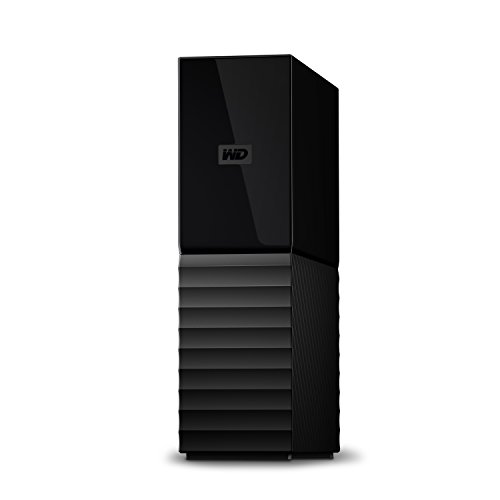
WD 2TB Elements Portable External Hard Drive for Windows, USB 3.2 Gen 1/USB 3.0 for PC & Mac, Plug and Play Ready - WDBU6Y0020BBK-WESN


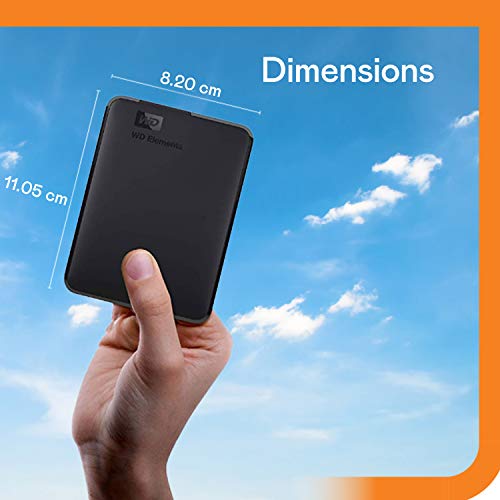


Key features
- •2TB storage capacity
- •USB 3.0 and USB 2.0 compatibility
- •Up to 5 GB/s data transfer speed
- •Formatted for Windows 8, 7, Vista & XP
- •Easily reformat Drive for Mac
WD 2TB Elements Portable External Hard Drive for Windows, USB 3.2 Gen 1/USB 3.0 for PC & Mac, Plug and Play Ready - WDBU6Y0020BBK-WESN
List Price: $160.04$144.04DEALYou Save: $16.00 (10%)
Free shippingFree Returns – 30 daysFree Order CancellationSecure Payment2–3 Days DeliveryGet It October 25, 2026In Stock (3)No marketing spamNo account requiredFulfilment by FedEx / Amazon / UPS / ShipwirePayPal / Card Buyer Protection
Customer Reviews
Reviews sourced from verified Amazon purchasers4.3
out of 5
Based on 10 reviews
5★
70%
4★
20%
3★
0%
2★
0%
1★
10%
FOR MAC USERS! Working great on my 2012 Macbook Pro
Lawrence Baldwin✓ Verified Purchase•June 15, 2018
Thanks to Amanda who shared how to format this for a current Mac. Here is a slightly updated version of her instructions:
Open Disk Utilities.
From the View menu, choose "Show All Devices."
Select WD Elements on the left side of the window.
Right click and choose "Erase" from the pop-up menu.
Create a name and choose "Mac OS Extended (Journaled)" assuming you have a current vision of OS-X.
It will reformat the drive in about a minute.
I followed these directions, and it was effortless. I am using this as a Time Machine backup disk. I keep it plugged into the USB hub that I connect my computer to when it is on my desk. From reviews, I see that some people have had disk failures, but I also do a cloud-based backup. But that only backs up my most recent version of each file. Time Machine gives me hourly backups for the last 24 hours, so I can recover something I've inadvertently overwritten.
I was using an old Synology 212+ for Time Machine, but after moving, it asked me to reinstall, crashed in the process of doing that, and lost all my data. RAID is useless in that situation. I've thought about buying a newer, faster NAS, but that's expensive, and decided to go this route at least for the time being. Unlike the Synology, which was accessible by WiFi, this won't do backups when I take my laptop away from my desk, but I do my most critical work at my desk in any event.
I bought this rather than the $5 cheaper, newer version because I prefer the rounded corners to sharp edges. The rough surface doesn't seem to show fingerprints, a problem reported by users of the shiny newer version. Amazing that 4TB can fit into such a tiny form factor and be such a reasonable price. I am delighted.
Open Disk Utilities.
From the View menu, choose "Show All Devices."
Select WD Elements on the left side of the window.
Right click and choose "Erase" from the pop-up menu.
Create a name and choose "Mac OS Extended (Journaled)" assuming you have a current vision of OS-X.
It will reformat the drive in about a minute.
I followed these directions, and it was effortless. I am using this as a Time Machine backup disk. I keep it plugged into the USB hub that I connect my computer to when it is on my desk. From reviews, I see that some people have had disk failures, but I also do a cloud-based backup. But that only backs up my most recent version of each file. Time Machine gives me hourly backups for the last 24 hours, so I can recover something I've inadvertently overwritten.
I was using an old Synology 212+ for Time Machine, but after moving, it asked me to reinstall, crashed in the process of doing that, and lost all my data. RAID is useless in that situation. I've thought about buying a newer, faster NAS, but that's expensive, and decided to go this route at least for the time being. Unlike the Synology, which was accessible by WiFi, this won't do backups when I take my laptop away from my desk, but I do my most critical work at my desk in any event.
I bought this rather than the $5 cheaper, newer version because I prefer the rounded corners to sharp edges. The rough surface doesn't seem to show fingerprints, a problem reported by users of the shiny newer version. Amazing that 4TB can fit into such a tiny form factor and be such a reasonable price. I am delighted.
**MAC USERS- TAKE NOTE!
Amanda✓ Verified Purchase•March 14, 2018
**FOR MAC USERS!! After 2 "failed" drives were sent back, I called customer support to find out why I wasn't able to troubleshoot via any online methods, and get this to work for my mac! Apparently the solution was insanely easy, but I never saw this eeeasy solution online in any of the forums I found. The issue with erasing/formatting for a mac just has to do with the view you have open in Disk Utility. Make sure you go to View > Show All Devices, and then "erase" the top tier drive. Problem solved.
PS4 Memory
Desiree✓ Verified Purchase•January 12, 2018
Bought for my boyfriend. The 4TB external worked great for his PS4. He said some of the memory was used for converting but he has 7x the amount of space he started with. He is very happy with this item and I will update my review if he comes across any problems.
Huge capacity, small size, reliable.
T.B.✓ Verified Purchase•January 10, 2018
Huge capacity. Working great so far. I use it with my Mac Pro to back up large 4k videos in ProRes 422 format (typical file size 45 gig). It's also fast enough that I can stream these files and watch them directly off the drive (USB 3.0 required for this). Works great on my USB 2.0 ports but takes a lot longer to back up large files through those ports and their reduced performance doesn't allow streaming of the ProRes 422 files. I formatted it ExFat. Very pleased so far. I ordered a second one.
Catastrophic Failure.
Kerry C.✓ Verified Purchase•January 4, 2018
I received this device on time, in good packaging, with product information. Immediately after ordering this Drive, I began using it to backup my music and video library. It was extremely fast, and worked continuously for about 5 hours. After I had backed up my necessary files, I left it connected to my laptop overnight, with my laptop in sleep mode, (thus the drive was powered down). The next morning I tried to access the drive, and found it unresponsive. I ejected it via the software built into Windows 10, and it ejected fine. Then I reconnected the drive, and tried again to access it, to no avail. I thought that perhaps just the FAT (File Allocation Table) had been messed up, but that the data was still there. Using a recovery program that should have been able to fix the FAT or replace it with the older version, on the drive, I was unable to even see the drive. Then I tried using my Apple laptop and recovery tools from it, and still no luck mounting the drive. So I have to assume this drive had a catastrophic failure after about 5 hours of continuous hard use. I DO NOT recommend this drive.
Page 1 of 2