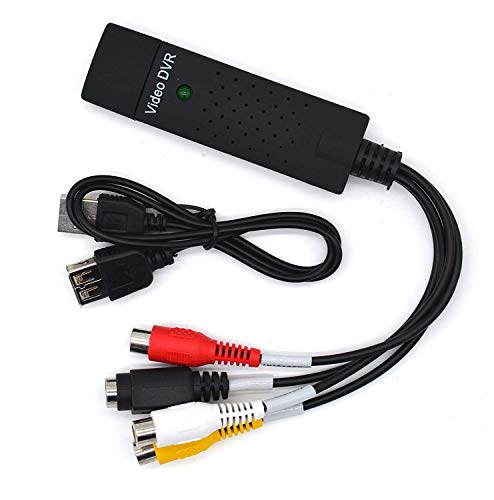
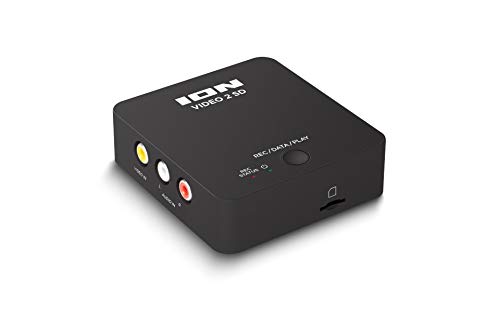
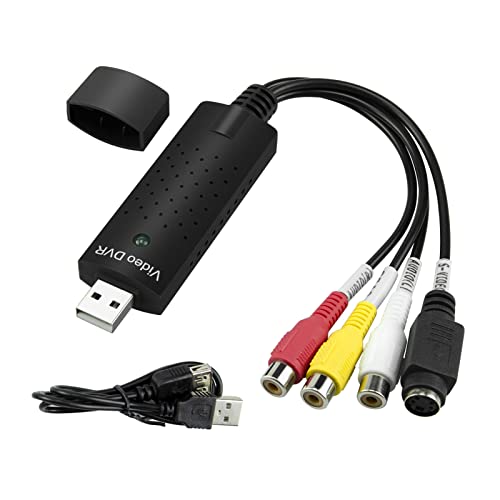
Little World USB 2.0 Audio/Video Converter, Video Capture Card VHS Box VHS VCR TV to Digital Converter, Windows 2000/XP/Vista/7/8/10/11/Mac




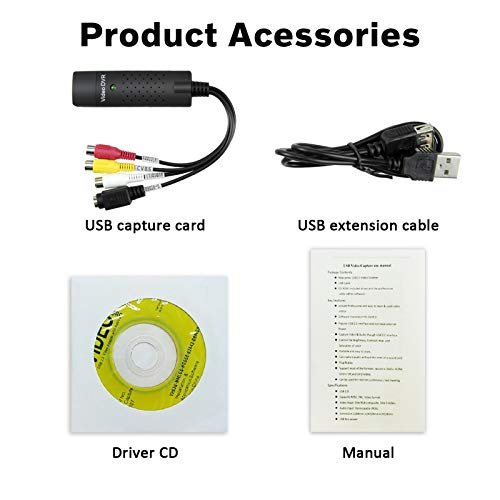
Key features
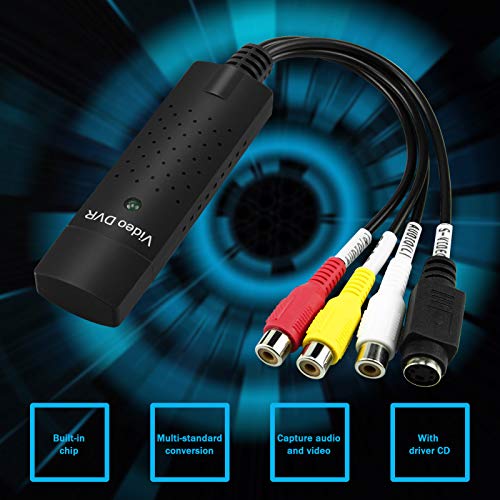
- •The VHS to Digital Converter USB 2.0 Video Converter Audio Capture Card VHS Box VHS VCR TV to Digital Converter Support Win 2000/Win Xp/ Win Vista /Win 7/Win 8/ Win 10 Linux Mac/Android
- •Capture High-quality Video & Audio through popular USB 2.0 interface and not need external power
- •Support for most formats: record in DVD+/-R/RW
- •Support Brightness, Contrast, Hue, and Saturation Control. Capture audio without the sound card
- •This product is suitable for windows10 and Mac, if you do not think it is applicable when you use this product, it should be unclear in the use of the software. If you have such a question, don't hesitate to contact us as soon as possible.
Little World USB 2.0 Audio/Video Converter, Video Capture Card VHS Box VHS VCR TV to Digital Converter, Windows 2000/XP/Vista/7/8/10/11/Mac
List Price: $29.08$26.17DEALYou Save: $2.91 (10%)
Free shippingFree Returns – 30 daysFree Order CancellationSecure Payment2–3 Days DeliveryGet It October 27, 2026In Stock (1)No marketing spamNo account requiredFulfilment by FedEx / Amazon / UPS / ShipwirePayPal / Card Buyer Protection
Customer Reviews
Reviews sourced from verified Amazon purchasers3.9
out of 5
Based on 10 reviews
5★
40%
4★
60%
3★
0%
2★
0%
1★
0%
Very good price for analog to digital converter.
Nathan Jones✓ Verified Purchase•August 7, 2023
This is a very good price for an analog to digital converter. I tested it and it worked on a Windows PC and Linux PC. It is definitely not the best quality but if you just need to rip a few videos from analog to digital it will get the job done for a great price. Overall, I am very happy with the purchase.
A few things:
1.) It is no surprise that the dongle is made really cheaply. The S-video input didn't work on the original one I ordered. I got a free replacement from Amazon and it worked perfectly. But, the casing on the dongle falls apart really easily and the USB part will bend easily if you aren't careful. I would imaging that if it bends too much it will stop working eventually. So, I doubt this device is going to last very long. You get what you pay for here.
2.) Drivers installed on Windows 10 and Linux by just plugging in the device....That's it. I plugged it in and it just worked.
3.) Since it comes with a S-video input, I would recommend using it if your output device supports it. The quality of the videos was noticeably better. However, you will need to select the s-video option if you use the included software. Or, if you use other software just leave the yellow cable disconnected and plug in the others.
4.) I did not realize that there was a small CD with the recording software in the packaging and threw it away. If you search the questions people have posted links that lead you to a download location for the files.
5.) You can use the software that they recommend but it is very outdated. Instead I would recommend downloading something like VLC which is free and using the capture function to convert videos. VLC take a little work to learn, but is a lot more flexible for file formats which means you have a lot of control over the compatibility of saved videos and the amount of storage space needed.
**Make sure you change the resolution of the video as mine always defaulted to the lowest format and I thought the quality was bad until I realized this**
6.) This device only converts an analog signal digital signal. If the quality of the original analog video or the cables are poor, the digital will be as well.
A few things:
1.) It is no surprise that the dongle is made really cheaply. The S-video input didn't work on the original one I ordered. I got a free replacement from Amazon and it worked perfectly. But, the casing on the dongle falls apart really easily and the USB part will bend easily if you aren't careful. I would imaging that if it bends too much it will stop working eventually. So, I doubt this device is going to last very long. You get what you pay for here.
2.) Drivers installed on Windows 10 and Linux by just plugging in the device....That's it. I plugged it in and it just worked.
3.) Since it comes with a S-video input, I would recommend using it if your output device supports it. The quality of the videos was noticeably better. However, you will need to select the s-video option if you use the included software. Or, if you use other software just leave the yellow cable disconnected and plug in the others.
4.) I did not realize that there was a small CD with the recording software in the packaging and threw it away. If you search the questions people have posted links that lead you to a download location for the files.
5.) You can use the software that they recommend but it is very outdated. Instead I would recommend downloading something like VLC which is free and using the capture function to convert videos. VLC take a little work to learn, but is a lot more flexible for file formats which means you have a lot of control over the compatibility of saved videos and the amount of storage space needed.
**Make sure you change the resolution of the video as mine always defaulted to the lowest format and I thought the quality was bad until I realized this**
6.) This device only converts an analog signal digital signal. If the quality of the original analog video or the cables are poor, the digital will be as well.
A little challenging to set up but works as advertised afterwards
Anthony Chiu✓ Verified Purchase•July 24, 2023
Bought it to digitialize decades of memories on DV and VCR before they no longer work. Thought I would give this thing a try before spending $$ to send them out to have some company do it.
Setting up is a little challenging. Challenges i ran into are
1) The disk that the package comes with only contains the app but no driver. If you open the app the list of drivers for video or audio would be empty. You will need to google driver for EasyCapture, download and install them. Of course the instructions that came with product has no mention of any of that.
2) After drivers are installed the driver list in the app is still empty. I don't remember exactly the steps but generally involve restarting the pc and the app.
3) The product key that you have to enter into the app is super tiny on the instuction book. Solved by taking a picture on an iphone and enlarge the pic.
After installation the app works as advertised. I didn't run into the issue of first min of video catpure getting cut off that some others are reporting. The app is easy to use and it has a very nice feature allowing recording to stop after a set time. This allows starting recording and go do something else without worry it will run out of memory or disk space.
I didn't use the Edit and Burn function that come with the app but the edit feature is rudimentary as expected. I would recommend getting something better like Corel VideoStudio for editing and converting into other formats.
I used VideoStudio to edit the footage and upload them to my ipad with no issue.
I tried to directly import from VCR and DV to VideoStudio but that apparently is not supported by VideoStudio. So it's a two step process. First import using EasyCapture app and then use the editor of choice to edit and upload.
Another recommendation is to clean the VCR head before starting the import project. The color was flickering on and off on my VCR before cleaning but restored after cleaning.
So all in all instead of having to spend a lot of money and risk losing or damaging the tapes during transit, this 15 bucks is one of the best investment ever.
Now back to importing hours and hours of tapes. Hope the camcorder play back function holds up until the job is done.
Setting up is a little challenging. Challenges i ran into are
1) The disk that the package comes with only contains the app but no driver. If you open the app the list of drivers for video or audio would be empty. You will need to google driver for EasyCapture, download and install them. Of course the instructions that came with product has no mention of any of that.
2) After drivers are installed the driver list in the app is still empty. I don't remember exactly the steps but generally involve restarting the pc and the app.
3) The product key that you have to enter into the app is super tiny on the instuction book. Solved by taking a picture on an iphone and enlarge the pic.
After installation the app works as advertised. I didn't run into the issue of first min of video catpure getting cut off that some others are reporting. The app is easy to use and it has a very nice feature allowing recording to stop after a set time. This allows starting recording and go do something else without worry it will run out of memory or disk space.
I didn't use the Edit and Burn function that come with the app but the edit feature is rudimentary as expected. I would recommend getting something better like Corel VideoStudio for editing and converting into other formats.
I used VideoStudio to edit the footage and upload them to my ipad with no issue.
I tried to directly import from VCR and DV to VideoStudio but that apparently is not supported by VideoStudio. So it's a two step process. First import using EasyCapture app and then use the editor of choice to edit and upload.
Another recommendation is to clean the VCR head before starting the import project. The color was flickering on and off on my VCR before cleaning but restored after cleaning.
So all in all instead of having to spend a lot of money and risk losing or damaging the tapes during transit, this 15 bucks is one of the best investment ever.
Now back to importing hours and hours of tapes. Hope the camcorder play back function holds up until the job is done.
Digitalizando Recuerdos: Útil Pero Requiere Paciencia
Simon Gonzalez✓ Verified Purchase•July 15, 2023
El Conversor VHS a DVD con USB 2.0 ha sido útil en nuestra misión de digitalizar viejas cintas VHS. La compatibilidad con varios sistemas operativos Windows es una gran ventaja y el proceso de conversión es generalmente simple. Sin embargo, la calidad de las digitalizaciones no siempre es perfecta y a veces requerimos varios intentos para conseguir una transferencia sin problemas. A pesar de estos desafÃos, ha sido un buen recurso para preservar nuestras preciadas cintas de VHS en formato DVD
Very good for this price.
mason✓ Verified Purchase•July 12, 2023
This converter was so simple to use! I couldn't figure out how to get the sound to work, but the video came out perfect, just what I was looking for! Great price too!
good item
Conrad A Smith✓ Verified Purchase•July 4, 2023
Works like designed
Page 1 of 2