PROZOR 192KHz Digital to Analog Audio Converter Optical to RCA Adapter Upgrade Volume Adjustable DAC with Optical Cable, SPDIF TOSLINK to Stereo L/R & 3.5mm Jack Converters


Key features
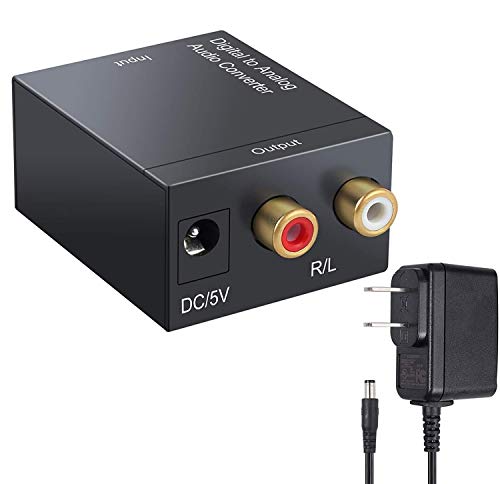
- •192kHz DAC converter prozor digital to analog Audio converter, converts coaxial or Toslink digital PCM Audio signals to analog L/R RCA and 3. 5mm jack Audio simultaneously (input and output cannot be reversed)
- •Supports volume adjustment headphone amplifier function; Audio amplifier chip and volume adjusting switch. Allowing you to drive your headphone directly and adjust the output volume. A similar amp function provides better sound quality.
- •192kHz 24-bit sampling rate supports sampling rate at 32kHz, 44. 1kHz, 48kHz and 96kHz and 192 kHz; 24-bit SPDIF incoming bit stream on L/R channels, to eliminate noise when no signal input, and automatically mute while non-audio input signal.
- •Aluminum metal casing durable aluminum metal shell makes it heat-resisted and high quality; It can easily install and operate. Powered by 5. 5mm USB power cable (power adapter is not included); Don't use Other plugs, It can only use 5V 1a plug.
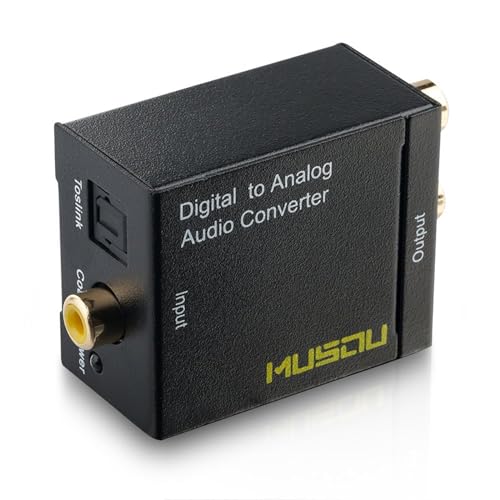
- •Gold-plated input & output gold Plated interface to reduce signal transmission loss. Input Audio connector: 1 x Toslink (included 1m 4. 0/OD slink cable), 1 x RCA (coaxial); output audio connector: 2 x RCA/L), 1 x 3. 5mm jack.
BrandPROZOR
CategoryDigital-Analog Converters
Sizesmall
Color192khz Dac With Volume Control
WarrantyOne year
PROZOR 192KHz Digital to Analog Audio Converter Optical to RCA Adapter Upgrade Volume Adjustable DAC with Optical Cable, SPDIF TOSLINK to Stereo L/R & 3.5mm Jack Converters
List Price: $47.12$42.41DEALYou Save: $4.71 (10%)
Free shippingFree Returns – 30 daysFree Order CancellationSecure Payment2–3 Days DeliveryGet It October 26, 2026In Stock (1)No marketing spamNo account requiredFulfilment by FedEx / Amazon / UPS / ShipwirePayPal / Card Buyer Protection
Customer Reviews
Reviews sourced from verified Amazon purchasers4.5
out of 5
Based on 10 reviews
5★
90%
4★
10%
3★
0%
2★
0%
1★
0%
The Prozor Digital to Analog Converter is perfect for those who are not satisfied with the tinny ...
James Perry✓ Verified Purchase•March 18, 2018
The Prozor Digital to Analog Converter is perfect for those who are not satisfied with the tinny sound that comes from their flat screen TVs. Before you complain that the converter is defective.......please do this first! Go to your digital tv's settings,and select "Sound". Scroll down the menu to Digital Audio Output. Select PCM format.This is the only sound format the converter can utilize! Then connect the digital output cable to the Digital Output port in the back of you tv. Remove the white plastic plugs that cover the connectors,before trying to plug them in. Then connect the HDMI cable to a HDMI port on your tv and the converter's power port. The red light on the converter tells you that you are connected. This is the converter's power supply. After you've done this....connect the red and white analog audio connectors to the converter...( in my case),and the TV/Aux port on your amp or receiver. Turn down the volume control on the tv......and select TV/Aux on your receiver or amp. It works for me...and it should work for you!
Great for adding an audio connection from a TV without one.
Skeptical Searcher✓ Verified Purchase•February 8, 2018
I recently bought a 40" Samsung 4K TV at a low sale price to replace the smaller 1080 HD TV that I had in my den. However, being satisfied with the new TV otherwise, I was disappointed to find that it had neither Bluetooth nor audio out connections that I could use to connect it to my Pyle stereo amplifier for the external sound system. The only audio outputs available from the TV were the optical output and HDMI, neither of which the Pyle amplifier had an input for.
Looking up what was available to rectify the situation, I first ordered from Amazon an Avantree aptX Low Latency Bluetooth Transmitter that had an optical input connection. It provided a very good Bluetooth connection to my Pyle amplifier, but no direct, hardwired audio connection, which I prefer to use. Researching further, I found the PROZOR, at a much cheaper price than the Avantree unit, and I ordered it. It was easy to install and to get it working with the Pyle amplifier and found it works great. I also used the supplied USB cable to plug into the TV to power the PROZOR. That way, when I turn on or off the TV, the PROZOR turns on and off also.
NOTE: If you are using this unit as I am for providing an audio output from a TV, if it does not appear to be working, you will need to go into your TV's audio settings and make sure the optical output is set to PCM. The PROZOR will not accept any other kind of Optical output.
I can even have the PROZOR transmit Bluetooth for my wireless earphones by plugging a TaoTronics Bluetooth 4.1 Transmitter / Receiver that I already had into the PROZOR's RCA receptacle.
Nevertheless, I am keeping the Avantree Bluetooth transmitter.
Another note. If, when you use any of these kinds of devices for converting a TV's optical signal to audio and there is a noticeable sync difference between the lips of the people on the screen and what they are saying, you can usually go into the TV settings to adjust the audio lag to make it sync. One way to make the sync adjustment is to have both the TV speakers and the sound system speakers on at the same time. Make the audio lag adjustment until the audio from both systems coincides, then disable the TV speakers.
TaoTronics Bluetooth 4.1 Transmitter / Receiver, 2-in-1 Wireless 3.5mm Adapter (aptX Low Latency, 2 Devices Simultaneously, For TV / Home Sound System)
Avantree aptX Low Latency Bluetooth Transmitter 100ft Range, DUAL LINK with A & B Button, Digital Optical, 3.5mm & RCA Wireless Audio Adapter for TV, PC, Bluetooth 4.2 - Audikast [2 Year Warranty]
Looking up what was available to rectify the situation, I first ordered from Amazon an Avantree aptX Low Latency Bluetooth Transmitter that had an optical input connection. It provided a very good Bluetooth connection to my Pyle amplifier, but no direct, hardwired audio connection, which I prefer to use. Researching further, I found the PROZOR, at a much cheaper price than the Avantree unit, and I ordered it. It was easy to install and to get it working with the Pyle amplifier and found it works great. I also used the supplied USB cable to plug into the TV to power the PROZOR. That way, when I turn on or off the TV, the PROZOR turns on and off also.
NOTE: If you are using this unit as I am for providing an audio output from a TV, if it does not appear to be working, you will need to go into your TV's audio settings and make sure the optical output is set to PCM. The PROZOR will not accept any other kind of Optical output.
I can even have the PROZOR transmit Bluetooth for my wireless earphones by plugging a TaoTronics Bluetooth 4.1 Transmitter / Receiver that I already had into the PROZOR's RCA receptacle.
Nevertheless, I am keeping the Avantree Bluetooth transmitter.
Another note. If, when you use any of these kinds of devices for converting a TV's optical signal to audio and there is a noticeable sync difference between the lips of the people on the screen and what they are saying, you can usually go into the TV settings to adjust the audio lag to make it sync. One way to make the sync adjustment is to have both the TV speakers and the sound system speakers on at the same time. Make the audio lag adjustment until the audio from both systems coincides, then disable the TV speakers.
TaoTronics Bluetooth 4.1 Transmitter / Receiver, 2-in-1 Wireless 3.5mm Adapter (aptX Low Latency, 2 Devices Simultaneously, For TV / Home Sound System)
Avantree aptX Low Latency Bluetooth Transmitter 100ft Range, DUAL LINK with A & B Button, Digital Optical, 3.5mm & RCA Wireless Audio Adapter for TV, PC, Bluetooth 4.2 - Audikast [2 Year Warranty]
The Fix For No Audio When PS4 Hooked To Old HDTVs
Zaroff32✓ Verified Purchase•January 14, 2018
I used this to enable sound on my son's new PS4 when connected to our Mesolithic Era RCA R52WM24 Flat Panel TV (circa 2006). The PS4 includes digital outputs, so using the HDMI adapter converted video only with no sound. I read tons of reviews and recommendations online to assure I purchased the right adapter, so I hope this helps those in my situation. It's very easy, just plug in (don't forget to buy a separate AC adapter,
HomeSpot - UL Certified USB Wall Charger Power Supply 5v 1A (1000mA) Universal Portable Travel Power Adapter Plug - it's not included here), then connect the supplied optical cable out of the PS4 into the box, and connect a pair of RCA analog audio cables (the Red & White kind) to the box and into your Old HDTV - works great! RCA cables also not included, so be sure to purchase them (Amazon basics are great). Also found it to be pleasantly solidly built with metal case, not cheese plastic that's lighter than the cables - so that's a plus. All in all very satisfied. Great product.
HomeSpot - UL Certified USB Wall Charger Power Supply 5v 1A (1000mA) Universal Portable Travel Power Adapter Plug - it's not included here), then connect the supplied optical cable out of the PS4 into the box, and connect a pair of RCA analog audio cables (the Red & White kind) to the box and into your Old HDTV - works great! RCA cables also not included, so be sure to purchase them (Amazon basics are great). Also found it to be pleasantly solidly built with metal case, not cheese plastic that's lighter than the cables - so that's a plus. All in all very satisfied. Great product.
The perfect TV sound bar replacement solution.
Sturm✓ Verified Purchase•October 24, 2017
I purchased this product to solve a unique issue. I recently went to a large electronics retail store to buy a sound bar for my TV, after purchasing 2 different big brand ones and trying them at home the sound was not as good as it seemed at the store. most of the mid bass was missing unless you turn the volume very high, too high to listen in comfort. then I knew that I could buy full range amplified speakers, from experience they always had a hissing sound from using the headphone output from the TV. So, I purchase the PROZOR D to A Converter, along with 1/8in phono to Stereo XLR splitter and a 60ft Fiber-optic cable. I connected the Fiber to the TV and the other end to the PROZOR and then the XLR splitter to the PROZOR and the other end to the Amplified full-range speakers. The sound quality is great and fills the room without excessive volume. Setting up your TV and sound system this way, you also get to select the speakers that fit your room or hide them from view, and satisfy your personal music preferences.
Allows you to have RCA Component Cables or 3.5 mm headphone jack on your TV again
LMFla1✓ Verified Purchase•September 4, 2017
This product worked perfectly out of the box.
1. This converts an input digital audio signal from a Digital Optical TOSLink to analogue output. Output choices include RCA component cables and a 3.5 mm headphone jack. In may case, I split the TOSLink from my TV via a 3-way splitter (one signal goes to a sound bar, and one to this converter). The splitter is at https://www.amazon.com/gp/product/B01IP9DK3Q/ref=oh_aui_detailpage_o00_s00?ie=UTF8&psc=1
2. Please note the VERY SPECIFIC power requirements for this product. It needs to be connected to a VERY SPECIFIC USB port of specific size, and must not be over-powered. The USB cable, but NOT the USB adapter, is shipped with the product. You will need to buy the right USB port.
3. There is no diminishment of signal through this analogue port. Audio quality is clear and not perceptably quieter or more distorted coming through this converter.
4. I bought a Samsung UHD TV 55" television (MU8000). Surprisingly, there is only one audio output beyond the TV speakers (Digital Optical TOSLink). I am a hearing aid user, and I need a 3.5 mm audio jack to plug an FM-transmitter into (Phonak Roger Pen, https://www.amazon.com/Phonak-Roger-Pen/dp/B00N32FR1O/ref=sr_1_1_a_it?ie=UTF8&qid=1504754879&sr=8-1&keywords=roger+pen to send audio to my hearing aid). By splitting the signal with the https://www.amazon.com/gp/product/B01IP9DK3Q/ref=oh_aui_detailpage_o00_s00?ie=UTF8&psc=1 , I then send it to this digital-to-analogue converter headphone port, and that gives me the jack I need to plug my Roger Pen into.
1. This converts an input digital audio signal from a Digital Optical TOSLink to analogue output. Output choices include RCA component cables and a 3.5 mm headphone jack. In may case, I split the TOSLink from my TV via a 3-way splitter (one signal goes to a sound bar, and one to this converter). The splitter is at https://www.amazon.com/gp/product/B01IP9DK3Q/ref=oh_aui_detailpage_o00_s00?ie=UTF8&psc=1
2. Please note the VERY SPECIFIC power requirements for this product. It needs to be connected to a VERY SPECIFIC USB port of specific size, and must not be over-powered. The USB cable, but NOT the USB adapter, is shipped with the product. You will need to buy the right USB port.
3. There is no diminishment of signal through this analogue port. Audio quality is clear and not perceptably quieter or more distorted coming through this converter.
4. I bought a Samsung UHD TV 55" television (MU8000). Surprisingly, there is only one audio output beyond the TV speakers (Digital Optical TOSLink). I am a hearing aid user, and I need a 3.5 mm audio jack to plug an FM-transmitter into (Phonak Roger Pen, https://www.amazon.com/Phonak-Roger-Pen/dp/B00N32FR1O/ref=sr_1_1_a_it?ie=UTF8&qid=1504754879&sr=8-1&keywords=roger+pen to send audio to my hearing aid). By splitting the signal with the https://www.amazon.com/gp/product/B01IP9DK3Q/ref=oh_aui_detailpage_o00_s00?ie=UTF8&psc=1 , I then send it to this digital-to-analogue converter headphone port, and that gives me the jack I need to plug my Roger Pen into.
Page 1 of 2