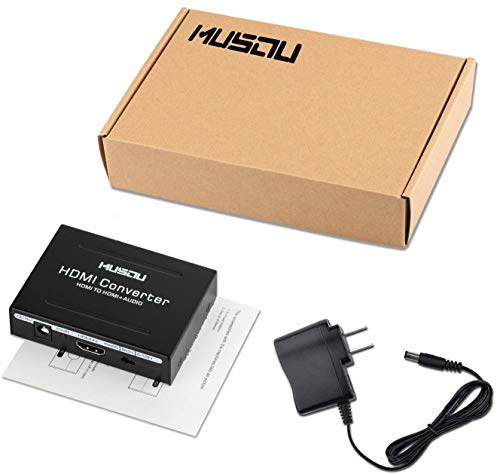
HDMI Audio Extractor Converter to HDMI Optical SPDIF RCA L/R Stereo Analog Outputs Video Audio Splitter Support HDCP Digital DTS 5.1 PCM(NOT Support ARC)


Key features
- •One HDMI input convert to one HDMI+ Audio (SPDIF+R/L)output.Note:This HDMI Audio Extractor Can Not Work With HDMI Switch and HDMI Splitter
- •SPDIF Output Supports Upto DD & DTS 5.1CH Audio; RCA Analog L/R Output Supports 2CH PCM Stereo Audio
- •Supports 24 bit /deep color 30bit, 36bit per channel (36bit all channel) deep color. Supports HDCP, Video EDID Pass Through; Plug & Playsupports AppleTV and various Blu-ray player
- •Audio EDID Settings: 2CH for L/R or SPDIF stereo output; 5.1CH for SPDIF Output, Supports uncompressed audio such as LPCM. Supports compressed audio such as DTS Digital, Dolby Digital(Dolby Digital Plus not supported)
- •Provides the Best Flexibility through Three NEW Audio EDID Settings: Pass, 2CH and 5.1CH, Support 3D video (To get 3D, all units connected to the splitter outputs must support 3D). This item supports Apple TV and various Blu-ray player and satellite receivers,Xbox one,Wii U/ PS3 PS4/raspberry pi
HDMI Audio Extractor Converter to HDMI Optical SPDIF RCA L/R Stereo Analog Outputs Video Audio Splitter Support HDCP Digital DTS 5.1 PCM(NOT Support ARC)
List Price: $34.90$31.41DEALYou Save: $3.49 (10%)
Free shippingFree Returns – 30 daysFree Order CancellationSecure Payment2–3 Days DeliveryGet It October 24, 2026In Stock (1)No marketing spamNo account requiredFulfilment by FedEx / Amazon / UPS / ShipwirePayPal / Card Buyer Protection
Customer Reviews
Reviews sourced from verified Amazon purchasers3.8
out of 5
Based on 10 reviews
5★
60%
4★
10%
3★
10%
2★
10%
1★
10%
some good some not so good
earthbru✓ Verified Purchase•April 3, 2018
I have a Samsung 6350 TV and an old Sony DE608 receiver. I want to attach a Roku device to the TV and be able to get the sound through the receiver. The Roku does not have any output that the receiver can match so I attached it to this device with an HDMI out to the TV and RCA out to the receiver. It works great for Pandora but for netflix movies the sound does not sync perfectly with the video. It is bearable but only just.
Had to Run A HDMI back to the Smart Hub of the Samsung TV
Dave & Jane Crews✓ Verified Purchase•March 4, 2018
Can't really say what happened. Used the (ARC) HDMI from TV too input.
RCA too my Onkyo Reciever. No Sound. Had to Run A HDMI back to the Smart Hub of the Samsung TV. Then it worked.
I guess you have to use the pass through for it to work.
Trouble started when I went to try the Bluray player.
Bluray turned on then went dark and never came back again. Now is a $100.00 paperweight.
No more sound at the receiver either. It's ok, just no signal.
I can not prove this device caused the problem. I believe the HDMI outlet on the TV went bad. It no longer functions with anything I plug in. All other HDMI's work. Just don't know what the cause was.
Returned.
RCA too my Onkyo Reciever. No Sound. Had to Run A HDMI back to the Smart Hub of the Samsung TV. Then it worked.
I guess you have to use the pass through for it to work.
Trouble started when I went to try the Bluray player.
Bluray turned on then went dark and never came back again. Now is a $100.00 paperweight.
No more sound at the receiver either. It's ok, just no signal.
I can not prove this device caused the problem. I believe the HDMI outlet on the TV went bad. It no longer functions with anything I plug in. All other HDMI's work. Just don't know what the cause was.
Returned.
Does exactly what I need!
Phillip O.✓ Verified Purchase•February 17, 2018
I use this to extract the 5.1 digital audio feed from my Amazon Fire Stick.
I plugged my Firestick into the HDMI input on this device, plug the HDMI output to my LCD projector (via a 6' HDMI cable from Twisted Veins), and connect the audio out via a fiber-optic cable to my 5.1 stereo/receiver. The 5.1 audio feed on movies and series from HBO, Amazon, Netflix, etc., now works great.
Only downside: The AC adapter cord is less than 3' long... much too short.
I plugged my Firestick into the HDMI input on this device, plug the HDMI output to my LCD projector (via a 6' HDMI cable from Twisted Veins), and connect the audio out via a fiber-optic cable to my 5.1 stereo/receiver. The 5.1 audio feed on movies and series from HBO, Amazon, Netflix, etc., now works great.
Only downside: The AC adapter cord is less than 3' long... much too short.
This will get your Xrocker gaming chair connected to your PS4!
MOB✓ Verified Purchase•February 9, 2018
Xrocker game chair connection to PS4....this is exactly what is needed! HDMI from PS4 to this, HDMI from this to tv...and then red/white audio cable from this to your chair. And BAM....in business & works great. You will need 2 HDMI cables and the red/white udio connect.
Purchased for my PS4 slim console
whoa!✓ Verified Purchase•December 26, 2017
It works great, (so far) though, I did just get it today. So I can't speak for it's durability. I will update If anything changes. I didn't read any directions. It was pretty simple. HDMI cord to the converter and to my PS4. Another hdmi cable to the tv and the other side of the converter. Plug in the power supply and optical cable. Flip the switch on the proper setting. Bam. Good to go!
Edit: I have had maybe a little over 2 months and it just burnt up. Smoke pouring out of it and my house is stinking. I unplugged this thing every time I was done with it, and haven't used it much this month due to working all the time. so it's not like it was on all day.
Edit 2: I had this thing running to my PS4 (HDMI 3) and Blu-ray for surround (HDMI 2) now both those ports are fried and won't get signal. Coincidence that it happened when this thing popped on me? I think not.
Now I have to buy a new TV!
Edit: I have had maybe a little over 2 months and it just burnt up. Smoke pouring out of it and my house is stinking. I unplugged this thing every time I was done with it, and haven't used it much this month due to working all the time. so it's not like it was on all day.
Edit 2: I had this thing running to my PS4 (HDMI 3) and Blu-ray for surround (HDMI 2) now both those ports are fried and won't get signal. Coincidence that it happened when this thing popped on me? I think not.
Now I have to buy a new TV!
Page 1 of 2