Doxie Go SE - The Intuitive Portable Document Scanner with Rechargeable Battery and Easy Software for Home, Office, or Work from Home



Key features
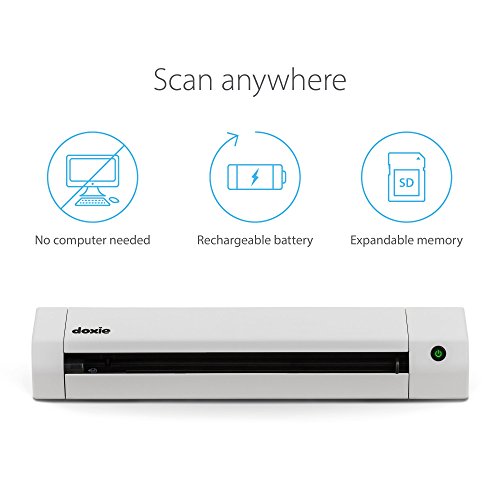
- •Doxie Go SE delivers smart, simple scanning that you can take anywhere – no computer required. Doxie's everything you want modern scanning to be.
- •Doxie makes it easy to scan documents at your desk or on the go – simply insert your paper. Scan full-color pages in just 8 seconds at up to 600 dpi.
- •Doxie is tiny – the size of a rolled up magazine – and portable with a rechargeable battery and included memory. Scan up to 400 pages per charge, store up to 4,000 pages before needing to sync.
- •Included Doxie app syncs scans, sends directly to your favorite apps, and uses the award-winning ABBYY® OCR technology to recognize the text in your document to create multi-page searchable PDFs.
Doxie Go SE - The Intuitive Portable Document Scanner with Rechargeable Battery and Easy Software for Home, Office, or Work from Home
List Price: $216.80$195.12DEALYou Save: $21.68 (10%)
Free shippingFree Returns – 30 daysFree Order CancellationSecure Payment2–3 Days DeliveryGet It October 24, 2026In Stock (4)No marketing spamNo account requiredFulfilment by FedEx / Amazon / UPS / ShipwirePayPal / Card Buyer Protection
Customer Reviews
Reviews sourced from verified Amazon purchasers4.3
out of 5
Based on 10 reviews
5★
70%
4★
10%
3★
20%
2★
0%
1★
0%
Good Idea - Not Good In Reality
Amazon Stockholder✓ Verified Purchase•January 24, 2018
This will be somewhat lengthy, but it may just may save you some time, money, and frustration.
I purchased this to replace a ScanSnap iX100 scanner. I liked the idea that it could scan directly to SD card without being attached to a computer-true portability. Unfortunately, beauty is only skin deep, and when you peer into the inner workings of this Doxie scanner, it isn't the end-all answer.
Let me start by saying I scanned 379 documents directly to the included SD card and then downloaded them wirelessly into my iPad - so that system works fine. But my first issue was the size of the PDF files compared to the size of the files the ScanSnap produces. For example, a multiple page photograph enriched document produced a 10.5MB size file with Doxie. That same file with ScanSnap was 3.5MB. Three times the size. And that difference continued throughout all types of scans.
Another issue I found in scanning my 379 documents - what if you're in the field, scan a customers invoice, give it back to them, and then when you get home, you see the scan is crooked, or not the right contrast, etc. It's too late at this point to scan it again. I had 5-10 scans in my 379 that would have been unacceptable if I was in a real world and not experimenting in the office.
Next, the software for this scanner is pathetic. It shows you thumbnails, but only lets you rotate the image - no crop, no contrast, not much of anything UNLESS you are connected to a laptop and using the full software package. But that defeats the portability. I want to be able to scan documents in the field, download them to the iPad, enhance, crop, rotate, and then send them to the cloud storage. I can't do that with just the iPad.
And if you use the full software suite to adjust the scan to "Photos", then in the field, with your iPad software App, you can't change that setting. So every receipt will be scanned as a photo...part of the large file sizes.
And last, it doesn't really save time to scan directly to the SD card. When you get home and import the documents, in my case, I had 379 imported documents, with little thumbnails, that I couldn't file quickly. Multiple page documents have to be "Stapled" together. The problem is, all of the little thumbnails look the same (if your scanning the same looking invoices). You constantly have to click on the next document to see where the last document is that you want to "staple". This is very time consuming. With the Scan Snap, if I scan a 5 page invoice, at the end of the scan, it automatically puts those 5 pages into a singe PDF file.
Overall, while I like the idea of scanning to an SD card, this Doxie needs a much more robust app for the iPad, the ability to change the settings from Photo to Document without having to be connected to a computer, and a more streamlined way to group pages together other than hunting for the last page of particular series.
I'm returning the Doxie and continuing to use the Scan Snap until I find a better alternative - the Doxie is not it. And I will close by saying, this is my opinion, with my limited 379 scans and your mileage may vary with this product.
I purchased this to replace a ScanSnap iX100 scanner. I liked the idea that it could scan directly to SD card without being attached to a computer-true portability. Unfortunately, beauty is only skin deep, and when you peer into the inner workings of this Doxie scanner, it isn't the end-all answer.
Let me start by saying I scanned 379 documents directly to the included SD card and then downloaded them wirelessly into my iPad - so that system works fine. But my first issue was the size of the PDF files compared to the size of the files the ScanSnap produces. For example, a multiple page photograph enriched document produced a 10.5MB size file with Doxie. That same file with ScanSnap was 3.5MB. Three times the size. And that difference continued throughout all types of scans.
Another issue I found in scanning my 379 documents - what if you're in the field, scan a customers invoice, give it back to them, and then when you get home, you see the scan is crooked, or not the right contrast, etc. It's too late at this point to scan it again. I had 5-10 scans in my 379 that would have been unacceptable if I was in a real world and not experimenting in the office.
Next, the software for this scanner is pathetic. It shows you thumbnails, but only lets you rotate the image - no crop, no contrast, not much of anything UNLESS you are connected to a laptop and using the full software package. But that defeats the portability. I want to be able to scan documents in the field, download them to the iPad, enhance, crop, rotate, and then send them to the cloud storage. I can't do that with just the iPad.
And if you use the full software suite to adjust the scan to "Photos", then in the field, with your iPad software App, you can't change that setting. So every receipt will be scanned as a photo...part of the large file sizes.
And last, it doesn't really save time to scan directly to the SD card. When you get home and import the documents, in my case, I had 379 imported documents, with little thumbnails, that I couldn't file quickly. Multiple page documents have to be "Stapled" together. The problem is, all of the little thumbnails look the same (if your scanning the same looking invoices). You constantly have to click on the next document to see where the last document is that you want to "staple". This is very time consuming. With the Scan Snap, if I scan a 5 page invoice, at the end of the scan, it automatically puts those 5 pages into a singe PDF file.
Overall, while I like the idea of scanning to an SD card, this Doxie needs a much more robust app for the iPad, the ability to change the settings from Photo to Document without having to be connected to a computer, and a more streamlined way to group pages together other than hunting for the last page of particular series.
I'm returning the Doxie and continuing to use the Scan Snap until I find a better alternative - the Doxie is not it. And I will close by saying, this is my opinion, with my limited 379 scans and your mileage may vary with this product.
Impressive (Updated after 3 weeks of use)
John Kramer✓ Verified Purchase•April 6, 2017
I have to say, I am impressed. I have used it for 1 day (approx 100 scans), and it seems to be everything it was advertised to be.
Right out of the box, this feels like a premium product (as the cost dictated), the packaging, packing and documentation are all top notch. The device itself is solid, the build quality is quite apparent (no pun intended!) just by holding it and upon close inspection.
I followed the quick start guide and scanned a photo in less than 3 minutes from opening the box.
The device accepts the media quite easily and quickly scans it. I tried some mangled receipts from my wallet, and it handled them well. You do have to make sure the front edge of the document is clean, for some really badly mangled receipts, I just folded the top back against itself to create a clean edge, and the scan worked just fine (no jamming). The scan quality was better than that of my Epson XP-410, and certainly faster.
The software setup was easy (an the online documentation is very thorough. The software is basically a tool to pull the scanned documents from the scanner. It provides some nice features to edit the scanned document and allow for some smart tagging (date/time). The OCR functionality worked better than I thought, even on some really faded poor quality receipts. I guess if there was one option missing, it would be the ability to automatically pull the scans from Doxie (or push from Doxie). There is the ability to manually save the scans to cloud services, I tried the Google Drive function, and it worked flawlessly.
WiFi setup was a bit complex if you don't use the default configuration. By default WiFi is configured as a host at 192.168.1.100 as its own network (PC -> Doxie direct, bypassing existing wireless router). So if you have an existing wireless router and it is on the 192.168.1.x subnet, you may have a conflict if another device on your network already has a 192.168.1.100 address. If you follow the instructions, it is possible to add a connection to access it over existing router network, but if you follow the instructions carefully and I recommend that you have your computer connected both via wireless router WiFi and hard wired via Ethernet cable during WIFi setup.
Overall, this is a great product. I will be using it every day, so I will report back on reliability if it becomes an issue.
Pros:
Solid, High quality in every aspect
Quick scanning with very good quality
Simple yet elegant SW interface
Cons:
WiFi Setup (relative to everything else) was a bit complex. But this is a one time thing, and it really was not bad as long as you follow instructions.
Update 4/22/02 - This thing is a tank. Powers thru scans like hot knife through butter. Use it everyday, and works like a charm. One of the best purchases I have made on Amazon.
Right out of the box, this feels like a premium product (as the cost dictated), the packaging, packing and documentation are all top notch. The device itself is solid, the build quality is quite apparent (no pun intended!) just by holding it and upon close inspection.
I followed the quick start guide and scanned a photo in less than 3 minutes from opening the box.
The device accepts the media quite easily and quickly scans it. I tried some mangled receipts from my wallet, and it handled them well. You do have to make sure the front edge of the document is clean, for some really badly mangled receipts, I just folded the top back against itself to create a clean edge, and the scan worked just fine (no jamming). The scan quality was better than that of my Epson XP-410, and certainly faster.
The software setup was easy (an the online documentation is very thorough. The software is basically a tool to pull the scanned documents from the scanner. It provides some nice features to edit the scanned document and allow for some smart tagging (date/time). The OCR functionality worked better than I thought, even on some really faded poor quality receipts. I guess if there was one option missing, it would be the ability to automatically pull the scans from Doxie (or push from Doxie). There is the ability to manually save the scans to cloud services, I tried the Google Drive function, and it worked flawlessly.
WiFi setup was a bit complex if you don't use the default configuration. By default WiFi is configured as a host at 192.168.1.100 as its own network (PC -> Doxie direct, bypassing existing wireless router). So if you have an existing wireless router and it is on the 192.168.1.x subnet, you may have a conflict if another device on your network already has a 192.168.1.100 address. If you follow the instructions, it is possible to add a connection to access it over existing router network, but if you follow the instructions carefully and I recommend that you have your computer connected both via wireless router WiFi and hard wired via Ethernet cable during WIFi setup.
Overall, this is a great product. I will be using it every day, so I will report back on reliability if it becomes an issue.
Pros:
Solid, High quality in every aspect
Quick scanning with very good quality
Simple yet elegant SW interface
Cons:
WiFi Setup (relative to everything else) was a bit complex. But this is a one time thing, and it really was not bad as long as you follow instructions.
Update 4/22/02 - This thing is a tank. Powers thru scans like hot knife through butter. Use it everyday, and works like a charm. One of the best purchases I have made on Amazon.
Revise review - An excellent scanner and an outstanding customer service
Pointer✓ Verified Purchase•January 9, 2017
March 8, 2017
I always thought that Amazon customer service is the best in the world. Well, there is a new kid on the block that even Amazons CS can learn something from - Apparent!
I left a 3 star review (can read below). I did not think it was a bad review. But Dan from Apparent thought that anything less than 5 stars is fail. He contacted me and suggested that maybe I had a lemon and suggested he ships me another one. Well, I live in Israel and most vendors on Amazon refuse to ship one item and here is a guy who will ship me also a replacement? But that was not all! A week before I managed to drop the scanner on its head and while it continues working, the power socket broke and the electrician who fixed it could not find a proper replacement so he hard wired a cable in place. Never mind, said Dan and nevertheless shipped a new scanner (and no need to ship back the broken one back). But even that is not all! One of the items I was complaining about is that the scanner will not take very old photographs that are printed on a very thick cardboard. So Dan from Apparent suggested that maybe the scanner that is more right for me is the Doxie flip. And shipped both. I must be dreaming"¦
So this is a revised review for the Doxie Go Plus and later on, there will be a review of Doxie Flip.
The battery "“ I complained that after 100 scans the battery was out of power. To tell the truth, I did fully charge the battery but that was a few weeks before and while I thought that some power will leak out I believed that it is mostly charged. The new scanner I received scanned 360 pages, and the battery was still going strong (but I was out of power"¦.)
The charger "“ I complained of a need to haul a charger as it is the old kind of charger, like old cell phone. However, there is no need to haul it around. The USB 2 cable that is supplied with the scanner can charge the scanner just as well. It takes longer (about 4 hours) but the most important thing is, no need to haul around multiple of chargers (if one has more than 360 scans to do) but only one with the ability to switch cables.
The feeder "“ I complained that it will not feed a page that is not strait as an arrow and will try to twist it around. But even for that there is a solution: adjust the rails to the size of the page and the twisting around of the page is minimized. But there is even a better solution: Apparent shipped me a sleeve for large pages and VOILA "“ twisting disappeared completely!
I complained that the scanner was finishing the job before the end of the page "“ I guess the old scanner was really a sick puppy. The new one did not have these problems at all
Very old photographs on thick card board "“ well, they still won't go thru but sometimes the supplied sleeve will help even with those.
All in all, an excellent scanner and an outstanding customer service
January 11, 2017
I really wanted to like this product but I cannot. The nice features first: it is compact and very nice looking. The scanned images can be stored in the scanner memory or on USB thumb drive or SD card. The box (that you buy separately) fits very snug and together it looks like a product that a lot of thought went into it HOWEVER
1) The battery is good and you can scan a good number of scans but after about 100 scans the battery needed recharging and sure as hell the charger was left at home (why I did not have the charger with me? because the snug nice box does not have a room for it)
2) The charger is the kind that has an EHX socket (like the old phones, laptops and earphones do) So it is another charger that one has to haul around. Why in the world, when manufacturers are moving to micro-USB (so all you need is one charger and one cable for different appliances) did they put this EHX socket.
3) The feeder will not feed a page that is not strait as an arrow. If the page you are trying to scan has a little rip or was earmarked, the scanner will twist it around and the scan will come unusable
4) Many times the scanner decided to end the scan before the end of the page (some pages have few lines on the top and few on the bottom, the scanner will scan the top and then decide the page ended and will stop the scan before it reached the bottom, so I had to input the page twice: ones from the top and once from the bottom)
5) If you are not hauling a computer (or device that can check the scans: tablet or phone with OTG cable) you arrive home to find that at least 20 percent of the scans are not good - would have been really nice to include a little screen on which one could see if the scan was good.
6) Some old pictures (very old pictures were printed on thick paper) will not go thru properly and the scanner will twist them
I always thought that Amazon customer service is the best in the world. Well, there is a new kid on the block that even Amazons CS can learn something from - Apparent!
I left a 3 star review (can read below). I did not think it was a bad review. But Dan from Apparent thought that anything less than 5 stars is fail. He contacted me and suggested that maybe I had a lemon and suggested he ships me another one. Well, I live in Israel and most vendors on Amazon refuse to ship one item and here is a guy who will ship me also a replacement? But that was not all! A week before I managed to drop the scanner on its head and while it continues working, the power socket broke and the electrician who fixed it could not find a proper replacement so he hard wired a cable in place. Never mind, said Dan and nevertheless shipped a new scanner (and no need to ship back the broken one back). But even that is not all! One of the items I was complaining about is that the scanner will not take very old photographs that are printed on a very thick cardboard. So Dan from Apparent suggested that maybe the scanner that is more right for me is the Doxie flip. And shipped both. I must be dreaming"¦
So this is a revised review for the Doxie Go Plus and later on, there will be a review of Doxie Flip.
The battery "“ I complained that after 100 scans the battery was out of power. To tell the truth, I did fully charge the battery but that was a few weeks before and while I thought that some power will leak out I believed that it is mostly charged. The new scanner I received scanned 360 pages, and the battery was still going strong (but I was out of power"¦.)
The charger "“ I complained of a need to haul a charger as it is the old kind of charger, like old cell phone. However, there is no need to haul it around. The USB 2 cable that is supplied with the scanner can charge the scanner just as well. It takes longer (about 4 hours) but the most important thing is, no need to haul around multiple of chargers (if one has more than 360 scans to do) but only one with the ability to switch cables.
The feeder "“ I complained that it will not feed a page that is not strait as an arrow and will try to twist it around. But even for that there is a solution: adjust the rails to the size of the page and the twisting around of the page is minimized. But there is even a better solution: Apparent shipped me a sleeve for large pages and VOILA "“ twisting disappeared completely!
I complained that the scanner was finishing the job before the end of the page "“ I guess the old scanner was really a sick puppy. The new one did not have these problems at all
Very old photographs on thick card board "“ well, they still won't go thru but sometimes the supplied sleeve will help even with those.
All in all, an excellent scanner and an outstanding customer service
January 11, 2017
I really wanted to like this product but I cannot. The nice features first: it is compact and very nice looking. The scanned images can be stored in the scanner memory or on USB thumb drive or SD card. The box (that you buy separately) fits very snug and together it looks like a product that a lot of thought went into it HOWEVER
1) The battery is good and you can scan a good number of scans but after about 100 scans the battery needed recharging and sure as hell the charger was left at home (why I did not have the charger with me? because the snug nice box does not have a room for it)
2) The charger is the kind that has an EHX socket (like the old phones, laptops and earphones do) So it is another charger that one has to haul around. Why in the world, when manufacturers are moving to micro-USB (so all you need is one charger and one cable for different appliances) did they put this EHX socket.
3) The feeder will not feed a page that is not strait as an arrow. If the page you are trying to scan has a little rip or was earmarked, the scanner will twist it around and the scan will come unusable
4) Many times the scanner decided to end the scan before the end of the page (some pages have few lines on the top and few on the bottom, the scanner will scan the top and then decide the page ended and will stop the scan before it reached the bottom, so I had to input the page twice: ones from the top and once from the bottom)
5) If you are not hauling a computer (or device that can check the scans: tablet or phone with OTG cable) you arrive home to find that at least 20 percent of the scans are not good - would have been really nice to include a little screen on which one could see if the scan was good.
6) Some old pictures (very old pictures were printed on thick paper) will not go thru properly and the scanner will twist them
Great idea! Great customer service!
rossdp✓ Verified Purchase•September 8, 2016
I like the portability and simplicity of this scanner. Unfortunately, It was always giving me problems. I didn't care for the way it worked. I usually had problems feeding the scanner with odd shaped paper, like reciepts or pages with a small or slight tear. It would often rotate the paper slightly while feeding and I'd end up with bad scans. I rarely was able to scan something once and have it turn out well. My happiest moment with this scanner was when I got rid of it. I wanted to like this product, but I found that my cellphone scanning app is faster, has no problems with paper feeding and delivers similar or better quality. Save your money and use your phone or try the Fujitsu, which supposedly has less feeding issues.
UPDATE: The company has addressed the paper feeding issue and they have reached out to me to see if I like it better. I haven't had enough time to give it a full assessment, but their effort to make their product better and to try and make their customers happy has made me change my review from a 1 star to 3 star. (I may change the stars as I spend more time with this scanner.)
UPDATE: The company has addressed the paper feeding issue and they have reached out to me to see if I like it better. I haven't had enough time to give it a full assessment, but their effort to make their product better and to try and make their customers happy has made me change my review from a 1 star to 3 star. (I may change the stars as I spend more time with this scanner.)
Amazing little scanner!
La Lune✓ Verified Purchase•August 27, 2016
When I bought this I was looking for a document and receipt scanner that was portable, small and lightweight and I definitely made the right choice. The Doxie Go Plus was perfect for our small business needs. It's small, lightweight, and easy to use. We use the Doxie in our business to mostly do taxes by scanning in receipts and other documents. The app for the software is also easy to use and works great. The battery life has been excellent and most of the time stays unplugged in a closet until it's use is needed.
We've only needed to charge it a couple of times even after some heavy use since we purchased it. I didn't order the wifi version since we don't really need the wireless capability, we run an at home web design company so there's always literally a computer at our fingertips and no need to buy the separate card instead of just plugging it in which takes 2 seconds. This would be great for our photography business though if we were still doing print contracts and wanted to scan and send a copy to a client right away out in the field however, so depending on what business you have depends if you need the wifi capability or not.
This little machine really has one job and it does it's one job really well, highly recommended!
We've only needed to charge it a couple of times even after some heavy use since we purchased it. I didn't order the wifi version since we don't really need the wireless capability, we run an at home web design company so there's always literally a computer at our fingertips and no need to buy the separate card instead of just plugging it in which takes 2 seconds. This would be great for our photography business though if we were still doing print contracts and wanted to scan and send a copy to a client right away out in the field however, so depending on what business you have depends if you need the wifi capability or not.
This little machine really has one job and it does it's one job really well, highly recommended!
Page 1 of 2