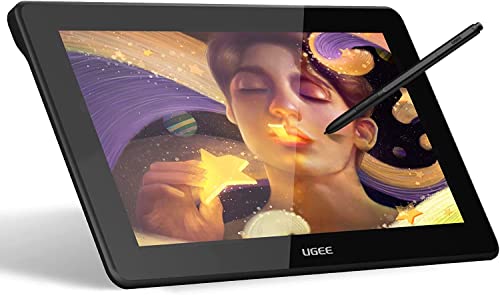
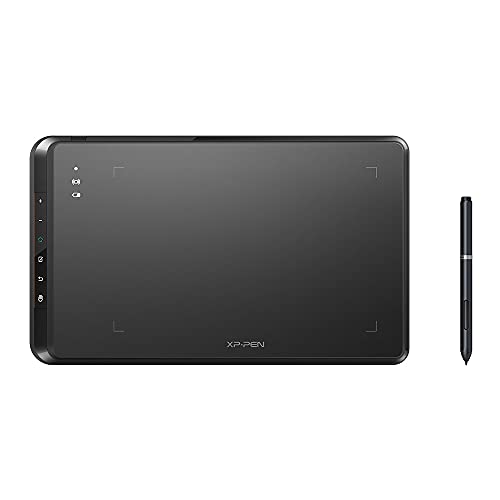
HUION Inspiroy H640P Drawing Tablet, 6x4 inch Digital Art with Battery-Free Stylus, 8192 Pen Pressure, 6 Hot Keys, Graphics Tablet for Drawing, Writing, Design, Teaching, Work with Mac, PC & Mobile


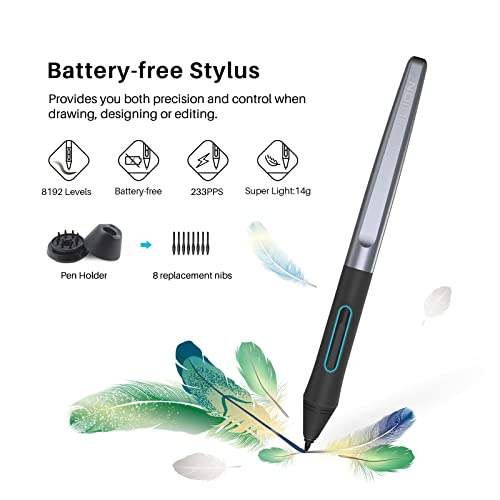


Key features
- •Brand Battery-free Stylus - Never worry about pen-charging, first of Huion's products features battery-free stylus.
- •8192 Levels of Pen Pressure Sensitivity - Enjoy the accuracy and precision when using animation tablet; Only 8mm thick and weigh 227g, 6.3×3.9 inch sufficient working surface, easy to carry the art tablet around.
- •6 Customizable Express Keys - Keep all your favourite short-cut in handy.
- •Durable Paper-like Surface - The graphic design digital tablet is coated with top graded material ensure long-term usage and fine texture; The whole digital tablet surface is covered with bezel-less design and round corners, giving this art tablet a sleek look.
- •Compatible with Windows and Mac OS systems and mainstream digital art software.
HUION Inspiroy H640P Drawing Tablet, 6x4 inch Digital Art with Battery-Free Stylus, 8192 Pen Pressure, 6 Hot Keys, Graphics Tablet for Drawing, Writing, Design, Teaching, Work with Mac, PC & Mobile
List Price: $48.87$43.98DEALYou Save: $4.89 (10%)
Free shippingFree Returns – 30 daysFree Order CancellationSecure Payment2–3 Days DeliveryGet It October 28, 2026In Stock (30)No marketing spamNo account requiredFulfilment by FedEx / Amazon / UPS / ShipwirePayPal / Card Buyer Protection
Customer Reviews
Reviews sourced from verified Amazon purchasers4.3
out of 5
Based on 10 reviews
5★
80%
4★
10%
3★
10%
2★
0%
1★
0%
Cheaper isn't always worse.
R3537L1F3•May 22, 2018
Pros:
- Battery-less pen
- Small form
- Programmable shortcut keys (on both tablet AND pen)
- Little to no lag
- Decent cord length
- Pen stand with extra nibs
- Crazy high pressure levels at a crazy low price
Cons:
- Cord could be longer (just personal preference)
- Some programs don't work well with the pressure sensitivity
Summary:
When buying this I wasn't sure what to think. I never drew digitally outside of a few things on my phone back when touch screens were a new and exciting thing. With everyone screaming the blessings of Wacom tablets I looked away at the cheaper ones with that "Oh no one talks about them, they must be inferior and don't work." I learned back when I swapped my Galaxy S3 for the LG G3 that just because it a smaller company with cheaper products, doesn't mean it's worse. Fast forward to now and seeing many reviews comparing this to Wacom's offerings saying that it's close to, if not better, I decided to give it a try. Now my art skills have diminished from years of not drawing but this tablet works well. Using a free trail of Paint Tool Sai and the free program Krita I was able to draw, paint, doodle, and whatever else with the full range of pressure. Gimp however does not work with the pressure sensitivity. The only real complaint was learning the softway and drawing without hitting the buttons on the pen, time will of course make those issues go away. If you new to digital drawing or just on a budget, this is a great purchase.
- Battery-less pen
- Small form
- Programmable shortcut keys (on both tablet AND pen)
- Little to no lag
- Decent cord length
- Pen stand with extra nibs
- Crazy high pressure levels at a crazy low price
Cons:
- Cord could be longer (just personal preference)
- Some programs don't work well with the pressure sensitivity
Summary:
When buying this I wasn't sure what to think. I never drew digitally outside of a few things on my phone back when touch screens were a new and exciting thing. With everyone screaming the blessings of Wacom tablets I looked away at the cheaper ones with that "Oh no one talks about them, they must be inferior and don't work." I learned back when I swapped my Galaxy S3 for the LG G3 that just because it a smaller company with cheaper products, doesn't mean it's worse. Fast forward to now and seeing many reviews comparing this to Wacom's offerings saying that it's close to, if not better, I decided to give it a try. Now my art skills have diminished from years of not drawing but this tablet works well. Using a free trail of Paint Tool Sai and the free program Krita I was able to draw, paint, doodle, and whatever else with the full range of pressure. Gimp however does not work with the pressure sensitivity. The only real complaint was learning the softway and drawing without hitting the buttons on the pen, time will of course make those issues go away. If you new to digital drawing or just on a budget, this is a great purchase.
I LOVE IT
chris•February 19, 2018
This thing is awesome! I'm using it on a MacBook Pro, and let me first say this:
If you type in the website to download the driver, it will say that there's no website available. If you simply just google s search it, it will pop up. Download was instantaneous - seriously, like a minute.
Button and pen button shortcuts are so easy to create.
I'm going to say this, though. This is my first graphic tablet. I have used my uncle's wacom which is more than $300 more but does the same thing.
I'm new to graphic design and the illustrator world, but I got the hang of this tablet so fast.
This is only the first full day I've had the thing, and I know I've seen people say that it stopped working after the first week. I will have to see for myself and come back to update.
I drew my first ever illustrator piece with this tablet. My little buddy peppy.
If you type in the website to download the driver, it will say that there's no website available. If you simply just google s search it, it will pop up. Download was instantaneous - seriously, like a minute.
Button and pen button shortcuts are so easy to create.
I'm going to say this, though. This is my first graphic tablet. I have used my uncle's wacom which is more than $300 more but does the same thing.
I'm new to graphic design and the illustrator world, but I got the hang of this tablet so fast.
This is only the first full day I've had the thing, and I know I've seen people say that it stopped working after the first week. I will have to see for myself and come back to update.
I drew my first ever illustrator piece with this tablet. My little buddy peppy.
First tablet, and amazing for general purpose.
Kyle•February 7, 2018
As my first tablet, I was expecting a massive learning curve - however, after only a few hours I began to get used to using this exclusively for browsing instead of a mouse. I typically work with graphic design and bring this into work frequently. However, one issue I have with the product is that I am unable to rebind any buttons at my work imac, even though I'm able to do so with my laptop at home. The pen feels extremely high quality and the nibs haven't worn down unlike with wacom tablets.
Great for drawing. Ok as a desktop mouse
Alfred C.•January 13, 2018
mainly brought this as a replacement for my intuos 2 (since newest windows update render almost unusable) It was mainly used as my mouse and reading all the reviews I was hoping this will be on par with my it.
Photoshop: as expected, it perform well. Pretty much every review I've read or watch shows how well it performs, so wasn't expecting it not to. Everything was responsive and no issues so far.
Windows 10: not as good as I was expecting. There are just a bunch of little issues, while I'm not 100% sure if the problem is with windows or the tablet, but it really slows down productivity.
* pen tip clicks are hit or miss. Sometimes I would have to click 2 or more to select something. Even on the pressure test screen, half the time I do a single click, pressure would register, but test panel would not. Suppose to show at least a blue dot, but half the time it doesn't
* double click. same as single click, hit or miss. I can't even map double click to one of the side button (one of my most used function on my intuos)
* small edge. I know it's a small tablet, but I rest my hand on the table for support and navigating to the far right of the screen it would just fall off. I kind solved this by stacking cardboard till it was the same height as the tablet, so my hand won't fall off the edge when moving right.
I think these could be fix in a driver update, but until then I can only give it 3 stars for now.
Photoshop: as expected, it perform well. Pretty much every review I've read or watch shows how well it performs, so wasn't expecting it not to. Everything was responsive and no issues so far.
Windows 10: not as good as I was expecting. There are just a bunch of little issues, while I'm not 100% sure if the problem is with windows or the tablet, but it really slows down productivity.
* pen tip clicks are hit or miss. Sometimes I would have to click 2 or more to select something. Even on the pressure test screen, half the time I do a single click, pressure would register, but test panel would not. Suppose to show at least a blue dot, but half the time it doesn't
* double click. same as single click, hit or miss. I can't even map double click to one of the side button (one of my most used function on my intuos)
* small edge. I know it's a small tablet, but I rest my hand on the table for support and navigating to the far right of the screen it would just fall off. I kind solved this by stacking cardboard till it was the same height as the tablet, so my hand won't fall off the edge when moving right.
I think these could be fix in a driver update, but until then I can only give it 3 stars for now.
This tablet is great for beginner artists
Lyle Beefelt•January 3, 2018
This tablet is great for beginner artists. The price is really affordable for someone without a large disposable income and has a lot of the same functionality as much more expensive drawing tablets. The pen pressure is really nice for inking albeit hard to set up but once it hits its stride its very effective. I think its a great deal for the price. when I was first starting out my first tablet from Wacom was about $75 (which I bought with my own money as a youngster) so I think this is a very good price range. it seems very small but its actually a reasonable size.
Page 1 of 2



![Drawing Glove for Tablet,[Pink 2Pack] Palm Rejection Artist Right Hand Glove Digital Art Accessories](https://m.media-amazon.com/images/I/41Jvp6-d4oL._SL500_.jpg)