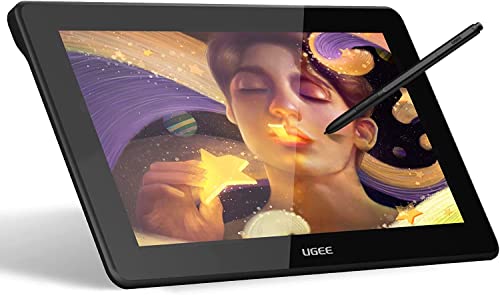
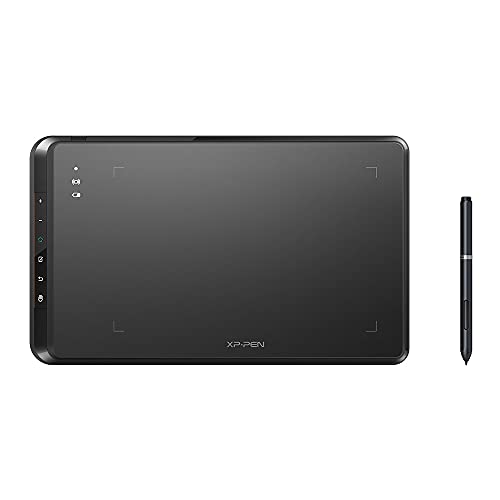
XPPen Updated Deco 01 V3 Drawing Tablet-16384 Levels of Pressure Battery-Free Stylus, 10x6 Inch OSU Graphic Tablet, 8 Hotkeys for Digital Art, Teaching, Gaming Drawing Pad for Chrome, PC, Mac, Android


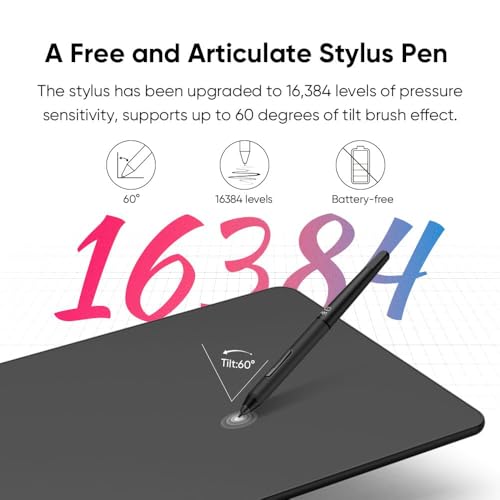


Key features
- •Features Type-C input design, easy to plug in and out. The Deco 01's expansive tablet is big and brilliant, yet still designed to break through the limit between express keys and drawing area
- •The latest Passive Pen design! Our PN03 stylus technology provides 8192 levels of instant pen pressure sensitivity_Providing you with groundbreaking control and fluidity to expand your creative output. No charging required!
- •10 x 6.25 inch working area, so you get more space to create or get work done. TheDeco 01's thickness is only 8mm, it is the thickness one of all the high level graphic tablets , you can carry it anywhere without any burden
- •Designed for both right and left hand users, 8 fully customizable express keys create a highly ergonomic and convenient work platform.The one-click toggle allows you to switch between Pen and Eraser instantly. The driver allows the shortcut keys to be attuned to many different software
- •We've adopted the newest High Tech IC, to make lines flow smoother and perform better. Fully bonded drawing film, making the Deco 01 durable and resistant to scratches. The Deco lights up on the ends of the drawing area, so you can create, even in the dark
XPPen Updated Deco 01 V3 Drawing Tablet-16384 Levels of Pressure Battery-Free Stylus, 10x6 Inch OSU Graphic Tablet, 8 Hotkeys for Digital Art, Teaching, Gaming Drawing Pad for Chrome, PC, Mac, Android
List Price: $67.61$60.85DEALYou Save: $6.76 (10%)
Free shippingFree Returns – 30 daysFree Order CancellationSecure Payment2–3 Days DeliveryGet It October 29, 2026In Stock (30)No marketing spamNo account requiredFulfilment by FedEx / Amazon / UPS / ShipwirePayPal / Card Buyer Protection
Customer Reviews
Reviews sourced from verified Amazon purchasers5.0
out of 5
Based on 5 reviews
5★
100%
4★
0%
3★
0%
2★
0%
1★
0%
Well worth the price!
Amazon Customer•February 18, 2018
This drawing tablet is well worth the $60!
Pros:
The packaging itself was very nice to look at.
It's easily the most precise one I have ever used.
8192 levels of Pen sensitivity really is wonderful to have.
It works with Krita and MyPaint perfectly.
The outer corners glow, which is a subtle but useful feature if working in the dark.
Pen buttons are programmable. 8 buttons on the tablet itself.
Lightweight, sleek design. The tablet connector is USB-C, so I can use it left-handed with no issues at all.
Comes with a pen holder and 8 extra nibs. It has a nice design, a bit weighted, and makes changing the nib very easy.
Comes with a free artist glove!
Neutral: You can change it with their driver, but by default you have to press fairly hard to reach the highest level sensitivity.
Con: I don't really care for the placement of the buttons on the pen, they seem to get in the way a little bit when I work on this, but to be fair I don't make digital art often. I'm not used to them so this is mostly subjective.
Note; before you plug this in, make sure all previous tablet drivers are uninstalled first. After that, go to their webpage and download their drivers for this, install, and THEN plug it in and load up the driver. It should automatically create a shortcut on your desktop.
All in all, easily worth it. I would use this over Wacom any day.
Pros:
The packaging itself was very nice to look at.
It's easily the most precise one I have ever used.
8192 levels of Pen sensitivity really is wonderful to have.
It works with Krita and MyPaint perfectly.
The outer corners glow, which is a subtle but useful feature if working in the dark.
Pen buttons are programmable. 8 buttons on the tablet itself.
Lightweight, sleek design. The tablet connector is USB-C, so I can use it left-handed with no issues at all.
Comes with a pen holder and 8 extra nibs. It has a nice design, a bit weighted, and makes changing the nib very easy.
Comes with a free artist glove!
Neutral: You can change it with their driver, but by default you have to press fairly hard to reach the highest level sensitivity.
Con: I don't really care for the placement of the buttons on the pen, they seem to get in the way a little bit when I work on this, but to be fair I don't make digital art often. I'm not used to them so this is mostly subjective.
Note; before you plug this in, make sure all previous tablet drivers are uninstalled first. After that, go to their webpage and download their drivers for this, install, and THEN plug it in and load up the driver. It should automatically create a shortcut on your desktop.
All in all, easily worth it. I would use this over Wacom any day.
useful with multi-monitor set up.
Y. James•February 13, 2018
I set up this Deco 01 to my left monitor then added XP-Pen Star05 to my right monitor.
If you want to use several monitors with separate pads, this would be a great choice.
The both will be operated by same software and the both use same pen.
If you want to use several monitors with separate pads, this would be a great choice.
The both will be operated by same software and the both use same pen.
Great alternative to a Wacom tablet - much better size for a fraction of the cost.
hollie white✓ Verified Purchase•February 5, 2018
This graphics pad is excellent! Took about 3 min to download and install the drivers. I haven't found a graphics program that it doesn't work with (I primarily use inkscape or gimp). I think it had a three week ship time but I got it in about a week (a weather delay so wasn't fault of seller and this comes from California). I bought this because of all of the reviews I'd read this was suggested by a graphics artist and glad I'd changed my mind and took their advice. This is very responsive, not overly sensitive but no problems at all with sensitivity. I haven't had the need yet to program the buttons so I can't write about that. Other than that - I HIGHLY recommend. Great price on a great product.
Excellent build quality and smooth performance
Vormulac•February 2, 2018
Excellent build quality and smooth performance, no Wacom-esque software/driver problems.
Very very impressive indeed, especially at this price point.
Thoroughly recommend it.
Very very impressive indeed, especially at this price point.
Thoroughly recommend it.
Exactly What I Wanted 💗
Melissa C.✓ Verified Purchase•January 6, 2018
I love this drawing tablet! 💕 The driver (download) was easy to find on the XP-Pen website with a .zip file that downloaded in seconds. I had the tablet hooked up to my Macbook and working within 3 minutes. My favorite part about this product is the large active area. The Wacom tablet I looked at was 50% smaller than the Deco 01, was more expensive and came with software I didn't need. This was a great purchase and I will update this review once I have created something worth sharing.



![Drawing Glove for Tablet,[Pink 2Pack] Palm Rejection Artist Right Hand Glove Digital Art Accessories](https://m.media-amazon.com/images/I/41Jvp6-d4oL._SL500_.jpg)