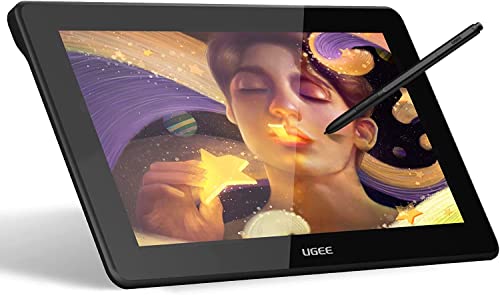
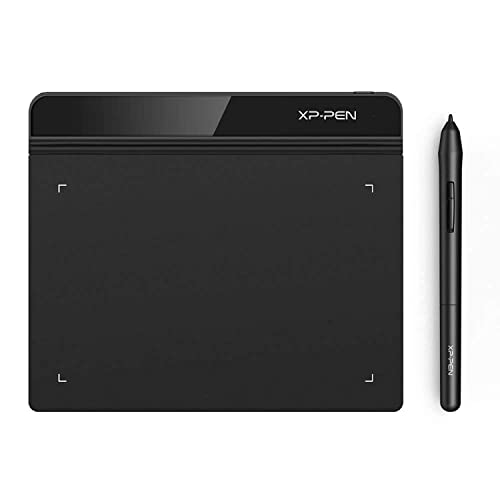
Drawing Tablet XPPen StarG640 Digital Graphic Tablet 6x4 Inch Art Tablet with Battery-Free Stylus Pen Tablet for Mac, Windows and Chromebook (Drawing/E-Learning/Remote-Working)





Key features
- •Designed for OSU! gameplay, drawing, painting, sketching, E-signatures etc. No need to install drivers for OSU! The Max Report Rate of the G640 has increased to 266 RPS, making lines flow quicker and smoother, enhancing overall performance
- •The perfect replacement for a traditional mouse! The XP-Pen advanced Battery-free stylus does not require charging, allowing for constant uninterrupted Draw and Play. Now comes with 20 replacement nibs. Allowing you to have more fun
- •Active Area: 6 x 4 inches Fully utilizing our 8192 levels of pen pressure sensitivity_Providing you with groundbreaking control and fluidity to expand your creative output. The G640 is only 2mm thick, it's as slim as all primary level graphic tablets, allowing you to carry it with you on the go
- •The one-click toggle allows you to switch between Pen and Eraser instantly. suitable for both right and left hand users
- •The G640 compatible with Windows 10/8/7 and Mac 10.10 or above operating systems and and is compatible with many creative software programs. XP-Pen provides one-year warranty and lifetime technical support for all our pen tablets/displays
Drawing Tablet XPPen StarG640 Digital Graphic Tablet 6x4 Inch Art Tablet with Battery-Free Stylus Pen Tablet for Mac, Windows and Chromebook (Drawing/E-Learning/Remote-Working)
List Price: $48.71$43.84DEALYou Save: $4.87 (10%)
Free shippingFree Returns – 30 daysFree Order CancellationSecure Payment2–3 Days DeliveryGet It October 26, 2026In Stock (1)No marketing spamNo account requiredFulfilment by FedEx / Amazon / UPS / ShipwirePayPal / Card Buyer Protection
Customer Reviews
Reviews sourced from verified Amazon purchasers4.1
out of 5
Based on 10 reviews
5★
70%
4★
30%
3★
0%
2★
0%
1★
0%
Very useful device & addition to your computer
Mac na Ceà rdaich✓ Verified Purchase•May 31, 2018
This is exactly what I have been looking for to sign documents I generate. I appreciate that the pen does not need to be charged and the writing pad is spacious. It does take a bit of adjustment if you have never used this type of system but relative easy to grasp after familiarizing yourself with the pen functions. I'm not a graphic artist or even close but there are many apps that you can use that even my 6 year old can color or draw with. I bought it mainly to use with photos & documents and so far it works great.
It's a tough little unit that works as described and the bonus 20 extra tips will give you long usage as you explore how many ways you can use it. Small & light weight and plugs in via USB cable right to any computer you want to use it on. Very pleased so far and once you start using it you will find that it's also fun!
It's a tough little unit that works as described and the bonus 20 extra tips will give you long usage as you explore how many ways you can use it. Small & light weight and plugs in via USB cable right to any computer you want to use it on. Very pleased so far and once you start using it you will find that it's also fun!
A Viable Alternative to Pricier Tablets
Barnard Rollit✓ Verified Purchase•April 30, 2018
I wasn't at all sure that this pen tablet would be up to snuff compared to my old Wacom Bamboo, but at the price I figured it would be worth giving it a try. I'm happy to report that it is up to snuff in spite of having to get used to certain aspects of its feel. The only notable deficiency is its inability to function at the account selection screen on my iMac (I need to resort to the mouse there, the Wacom did not have this problem); however, once startup or reboot is complete is works very well, even across my iMac screen and auxiliary monitor.
Not a mouse but perfect for artistic apps
eternityofsong✓ Verified Purchase•December 31, 2017
This is super helpful. It is exactly what I originally wanted for my graphics tablet there is no complicated software it is like holding the mouse like a pencil. Fine detail is a breeze if you have a steady hand. It is perfectly simple it does not slow down my computer at all like some of the overcomplicated tablets do. I use it in adobe photoshop and Microsoft paint and either one works flawlessly. Not for mouse use daily it is easier to draw with this and use a regular mouse for the everyday stuff. :) very happy
Excellent tablet!
Howard Zaretsky✓ Verified Purchase•September 24, 2017
I love this little tablet. I ditched mice 25 years ago and started with Wacom tablets. Can't remember how many I've been through but I got tired of paying the Wacom tax and tried different brands. I also tried Huon tablets but their pens require a battery and to charge them constantly. Mine stopped taking a charge, now what do I do?
The XP-Pen I've been using with my MacBook Pro laptop is excellent! Their engineers did their homework. I don't know how it could cost $25 and everyone still makes money. Nevertheless, don't hesitate - this tablet works very well and the cursor is very stable with no wobbling like I get on the Huon tablet. Plus no batteries in the pen to change or wear out. BTW, it also works on my Linux Mint Cinnamon desktop.
The XP-Pen I've been using with my MacBook Pro laptop is excellent! Their engineers did their homework. I don't know how it could cost $25 and everyone still makes money. Nevertheless, don't hesitate - this tablet works very well and the cursor is very stable with no wobbling like I get on the Huon tablet. Plus no batteries in the pen to change or wear out. BTW, it also works on my Linux Mint Cinnamon desktop.
works on mac osx 10.11 photoshop cc and fcpx 10.3.4
dfphoto✓ Verified Purchase•July 17, 2017
works on mac osx 10.11 and photoshop cc plus final cut pro x 10.3.4 but get the beta driver from the company!! This is my 2nd unit the first was a warehouse deal and it froze on the photoshop.... got a new one and a beta driver...
It is really thin and small very light, I travel a lot so that made a big difference, I am left handed and the software allows for a flip so I like this a lot but if you need your hand on a surface note this is about 4x5" total size and about 1/8" thick!!! The pen has a little slop in it but not more than the bamboo by wacom...I think it's a good deal
It is really thin and small very light, I travel a lot so that made a big difference, I am left handed and the software allows for a flip so I like this a lot but if you need your hand on a surface note this is about 4x5" total size and about 1/8" thick!!! The pen has a little slop in it but not more than the bamboo by wacom...I think it's a good deal
Page 1 of 2



![Drawing Glove for Tablet,[Pink 2Pack] Palm Rejection Artist Right Hand Glove Digital Art Accessories](https://m.media-amazon.com/images/I/41Jvp6-d4oL._SL500_.jpg)