MikroTik hAP ac2 RBD52G-5HacD2HnD-TC Dual-Concurrent 2.4/5GHz Access Point, 802.11a/b/g/n/ac, 5 x Gigabit Ethernet ports


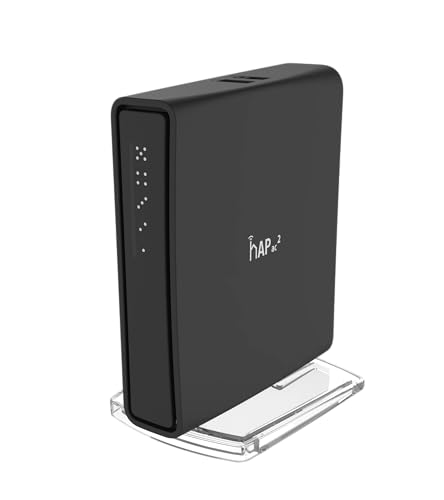
Key features
- •The hAP ac² RBD52G-5HacD2HnD-TC is a Dual-concurrent Access Point, that provides Wifi coverage for 2.4 GHz and 5 GHz frequencies at the same time.
- •Five 10/100/1000 Ethernet ports provide Gigabit connections for your wired devices, USB can be used for external storage or 4G/LTE modem, and device supports IPsec hardware acceleration.
- •New design universal case allows unit to be positioned either horizontally (desktop) or vertically (tower case).
- •CPU core count: 4, Size of RAM: 128MB, PoE in: Passive PoE, PoE input voltage: 18 - 28V
MikroTik hAP ac2 RBD52G-5HacD2HnD-TC Dual-Concurrent 2.4/5GHz Access Point, 802.11a/b/g/n/ac, 5 x Gigabit Ethernet ports
List Price: $116.55$104.90DEALYou Save: $11.65 (10%)
Free shippingFree Returns – 30 daysFree Order CancellationSecure Payment2–3 Days DeliveryGet It October 24, 2026In Stock (5)No marketing spamNo account requiredFulfilment by FedEx / Amazon / UPS / ShipwirePayPal / Card Buyer Protection
Customer Reviews
Reviews sourced from verified Amazon purchasers4.6
out of 5
Based on 10 reviews
5★
40%
4★
60%
3★
0%
2★
0%
1★
0%
Tons of features lack of power
Edgar✓ Verified Purchase•October 30, 2023
This product offers tons of features that comes in a small package. I love all I can do with this little boy in my network but my only complaint is the lack of power of Wifi signal. I'm using att fiber modem and an old google router that delivers twice signal range than this little device. I can't say I don't like the product, I really love the potential on it but it's not a complete product. I will use it much as router than AP. Features include on it allows me customize my network as I want it be. In conclusion this little boy going to make the money that you spent on it worth as router, as AP it's a waste of money. But it still been a great device.
Small, powerful, feature rich.
Joyce✓ Verified Purchase•October 15, 2023
You can't find a more capable dual-band router at this price point, setup isn't the easiest but with increased difficulty comes increased capabilities. The default Quick Set screen will get you up and running without issues. It's when you get into Webfig, Winbox, or CLI that you will see how complex the device can be.
The MikroTik app which is a mobile version of Winbox is excellent, in several areas it makes things easier such as setting up port forwarding.
I replaced a Linksys EA7500 with the hAP ac2 and couldn't be happier, sure the Linksys has a bit better wireless but lacks everywhere else. I'm using it bridged as an AP which works nicely with the ac2 doing all the routing.
I can barely believe the range of the hAP ac2 has, don't let this tiny device with no external antennas fool you. The range is comparable to the ea7500, and it has three large external antennas. You could almost fit four hAP ac2 devices inside the Linksys, it's that much smaller.
The reason it's not 5 stars comes down to lack of available 5ghz channels, if you pick-up the International version this device is 5 stars as it has access to all the channels.
The MikroTik app which is a mobile version of Winbox is excellent, in several areas it makes things easier such as setting up port forwarding.
I replaced a Linksys EA7500 with the hAP ac2 and couldn't be happier, sure the Linksys has a bit better wireless but lacks everywhere else. I'm using it bridged as an AP which works nicely with the ac2 doing all the routing.
I can barely believe the range of the hAP ac2 has, don't let this tiny device with no external antennas fool you. The range is comparable to the ea7500, and it has three large external antennas. You could almost fit four hAP ac2 devices inside the Linksys, it's that much smaller.
The reason it's not 5 stars comes down to lack of available 5ghz channels, if you pick-up the International version this device is 5 stars as it has access to all the channels.
Muy muy buena inversion en comparación a las demas marcas
Ernesto Sanchez B✓ Verified Purchase•September 22, 2023
Un buen router/ap un poco complicado de configurar, pero una vez pasado eso veras que vale pena poner todo homologado a mikrotik.
EASY setup home router, beautiful configs, UPDATE FIRMWARE AND OS!
re.viewer✓ Verified Purchase•September 17, 2023
When I opened the box, and found that the router was small enough to fit in my palm, I was worried for a second that it wouldn't perform. I quickly learned that size doesn't matter.
I was searching hard to find a dual band home router that would work well with DD-WRT to replace my housemate's Belkin AC1200 router which barely carried a 5GHz signal into my room and had a painfully slow 2GHz signal as well. I looked into TP-Link and some of the Netgear Nighthawks, as well as the >$100 hAP AC before settling on this router. I was about to get a consumer home router but was primarily worried about weak 5Ghz bands and incredibly poor software. That's when I came across the brand Mikrotik on a Reddit post and looked into their offerings. Basically, these boards are much cheaper because they aren't marketed towards the consumer electronic market and are made by a Latvian company. They also run RouterOS, which is incredibly robust and I've barely scratched the surface of.
I'm a Computer Engineering major with very little networking background, but I can confidently say that this router will be AS SIMPLE AS ANY OTHER HOME ROUTER - you just need to ignore the extra options.
If you follow my instructions exactly as below, you shouldn't have any problems. Don't skim. Read, understand, and enjoy this router that blows away others in its price range.
SETUP:
Plug your router into the power, then connect ethernet from your modem (or other router) into the ethernet in.
To enter the settings panel, there are three options: Mikrotik iOS/Android App (Easy), Web Portal (Medium), WinBox (Hard).
Rationale behind rating: I showed my girlfriend all three options as the ways to setup the router and based it on how confused she looked. There is fairly significant difference in how eye-pleasing each of them is, and every bit helps. You will be able to do the same stuff regardless of what platform you are on.
HOW TO CONNECT - MAKE SURE TO UPDATE AFTER SETUP:
APP:
Is really well designed and easy to navigate, plus has a DETECT feature that connects to the router when you open the app and connect it to the open wifi that the router broadcasts for the first time. If it doesn't connect automatically, GO TO 192.168.88.1, the default RouterOS address. I don't think it comes with a password, the instructions in the box will have it if otherwise. Once in the app, there is a QUICK SETUP option that will make your life a lot easier. PARENTS: THE KID CONTROL SETTING is a lot easier to find in the app - it's on the first page. The app can also do basically everything either other platform can, including accessing the terminal, so it's great to have anyway.
Web Browser and WinBox:
Connect to 192.168.88.1, the default IP address for this router. Login, then check my attached image. Click on QUICK SET and select HOME AP DUAL in the dropdown menu in the top right. Automatic Address Acquisition should work for most US based receivers. Set name and password like in any other router. Connecting to the webapp also gives the option to install WinBox which lives on your Windows computer (sorry Mac/Linux), but does the same exact stuff as the other two options.
SUPER IMPORTANT: update both the RouterOS software AND the firmware for the RouterBoard. If on the webapp, select WebFig to see the menu, or open the menu from the app. The location of the setting will be the same on both. For RouterOS, go to System>Packages>Check For Updates (possibly have to click another button on phone) and update to the latest version on the stable or long term channels.
For the Firmware, go to System>Routerboard>Upgrade.
REBOOT after changes!
If you have any speed or stability issues, I've heard that updating both fixes it. I did it as soon as I got it and have had no issues.
If you want to optimize this for your space, check out which wifi channel is best for your router to broadcast on. There's free software for this on any computer or phone if you look it up. This router does have the channel displayed as the actual frequency in Mhz, so find a table online to convert between the channel number you may get in the program and the frequency the router takes. If it doesn't work, the band may be blocked in the US as this version is manufactured for the states, so try a different frequency.
This router significantly boosted the connection throughout my house, and the gigabit ethernet is nice too. It's very noticeable how much better the signal is pushed through on an enterprise grade router as opposed to a consumer router. Even my 2.4Ghz band has been made a lot better - I use it for any smart light/home devices and a Google home, and responses have become a little faster in turning on and off lights, answering questions, not dropping requests, etc. This device will definitely work better for serving to a larger number of devices than most home routers.
I picked this over the hAP AC after much deliberation. This router was $60 when I got it and the AC was listed at $110. It has an SFP port for optical fiber gigabit and three-chain wifi, as well as a Power over Ethernet output port which is missing from the ac2, but I need none of those features and neither do 90% of consumers. In return, the ac2 has a better CPU and I think more memory? In any case, the three-chain wifi offered by the AC will be bottlenecked by most devices anyways that don't have appropriate wireless receivers to handle the additional throughput, so for the majority of use cases it is more helpful to have more computing power. I also have no need yet for power over ethernet to any additional access points. When close to the router, I'll receive close to 300 mbps down. In my room, which due to unfortunate design limitations is about 45+ feet away from the router and behind 3ish walls and a door, I'll get about 55 mbps down. Significantly better than previously not getting signal at all on occasion.
BONUS STEP:
Change your DNS server. Find the DNS settings and redirect it to something like Cloudflare's 1.1.1.1 service for faster speeds. It's likely a pretty good improvement over a stock ISP DNS provider which also provides them more of your browsing information. Your previous router may not have had this option, or you may have DNS configured on your individual devices, but taking the time to do it can improve your internet across all devices without updating the DNS settings on each manually.
I've also read that there's an option on this router for it to run its own local DNS server to resolve requests faster and that it may be adaptive based on your sites? Not fully sure how to set that up but it's something cool to look into.
If you have any questions at all about the settings, I've found the YouTube channel TKSJa to be an excellent goldmine of information and tutorials that's covered everything I need. There are over 100 clearly titled and concise videos there, go check it out and see if you still can't get your equipment to work.
So yeah. Get this router, follow the instructions, enjoy better performance without paying for the scam that's consumer routers.
I was searching hard to find a dual band home router that would work well with DD-WRT to replace my housemate's Belkin AC1200 router which barely carried a 5GHz signal into my room and had a painfully slow 2GHz signal as well. I looked into TP-Link and some of the Netgear Nighthawks, as well as the >$100 hAP AC before settling on this router. I was about to get a consumer home router but was primarily worried about weak 5Ghz bands and incredibly poor software. That's when I came across the brand Mikrotik on a Reddit post and looked into their offerings. Basically, these boards are much cheaper because they aren't marketed towards the consumer electronic market and are made by a Latvian company. They also run RouterOS, which is incredibly robust and I've barely scratched the surface of.
I'm a Computer Engineering major with very little networking background, but I can confidently say that this router will be AS SIMPLE AS ANY OTHER HOME ROUTER - you just need to ignore the extra options.
If you follow my instructions exactly as below, you shouldn't have any problems. Don't skim. Read, understand, and enjoy this router that blows away others in its price range.
SETUP:
Plug your router into the power, then connect ethernet from your modem (or other router) into the ethernet in.
To enter the settings panel, there are three options: Mikrotik iOS/Android App (Easy), Web Portal (Medium), WinBox (Hard).
Rationale behind rating: I showed my girlfriend all three options as the ways to setup the router and based it on how confused she looked. There is fairly significant difference in how eye-pleasing each of them is, and every bit helps. You will be able to do the same stuff regardless of what platform you are on.
HOW TO CONNECT - MAKE SURE TO UPDATE AFTER SETUP:
APP:
Is really well designed and easy to navigate, plus has a DETECT feature that connects to the router when you open the app and connect it to the open wifi that the router broadcasts for the first time. If it doesn't connect automatically, GO TO 192.168.88.1, the default RouterOS address. I don't think it comes with a password, the instructions in the box will have it if otherwise. Once in the app, there is a QUICK SETUP option that will make your life a lot easier. PARENTS: THE KID CONTROL SETTING is a lot easier to find in the app - it's on the first page. The app can also do basically everything either other platform can, including accessing the terminal, so it's great to have anyway.
Web Browser and WinBox:
Connect to 192.168.88.1, the default IP address for this router. Login, then check my attached image. Click on QUICK SET and select HOME AP DUAL in the dropdown menu in the top right. Automatic Address Acquisition should work for most US based receivers. Set name and password like in any other router. Connecting to the webapp also gives the option to install WinBox which lives on your Windows computer (sorry Mac/Linux), but does the same exact stuff as the other two options.
SUPER IMPORTANT: update both the RouterOS software AND the firmware for the RouterBoard. If on the webapp, select WebFig to see the menu, or open the menu from the app. The location of the setting will be the same on both. For RouterOS, go to System>Packages>Check For Updates (possibly have to click another button on phone) and update to the latest version on the stable or long term channels.
For the Firmware, go to System>Routerboard>Upgrade.
REBOOT after changes!
If you have any speed or stability issues, I've heard that updating both fixes it. I did it as soon as I got it and have had no issues.
If you want to optimize this for your space, check out which wifi channel is best for your router to broadcast on. There's free software for this on any computer or phone if you look it up. This router does have the channel displayed as the actual frequency in Mhz, so find a table online to convert between the channel number you may get in the program and the frequency the router takes. If it doesn't work, the band may be blocked in the US as this version is manufactured for the states, so try a different frequency.
This router significantly boosted the connection throughout my house, and the gigabit ethernet is nice too. It's very noticeable how much better the signal is pushed through on an enterprise grade router as opposed to a consumer router. Even my 2.4Ghz band has been made a lot better - I use it for any smart light/home devices and a Google home, and responses have become a little faster in turning on and off lights, answering questions, not dropping requests, etc. This device will definitely work better for serving to a larger number of devices than most home routers.
I picked this over the hAP AC after much deliberation. This router was $60 when I got it and the AC was listed at $110. It has an SFP port for optical fiber gigabit and three-chain wifi, as well as a Power over Ethernet output port which is missing from the ac2, but I need none of those features and neither do 90% of consumers. In return, the ac2 has a better CPU and I think more memory? In any case, the three-chain wifi offered by the AC will be bottlenecked by most devices anyways that don't have appropriate wireless receivers to handle the additional throughput, so for the majority of use cases it is more helpful to have more computing power. I also have no need yet for power over ethernet to any additional access points. When close to the router, I'll receive close to 300 mbps down. In my room, which due to unfortunate design limitations is about 45+ feet away from the router and behind 3ish walls and a door, I'll get about 55 mbps down. Significantly better than previously not getting signal at all on occasion.
BONUS STEP:
Change your DNS server. Find the DNS settings and redirect it to something like Cloudflare's 1.1.1.1 service for faster speeds. It's likely a pretty good improvement over a stock ISP DNS provider which also provides them more of your browsing information. Your previous router may not have had this option, or you may have DNS configured on your individual devices, but taking the time to do it can improve your internet across all devices without updating the DNS settings on each manually.
I've also read that there's an option on this router for it to run its own local DNS server to resolve requests faster and that it may be adaptive based on your sites? Not fully sure how to set that up but it's something cool to look into.
If you have any questions at all about the settings, I've found the YouTube channel TKSJa to be an excellent goldmine of information and tutorials that's covered everything I need. There are over 100 clearly titled and concise videos there, go check it out and see if you still can't get your equipment to work.
So yeah. Get this router, follow the instructions, enjoy better performance without paying for the scam that's consumer routers.
Bricked when updated
Curious George✓ Verified Purchase•September 9, 2023
Very versatile router. Too bad the first one bricked when I updated the firmware.
Page 1 of 2
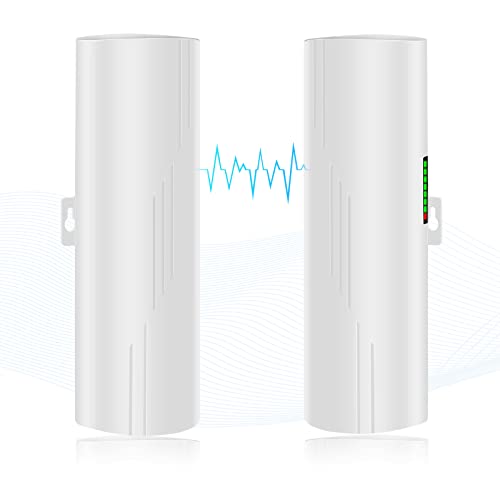
![Wireless Bridge, KuWFi 2.4G Outdoor CPE Point to Point Long Range Access Nano Station with 12dBi Panel Antenna, Support 24V POE[2-Pack, Pre-Pairing]](https://m.media-amazon.com/images/I/31iv+aADLxL._SL500_.jpg)


![[New Upgraded] VIEWISE Outdoor Wireless WiFi Bridge, Point to Point or Point to Multi-Point, EZ Setup via Dip Switches, 5GHz, 900Mbps 48V PoE (5GHz / 900Mbps)](https://m.media-amazon.com/images/I/21WXzzy6KfL._SL500_.jpg)
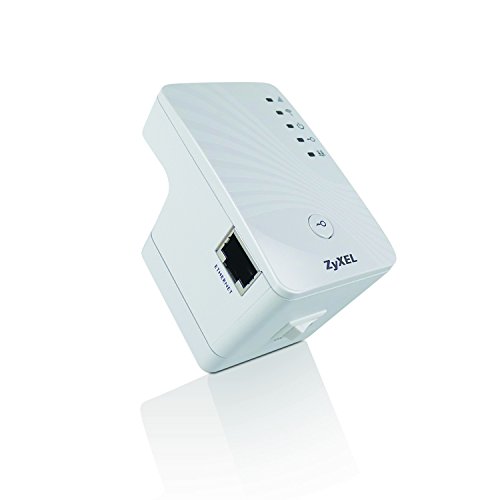
![ZyXEL Wireless Access Point with AP / Universal Repeater / Client Mode [WAP3205V2]](https://m.media-amazon.com/images/I/41bQQjwODqL._SL500_.jpg)