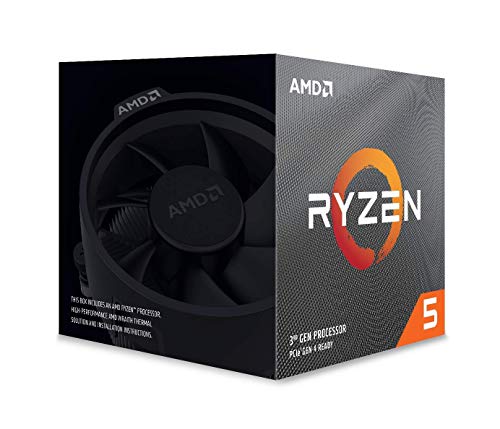
AMD Ryzen 7 2700 Processor with Wraith Spire LED Cooler - YD2700BBAFBOX


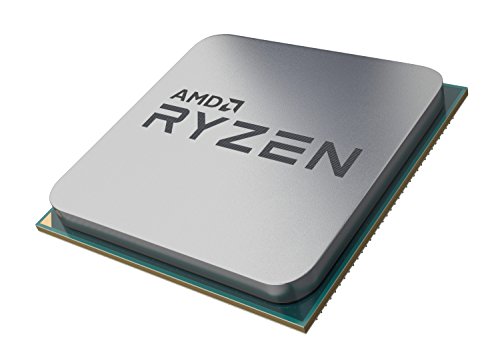

Key features
- •8 Cores/16 Threads UNLOCKED. Supported Technologies AMD StoreMI Technology, AMD SenseMI Technology, AMD Ryzen Master Utility
- •Frequency: 4.1 GHz Max Boost. CMOS : 12nm FinFET. OS Support Windows 10 64 Bit Edition, RHEL x86 64 Bit, Ubuntu x86 64 Bit, Operating System (OS) support will vary by manufacturer
- •Includes Wraith Spire Cooler with LED
- •20MB of Combined Cache. PCI Express Version : PCIe 3.0 x16
- •Socket AM4 Motherboard Required
AMD Ryzen 7 2700 Processor with Wraith Spire LED Cooler - YD2700BBAFBOX
List Price: $334.64$301.18DEALYou Save: $33.46 (10%)
Free shippingFree Returns – 30 daysFree Order CancellationSecure Payment2–3 Days DeliveryGet It October 25, 2026In Stock (1)No marketing spamNo account requiredFulfilment by FedEx / Amazon / UPS / ShipwirePayPal / Card Buyer Protection
Customer Reviews
Reviews sourced from verified Amazon purchasers4.8
out of 5
Based on 10 reviews
5★
90%
4★
10%
3★
0%
2★
0%
1★
0%
Great value for building a hybrid gaming/workstation rig!
John Cook✓ Verified Purchase•November 7, 2023
I've been getting more and more into video production lately both at home and creating training videos for customers at work. I've been looking for something with enough multicore beef to allow me to do very high quality software encoding and my old 7700k wasn't quite cutting it in some projects. After building a few cheaper Ryzen 5 gaming systems for friends and coming away impressed, I decided to take a chance on AMD myself. I have to say, I don't regret it. This CPU powers through multi-threaded workloads with ease and keeps the 1080Ti fed plenty well enough for my 4k60Hz monitor when gaming. If you plan on pushing clock speeds though, plan on spending for an aftermarket cooler or just go for the 2700x if the price is close enough. The Wraith Spire is pretty good for 'free' cooler, but Ryzen tends to hit a thermal wall pretty quickly at about 3.8-4Ghz depending on your luck in the silicon lottery. For my needs though, the spire is fine and it's an attractive, compact cooler. My particular chip was able to hit 3.8Ghz on all cores with the voltage set to 1.21 (all boost/performance options in ASUS BIOS enabled also) and that pretty much maxes out the spire's thermal capacity. All higher clocks needed exponentially more voltage (thus heat) and are a no-go without a very large air cooler or AIO. Aida64 was stable for 3 hours and posted an average temp of 85 celsius with one very brief random spike to 92. Blender and any video projects I've done so far have not managed to get the CPU nearly this hot (usually never worse than 75 celsius with occasional 80 spike). Gaming doesn't stress the CPU too much, particularly at 4K60Hz and after a couple hours of 64 player action in Battlefield, my temps never exceeded 62 celsius. Overall, great chip. Also got one for my father shortly after purchasing the first and his was able to hit 4Ghz (all cores) on the stock cooler at similar temps to mine @ 3.8.
Amazing! Simply Amazing
Eric W✓ Verified Purchase•November 6, 2023
Wow. Positively amazing. This was an upgrade to an older Haswell era i7. I thought, sure it'll be a bit faster. No..oh no...It's like the first time you experienced a SSD versus a HDD. This is an absolute MONSTER of a CPU. I've been using it at the heart of a workstation for Next Generation Sequencing analysis, where 8 cores is about the minimum necessary, and I was blown away by the speed of this CPU.
I'm running this AMD 2700 cpu on an ASROCK B450M Pro4 motherboard
with a Noctua Nh-L12 cpu cooler
with 64GB of DDR4 2933MHz vengeance LPX memory from Corsair.
a 500GB WD Black SN750 nVME M.2 SSD
a 1TB WD blue SATA M.2 SSD
an old Radeon HD7750 GPU for basic display out purposes
with the OS being Ubuntu 18.04 LTS
First thing was first, I overclocked it. It's a bit more difficult with Linux as the benchmarking software is lacking, but using Blender I was able to dial in a stable all core OC of 4.1GHz at 1.36v. With the Noctua NH-L12 (with a NF-A12x25 fan, great fan!) I'm getting peak load temps while OC'ed around 72C with the fan at 100% (surprisingly tolerable noise level). At stock, not OC'ed, it was more like 3.6GHz all core, and 58C. If I didn't already have this cooler lying around I'd have gone for the NH-C14S, but for now this is fine because it cost me nothing extra.
Most people running the particular scientific programs around getting around 300-400 millions reads mapped per hour (at best) on their Xeon E5 based professional OEM workstation systems, meanwhile with the consumer grade Ryzen 7 2700 I'm getting ~800 million paired end reads mapped per hour. Most people say that hyperthreading isn't very useful for many of these scientific programs. However, I found AMD's implementation of simultaneous multithreading to be much more effective than Intel's hyperthreading and it was actually beneficial to use multithreading on AMD where it made almost no difference on Intel.
Paired with 64GB of RAM this thing is a beast. I wish it was possible to use 128GB as intel has supposedly allowed on their consumer platform using double capacity memory (which is so expensive it may as well not exist), but unfortunately memory capacities like that are only available on Threadripper for AMD.
A few programs a limited to a single CPU thread. In these cases it did boost up to 4.1GHz at stock, but would rarely hold there for long and would spend far more time around 3.6GHz. Manually overclocking in BIOS ensured the CPU will be around 3.9-4.1GHz all the time. Makes the system extremely responsive. Intel still reigns supreme at single thread workloads though with single core clocks of over 5GHz. Hopefully the next generation of Ryzen 3000 cpu's will address single thread speed a bit more.
Overall, I couldn't be happier, well maybe if I'd gone with Threadripper, but for the money, this CPU can't be beat.
I'm running this AMD 2700 cpu on an ASROCK B450M Pro4 motherboard
with a Noctua Nh-L12 cpu cooler
with 64GB of DDR4 2933MHz vengeance LPX memory from Corsair.
a 500GB WD Black SN750 nVME M.2 SSD
a 1TB WD blue SATA M.2 SSD
an old Radeon HD7750 GPU for basic display out purposes
with the OS being Ubuntu 18.04 LTS
First thing was first, I overclocked it. It's a bit more difficult with Linux as the benchmarking software is lacking, but using Blender I was able to dial in a stable all core OC of 4.1GHz at 1.36v. With the Noctua NH-L12 (with a NF-A12x25 fan, great fan!) I'm getting peak load temps while OC'ed around 72C with the fan at 100% (surprisingly tolerable noise level). At stock, not OC'ed, it was more like 3.6GHz all core, and 58C. If I didn't already have this cooler lying around I'd have gone for the NH-C14S, but for now this is fine because it cost me nothing extra.
Most people running the particular scientific programs around getting around 300-400 millions reads mapped per hour (at best) on their Xeon E5 based professional OEM workstation systems, meanwhile with the consumer grade Ryzen 7 2700 I'm getting ~800 million paired end reads mapped per hour. Most people say that hyperthreading isn't very useful for many of these scientific programs. However, I found AMD's implementation of simultaneous multithreading to be much more effective than Intel's hyperthreading and it was actually beneficial to use multithreading on AMD where it made almost no difference on Intel.
Paired with 64GB of RAM this thing is a beast. I wish it was possible to use 128GB as intel has supposedly allowed on their consumer platform using double capacity memory (which is so expensive it may as well not exist), but unfortunately memory capacities like that are only available on Threadripper for AMD.
A few programs a limited to a single CPU thread. In these cases it did boost up to 4.1GHz at stock, but would rarely hold there for long and would spend far more time around 3.6GHz. Manually overclocking in BIOS ensured the CPU will be around 3.9-4.1GHz all the time. Makes the system extremely responsive. Intel still reigns supreme at single thread workloads though with single core clocks of over 5GHz. Hopefully the next generation of Ryzen 3000 cpu's will address single thread speed a bit more.
Overall, I couldn't be happier, well maybe if I'd gone with Threadripper, but for the money, this CPU can't be beat.
Cheap'n'perfect swap for 5820k.
July@5am✓ Verified Purchase•October 16, 2023
Sold my previous mobo+cpu for almost the 3/4 of the ryzen system price. Two more cores, 25-30% more multithread horsepower, significantly less power consumption and heat. It could be even cheaper if I'd get some less dedicated motherboard. For this price (209$) it's unbeatable.
[email protected]: stable enough, good temps, but I needed to change some VRM things to get it reliable durning benchmarks. First, LLC level 5. Second: VRM frequency is set to 500mhz. Maybe it's a coincedence, but when I lowered it to 450 system crashed at the same voltages. VRM Spread Spectrum, by the way, leads to crashes more frequently, so I guess it should be avoided on manual voltages. The last little things: 130% current max and optimized phazes for both CPU and SoC.
4.1, 4.2, 4.3 are more than possible, but they produce too much heat and 1.23v seems too sweet to go up to ≈ 1.3+ just for another 100mhz or ≈1.4 to get more 200-300. Probably, I'll try it someday if I get 3x140mm radiator in addition to my humble 2x140.
upd:
Now, when Zen 2 is released I must say that it's still unbeatable choice, if you have mid/lower-tier GPU or 60mhz monitor (in other words, if you don't need that 100fps+ in games). It's simple enough: 3700X costs almost 70% more for 15% of improvement. Moreover, now it looks even better comparing to 2700X, because the difference between these X-models is even less (about 80$) and 2700 is easily overclocks to 2700X speeds. In fact, these 2700 models are the same CPU, but the X one has a factory overclocking (easy to see because of it's 105W TDP). Long story short, we have a budget monster here.
upd2:
december 2019. 140 bucks. insane value for money.
[email protected]: stable enough, good temps, but I needed to change some VRM things to get it reliable durning benchmarks. First, LLC level 5. Second: VRM frequency is set to 500mhz. Maybe it's a coincedence, but when I lowered it to 450 system crashed at the same voltages. VRM Spread Spectrum, by the way, leads to crashes more frequently, so I guess it should be avoided on manual voltages. The last little things: 130% current max and optimized phazes for both CPU and SoC.
4.1, 4.2, 4.3 are more than possible, but they produce too much heat and 1.23v seems too sweet to go up to ≈ 1.3+ just for another 100mhz or ≈1.4 to get more 200-300. Probably, I'll try it someday if I get 3x140mm radiator in addition to my humble 2x140.
upd:
Now, when Zen 2 is released I must say that it's still unbeatable choice, if you have mid/lower-tier GPU or 60mhz monitor (in other words, if you don't need that 100fps+ in games). It's simple enough: 3700X costs almost 70% more for 15% of improvement. Moreover, now it looks even better comparing to 2700X, because the difference between these X-models is even less (about 80$) and 2700 is easily overclocks to 2700X speeds. In fact, these 2700 models are the same CPU, but the X one has a factory overclocking (easy to see because of it's 105W TDP). Long story short, we have a budget monster here.
upd2:
december 2019. 140 bucks. insane value for money.
Back to being an AMD User
Ozziebunch✓ Verified Purchase•October 4, 2023
I have always considered myself a hardcore gamer, but not like in the first person shooter sense, though I do play them...I am more into the RTS, simulator and turn based games. Which has meant not needing the best graphics cards but a decent one and good supporting hardware but not needing the top shelf stuff. So I design my systems in a mid-range sense and usually one generation behind when I upgrade my systems. Not being cheap or getting cheap things, but making sure I am getting the best bang for my buck. When I first started building my own PCs, that meant several rigs made with AMD CPUs. They were on par with or even better than the Intels and you could get them for a lot less. Then Intel leapfrogged AMD with the Core 2 Duos and even tho they were more expensive than the AMDs of the time, they were hands down offering you raw power and performance for those extra dollars that it was impossible to say no to them. AMD struggled to keep up and just when they had something that would compete, intel introduced the i-series and left AMD in dust again. Fast forward to today and my i-5 43xx is dropping framerates on some of the newer AAA FPS games I am getting into. These newer FPS games are just to good not to play and I am at a point in my life where I have some extra cash to splurge on a better rig than I have typically built in the past. Usually when I am upgrading my rig it is with a 500-800 dollar budget in mind. This time it was more like 1400-1500. Still not tippity top shelf for that you are spending 2000 to the skys the limit, but a lot of it came off of the middle and top shelves and all of it is current generation. This processor AMD Ryzen 7 2700, Asus Prime x370-pro, 16gb(2x8) Corsair vengeance ddr4 3200mhz, EVGA RTX 2070 ultra gaming, crucial M.2 1TB SSD and a new license for Window 10(as I was on 7 and support for it ends later this year nor would the old license play nice with the new mobo). I recycled my case and its fans, the 2.5" Samsung evo SATA 1TB SSD for storage which had been my boot drive for about 3 months, the 700watt power supply and dvd drive for legacy purposes. This CPU does come with a better than the average intel stock cooler, but not by much and will get me by while I determine which air tower cooler I want to use, but for now I am digging the RGB lighting it came with. By my standards its not near good as the tower cooler I was running before which would keep my cpu at 28-30C idle and maybe 50 or 60C under load. This thing is more like 40-50 idle and 70-80 under load probably higher if I forget to open the door to the computer cubby to let the cold air in and the hot air out. So I will be doing some research to upgrade that before too long. I want to drop those temps about 10 across the board. But for free it saved me some upfront money and gives me time to make an informed decision on my upgrade path. This CPU is truly a great bang for you buck, if you are into overclocking you may want to spend the extra 50 or so bucks get the R7 2700X and you still will be getting a great processor for less than the gen9 i5, i7 and i9. From what I gather, there is only one thing the intel CPUs are truly better at right now and that is playing what ever game you are playing and only that. Essentially single applications. If you are like me and have a browser open on a secondary monitor so you can check forums, guides and map while you play or have show on from Amazon this is you baby. Basically the more programs and apps you have open, the more this thing shines over the intel. Its nice that I can choose the AMD lineup again without feeling like I am giving up something significant and in the process save hundreds. Its good when there is competition in a market, these new offerings from AMD should force Intel into lowering their prices to remain both competitive and relevant, because I think its only a matter of time before AMD releases some real intel killers. The consensus from all the pro reviewers on youtube and across the internet is that this is not an Intel killer, but it is a strong competitor the likes of which we have not seen from AMD in over a decade. And I am for one super happy with my purchase and have no regrets. I don't like to rave or review my electronics until I have been using them daily for a month because we all know that they are either going to be DOA or start glitching out and failing in the 1st month or some. Everything I purchased and put together has been rock steady and awesome.
Excellent performance for just about any task.
tay_t✓ Verified Purchase•August 27, 2023
Pros:
- 16 threads to deal with hardware intensive software and games as I use it for.
- Perfect clock rate, can go up but I haven't needed to overclock it thus far.
- No thermal issues whatsoever on my end.
- Blows every other CPU I've ever owned out of the water.
- Quiet
Cons:
(these are minor)
- Installation was .. exhausting. I haven't dealt with a screw in type versus the clamp on type of processor before. The screws were so stiff I thought I was doing something wrong and had to search into it. But no, they actually do take something along the lines of 30 pounds or more of pressure to push the springs down. I reeeeally don't like that feeling when dealing with delicate electronics. Probably a quirk of my motherboard but the backplate for the processor was not adhered to the case, so I had to tape that so I could be able to screw this in, put the entire tower on my lap and hold the back of the board against my leg, and push down with my screwdriver with all my might until it would actually screw in. I'll still give it a 3/5 on ease because maybe others do not share this trouble - other than that this installation is pretty straight forward, but I personally don't look forward to applying new paste later due to my first experience.
- Software for controlling LEDs on this is nonexistent. There's multiple .zipped software that appears to have never been finished or properly updated, it installs drivers, but seems in no way compatible with this. Really seems like an afterthought which slightly irks me, but I'm more for function over aesthetics. Still, shouldn't sell a feature they don't care enough to properly work with. If ANYONE has any idea what actually works with this, if anything (and yes, it is plugged into the proper addressable RGB port on my motherboard) does, let me know, but I don't think that exists.
- 16 threads to deal with hardware intensive software and games as I use it for.
- Perfect clock rate, can go up but I haven't needed to overclock it thus far.
- No thermal issues whatsoever on my end.
- Blows every other CPU I've ever owned out of the water.
- Quiet
Cons:
(these are minor)
- Installation was .. exhausting. I haven't dealt with a screw in type versus the clamp on type of processor before. The screws were so stiff I thought I was doing something wrong and had to search into it. But no, they actually do take something along the lines of 30 pounds or more of pressure to push the springs down. I reeeeally don't like that feeling when dealing with delicate electronics. Probably a quirk of my motherboard but the backplate for the processor was not adhered to the case, so I had to tape that so I could be able to screw this in, put the entire tower on my lap and hold the back of the board against my leg, and push down with my screwdriver with all my might until it would actually screw in. I'll still give it a 3/5 on ease because maybe others do not share this trouble - other than that this installation is pretty straight forward, but I personally don't look forward to applying new paste later due to my first experience.
- Software for controlling LEDs on this is nonexistent. There's multiple .zipped software that appears to have never been finished or properly updated, it installs drivers, but seems in no way compatible with this. Really seems like an afterthought which slightly irks me, but I'm more for function over aesthetics. Still, shouldn't sell a feature they don't care enough to properly work with. If ANYONE has any idea what actually works with this, if anything (and yes, it is plugged into the proper addressable RGB port on my motherboard) does, let me know, but I don't think that exists.
Page 1 of 2