CanaKit Raspberry Pi 3 B+ (B Plus) Starter Kit (32 GB EVO+ Edition, Premium Black Case)


Key features
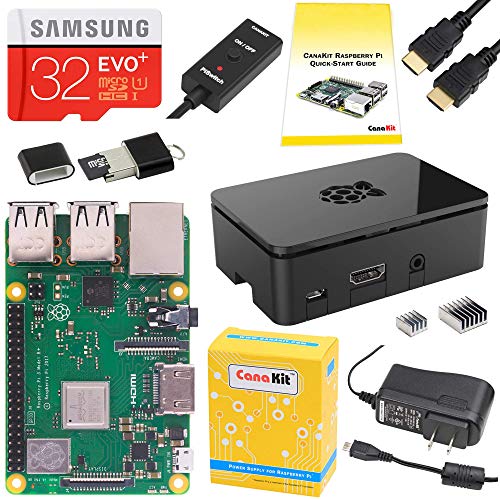
- •Includes Made in UK Raspberry Pi 3 B+ (B Plus) with 1.4 GHz 64-bit Quad-Core Processor, 1 GB RAM
- •Dual Band 2.4GHz and 5GHz IEEE 802.11.b/g/n/ac Wireless LAN, Enhanced Ethernet Performance
- •32 GB Samsung EVO+ Micro SD Card (Class 10) Pre-loaded with NOOBS, USB MicroSD Card Reader
- •CanaKit 2.5A USB Power Supply with Micro USB Cable and Noise Filter - Specially designed for the Raspberry Pi 3 B+ (UL Listed)
- •Premium Raspberry Pi 3 B+ Case, High Quality HDMI Cable, 2 x Heat Sinks, GPIO Quick Reference Card, CanaKit Full Color Quick-Start Guide
BrandCanaKit
CategorySingle Board Computers
CanaKit Raspberry Pi 3 B+ (B Plus) Starter Kit (32 GB EVO+ Edition, Premium Black Case)
List Price: $145.49$130.94DEALYou Save: $14.55 (10%)
Free shippingFree Returns – 30 daysFree Order CancellationSecure Payment2–3 Days DeliveryGet It October 27, 2026In Stock (1)No marketing spamNo account requiredFulfilment by FedEx / Amazon / UPS / ShipwirePayPal / Card Buyer Protection
Customer Reviews
Reviews sourced from verified Amazon purchasers4.5
out of 5
Based on 10 reviews
5★
70%
4★
10%
3★
20%
2★
0%
1★
0%
Great little machine. Fun!
fwoom•July 7, 2018
Fun little inexpensive computer to play with and add functionality to my home network. This thing operates better than expected overall for what I'm using it for.
I use it to monitor my network traffic and also for data storage at home (I added an external hard drive to it).
I'm already familiar with the linux platform, so there wasn't much of a learning curve there. It's been some years, so I'm a little rusty. But this little guy works great for the price. Everything fits in the case well enough (one of the heat sinks is a little off, but it's no big deal to me at all). The included power supply seems to have enough juice to power the external hard drive I added, which surprised me a little. I thought I was going to have to add a powered hub (and maybe I should anyway, just for good measure), but I don't have to. It's great.
Keep in mind that this is not a hardcore machine, but a really simple, small computer that you can use for a ton of different applications. This does the trick.
I use it to monitor my network traffic and also for data storage at home (I added an external hard drive to it).
I'm already familiar with the linux platform, so there wasn't much of a learning curve there. It's been some years, so I'm a little rusty. But this little guy works great for the price. Everything fits in the case well enough (one of the heat sinks is a little off, but it's no big deal to me at all). The included power supply seems to have enough juice to power the external hard drive I added, which surprised me a little. I thought I was going to have to add a powered hub (and maybe I should anyway, just for good measure), but I don't have to. It's great.
Keep in mind that this is not a hardcore machine, but a really simple, small computer that you can use for a ton of different applications. This does the trick.
Works right out of the box
Woody•May 23, 2018
Worked perfectly right out of the box. Amazing how much power there is in such a small device--and for such a low cost.
This is an excellent starter kit. It has everything you need to get started (except for keyboard and mouse) and once you have it up and running, you can decide which additional peripherals you want to add. Well worth the paltry sum it costs. The micro SD card, HDMI cable, power supply, and case would likely cost quite a bit more if you purchased a RPi 3 B+ and these necessities individually.
I had some concerns about the fact that the power brick doesn't have an on-off switch, but after reading reviews of many replacement power supplies that come with inline switches, I understand that the reason this one doesn't is the power drain inherent in adding an inline switch. If I find I really need one, I'll just pick up a powerstrip with a built-in switch to use instead.
Now I just need to get me a book of projects to try out. ;-)
This is an excellent starter kit. It has everything you need to get started (except for keyboard and mouse) and once you have it up and running, you can decide which additional peripherals you want to add. Well worth the paltry sum it costs. The micro SD card, HDMI cable, power supply, and case would likely cost quite a bit more if you purchased a RPi 3 B+ and these necessities individually.
I had some concerns about the fact that the power brick doesn't have an on-off switch, but after reading reviews of many replacement power supplies that come with inline switches, I understand that the reason this one doesn't is the power drain inherent in adding an inline switch. If I find I really need one, I'll just pick up a powerstrip with a built-in switch to use instead.
Now I just need to get me a book of projects to try out. ;-)
I've never had an easier time configuring an OS than ...
Karl Michalak•April 30, 2018
I've never had an easier time configuring an OS than with the Raspberry Pi and Retropie 4.0.
The Canakit works flawlessly, just use one of the heatsinks in the indicated spot on the board and pop together the case. No special tools required. There's really nothing to it.
I downloaded the image for Retropie onto the included 32 Gig micro SD card using the USB adapter, popped it into the Pi, plugged in the HDMI to my monitor, plugged in the power adapter along with a $10 USB keyboard, and the system practically did all the rest (til I put my own USB thumb-drive into the unit to format it and put ROMs onto the system, that is).
And of course you need a gamepad. I have many 3rd party USB controllers but of course a Dualshock or Xbox 360 controller is supposed to work perfectly as well.
If you want your own dedicated classic game console that fits in your pocket: buy this now.
I'm interested in getting a touchscreen kit to use this as an e-reader soon, possibly!
The Canakit works flawlessly, just use one of the heatsinks in the indicated spot on the board and pop together the case. No special tools required. There's really nothing to it.
I downloaded the image for Retropie onto the included 32 Gig micro SD card using the USB adapter, popped it into the Pi, plugged in the HDMI to my monitor, plugged in the power adapter along with a $10 USB keyboard, and the system practically did all the rest (til I put my own USB thumb-drive into the unit to format it and put ROMs onto the system, that is).
And of course you need a gamepad. I have many 3rd party USB controllers but of course a Dualshock or Xbox 360 controller is supposed to work perfectly as well.
If you want your own dedicated classic game console that fits in your pocket: buy this now.
I'm interested in getting a touchscreen kit to use this as an e-reader soon, possibly!
New to Raspberry Pi? Start here with a really solid kit!
penguin1395•April 24, 2018
I think a complete kit like this is definitely the way to go for first time Pi users. Yes, you could probably save a few bucks cobbling this together by yourself, but this works, and works pretty well. There have been some complaints about the case and the difficulties with it. They give you a link to a video of how to assemble the case. Watch it! The case is actually in 3 parts, and the Pi itself sits on the bottom, then the other parts are added on top of it. Don't insert the SD card until it is in the case. The same goes for the heat sinks - don't attach them until the case is assembled. Speaking of heat sinks, one of the case cutouts doesn't line up exactly with the chip that the heat sink attaches to. It's not a deal-breaker by any means, and the heat sink covers ~80% of the smaller chip, so I'm sure it's fine. But this is why you shouldn't attach the heat sinks until the case is assembled, otherwise you might not be able to put everything together.
It would be nice if you could see the activity LEDs with the case closed up, but I can see how that would be difficult to achieve.
I've played around with the Pi a bit, the pi-hole ad blocker is a nifty tool, and the retro-pie gaming console is fun, too. There's lots and lots more you can do with this little thing. I'm excited to explore and see what else I can do with it. I was happy to see that it is basically a linux device, so you can certainly use it to to do lots of programming and scripting, too. I'd like to learn how to use Python, and this could do that.
It would be nice if you could see the activity LEDs with the case closed up, but I can see how that would be difficult to achieve.
I've played around with the Pi a bit, the pi-hole ad blocker is a nifty tool, and the retro-pie gaming console is fun, too. There's lots and lots more you can do with this little thing. I'm excited to explore and see what else I can do with it. I was happy to see that it is basically a linux device, so you can certainly use it to to do lots of programming and scripting, too. I'd like to learn how to use Python, and this could do that.
Great value and cheap education!
CPT Clem•April 17, 2018
I built a desktop pc about 3 years ago; it was pretty easy and I installed Linux. This was my first single board experience. Everything works as described, if you go slow. The instructions (and the video explaining) must have been produced by someone who has assembled and disassembled one of these hundreds of times as it looks real, real easy and it is if you know the tricks! Just go slow and do not force anything and you will be OK. I am writing this on my RPi using Chromium web browser and it works swell! But you are not driving a system with 8 or 16 GB of RAM, so don't load it up or it will just crawl into a black hole and die.... Using the Task Manager that came with the system, I have found that if you run it over 700 MB of the 1024 MB RAM available, it will slow to a crawl. Just keep your use to one task at a time and you will be OK.
I have a 28" HDMI monitor (16x10 ratio) attached and the GPU will render 720 HD video with no problems. It is my plan to set up a dual boot so that I can boot as a Linux disk top (great for spreadsheets on that big monitor) or as a entertainment system to run Netflix, Amazon Prime, etc on it.
Just one problem that I have not solved as yet: bluetooth will find and connect to my speaker but does not actually switch from the HDMI output to the bluetooth channel. I dock one star for that (on the other hand it is giving me another free learning experience while trouble shooting it!)
In any case, well worth the $79. They just need to work on that video a little more.
I have a 28" HDMI monitor (16x10 ratio) attached and the GPU will render 720 HD video with no problems. It is my plan to set up a dual boot so that I can boot as a Linux disk top (great for spreadsheets on that big monitor) or as a entertainment system to run Netflix, Amazon Prime, etc on it.
Just one problem that I have not solved as yet: bluetooth will find and connect to my speaker but does not actually switch from the HDMI output to the bluetooth channel. I dock one star for that (on the other hand it is giving me another free learning experience while trouble shooting it!)
In any case, well worth the $79. They just need to work on that video a little more.
Page 1 of 2


