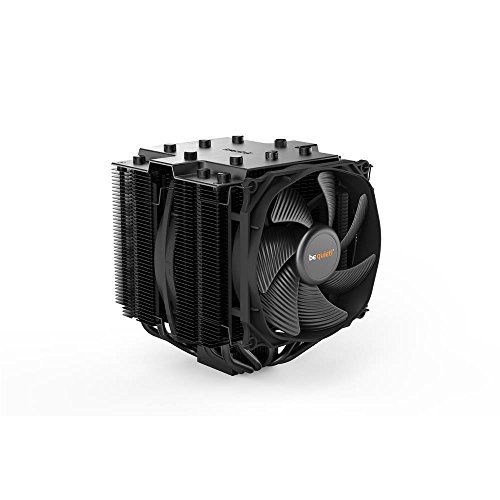
be quiet! Dark Rock Pro 4 250W TDP CPU Cooler | includes Two Silent Wings PWM Fans | Intel 1700 1200 2066 1150 1151 1155 2011 Square ILM | AMD4 AMD5 | Black | BK022


Key features
- •Two virtually inaudible silent Wings PWM fans
- •Funnel-shaped frame of the front fan for high air pressure
- •Achieves only 24.3Db(a) at maximum fan speed
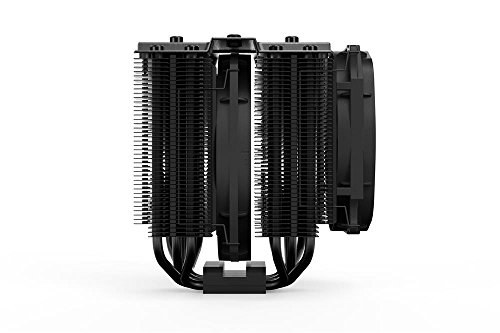
- •Seven high-performance copper heat pipes. Overall dimensions without Mounting material (L x w x H): 5.7 x 5.35 x 6.40 inch
- •Airflow-optimized cooling fins; cutouts enhance the RAM compatibility
- •Easily installable black Installation Kit can be mounted from above
be quiet! Dark Rock Pro 4 250W TDP CPU Cooler | includes Two Silent Wings PWM Fans | Intel 1700 1200 2066 1150 1151 1155 2011 Square ILM | AMD4 AMD5 | Black | BK022
List Price: $130.80$117.72DEALYou Save: $13.08 (10%)
Free shippingFree Returns – 30 daysFree Order CancellationSecure Payment2–3 Days DeliveryGet It October 26, 2026In Stock (1)No marketing spamNo account requiredFulfilment by FedEx / Amazon / UPS / ShipwirePayPal / Card Buyer Protection
Customer Reviews
Reviews sourced from verified Amazon purchasers4.7
out of 5
Based on 10 reviews
5★
80%
4★
20%
3★
0%
2★
0%
1★
0%
is too heavy
David✓ Verified Purchase•October 20, 2023
A good CPU cooler except for LGA 1700
clm✓ Verified Purchase•October 2, 2023
I like Dark Rock coolers and the be quiet! brand. They are a very high quality, reliable, well performing product in general. I have three of their coolers on different computers, the CPUs being three different Intel generations - i9-9900K, i9-11900K, and i9-12900K.
The important bit of information there is that it's the identical Dark Rock contact plate being mounted on three different Intel sockets - namely the LGA 1151, LGA 1200, and LGA 1700. While the Dark Rock cooler performs extremely well on the LGA 1151 and LGA 1200, those sockets are almost identical in size and shape, and the maximum TDP for any of them is 125 watts. The base plate of the Dark Rock cooler matches very closely the size and shape of the processor in the socket, for LGA 1151 and LGA 1200.
The LGA 1700 is a physically larger socket with a different shape, and allows TDPs up to 150 watts base and 241 watts Turbo Power. In the real world, at 100%, the power draw of the i9-9900K is about 120 watts, the i9-11900K is about 170 watts, and the i9-12900K is about 210 watts. I own all of these products. The Dark Rock 4 and Dark Rock 4 Pro coolers, despite their claimed power ratings, can only maintain a stable temperature on a LGA 1700 socket up to about 170 watts. I expect this is because the contact plate between the cooler and the CPU was optimized for the earlier LGA 1151 and LGA 1200; it's not optimized for the LGA 1700, it's a bit too small, and does not match the larger rectangular shape.
The bottom line here is that you will have to put a Turbo Boost Power Max limit (PL1 limit) of 160 or 165 watts on your LGA 1700 computer, to maintain stable cooling in a safe temperature range (up to 80 degrees C), using the Dark Rock 4 Pro or Dark Rock 4. The performance of these coolers is actually a bit inferior on the LGA 1700 compared to an identical TDP on a LGA 1200, again, because of the mismatch in shape between the cooler bottom plate and the CPU. I'm still using the Dark Rock 4 Pro on my LGA 1700, but it's limited to 165 watts PL1. That's enough to run 16 cores at 4.7 GHz, which still pretty much slays all the previous generation Intel CPUs. At some point, I will probably replace the Dark Rock cooler with one optimized for the LGA 1700.
The important bit of information there is that it's the identical Dark Rock contact plate being mounted on three different Intel sockets - namely the LGA 1151, LGA 1200, and LGA 1700. While the Dark Rock cooler performs extremely well on the LGA 1151 and LGA 1200, those sockets are almost identical in size and shape, and the maximum TDP for any of them is 125 watts. The base plate of the Dark Rock cooler matches very closely the size and shape of the processor in the socket, for LGA 1151 and LGA 1200.
The LGA 1700 is a physically larger socket with a different shape, and allows TDPs up to 150 watts base and 241 watts Turbo Power. In the real world, at 100%, the power draw of the i9-9900K is about 120 watts, the i9-11900K is about 170 watts, and the i9-12900K is about 210 watts. I own all of these products. The Dark Rock 4 and Dark Rock 4 Pro coolers, despite their claimed power ratings, can only maintain a stable temperature on a LGA 1700 socket up to about 170 watts. I expect this is because the contact plate between the cooler and the CPU was optimized for the earlier LGA 1151 and LGA 1200; it's not optimized for the LGA 1700, it's a bit too small, and does not match the larger rectangular shape.
The bottom line here is that you will have to put a Turbo Boost Power Max limit (PL1 limit) of 160 or 165 watts on your LGA 1700 computer, to maintain stable cooling in a safe temperature range (up to 80 degrees C), using the Dark Rock 4 Pro or Dark Rock 4. The performance of these coolers is actually a bit inferior on the LGA 1700 compared to an identical TDP on a LGA 1200, again, because of the mismatch in shape between the cooler bottom plate and the CPU. I'm still using the Dark Rock 4 Pro on my LGA 1700, but it's limited to 165 watts PL1. That's enough to run 16 cores at 4.7 GHz, which still pretty much slays all the previous generation Intel CPUs. At some point, I will probably replace the Dark Rock cooler with one optimized for the LGA 1700.
This is probably the best air cooler you can get for money!
Enmanuel Balcacer✓ Verified Purchase•September 29, 2023
I've been using it for more than 2 years and still working like the first day, it's too silent. I have a R7 5800X and it never get hot, it's like a fridge :)
Comes with awesome long screwdriver!
Yes Man✓ Verified Purchase•September 7, 2023
A big ol set it and forget it cooler, just keep it from becoming a dust clump and enjoy beefy black quiet cooling. My setup is AM4, had no issues installing it. Plus, comes with a simple long tip phillips screwdriver that's perfect for Mobos and other hard to reach stuff in a pc case. In a few years, when my pc needs an upgrade again, I'll probably just get an adapter and use this again on the next build. It is a fairly Chonky boi, so my case panel doesn't fit on it but that's just hot rod fps power lol.
This...is...a...BEAST of an air cooler. Don't let ANYONE tell you otherwise
David W.✓ Verified Purchase•September 5, 2023
System:
Gigabyte X570S Aorus Elite AX
AMD Ryzen 9 5900x
64GB memory
750 Watt PSU
3x 1TB SSD
1x 1TB HDD
Corsair 4000D Airflow w/stock fans
This cooler is a monster. It is huge. Some reviews will say "it's not that big" or "it's not as big as people say"...that is a lie. I'm not upset by the size, I specifically got a case that absolutely has room for it but it's bloody HUGE!
That said, it's silent and does a phenomenal job keeping a 12-core/24-thread CPU cool. The machine runs 24/7 and has sufficient clearance for air flow (not tucked tightly into a corner), but isn't out in the middle of the room. The room is kept under 75 degrees during the day (hey, it's summer...it's HOT outside and the A/C can only do so much).
Temp at the time of writing is 46 degrees C. I am running a couple of virtual machines, a video game (afk but actively doing something), multiple browser windows and tabs, and crunching some numbers in Excel (actively extracting/importing a number of tables from a PDF and doing more than a little data modification).
The loss of a star for Easy to Install is due to it just being so big. But if you follow the instructions, it's as easy as possible for something so large. That said, READ THE INSTRUCTIONS. Install it on the MB BEFORE you install the MB. Order of installation unless you have ultra super low profile memory is:
1) Install the bracket
2) Install the CPU
3) Install the memory
4) Install the cooler
And they provide a screwdriver for a reason...you need it due to diameter of the holes you are using and the height of the cooler.
If you follow the instructions, you'll be fine.
I have been a Noctua fan (no pun intended) for decades, but this bad boy was less expensive than the NH-D15 (Noctua equivalent), the other reviews showed a difference of maybe 1-2 degrees in cooling capability and the Dark Rock Pro 4 is quieter.
I really couldn't be happier with this purchase. As long as your system can fit it, you will not be disappointed with this cooler.
Gigabyte X570S Aorus Elite AX
AMD Ryzen 9 5900x
64GB memory
750 Watt PSU
3x 1TB SSD
1x 1TB HDD
Corsair 4000D Airflow w/stock fans
This cooler is a monster. It is huge. Some reviews will say "it's not that big" or "it's not as big as people say"...that is a lie. I'm not upset by the size, I specifically got a case that absolutely has room for it but it's bloody HUGE!
That said, it's silent and does a phenomenal job keeping a 12-core/24-thread CPU cool. The machine runs 24/7 and has sufficient clearance for air flow (not tucked tightly into a corner), but isn't out in the middle of the room. The room is kept under 75 degrees during the day (hey, it's summer...it's HOT outside and the A/C can only do so much).
Temp at the time of writing is 46 degrees C. I am running a couple of virtual machines, a video game (afk but actively doing something), multiple browser windows and tabs, and crunching some numbers in Excel (actively extracting/importing a number of tables from a PDF and doing more than a little data modification).
The loss of a star for Easy to Install is due to it just being so big. But if you follow the instructions, it's as easy as possible for something so large. That said, READ THE INSTRUCTIONS. Install it on the MB BEFORE you install the MB. Order of installation unless you have ultra super low profile memory is:
1) Install the bracket
2) Install the CPU
3) Install the memory
4) Install the cooler
And they provide a screwdriver for a reason...you need it due to diameter of the holes you are using and the height of the cooler.
If you follow the instructions, you'll be fine.
I have been a Noctua fan (no pun intended) for decades, but this bad boy was less expensive than the NH-D15 (Noctua equivalent), the other reviews showed a difference of maybe 1-2 degrees in cooling capability and the Dark Rock Pro 4 is quieter.
I really couldn't be happier with this purchase. As long as your system can fit it, you will not be disappointed with this cooler.
Page 1 of 2