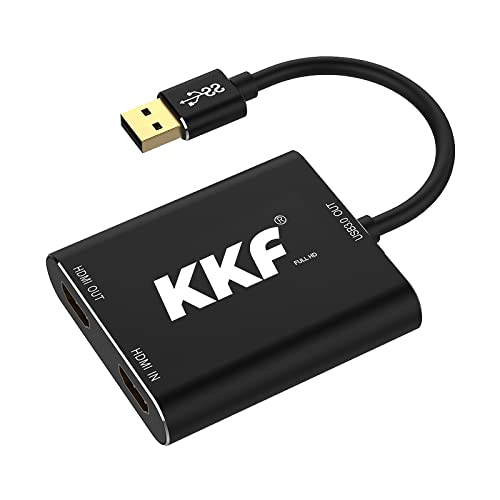
Mirabox Capture Card for Nintendo Switch,USB3.0 1080P 60FPS Video Audio Capture Card,Support 4K@30Hz Input and Passthrough for PS4 PS5 DSLR Xbox Streaming and Recording by OBS


Key features
- •【Stronger Compatibility】This 1080P hdmi capture can be compatible with all 1080P 720P hdmi device, such as Wii U, PS4, PS3, Xbox One, Xbox 360, Wii, Nintendo Switch, DVD, camera, DSLR and set top box etc.
- •【1080P With 60FPS,Support HDCP】The HD video capture card can support HDCP 1080P with 60FPS, it is very suitable to use it for game live streaming.
- •【Faster Data Transmition】USB3.0 high speed transmission port,let your live streaming to Twitch, Youtube, OBS, Potplayer more easily.
- •【ZERO Latency HDMI Loopout】There is no latency when you use the hdmi loopout port, the hdmi loopout port is very usefully when you are making a game live streaming.
- •【Plug and Play,No Need to Install Driver】It is compatible with Lunix, windows 7/8/10 and Mac OS, very easy to setup, there is no need to install driver.
Mirabox Capture Card for Nintendo Switch,USB3.0 1080P 60FPS Video Audio Capture Card,Support 4K@30Hz Input and Passthrough for PS4 PS5 DSLR Xbox Streaming and Recording by OBS
List Price: $105.91$95.32DEALYou Save: $10.59 (10%)
Free shippingFree Returns – 30 daysFree Order CancellationSecure Payment2–3 Days DeliveryGet It October 26, 2026In Stock (1)No marketing spamNo account requiredFulfilment by FedEx / Amazon / UPS / ShipwirePayPal / Card Buyer Protection
Customer Reviews
Reviews sourced from verified Amazon purchasers4.0
out of 5
Based on 10 reviews
5★
80%
4★
10%
3★
0%
2★
0%
1★
10%
It works great running on managed switches
W. M. Barber✓ Verified Purchase•August 7, 2018
This review is for Mirabox 150m(525ft) 1080P HDMI Extender IR over Rj45 Cat5/5e/6/6e UTP/STP Ethernet Lan Network TCP/IP with Audio Extractor Supports
I have my TiVo in the living room and a second TV in my office. I have had an HDMI cord running between the two rooms but it's unsightly. I also have managed switches in both the living room and office so the thought was if I got the Mirabox I wouldn't need the long HDMI cord.
So I setup a dedicated VLAN on the switches for the extender to use between the two rooms and assigned ports on both switches for that VLAN so the traffic they send doesn't degrade WIFI like other reviewers have had issues with. Plugged everything in and a few seconds later I was watching TV.
For those curious on how much bandwidth is required, the switches were reporting 30-40 mbps on average being fed a 1080I signal from the TiVo.
The boxes get warm to the touch so don't plan on burying them in a corner - I'd make sure they have some airflow so they don't die prematurely.
I have my TiVo in the living room and a second TV in my office. I have had an HDMI cord running between the two rooms but it's unsightly. I also have managed switches in both the living room and office so the thought was if I got the Mirabox I wouldn't need the long HDMI cord.
So I setup a dedicated VLAN on the switches for the extender to use between the two rooms and assigned ports on both switches for that VLAN so the traffic they send doesn't degrade WIFI like other reviewers have had issues with. Plugged everything in and a few seconds later I was watching TV.
For those curious on how much bandwidth is required, the switches were reporting 30-40 mbps on average being fed a 1080I signal from the TiVo.
The boxes get warm to the touch so don't plan on burying them in a corner - I'd make sure they have some airflow so they don't die prematurely.
(edited) Pretty much doesn't work.
Amazon Customer✓ Verified Purchase•July 28, 2018
At first I thought I could figure out some of the issues in this box as I got a better PC and updated my software, but doing this actually made realize how bad it actually is. At first I thought the picture quality was good, ignoring the fact that it nowhere near reached the advertised 60fps. However, now most of the time i can't even get 1fps. This box crashes and freezes if you change any setting on the software you use or sometimes it just crashes for no reason. In the time that I have had this in my possession I have tried to give it a fair shot, but it just continued to disappoint. I can't even get it to work at all now. All of this software restarting and cable-pulling in vain is unacceptable. I am happy to see the I still have a day left to return this, and return I shall. That "Made in China" label on the box should have been a warning sign that I had bought a crappy off-brand...
[MiraBox USB 3.0 HDMI Game Capture Card Device] Works well, but have not yet found a "perfect" capture method.
Film and music buff✓ Verified Purchase•July 18, 2018
It seems to work fine thus far. I am still a bit unclear if this is actually encoding the HD input on the fly or not. Most of the software I use for capturing does encoding, even the software they recommend (i.e - Potplayer and OBS). I have tried various settings and the only setting that seems to capture without dropped frames is a default setting for DV, which make no sense as the incoming signal is for sure 1920x1080. On the other hand sell points such as "webcam solution" and " suitable to use it for game live streaming" leads me back to the question if this is already outputting an encoded signal.
Works as advertised -
Richard Y.✓ Verified Purchase•February 4, 2018
Product Works well as advertised, however - there's a few things that I discovered about this device to make it work in our production area.
Works using a wireless bridge to a certain point. As Windows desktop for internet browsing, youtube - it works perfectly well. Even transmit sounds through the wireless bridge. I used a nanostation it works to a certain point, when we used it for an application we created, it didn't have enough bandwidth to refresh the display.
Using a 10/100mb switch - same as the Wireless Bridge, it worked for internet browsing and other simple applications. Displays in HD. However, once you have an application that uses a lot of data using full HD screen, it fails and goes black.
Works on VDSL/SDSL with the same limitation as above -
I had to use a gigabit switch to make this work for our application. I had 1 sender and 5 receivers displaying the same content. The gigabit was necessary to make it work on 5 different 40" displays.
Works using a wireless bridge to a certain point. As Windows desktop for internet browsing, youtube - it works perfectly well. Even transmit sounds through the wireless bridge. I used a nanostation it works to a certain point, when we used it for an application we created, it didn't have enough bandwidth to refresh the display.
Using a 10/100mb switch - same as the Wireless Bridge, it worked for internet browsing and other simple applications. Displays in HD. However, once you have an application that uses a lot of data using full HD screen, it fails and goes black.
Works on VDSL/SDSL with the same limitation as above -
I had to use a gigabit switch to make this work for our application. I had 1 sender and 5 receivers displaying the same content. The gigabit was necessary to make it work on 5 different 40" displays.
Works LIke Advertised.
DB✓ Verified Purchase•January 24, 2018
Worked Perfectly in my situation... Had One Dell PC that had one HDMI output. Was running two 52" Smart LCD television monitors with it. Connected the PC HDMI output to an external HDMI splitter and one output from the splitter went to one TV that was closest to the PC and the other splitter output went into this HDMI extender that connected into another room over about 75 feet of Cat5 cable. Each end is USB powered. Have to use a PC port to power it or get a wall coverter. The TV had a USB port and I plugged it in there and it powered it up fine. If you need that USB port for something you will have to find an AC converter or USB hub or something to power it with.
Page 1 of 2