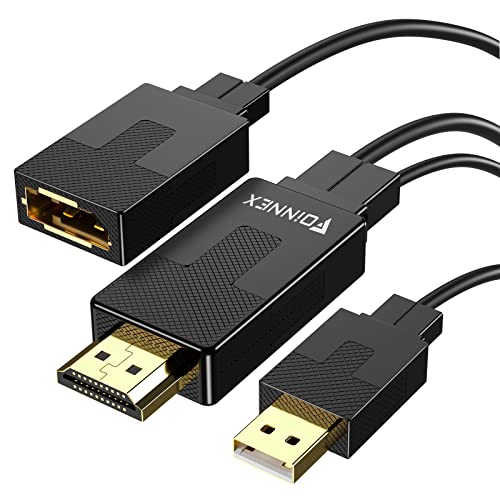
FOINNEX HDMI to DisplayPort Adapter, 4K@60Hz Not-Bidirectional HDMI to Display Port, Unidirectional HDMI Source to DP Display Male to Female for Computer, Monitor, PS4, NS


Key features
- •【HDMI to Display Converter】transmits high-definition video and audio from your computer to a DisplayPort monitor for video streaming or gaming. Connect and configure your monitor for an Extended Desktop or Mirrored Displays
- •【Wide Compability】Active HDMI to DP Adapter lets you connect an HDMI enabled video source,such as laptop, PC, Apple devices, Blu-ray player, camera, PS3, PS4, Nintendo Switch, XBOX, video game console to a DisplayPort TV, monitor or projector. A DP cable sold seperately.
- •【Support 4k】Supports resolutions of UHD 4K (3840x2160)@30Hz, 1080p (1920x1080)@60Hz, delivering crystal clear images to your digital life. * NOTE that GAME CONSOLES with native 4K @60Hz (such as XBOX One S) will display in 1080p.
- •【USB Powered】Plug the USB connector into a USB port for best performance and compatibility. Plug and Play - No driver or software required!
- •【Note】1. HDMI to Display Port is NOT a bi-directional adapter. DO NOT use for Displayport to HDMI conversion 2. GAME CONSOLES with native 4K@60Hz (such as XBOX One S) will display in 1080p
FOINNEX HDMI to DisplayPort Adapter, 4K@60Hz Not-Bidirectional HDMI to Display Port, Unidirectional HDMI Source to DP Display Male to Female for Computer, Monitor, PS4, NS
List Price: $34.90$31.41DEALYou Save: $3.49 (10%)
Free shippingFree Returns – 30 daysFree Order CancellationSecure Payment2–3 Days DeliveryGet It June 25, 2026In Stock (2)No marketing spamNo account requiredFulfilment by FedEx / Amazon / UPS / ShipwirePayPal / Card Buyer Protection
Customer Reviews
Reviews sourced from verified Amazon purchasers4.4
out of 5
Based on 10 reviews
5★
80%
4★
20%
3★
0%
2★
0%
1★
0%
These worked in an Anker docking station for me!
Shawn Parker✓ Verified Purchase•February 26, 2024
Someone said these don't work in docking stations but they worked for me in the Anker 13 in 1 docking station.
Plug-and-play QHD for monitors requiring DisplayPort
catweazle✓ Verified Purchase•February 16, 2024
UPDATE: I just read the top-rated critical review for this product and wanted to respond: The fellow reviewer claims that after he connected a monitor to his computer using the adapter, the monitor was no longer properly responding to power-saving mode. This is not my experience. I have two monitors connected (see below), one with the adapter, and one straight-through, and they both gradually dim and go dark in perfect sync. When waking up, the one that is wired straight-through does come online a second or two faster. Whether that's due to the adapter, or simply because it's assigned "primary" duty, and displays the login challenge, I don't know. It doesn't seem to matter much, anyway. Whatever problems the other reviewer experienced may be rooted in his particular setup being incompatible with the adapter, or -- and this is my guess -- they may be entirely unrelated to the adapter. In either case, I don't experience these problems
END OF UPDATE
I bought a couple of older Dell UltraSharp U2713HM monitors that I needed to connect with my AMD Gigabyte B550I Aorus Pro AX board running integrated graphics using a Ryzen 5 5600G CPU. The only problem with this setup is that the monitors run at their maximum QHD resolution only using DisplayPort connections. With HDMI connection they fall back to 1080p. But my motherboard only has one DP connector. This adapter solves this problem. It is able to plug into an unused HDMI port and a USB port (for power) on the PC side, and then connects that PC via DisplayPort cable to one of the monitors. The monitor accepts the connection as DisplayPort and runs at its full native 2560x1440 resolution with 60Hz refresh rate. There's no noticeable difference to the identical monitor that is connected to the "real" DP port on the PC. The adapter is driverless, and works fine under Linux. The whole switch from old 24" 1080p HDMI monitors to these "new-to-me" 27" QHD monitors didn't even require a shutdown and reboot. All hardware was recognized instantly by Ubuntu 22.04, without even requiring a shutdown.
END OF UPDATE
I bought a couple of older Dell UltraSharp U2713HM monitors that I needed to connect with my AMD Gigabyte B550I Aorus Pro AX board running integrated graphics using a Ryzen 5 5600G CPU. The only problem with this setup is that the monitors run at their maximum QHD resolution only using DisplayPort connections. With HDMI connection they fall back to 1080p. But my motherboard only has one DP connector. This adapter solves this problem. It is able to plug into an unused HDMI port and a USB port (for power) on the PC side, and then connects that PC via DisplayPort cable to one of the monitors. The monitor accepts the connection as DisplayPort and runs at its full native 2560x1440 resolution with 60Hz refresh rate. There's no noticeable difference to the identical monitor that is connected to the "real" DP port on the PC. The adapter is driverless, and works fine under Linux. The whole switch from old 24" 1080p HDMI monitors to these "new-to-me" 27" QHD monitors didn't even require a shutdown and reboot. All hardware was recognized instantly by Ubuntu 22.04, without even requiring a shutdown.
Just What I Needed
Glen Campbell✓ Verified Purchase•February 10, 2024
Wanted to pass along to any others facing the situation where you have a relatively new HDMI device (e.g. 2.0 / 2.1) supplying the video signal (for me it's a new PC) but, say, an older HDMI monitor (e.g. 1.4). This device was EXACTLY what i needed. I used one of the USB ports on the monitor to supply the power this cable needs, and I now have 4k @60Hz using my monitor's displayPort 1.2 interface - MUCH better than the 4k @30Hz I would have to use with my monitor's older HDMI 1.4 ports.
Perfect
Sutton Doty✓ Verified Purchase•December 22, 2023
I accidentally overlooked the fact that two PCs in a huge project only had one display port and one HDMI port. When I went to do the job, all of the pre-ran cables were display port on both ends. Oops. These adapters saved my bacon.
Inconvenient, but does work.
Occupant✓ Verified Purchase•December 3, 2023
I'm using this to connect a Dell U2412M monitor to a Raspberry Pi 4, as a second display. The DVI port on the monitor is already occupied, leaving me with DisplayPort, or VGA. The cable does work, but requires external power in the form of a USB port. The cable doesn't work well connected to a spare USB port on the Pi, which would be the clean setup. It seems that the cable takes a bit of time to become ready after power on, and the OS has already decided nothing is connected. It will work if I let the Pi boot, and then issue a reboot each time I power it up. The monitor is detected on the second boot.
Instead, I have it connected to a 1 amp USB power brick. With the cable powered up before the Pi, the monitor is detected, and all is well. It's working, but for $33, it could work a lot better.
There is another cable out there which does not require external power. Kinda wish I had tried that one.
Instead, I have it connected to a 1 amp USB power brick. With the cable powered up before the Pi, the monitor is detected, and all is well. It's working, but for $33, it could work a lot better.
There is another cable out there which does not require external power. Kinda wish I had tried that one.
Page 1 of 2

![QGeeM USB C to HDMI Adapter 4K Cable, USB Type-C to HDMI Adapter [Thunderbolt 3/4] HDMI Adapter for Laptop MacBook Pro/Air, Galaxy S10/S9/S8, Dell XPS 13/15, Pixelbook, Surface Pro and More(Pink)](https://m.media-amazon.com/images/I/21V8dThK9rS._SL500_.jpg)


![WAVLINK USB 2.0 to VGA/DVI/HDMI Universal Video Graphics Card Adapter for Multiple Monitors Up to 1920x1080@60Hz for Windows, Mac OS & Chrome OS[Includes DVI-to-VGA,DVI-to-HDMI Converter]](https://m.media-amazon.com/images/I/41EpG2i9dhL._SL500_.jpg)