Fusion5 10.1" Windows 11 Tablet PC - FWIN232 Plus Ultra Slim Windows Tablet Computer - Intel 13th Gen, 8GB RAM, Full HD 10 Inch Display, 5G WiFi, USB 3.0, Micro HDMI, Dual Cameras, Bluetooth


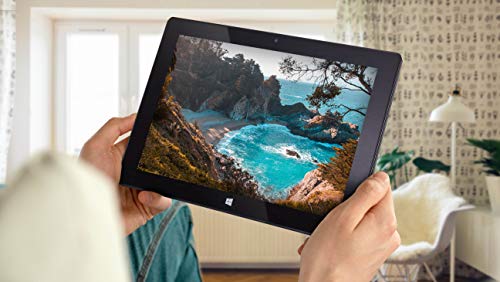
Key features
- •ULTRA SLIM & ULTRA STYLE: WINDOWS 10 TABLET - the ultimate user experience. This newest version of Windows Tablet PC from Fusion5 is fully-loaded with the latest user-friendly Windows 10 package. Perfect Windows tablet PC for your daily requirement, be it education, office work or industrial use.
- •POWERFUL & MEGA STORAGE SPACE - what more is there?! Upgraded Intel Quad-core CPU with powerful GPU - 4GB of RAM - 64GB of storage (please note: part of storage is pre-occupied by OS). Your new Windows tablet laptop PC is all ready for work, fun and play! This is a super powerful Windows tablet!!
- •10'' GRAPHIC DISPLAY FOR OPTIMAL VIEWING - the 10'' screen on this Windows 10 tablet PC by Fusion5 is perfect for viewing our favourite TV shows, movies, Youtube and playing games!
- •WANT MORE? - this is a Bluetooth 4.0 Windows PC laptop tablet. Equipped with Intel Quad-core Processor, and full-size USB 3.0 port.
- •WHY BUY THIS WINDOWS 10 TABLET PC BY FUSION5? - this ultra-slim and stylish Windows laptop tablet not only ticks all the boxes in terms of ultimate usability, delicious graphics and overall specs but...it also comes with 12 MONTHS OF FULL USA WARRANTY @ A US SERVICE CENTER.
Fusion5 10.1" Windows 11 Tablet PC - FWIN232 Plus Ultra Slim Windows Tablet Computer - Intel 13th Gen, 8GB RAM, Full HD 10 Inch Display, 5G WiFi, USB 3.0, Micro HDMI, Dual Cameras, Bluetooth
List Price: $378.29$340.46DEALYou Save: $37.83 (10%)
Free shippingFree Returns – 30 daysFree Order CancellationSecure Payment2–3 Days DeliveryGet It October 25, 2026In Stock (2)No marketing spamNo account requiredFulfilment by FedEx / Amazon / UPS / ShipwirePayPal / Card Buyer Protection
Customer Reviews
Reviews sourced from verified Amazon purchasers4.1
out of 5
Based on 10 reviews
5★
20%
4★
80%
3★
0%
2★
0%
1★
0%
Not too bad suffers from windows bloat.
Justin M✓ Verified Purchase•September 18, 2023
I've used this for quite a while now and I can say for sure being able to use windows on a tablet is a bajillion times better than useless android devices. Unfortunately Windows really cripples these types of devices quite heavily with it's sheer girth and annoying background shenanigans. If it decided to start doing tasks in the background like updating or scanning the computer with windows defender you will 100% notice. It's rough. I skimmed through settings and shut off as much as I could and still you can see with the task manager it eats up a hunk of the CPU. Once it's done it becomes way more usable. I think this would benefit greatly with a light Linux install but good lord it seems like every other task you try to do ends up either being a cake walk to a rabbit hole of dispair with Linux. The screen and it's case with keyboard you can get is extraordinarily disappointing. The keyboard has a hard time staying connected and loses contact with the pins easily and the screen is plastic. I bought the case to help protect it but the plastic keyboard rubbing up against the screen causes scratching. That's right the keyboard made for this device scratches the screen in the thing you use to protect it. A screen protector if you can get one to work with it is necessary. My brother just tossed it in a box like an idiot while we where moving. Yes tossed my $200 tablet loose in a box not even in it's protector that was in same box and it looks like it got attacked by a raccoon with scratches and gauges all over. I honestly don't know how I feel about it overall, I'm a bit disappointed but it's a pretty darn low price and I don't know how the windows surface pro that has half the cores with more hz can stack up. I use it to program games with java and it is nice to test them on such a slow machine vs my beast of a desktop that could make the least optimized trash code run like normal. I'd just beware you need to have patience when working on this machine don't expect ultra responsiveness like you get with a desktop. Oh and I filled the SSD up in no time and sd cards are not very fast as a substitute.
Works nicely out of the box
L. S.✓ Verified Purchase•September 5, 2023
Works nicely right out of the box. Setup was uneventful, screen clear and sharp. A couple of observations to pass along. To power on press and hold power button until tiny blue light on the upper right turns on. Micro HDMI port connector is very small, and most HDMI cables are relatively large, and stiff. Easy for the connection to come loose causing loss of external screen. While the tablet itself seems fine, unfortunately the optional keyboard docking station is flimsy. It cannot support the weight of the tablet. Ironically there is a docking station for another similar tablet that works much better, but the keyboard connector does not fit. Best to just pass on the docking station.
Handy Win11 Tablet for on the go
Nate Dogg✓ Verified Purchase•August 30, 2023
Manage your expectations, at $200 it's low quality materials but the thing works. The plastic screen easily scratches so be gentle. Charging with USB-C is not an option. Only issue is the screen flickers on the left side of the screen. I tried all sorts of things to fix it by changing settings and updating the display driver with no success. I finally did find a work around, if it's flickering, restart the computer and the flicker stops. Probably some sort of initialization problem when starting up from a shutdown. Maybe the manufacturer will look into this and provide a permanent fix. Enjoy!
A Nice Device for a Good Price
Derek✓ Verified Purchase•July 31, 2023
Fusion 5 10.1" Windows 10 Tablet
I picked up this tablet as an upgrade to my Kindle Fire 8". Overall, I'd say it was a good choice.
Initially, I began shopping for a 10" version of my same tablet, but I thought, why not upgrade a bit in the process? Since most of my other equipment is in the Microsoft ecosystem, I chose to go with a Windows tablet. That way, I can sync easily between my desktop, phone, and tablet, having all my data available from any device.
When I first started shopping, my gut instinct was to pick up the MS Surface Go, which is a 10" Windows 10 tablet. The down side is that Windows is running in S Mode. Windows 10 in S Mode is a more limited, locked-down Windows operating system. In S Mode, you can only install apps from the Store, and you can only browse the web with Microsoft Edge.
I didn't want to be limited, and I began looking around for another solution, eventually deciding on the Fusion5.
Order the device through Amazon was simple and painless, as most Amazon transactions are. The device was shipped promptly, and arrived when it was supposed to.
I've been using the tablet for a few weeks now, so I think I might be able to relay my experience with it.
Screen
The screen is great, on par with other high end tablets. The resolution of the 10.1" (diagonally measured) display makes for a nice crisp display, with good color and brightness.
Touch sensitive is good as well. I've had no problem with making selections for text fields, buttons, etc. Some other folks have commented about a problem with selecting a text field, and not having the on-screen keyboard pop up. I don't think this is a failing of the tablet itself, but rather the way Windows 10 works with touch. It's been an issue for the last several version of Windows, and 10 is no different. Putting Windows 10 into tablet mode alleviates the problem somewhat, but in some text fields you may need to double tap.
Using the Inking function in Edge, OneNote, and other apps worked flawlessly. Using a stylus or your finger, you can highlight data on web pages or other places, or even include short notes.
The only complaint I would have about the display is the inclusion of a less than stellar screen protector with the device, already installed. When I received mine, it was loose along the bottom bezel of the display. Further, the protector slightly hindered use of touch features. Once I removed the protector, touch sensitivity was much better. The downside if your remove the protector (and don't replace it) is the potential for scratches, as well as the mass of fingerprints that will collect on the display.
Connectivity
The only option for connectivity include with the device is WiFi. I've tested it by connecting to several different access points, public and private, and have had no issues. The only downside I can mention is the lack of high speed options with the on-board WiFi. In my testing, I was only able to connect with 802.11b, which is limited to 11 Mbps, so you're roughly getting 9.5-10 Mbps. I think a better option would be to use an 802.11 b/g/n chip for faster speeds.
Even with the limited connectivity, I am able stream NetFlix, work on documents from OneDrive, and surf the internet with no issues. There is some slight buffering at the start of a NetFlix video, but my desktop does the exact same thing, so I don't see that as negative. The rest of the stream is fine, and displays in HD. Streaming from YouTube was a bit better, with a quicker start to viewing than with NetFlix.
The device comes with a variety of ports on the side, including a full size USB port, mini HDMI, USB-C and a power port. Charging via the power port *or* USB-C worked fine. I wasn't able to test USB-C peripherals, as I don't have any.
Using the standard USB port, I connected a wired mouse, and it worked with no issue. also tried a USB keyboard, headset, and game controller. All worked with problem. As long as Windows has or can find the correct driver for the device, most should work with the tablet.
One cool thing I was able to do is connect the tablet to my KVM switch. A KVM switch (with KVM being an abbreviation for "keyboard, video and mouse") is a hardware device that allows a user to control multiple computers from one keyboard, monitor, and mouse.
Using the KVM, I was able to use my full size equipment at my desk. The device found the peripherals with no issues, and I happily surfed the web and am actually writing this review using the tablet now, using the big screen. Document editing is much easier with full size equipment, and the Fusion5 had no problems allowing me to use my regular gear.
Bluetooth connectivity is good, and I tried a couple of different devices with the Fusion5, including my phone, a mouse, and two different sets of headphones. Range and functionality was good. Leaving the tablet in my home office, I was able to move up to 50 feet away, and the sound was still good in my headphones.
Sound
The tablet included two speakers, although they are not very good. At maximum volume, the sound is *just* audible. This doesn't bother me, however, as I use a bluetooth headset when I am streaming video, using Skype, etc.
I haven't use the on-board microphone, but I imagine you would be better served getting a good bluetooth headset for Skype calls, or perhaps a wired headset connected to the USB port.
Storage
The version of the device I purchased included 4 GB of RAM, as well as 64 GB of storage on-board.
While 4 GB of RAM won't give you enough "oomph" to run things like MySQL or Doom, it is more than enough to edit documents in Word, spreadsheets in Excel, surf the net with multiple tabs open (but no too many!), and play some lighter games like Asphalt Airborne and the like.
Mass storage of the device is a seemingly huge 64 GB. However, keep in mind that Windows 10 takes a large chunk of this space for itself. The device does include an SD card slot, with which you can use to expand the storage. With this in mind, I did purchase a 128 GB SD card. I inserted the card, and it worked straight away.
The first thing I did is set my OneDrive folder to the new drive, to keep things of the system drive. That way, you're not cluttering up the system drive with your random cat pictures and crossword puzzles.
Operating System
The Fusion5 comes with Windows 10 Home Edition, 32-bit. This is not a watered down version of Windows, nor is it Windows running in S mode. This is the full version of Windows 10 Home Edition. What this means is that anything that you can run on your home machine, you can run on your tablet, provided that it fits in to the requirements of the software.
For example, I am a hobbyist software developer. I write applications and utilities for use by people all over the world. On this device, I was able to install and use a Win32 application that I built on my desktop machine. No errors, no missing drivers. It just worked.
Where all this leads is if there is something you want to connect to this tablet, or some software you want to install, the only questions you need to ask are "Is it compatible with Windows 10?" and "Does my hardware meet the requirements?"
Battery Life
The claimed battery life is around eight hours, and I have no dispute with that. I charge the device once per week, and have yet to have an unexpected shutdown due to battery problems. I imagine with some power management like dimming the display and throttling the CPU a bit (both available by tapping on the battery icon in the system tray), you could stretch it out to ten hours.
Summary
I'm pretty happy with this purchase. I use the Fusion5 for reading ebooks, watching streaming video, and some light web surfing. While it won't replace my desktop or my full laptop (it's a beast!), it is great for use on airplanes, laying in bed at night, riding the bus, etc.
Besides the few minor items I pointed out previously, I would make one more ask for this device. The tablet includes no recovery media with it. It would be nice to have the option of performing a clean install of Windows 10 from media, if the need arises. As it sits, I'm not sure it can be booted from USB, but than may be an option, provided I can find the product key.
Overall, if you are in the market for an inexpensive Windows 10 device, I would recommend the Fusion5 10.1" Windows 10 tablet. At just under $200, it's a pretty great buy.
I picked up this tablet as an upgrade to my Kindle Fire 8". Overall, I'd say it was a good choice.
Initially, I began shopping for a 10" version of my same tablet, but I thought, why not upgrade a bit in the process? Since most of my other equipment is in the Microsoft ecosystem, I chose to go with a Windows tablet. That way, I can sync easily between my desktop, phone, and tablet, having all my data available from any device.
When I first started shopping, my gut instinct was to pick up the MS Surface Go, which is a 10" Windows 10 tablet. The down side is that Windows is running in S Mode. Windows 10 in S Mode is a more limited, locked-down Windows operating system. In S Mode, you can only install apps from the Store, and you can only browse the web with Microsoft Edge.
I didn't want to be limited, and I began looking around for another solution, eventually deciding on the Fusion5.
Order the device through Amazon was simple and painless, as most Amazon transactions are. The device was shipped promptly, and arrived when it was supposed to.
I've been using the tablet for a few weeks now, so I think I might be able to relay my experience with it.
Screen
The screen is great, on par with other high end tablets. The resolution of the 10.1" (diagonally measured) display makes for a nice crisp display, with good color and brightness.
Touch sensitive is good as well. I've had no problem with making selections for text fields, buttons, etc. Some other folks have commented about a problem with selecting a text field, and not having the on-screen keyboard pop up. I don't think this is a failing of the tablet itself, but rather the way Windows 10 works with touch. It's been an issue for the last several version of Windows, and 10 is no different. Putting Windows 10 into tablet mode alleviates the problem somewhat, but in some text fields you may need to double tap.
Using the Inking function in Edge, OneNote, and other apps worked flawlessly. Using a stylus or your finger, you can highlight data on web pages or other places, or even include short notes.
The only complaint I would have about the display is the inclusion of a less than stellar screen protector with the device, already installed. When I received mine, it was loose along the bottom bezel of the display. Further, the protector slightly hindered use of touch features. Once I removed the protector, touch sensitivity was much better. The downside if your remove the protector (and don't replace it) is the potential for scratches, as well as the mass of fingerprints that will collect on the display.
Connectivity
The only option for connectivity include with the device is WiFi. I've tested it by connecting to several different access points, public and private, and have had no issues. The only downside I can mention is the lack of high speed options with the on-board WiFi. In my testing, I was only able to connect with 802.11b, which is limited to 11 Mbps, so you're roughly getting 9.5-10 Mbps. I think a better option would be to use an 802.11 b/g/n chip for faster speeds.
Even with the limited connectivity, I am able stream NetFlix, work on documents from OneDrive, and surf the internet with no issues. There is some slight buffering at the start of a NetFlix video, but my desktop does the exact same thing, so I don't see that as negative. The rest of the stream is fine, and displays in HD. Streaming from YouTube was a bit better, with a quicker start to viewing than with NetFlix.
The device comes with a variety of ports on the side, including a full size USB port, mini HDMI, USB-C and a power port. Charging via the power port *or* USB-C worked fine. I wasn't able to test USB-C peripherals, as I don't have any.
Using the standard USB port, I connected a wired mouse, and it worked with no issue. also tried a USB keyboard, headset, and game controller. All worked with problem. As long as Windows has or can find the correct driver for the device, most should work with the tablet.
One cool thing I was able to do is connect the tablet to my KVM switch. A KVM switch (with KVM being an abbreviation for "keyboard, video and mouse") is a hardware device that allows a user to control multiple computers from one keyboard, monitor, and mouse.
Using the KVM, I was able to use my full size equipment at my desk. The device found the peripherals with no issues, and I happily surfed the web and am actually writing this review using the tablet now, using the big screen. Document editing is much easier with full size equipment, and the Fusion5 had no problems allowing me to use my regular gear.
Bluetooth connectivity is good, and I tried a couple of different devices with the Fusion5, including my phone, a mouse, and two different sets of headphones. Range and functionality was good. Leaving the tablet in my home office, I was able to move up to 50 feet away, and the sound was still good in my headphones.
Sound
The tablet included two speakers, although they are not very good. At maximum volume, the sound is *just* audible. This doesn't bother me, however, as I use a bluetooth headset when I am streaming video, using Skype, etc.
I haven't use the on-board microphone, but I imagine you would be better served getting a good bluetooth headset for Skype calls, or perhaps a wired headset connected to the USB port.
Storage
The version of the device I purchased included 4 GB of RAM, as well as 64 GB of storage on-board.
While 4 GB of RAM won't give you enough "oomph" to run things like MySQL or Doom, it is more than enough to edit documents in Word, spreadsheets in Excel, surf the net with multiple tabs open (but no too many!), and play some lighter games like Asphalt Airborne and the like.
Mass storage of the device is a seemingly huge 64 GB. However, keep in mind that Windows 10 takes a large chunk of this space for itself. The device does include an SD card slot, with which you can use to expand the storage. With this in mind, I did purchase a 128 GB SD card. I inserted the card, and it worked straight away.
The first thing I did is set my OneDrive folder to the new drive, to keep things of the system drive. That way, you're not cluttering up the system drive with your random cat pictures and crossword puzzles.
Operating System
The Fusion5 comes with Windows 10 Home Edition, 32-bit. This is not a watered down version of Windows, nor is it Windows running in S mode. This is the full version of Windows 10 Home Edition. What this means is that anything that you can run on your home machine, you can run on your tablet, provided that it fits in to the requirements of the software.
For example, I am a hobbyist software developer. I write applications and utilities for use by people all over the world. On this device, I was able to install and use a Win32 application that I built on my desktop machine. No errors, no missing drivers. It just worked.
Where all this leads is if there is something you want to connect to this tablet, or some software you want to install, the only questions you need to ask are "Is it compatible with Windows 10?" and "Does my hardware meet the requirements?"
Battery Life
The claimed battery life is around eight hours, and I have no dispute with that. I charge the device once per week, and have yet to have an unexpected shutdown due to battery problems. I imagine with some power management like dimming the display and throttling the CPU a bit (both available by tapping on the battery icon in the system tray), you could stretch it out to ten hours.
Summary
I'm pretty happy with this purchase. I use the Fusion5 for reading ebooks, watching streaming video, and some light web surfing. While it won't replace my desktop or my full laptop (it's a beast!), it is great for use on airplanes, laying in bed at night, riding the bus, etc.
Besides the few minor items I pointed out previously, I would make one more ask for this device. The tablet includes no recovery media with it. It would be nice to have the option of performing a clean install of Windows 10 from media, if the need arises. As it sits, I'm not sure it can be booted from USB, but than may be an option, provided I can find the product key.
Overall, if you are in the market for an inexpensive Windows 10 device, I would recommend the Fusion5 10.1" Windows 10 tablet. At just under $200, it's a pretty great buy.
great tablet! good product for the price!
lad✓ Verified Purchase•July 10, 2023
great tablet!
3 drawbacks that I've seen. slow processor, light on the memory (both storage and operational) and battery life isn't so good. all three i knew about when buying it. this tablet is secondary computer for me, and as such i didn't use it for heavy processing of as my main computer. i also find the lack of storage unimportant as it has the TF slot, making it easy to put things on the tablet from my laptop and making the lack of storage an utterly unimportant detail.
what makes this thing rock is it's a windows computer (i loath ipads as it's so hard to put my own personal files onto a tablet that i personaly own from a computer i own! in other words, ipads suck because they are locked.) so i can use programs i'm used to, put my own files on it with ease.
good price, good product for that price
3 drawbacks that I've seen. slow processor, light on the memory (both storage and operational) and battery life isn't so good. all three i knew about when buying it. this tablet is secondary computer for me, and as such i didn't use it for heavy processing of as my main computer. i also find the lack of storage unimportant as it has the TF slot, making it easy to put things on the tablet from my laptop and making the lack of storage an utterly unimportant detail.
what makes this thing rock is it's a windows computer (i loath ipads as it's so hard to put my own personal files onto a tablet that i personaly own from a computer i own! in other words, ipads suck because they are locked.) so i can use programs i'm used to, put my own files on it with ease.
good price, good product for that price
Page 1 of 2