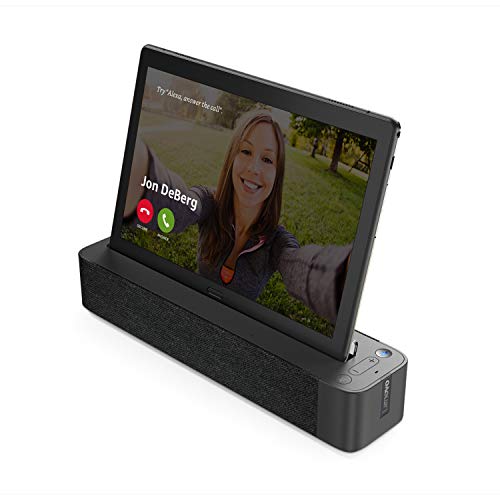
Lenovo Smart Tab P10 10.1” Android Tablet, Alexa-Enabled Smart Device with Fingerprint Sensor and Smart Dock Featuring 4 Dolby Atmos Speakers - 64GB Storage with Alexa Enabled Charging Dock Included


Key features
- •CES WINNER: Smart Tab is the winner of the 2019 Best of Innovation Award
- •POWERFUL TABLET: Qualcomm Snapdragon processor, 4 GB RAM, and up to 256 GB micro SD card support
- •FULL HD DISPLAY: A great Android tablet with a stunning and a captivating display with 4 front speakers with Dolby Atmos
- •ANDROID OPERATED WITH A FINGERPRINT SENSOR: Runs on the latest Android O operating system. Smart Tab P10 includes a fingerprint login for multiple profiles
- •SURROUND SOUND: This tablet bundle includes a Smart Speaker offering booming audio with sound from 4 full range Dolby Atmos speakers
- •ALEXA EXPERIENCE: Transform your tablet into a Smart Screen with Amazon Alexa when docked. Control your smart home devices too hands free
Lenovo Smart Tab P10 10.1” Android Tablet, Alexa-Enabled Smart Device with Fingerprint Sensor and Smart Dock Featuring 4 Dolby Atmos Speakers - 64GB Storage with Alexa Enabled Charging Dock Included
List Price: $480.14$432.13DEALYou Save: $48.01 (10%)
Free shippingFree Returns – 30 daysFree Order CancellationSecure Payment2–3 Days DeliveryGet It October 24, 2026In Stock (1)No marketing spamNo account requiredFulfilment by FedEx / Amazon / UPS / ShipwirePayPal / Card Buyer Protection
Customer Reviews
Reviews sourced from verified Amazon purchasers4.0
out of 5
Based on 10 reviews
5★
50%
4★
50%
3★
0%
2★
0%
1★
0%
Great tablet, very good value, looks and performance great.. but..
Steve H✓ Verified Purchase•December 15, 2023
Nice looking tablet.. visually pleasing design.. great specs at a price that beats the Samsung tabs, hands down. TL;DR - I like this tablet, I like the 4-gig ram, 64-gig space, available MicroSD slot for expanded storage, I like the overall functionality, abilities, performance, and potential, I liked the good bang4buck price (I also like that for whatever reason, I lucked out with a -$100 coupon!)
BUT.. and there are always some buts.. (which are not dealbreakers for me, but worth being aware of)
Caveats:
1. It's glass front and back. And while that makes it one 'sexy' tab.. it also makes it slippery as he!!. You're going to want a protective case for this, immediately.
2. Case caveat.. putting a case on, means you need to take the case off to use the base. I've found one case that you do not need to remove, and I've ordered it - not yet rec'd it - but to use it, it uses 3M high-bond double-faced tape to stick to the back of your tablet, so half of the back can fold out of the way. So you have to decide - Use no case and deal with slippery tablet, use a full case and remove it when you dock it, use the dockable case and deal with tape residue removal eventually.
3. Talking about the dock? While the tablet does not *need* the dock for Alexa? It simply works much better and easier with the dock. You'll want to use the dock. The tablet charges in the dock, and you can also charge via USB-C cable. Due to the nature of current rechargeable batteries? It is not recommended to constantly charge them beyond 80%.. or leave them plugged into a charger. This is actually why I bought this tablet - to replace a Google Nexus 7 tablet, that died a hard unrecoverable death, because I'd left it sitting plugged in for days/weeks at a time, when not in use. Eventually the battery just ran out of charge cycles.. and bricked itself. I cannot even power the tablet on, if it's plugged in and reports "charging". So the base on this unit, is a catch-22. You need to use it with the tablet mounted, and power plugged in, to get the best use of this tablet + Alexa. But doing so, can eat up battery charge cycles. It's got a 7,000mAh battery, so that's great, but.. over the course of 2-3 years or so, constant mounted charging while using, will take its toll. I don't see any options for charge limiting, and even the setup guide states on Page 6 "To extend battery life, we recommend charging the battery to at least 30 to 50% capacity each time, and recharging it every three months to prevent over discharge." (You are not going to get 3 months use from a 50% charge.)
4. Speakers: The tablet boasts Dolby Atmos 4-speakers in the tab. Meh. They're OK and better than most phone or small tab speakers. But here again.. you'll want to use the Dock. The sound quality is very good. Not *great*, but on par with a decent portable BT speaker. Respectable base, mids and highs, and more than sufficient for casual listening.
5. Base/Speakers caveat: The base is Bluetooth enabled. Yes, you can pair it with a laptop, phone or other prime device.. but there's no point. When I bought this, I thought I would be able to use the base as the BT speaker base for the tablet, my laptop, phone, etc.. but that's not the case. My laptop sees the base and pairs, but the base does not provide any services - ie: does not act as a BT speaker. The base only acts as a speaker when the tablet is inserted into it. This means that the base becomes a dedicated speaker for the tablet, and that's it.
6. Alexa: Alexa is .. assertive. There is a mode called "Show Mode" which is .. for lack of a better term .. an Alexa "Enforcer". You can turn it on and off, you can turn off the tablet microphone (prevents Alexa from listening), you can turn off the base microphone (again.. Alexa can't listen), and you can turn off BT from both tablet and base. However.. caveat ad nauseam.. Every Single Time you remount the tablet in the base, Alexa - which runs as a service - will prompt - or simply take action - to turn-on BT to pair the tablet to the base again. Alexa is persistent. While this is extremely convenient.. it's not always desirable, IMO, to allow the Alexa/Amazon ecosystem to listen in. The easy way to avoid this, is to unplug the power cord from the base. Unfortunately, there is no on/off switch for the base. If it's plugged in, it's on. If it's on, it defaults to BT and Microphone enabled. You can, however, hold both BT and Mic buttons for approx 3-5 seconds, and "turn them off" for the duration. But again.. if you remove and remount the tablet, Alexa services will interface with the base and try to turn them back on.
7. Camera. I haven't tested the camera for pictures.. but take note, the camera, at least while on the base, is light/proximity sensitive. Which means an aspect of it may be always on. Immediately to the right of the camera, are a light and proximity sensor. They're not easily visible, but they're always active. There is no visible indicator - such as an LED - that alerts you to when the camera is on and active. I suggest you use this with a sliding webcam cover to cover the camera portal, while leaving the light/proximity sensors uncovered - this allows for auto-brightness control. Does that sound paranoid? Well, remember.. Alexa enabled devices, as well documented on the Amazon Echo devices, randomly listens in, to wait for the "Alexa" activation word. And the user-agreements you will need to accept, for both Lenovo and Amazon, tend to skew towards their benefit, and against your privacy.
8. WiFi.. I'm not sure if I had a problem with a specific app, or my original pairing did not work properly - as I'd used WPS PIN 1st, then had an issue to re-sync, so used WPS button. Whatever it was.. after my initial unpacking of the tablet, all was well, I ran all the updates to the core OS, Alexa, and Lenovo apps, to get the tablet fully up to date on the latest core versions. After I installed a small handful of apps, I had issues with my WiFi, both 2.4 and 5G, dropping out. After several attempts at a simple fix.. I ultimately had to factory reset the tablet, and entered my WiFi passwords manually. Thus far, the WiFi is stable again, and I've installed about 5 of my most used apps. I still have to attempt several other apps, to see if any of them caused a WiFi conflict, or there was just an issue with my original setup. Could have been a 1-off "technology blows" issue.
9. Initial setups: Ugh.. seriously, Ugh. This should have been a ridiculously simple thing.. but here's the problem. Out of the box? You'll almost certainly need to update: 1. Android OS, 2. Alexa, 3. Lenovo core support apps. The problem is, once you establish Internet access? They ALL start to request updates, and each ends up stepping on the other, and getting in your way. This also happened after I factory reset the tablet. Although the reset did not impact my Android OS update, it still checked for one. The reset Did affect my Alexa updates and pre-installed App updates - Those were all reset to the original installed versions, sans latest updates, so the tablet went thru the motions again, and each series of updates insisted it had priority over your screen. So, initial setup is manageable.. but sloppily implemented.
10. Screen real-estate: For a Full HD screen? There is a tremendous waste of space between app and folder icons. There are settings to enable you to change the icon shape, change the font size, and change the general display size of icons and folders. But.. there is NO setting that tightens up the spacing between any of those apps or folders. So while you have a beautiful FHD display.. and it does great at displaying apps, movies, pictures.. it's simply horrible at being efficient with 'Desktop' real estate.
So, if you've read this far, none of these were dealbreakers for me. More like: "Ugh.. folks, really? Pay more attention to details!". But I'm a die-hard old-school geek-engineer. Nitpicky things like this irk the shiz out of me, when I see something that has great potential, but know that somewhere some humans were slacking and didn't give 110% effort to make it better.
[Edit - Next Day] WRT #3, I need to amend my comment. During the 1st 2 days of use, the tablet would not use the base as a BT speaker unless it was mounted. Following my device factory-reset and another round of updates, end of the 2nd day, a Lenovo update was delivered for the base unit, as well. I don't know if there was an initial out-of-box setup glitch, but now that I had fully reset, and re-updated all the OS, software, firmware and apps on the unit, now I'm able to connect to the base via BT from the tablet, without the tablet being mounted. Which is a huge boon for battery life.
And regarding battery life - - currently at 75% charge, the unit reports it should run for 2-days before empty. Even the Accubattery app is now reporting 30+ hours battery remaining under casual use. 8+ hours if I use it with the screen on constantly.
So the unit is fully running smoothly now.. it just took a bit of massaging, and getting all the necessary updates in place. Much better than my initial out-of-box experience!
BUT.. and there are always some buts.. (which are not dealbreakers for me, but worth being aware of)
Caveats:
1. It's glass front and back. And while that makes it one 'sexy' tab.. it also makes it slippery as he!!. You're going to want a protective case for this, immediately.
2. Case caveat.. putting a case on, means you need to take the case off to use the base. I've found one case that you do not need to remove, and I've ordered it - not yet rec'd it - but to use it, it uses 3M high-bond double-faced tape to stick to the back of your tablet, so half of the back can fold out of the way. So you have to decide - Use no case and deal with slippery tablet, use a full case and remove it when you dock it, use the dockable case and deal with tape residue removal eventually.
3. Talking about the dock? While the tablet does not *need* the dock for Alexa? It simply works much better and easier with the dock. You'll want to use the dock. The tablet charges in the dock, and you can also charge via USB-C cable. Due to the nature of current rechargeable batteries? It is not recommended to constantly charge them beyond 80%.. or leave them plugged into a charger. This is actually why I bought this tablet - to replace a Google Nexus 7 tablet, that died a hard unrecoverable death, because I'd left it sitting plugged in for days/weeks at a time, when not in use. Eventually the battery just ran out of charge cycles.. and bricked itself. I cannot even power the tablet on, if it's plugged in and reports "charging". So the base on this unit, is a catch-22. You need to use it with the tablet mounted, and power plugged in, to get the best use of this tablet + Alexa. But doing so, can eat up battery charge cycles. It's got a 7,000mAh battery, so that's great, but.. over the course of 2-3 years or so, constant mounted charging while using, will take its toll. I don't see any options for charge limiting, and even the setup guide states on Page 6 "To extend battery life, we recommend charging the battery to at least 30 to 50% capacity each time, and recharging it every three months to prevent over discharge." (You are not going to get 3 months use from a 50% charge.)
4. Speakers: The tablet boasts Dolby Atmos 4-speakers in the tab. Meh. They're OK and better than most phone or small tab speakers. But here again.. you'll want to use the Dock. The sound quality is very good. Not *great*, but on par with a decent portable BT speaker. Respectable base, mids and highs, and more than sufficient for casual listening.
5. Base/Speakers caveat: The base is Bluetooth enabled. Yes, you can pair it with a laptop, phone or other prime device.. but there's no point. When I bought this, I thought I would be able to use the base as the BT speaker base for the tablet, my laptop, phone, etc.. but that's not the case. My laptop sees the base and pairs, but the base does not provide any services - ie: does not act as a BT speaker. The base only acts as a speaker when the tablet is inserted into it. This means that the base becomes a dedicated speaker for the tablet, and that's it.
6. Alexa: Alexa is .. assertive. There is a mode called "Show Mode" which is .. for lack of a better term .. an Alexa "Enforcer". You can turn it on and off, you can turn off the tablet microphone (prevents Alexa from listening), you can turn off the base microphone (again.. Alexa can't listen), and you can turn off BT from both tablet and base. However.. caveat ad nauseam.. Every Single Time you remount the tablet in the base, Alexa - which runs as a service - will prompt - or simply take action - to turn-on BT to pair the tablet to the base again. Alexa is persistent. While this is extremely convenient.. it's not always desirable, IMO, to allow the Alexa/Amazon ecosystem to listen in. The easy way to avoid this, is to unplug the power cord from the base. Unfortunately, there is no on/off switch for the base. If it's plugged in, it's on. If it's on, it defaults to BT and Microphone enabled. You can, however, hold both BT and Mic buttons for approx 3-5 seconds, and "turn them off" for the duration. But again.. if you remove and remount the tablet, Alexa services will interface with the base and try to turn them back on.
7. Camera. I haven't tested the camera for pictures.. but take note, the camera, at least while on the base, is light/proximity sensitive. Which means an aspect of it may be always on. Immediately to the right of the camera, are a light and proximity sensor. They're not easily visible, but they're always active. There is no visible indicator - such as an LED - that alerts you to when the camera is on and active. I suggest you use this with a sliding webcam cover to cover the camera portal, while leaving the light/proximity sensors uncovered - this allows for auto-brightness control. Does that sound paranoid? Well, remember.. Alexa enabled devices, as well documented on the Amazon Echo devices, randomly listens in, to wait for the "Alexa" activation word. And the user-agreements you will need to accept, for both Lenovo and Amazon, tend to skew towards their benefit, and against your privacy.
8. WiFi.. I'm not sure if I had a problem with a specific app, or my original pairing did not work properly - as I'd used WPS PIN 1st, then had an issue to re-sync, so used WPS button. Whatever it was.. after my initial unpacking of the tablet, all was well, I ran all the updates to the core OS, Alexa, and Lenovo apps, to get the tablet fully up to date on the latest core versions. After I installed a small handful of apps, I had issues with my WiFi, both 2.4 and 5G, dropping out. After several attempts at a simple fix.. I ultimately had to factory reset the tablet, and entered my WiFi passwords manually. Thus far, the WiFi is stable again, and I've installed about 5 of my most used apps. I still have to attempt several other apps, to see if any of them caused a WiFi conflict, or there was just an issue with my original setup. Could have been a 1-off "technology blows" issue.
9. Initial setups: Ugh.. seriously, Ugh. This should have been a ridiculously simple thing.. but here's the problem. Out of the box? You'll almost certainly need to update: 1. Android OS, 2. Alexa, 3. Lenovo core support apps. The problem is, once you establish Internet access? They ALL start to request updates, and each ends up stepping on the other, and getting in your way. This also happened after I factory reset the tablet. Although the reset did not impact my Android OS update, it still checked for one. The reset Did affect my Alexa updates and pre-installed App updates - Those were all reset to the original installed versions, sans latest updates, so the tablet went thru the motions again, and each series of updates insisted it had priority over your screen. So, initial setup is manageable.. but sloppily implemented.
10. Screen real-estate: For a Full HD screen? There is a tremendous waste of space between app and folder icons. There are settings to enable you to change the icon shape, change the font size, and change the general display size of icons and folders. But.. there is NO setting that tightens up the spacing between any of those apps or folders. So while you have a beautiful FHD display.. and it does great at displaying apps, movies, pictures.. it's simply horrible at being efficient with 'Desktop' real estate.
So, if you've read this far, none of these were dealbreakers for me. More like: "Ugh.. folks, really? Pay more attention to details!". But I'm a die-hard old-school geek-engineer. Nitpicky things like this irk the shiz out of me, when I see something that has great potential, but know that somewhere some humans were slacking and didn't give 110% effort to make it better.
[Edit - Next Day] WRT #3, I need to amend my comment. During the 1st 2 days of use, the tablet would not use the base as a BT speaker unless it was mounted. Following my device factory-reset and another round of updates, end of the 2nd day, a Lenovo update was delivered for the base unit, as well. I don't know if there was an initial out-of-box setup glitch, but now that I had fully reset, and re-updated all the OS, software, firmware and apps on the unit, now I'm able to connect to the base via BT from the tablet, without the tablet being mounted. Which is a huge boon for battery life.
And regarding battery life - - currently at 75% charge, the unit reports it should run for 2-days before empty. Even the Accubattery app is now reporting 30+ hours battery remaining under casual use. 8+ hours if I use it with the screen on constantly.
So the unit is fully running smoothly now.. it just took a bit of massaging, and getting all the necessary updates in place. Much better than my initial out-of-box experience!
Wasn't ready for prime time but is great now
Brad✓ Verified Purchase•October 29, 2023
Updating my original review because Lenovo has pushed out 2 or 3 firmware updates which have resolved pretty much every issue I had with the tablet and dock. It no longer constantly disconnects and reconnects to the dock. You can now use the dock speakers while the tablet is off of the dock which is very nice for youtube where you want to hold the tablet to swipe through videos.
With updates to Android you can now set Google Assistant as the default assistant while still using Alexa in hands free mode. With smart lock you can use the dock to unlock the tablet. This allows you to use Alexa and Google assistant both. For example "Alexa what is the forecast for today" or "Hey google open youtube", both work great. I can use google assistant to open my e-mail app or even use Alexa to read my e-mails to me. Took them a while but I am very happy with the tablet/dock now.
I really wanted to like this tablet since android tablet options are pretty limited. I got mine on sale for $149.00 so I am very happy with that price. The tablet itself is not too bad. It is very light and the screen is decent. The CPU is a little lower end. Geekbench scores are Single core 150 Multi core 919. You can feel it using the tablet when for example scrolling through youtube it with hitch and pause very noticeably. The tablet is all glass so it is a little slippery, probably not a good idea for kids to use. The tablet speakers are decent and it does have Dolby atmos. They are a little tinny and lacking bass, but sound is clear and volume levels are good.
Where I have issues with this tablet is primarily the dock. Setting up the tablet should be easy, but if you set it up while it is on the dock like I did(I wanted it to charge) it is kind of a mess. You get the standard android tablet setup where you add or create your gmail account but at the same time you also get the Alexa setup and the screens take each other over and it can get a little confusing. For example when adding a finger print to the reader a Alexa setup screen popped up and canceled out the finger print setup. While on the dock the dock setup process also starts so you have three different setups running at the same time. It would be nice to setup the tablet, then setup Alexa, and finally setup the dock.
Where I really start to dislike the tablet is the docking process. You set the tablet on the dock and it pairs via bluetooth. Pretty easy process except that the connection gets dropped quite frequently. Sometimes it will re-pair quickly other times I have to power off the dock and back on to get it to pair. Sometimes it acts like it is pairing for the first time so I have to tap Connect and Pair and the accept the prompts for permissions which is frustrating. Might just be my tablet and dock, but that is what I am experiencing. The echo show mode is nice, but the audio from the tablet to the dock speakers is bluetooth and is often times very choppy and alexa is hard to understand. Another thing that I find disappointing is that the tablet connects to the dock with blue tooth but if you lift the tablet off the dock it disconnects so the audio switches to the tablets speakers. You cannot hold the tablet in your hand to browse youtube videos and use the dock speakers which are far superior to the tablets built in speakers. I would not recommend or purchase this item again. I think many of the issues are fixable with firmware and software updates. I will update if they are addressed.
With updates to Android you can now set Google Assistant as the default assistant while still using Alexa in hands free mode. With smart lock you can use the dock to unlock the tablet. This allows you to use Alexa and Google assistant both. For example "Alexa what is the forecast for today" or "Hey google open youtube", both work great. I can use google assistant to open my e-mail app or even use Alexa to read my e-mails to me. Took them a while but I am very happy with the tablet/dock now.
I really wanted to like this tablet since android tablet options are pretty limited. I got mine on sale for $149.00 so I am very happy with that price. The tablet itself is not too bad. It is very light and the screen is decent. The CPU is a little lower end. Geekbench scores are Single core 150 Multi core 919. You can feel it using the tablet when for example scrolling through youtube it with hitch and pause very noticeably. The tablet is all glass so it is a little slippery, probably not a good idea for kids to use. The tablet speakers are decent and it does have Dolby atmos. They are a little tinny and lacking bass, but sound is clear and volume levels are good.
Where I have issues with this tablet is primarily the dock. Setting up the tablet should be easy, but if you set it up while it is on the dock like I did(I wanted it to charge) it is kind of a mess. You get the standard android tablet setup where you add or create your gmail account but at the same time you also get the Alexa setup and the screens take each other over and it can get a little confusing. For example when adding a finger print to the reader a Alexa setup screen popped up and canceled out the finger print setup. While on the dock the dock setup process also starts so you have three different setups running at the same time. It would be nice to setup the tablet, then setup Alexa, and finally setup the dock.
Where I really start to dislike the tablet is the docking process. You set the tablet on the dock and it pairs via bluetooth. Pretty easy process except that the connection gets dropped quite frequently. Sometimes it will re-pair quickly other times I have to power off the dock and back on to get it to pair. Sometimes it acts like it is pairing for the first time so I have to tap Connect and Pair and the accept the prompts for permissions which is frustrating. Might just be my tablet and dock, but that is what I am experiencing. The echo show mode is nice, but the audio from the tablet to the dock speakers is bluetooth and is often times very choppy and alexa is hard to understand. Another thing that I find disappointing is that the tablet connects to the dock with blue tooth but if you lift the tablet off the dock it disconnects so the audio switches to the tablets speakers. You cannot hold the tablet in your hand to browse youtube videos and use the dock speakers which are far superior to the tablets built in speakers. I would not recommend or purchase this item again. I think many of the issues are fixable with firmware and software updates. I will update if they are addressed.
A decent all around (cheap) tablet - Light Gaming OK!
Jeff✓ Verified Purchase•October 28, 2023
Let me start by saying I bought this tablet myself and did not get it as part of any promotion or incentive. The below opinions are mine & mine alone.
The tablet arrived quickly and damage free. The initial setup was quick and straight forward, with each section fully explained. All told, I was up and running in under 10 mins. Once connected to my WIFI, the tablet immediately began the auto-update process and a short time later, Android 9 was installed and running. Please note, that the tablet will download the update(s) but that you have to go and manually start the install process. Just go into the settings menu. You'll see what you need to do as it's clearly marked. Once finished, the tablet will restart and it''ll be ready to use.
As this tablet was purchased mostly for connecting to my Kindle library, and thus for reading, I was aware of it's hardware limitations prior to buying it and so wasn't expecting it to be a powerful gaming tablet. That being said, It plays "Titans Quest" just fine and this game is quite a bit more demanding than say the typical match 3 game such as "Candy Crush" so it'll play a fair amount of games and smoothly. I also tried other lesser visually demanding games and the tablet frankly worked perfect.
I'm no audiophile but for a sub-$100 tablet, the audio was nice and clear coming from the charging base and it was loud enough for me to hear it from the family room while in the kitchen, a distance of say 40 or so feet. So if it's next to you on the couch or bed, you'll have no problem hearing it.
The Google Play store works just fine.
From what I was able to tell, Alexa worked just fine as well. She understood me and performed the requested instructions once asked. She can also connect to a WIDE range of smart options for the house. Everything from security to turning on/off and dimming the lights via a wide range of products and was very simple to setup via the "Alexa" app on the main screen.
My only complaint, which isn't so much against this tablet itself, but rather against all tablets, but enough to drop a star is that tablet makers are still using 2GB of RAM and offering 16GB of storage. 2 GB of RAM is quickly becoming the bare minimum needed and the 16GB of storage is miss-leading as it's closer to 6GB of usable storage after the Android operating system (OS) has been installed. (From the factory and during the updates) The M10 HD does support using an additional SD card for storage which is nice. It would have also been nice if the tablet came with a protective cover and bluetooth keyboard & mouse, which many other vendors are doing now, even at this price point, would have been a nice addition.
All in all, I'm happy with my tablet. I just hope it lasts. This is my first Lenovo product.
The tablet arrived quickly and damage free. The initial setup was quick and straight forward, with each section fully explained. All told, I was up and running in under 10 mins. Once connected to my WIFI, the tablet immediately began the auto-update process and a short time later, Android 9 was installed and running. Please note, that the tablet will download the update(s) but that you have to go and manually start the install process. Just go into the settings menu. You'll see what you need to do as it's clearly marked. Once finished, the tablet will restart and it''ll be ready to use.
As this tablet was purchased mostly for connecting to my Kindle library, and thus for reading, I was aware of it's hardware limitations prior to buying it and so wasn't expecting it to be a powerful gaming tablet. That being said, It plays "Titans Quest" just fine and this game is quite a bit more demanding than say the typical match 3 game such as "Candy Crush" so it'll play a fair amount of games and smoothly. I also tried other lesser visually demanding games and the tablet frankly worked perfect.
I'm no audiophile but for a sub-$100 tablet, the audio was nice and clear coming from the charging base and it was loud enough for me to hear it from the family room while in the kitchen, a distance of say 40 or so feet. So if it's next to you on the couch or bed, you'll have no problem hearing it.
The Google Play store works just fine.
From what I was able to tell, Alexa worked just fine as well. She understood me and performed the requested instructions once asked. She can also connect to a WIDE range of smart options for the house. Everything from security to turning on/off and dimming the lights via a wide range of products and was very simple to setup via the "Alexa" app on the main screen.
My only complaint, which isn't so much against this tablet itself, but rather against all tablets, but enough to drop a star is that tablet makers are still using 2GB of RAM and offering 16GB of storage. 2 GB of RAM is quickly becoming the bare minimum needed and the 16GB of storage is miss-leading as it's closer to 6GB of usable storage after the Android operating system (OS) has been installed. (From the factory and during the updates) The M10 HD does support using an additional SD card for storage which is nice. It would have also been nice if the tablet came with a protective cover and bluetooth keyboard & mouse, which many other vendors are doing now, even at this price point, would have been a nice addition.
All in all, I'm happy with my tablet. I just hope it lasts. This is my first Lenovo product.
Great concept, but needs some polishing.
Serguei K.✓ Verified Purchase•October 23, 2023
This is about Smart Tab M10HD. 2g/16g option (most basic). Got this on sale so it is an incredible value for me. Right out of the box, it had to go through 2 OS updates and 1 smart dock firmware update. It ended up being Android Pie tablet.
From the get-go, the tablet was not able to keep connected to the dock. After enabling developer mode and changing Bluetooth 1.4 to 1.6, the dock connection became very solid. The Alexa Show software which automatically launches when the tablet is docked, is pretty clean and does as advertised; however, the Alexa does loose track of it's thought once in a while as if the internet connection has disappears for a second. I do not think it was that, I think the Alexa Show Experience software, probably needs an update. Overall, this is not very annoying so I am not deducting for this. I am deducting one star for the fact that if you use Alexa say to look up a recipe, then if you take the tablet off the dock, the Alexa closes and the recipe goes away and no longer accedible. I think it would have been way better if the Alexa Show mode was fully manual - manual start and manual stop. So if user decided to use the tablet as Alexa Show, it would stay Alexa Show regardless if it is on dock or not. Also the dock disconnects from Bluetooth if the tablet is removed. I think this is BS as well, it would have been way better if it was up to the user to connect or disconnect the dock speaker from Bluetooth. That said, it is possible to get used to the automated methods hardwired into the system. Another inconvenience is that when in Alexa mode, the apps installed on the Android side are not accedible by the Alexa. So you can not open Netflix, Hulu, or Google Maps by asking Alexa to do that. So you have to be in the mindset that when the tablet is in the Alexa mode, it is no longer Android tablet, but Alexa Show.
Alexa Show can be closed out and then, even if on the dock, the tablet can be used as an Android tablet is ith it's Google Assistant. Equally so, you can turn on Alexa Show mode even if the tablet off the dock, however, it will not stay awake if it is not Bluetooth connected to the dock. The speaker can be used as a Bluetooth speaker even by other devices. The speaker sound quality is very good and it is quite loud on fuul volume. The speaker has no internal battery and must be connected to an outlet to work. The tablet itself has an ok sound for the tablet, actually pretty good for its class. The cameras are lower rez, but pretty good for what they are. That said, I would not say this can be used as photo camera at all, but for video calls it is ok. The cameras do not have flash do need good lighting to take ok pictures. 1280x800 rez of the screen seems low, but it is quite acceptable if there is nothing to compete it to side by side. One of the great features of the OS is that it is possible to format the added SD card as internal memory which adds to the onboard storage. I added 128G card and now the tablet has 144G of ram for the OS, Apps, and whatever is downloaded or photographed. This makes it that there is no real reason to get higher memory options although 3G or RAM can help in the higher memory models. Overall fit and finish of the tablet is very good. Controls and connections feel good and respond as needed.
Many users will be frustrated by the lack of integration between Alexa and Android modes, but again, you have to treat the two modes as if these were different devices. Once you on that page, it is a very good combo. It would have been best, if Lenovo put together an all Google version... Say Android tablet when undocked and Google Home Hub when docked. All-in-all, I am pretty happy with the purchase, so that I actually got two of them while on sale. There has been no problems using both in the same Bluetooth range. I do not have any smart home devices, so not sure how that part works, but based on everything, I do not expect that to be a problem.
From the get-go, the tablet was not able to keep connected to the dock. After enabling developer mode and changing Bluetooth 1.4 to 1.6, the dock connection became very solid. The Alexa Show software which automatically launches when the tablet is docked, is pretty clean and does as advertised; however, the Alexa does loose track of it's thought once in a while as if the internet connection has disappears for a second. I do not think it was that, I think the Alexa Show Experience software, probably needs an update. Overall, this is not very annoying so I am not deducting for this. I am deducting one star for the fact that if you use Alexa say to look up a recipe, then if you take the tablet off the dock, the Alexa closes and the recipe goes away and no longer accedible. I think it would have been way better if the Alexa Show mode was fully manual - manual start and manual stop. So if user decided to use the tablet as Alexa Show, it would stay Alexa Show regardless if it is on dock or not. Also the dock disconnects from Bluetooth if the tablet is removed. I think this is BS as well, it would have been way better if it was up to the user to connect or disconnect the dock speaker from Bluetooth. That said, it is possible to get used to the automated methods hardwired into the system. Another inconvenience is that when in Alexa mode, the apps installed on the Android side are not accedible by the Alexa. So you can not open Netflix, Hulu, or Google Maps by asking Alexa to do that. So you have to be in the mindset that when the tablet is in the Alexa mode, it is no longer Android tablet, but Alexa Show.
Alexa Show can be closed out and then, even if on the dock, the tablet can be used as an Android tablet is ith it's Google Assistant. Equally so, you can turn on Alexa Show mode even if the tablet off the dock, however, it will not stay awake if it is not Bluetooth connected to the dock. The speaker can be used as a Bluetooth speaker even by other devices. The speaker sound quality is very good and it is quite loud on fuul volume. The speaker has no internal battery and must be connected to an outlet to work. The tablet itself has an ok sound for the tablet, actually pretty good for its class. The cameras are lower rez, but pretty good for what they are. That said, I would not say this can be used as photo camera at all, but for video calls it is ok. The cameras do not have flash do need good lighting to take ok pictures. 1280x800 rez of the screen seems low, but it is quite acceptable if there is nothing to compete it to side by side. One of the great features of the OS is that it is possible to format the added SD card as internal memory which adds to the onboard storage. I added 128G card and now the tablet has 144G of ram for the OS, Apps, and whatever is downloaded or photographed. This makes it that there is no real reason to get higher memory options although 3G or RAM can help in the higher memory models. Overall fit and finish of the tablet is very good. Controls and connections feel good and respond as needed.
Many users will be frustrated by the lack of integration between Alexa and Android modes, but again, you have to treat the two modes as if these were different devices. Once you on that page, it is a very good combo. It would have been best, if Lenovo put together an all Google version... Say Android tablet when undocked and Google Home Hub when docked. All-in-all, I am pretty happy with the purchase, so that I actually got two of them while on sale. There has been no problems using both in the same Bluetooth range. I do not have any smart home devices, so not sure how that part works, but based on everything, I do not expect that to be a problem.
Great budget tablet, but still has some hiccups!
Orlando✓ Verified Purchase•September 17, 2023
I have had this tablet saved on my lists for some time. I'm finally breaking into the smart home territory and I wanted to get a smart display for my kitchen. However, the Google Home's don't have Netflix or really any video streaming on device. The show is kind of the same as well. My girlfriend and I stream a lot of content while we are cooking or eating, or just hanging out. So when I saw this, it was a no-brainer. Best of both worlds. We had already jumped on Alexa with two dots already in the house, so this was the way to go.
The device was on sale, $150 for the 64GB storage, 4GB RAM model P10. I had to buy it!
So it arrived, brand new, in plastic. Perfect shipping from Amazon. Actually this was my first Amazon delivered package, and I liked seeing where it was in detail. Cool!
I opened it up and the first thing that will strike you when you hold this tablet is... IT IS SLIPPERY! Glass on the front and back was a TERRIBLE idea! I have a Samsung Galaxy S2 9.7 in the house that has a rubber back, that is how it should be on such a large device. I think I might put a grippy vinyl sheet on the back to help with that and protect it.
I turned it on and it booted Android no problem. I had to do TWO major updates before it was ready to go, and then update the dock. Make sure you update the tablet first and then the dock after the tablet is fully updated. Don't bother logging into Alexa until the dock firmware is up to date. Just in case.
It's now running Android 9 and so far so good. It does have a little bit of bloatware and some poor design choices, but I can tweak those with some settings.
The docking mechanism takes some getting used to and is kind of where this device falls short. It runs Android perfectly, it runs as an Alexa show perfectly, but the two do not like each other very much. I do need to do some deeper research, but at the moment I cannot command Alexa to open Android apps. For instance, I like to watch anime on the VRV app. I cannot say "Alexa, open VRV". I might be able to make a routine for it, but I'm not sure. I do have to see if such skills exists as well. So, with that said, when it's in Show Mode, expect it to act just like an Echo or Echo Show.
Another issue that isn't their fault, but my own for not checking, I thought the dock was portable. It is not. It requires power at all times. That would have been EPIC if they made that dock battery powered. I could leave it's charger on the counter and move it over to the dining table for shows while I eat. Perhaps a future iteration will include that. So for now, you have to put it on an outlet.
The tablet hooks up to the dock via Bluetooth. Why it doesn't use the pogo pins, or why they didn't put a connector there baffles me, as the bluetooth is sometimes spotty. I've had a few connection hiccups, but not enough to infuriate me.
My last gripe is, if you start a video in full screen, putting it on the dock pulls it out of full screen, and SOMETIMES will go into show mode, although it's not supposed to. It should stay on whatever you are watching, and it does 9 times out of 10, but it will pause the video and pull it out of full screen if it already is.
Overall, it's good for what I got it for, an entertainment/informational tablet for the kitchen that interfaces with Alexa.
Performance is good
Build quality is OK
Battery is good
Sound in and out of the dock is good
Software needs some more tweaks
Overall it's good, and at $150, you can NOT beat what you get!
The device was on sale, $150 for the 64GB storage, 4GB RAM model P10. I had to buy it!
So it arrived, brand new, in plastic. Perfect shipping from Amazon. Actually this was my first Amazon delivered package, and I liked seeing where it was in detail. Cool!
I opened it up and the first thing that will strike you when you hold this tablet is... IT IS SLIPPERY! Glass on the front and back was a TERRIBLE idea! I have a Samsung Galaxy S2 9.7 in the house that has a rubber back, that is how it should be on such a large device. I think I might put a grippy vinyl sheet on the back to help with that and protect it.
I turned it on and it booted Android no problem. I had to do TWO major updates before it was ready to go, and then update the dock. Make sure you update the tablet first and then the dock after the tablet is fully updated. Don't bother logging into Alexa until the dock firmware is up to date. Just in case.
It's now running Android 9 and so far so good. It does have a little bit of bloatware and some poor design choices, but I can tweak those with some settings.
The docking mechanism takes some getting used to and is kind of where this device falls short. It runs Android perfectly, it runs as an Alexa show perfectly, but the two do not like each other very much. I do need to do some deeper research, but at the moment I cannot command Alexa to open Android apps. For instance, I like to watch anime on the VRV app. I cannot say "Alexa, open VRV". I might be able to make a routine for it, but I'm not sure. I do have to see if such skills exists as well. So, with that said, when it's in Show Mode, expect it to act just like an Echo or Echo Show.
Another issue that isn't their fault, but my own for not checking, I thought the dock was portable. It is not. It requires power at all times. That would have been EPIC if they made that dock battery powered. I could leave it's charger on the counter and move it over to the dining table for shows while I eat. Perhaps a future iteration will include that. So for now, you have to put it on an outlet.
The tablet hooks up to the dock via Bluetooth. Why it doesn't use the pogo pins, or why they didn't put a connector there baffles me, as the bluetooth is sometimes spotty. I've had a few connection hiccups, but not enough to infuriate me.
My last gripe is, if you start a video in full screen, putting it on the dock pulls it out of full screen, and SOMETIMES will go into show mode, although it's not supposed to. It should stay on whatever you are watching, and it does 9 times out of 10, but it will pause the video and pull it out of full screen if it already is.
Overall, it's good for what I got it for, an entertainment/informational tablet for the kitchen that interfaces with Alexa.
Performance is good
Build quality is OK
Battery is good
Sound in and out of the dock is good
Software needs some more tweaks
Overall it's good, and at $150, you can NOT beat what you get!
Page 1 of 2