Kindle Oasis – With 7” display and page turn buttons




Key features
- •Our best 7", 300 ppi flush-front Paperwhite display.
- •Adjustable warm light to shift screen shade from white to amber.
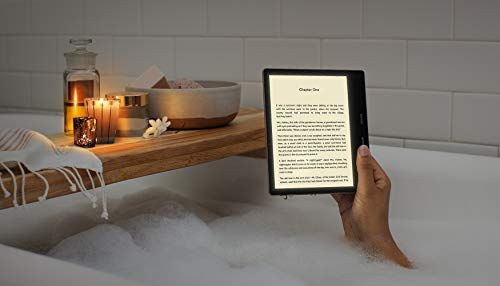
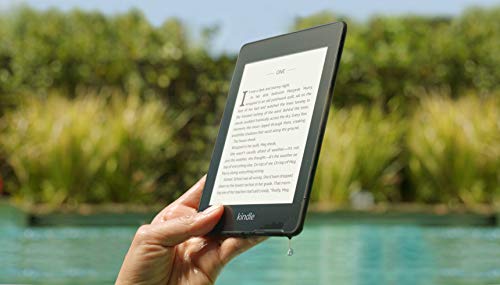
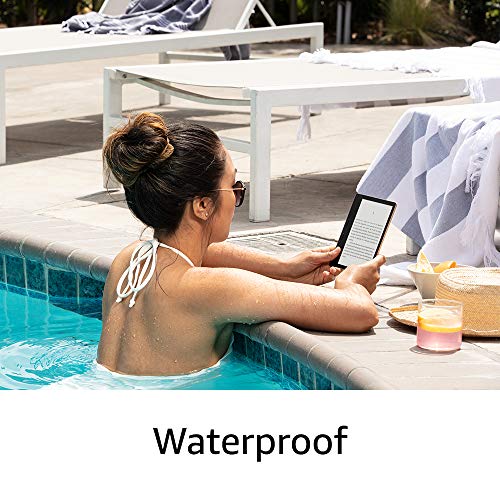
- •Waterproof (IPX8) so you can read in the bath or by the pool.
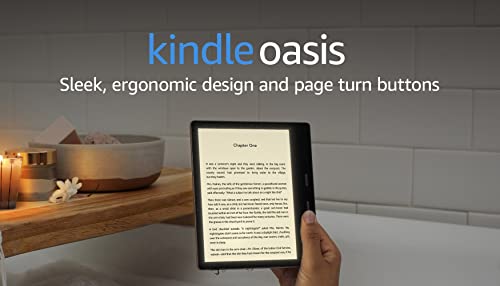
- •Thin and light ergonomic design with page turn buttons.
- •Reads like real paper with the latest e-ink technology for fast page turns.
- •Instant access to millions of books, newspapers, and audiobooks.
Kindle Oasis – With 7” display and page turn buttons
List Price: $407.39$366.65DEALYou Save: $40.74 (10%)
Free shippingFree Returns – 30 daysFree Order CancellationSecure Payment2–3 Days DeliveryGet It October 25, 2026In Stock (1)No marketing spamNo account requiredFulfilment by FedEx / Amazon / UPS / ShipwirePayPal / Card Buyer Protection
Customer Reviews
Reviews sourced from verified Amazon purchasers4.5
out of 5
Based on 10 reviews
5★
40%
4★
60%
3★
0%
2★
0%
1★
0%
Love it! Read how to save 25%, plus free perks and customizable buttons
IceNsnow✓ Verified Purchase•September 8, 2023
The media could not be loaded. I decided to finally upgrade my Kindle from the first Paperwhite when I found out I could get a 25% discount and a $5 Amazon gift card for trading in my very old and unused Kindle Keyboard 1st gen, as well as other bonuses of 6 months free Kindle Unlimited (approx $60) plus a 30 day Audible trial.
I'm very happy with it and it has some great features.
I do like the adjustable amber tint, but I also really like the ability to invert the colors to white print on a black background. This is even easier on the eyes, but it does have a noticeable (and irritating) white flash every few page turns when using the buttons, and almost with every page turn when advancing with the touch screen. I believe this is the e-ink refreshing. I will probably use the black inverted color only when I'm reading outside in bright sunlight.
I also am really happy to have buttons to turn the page again. It's the ultimate laziness to be able to just keep your thumb in the button and depress it to turn the page instead of having to actually move your thumb a half inch to touch the screen, but hey, why move a half inch when your can push down 1/16th of an inch? All that extra movement add up over the years.
The real reason I like the buttons is this: I live in Alaska and we have very long, cold nights. But even in the winter, we turn down the heat at night. I read in bed every single night, tucked all cozy and warm under my down comforter... except for having to have my hand out in order to touch the screen on my Paperwhite to turn the page. My hand starts to get very cold. It's uncomfortable. My half frozen hand takes away from my happy bedtime reading experience. With the Oasis, I can keep my hand under the blankets and just push the button. You don't know what a big deal this is until you spend night after night with a frozen hand.
I also like that you can select which button to the the page advance button and which is the page back button. The Oasis comes set up with the top button as the page advance and the bottom as the page back, but I switched them: the bottom is the advance, the top is the back. I hold my ereaders at the bottom sides, and had to stretch my thumb to advance the page when it was set for the top button. It's just easier and more comfortable to use the bottom button. And this is cool: the bottom button stays as my page advance button even when I rotate the Oasis 180 to use left handed!! Smart!!
Others have covered the size and weight so I won't go it I all that except to say it's comfortable to hold. I do use the official Amazon Premium leather cover and it fits perfectly, and the magnetic closure/sleep/wake functions work perfectly also.
Dislike: Nothing with the ereader itself, but with however Amazon picks the "special offers". From what I read, these offers are supposed to be tailored off of a person's reading history/preferences. I may be wrong.
The books they are featuring for me are "romance" genre. I am sooo not a romance genre girl. I don't believe I've ever purchased this genre in my life. I'm a hardcore sci-fi/dystopian. I have an adverse reaction when I see romance special offer.
Other than that, some of the complaints by others leaves me wondering.
I just don't think it's THAT big of deal that it has a micro usb. Really, it's just not that hard to figure out the big end of the cable from the small end. As for charging speed, charge mine while I'm sleeping at night so it doesn't matter if it takes 1 hour or 4. I suppose having to carry a micro usb cord and charger when other devices use a usb-c cord/charger may be annoying but I think I can find 2 square inches in my purse/pocket/bag/backpack for it.
Also remember that this is an e-reader. It's not a tablet, computer or smartphone, nor does it make any claims to be. Expecting an ereader to function basically like a computer/tablet/smartphone is expecting too much. It does an outstanding job at doing it's job as an ereader.
I have sent many different type of files to my Paperwhite using my kindle email address and it's worked excellent with that old ereader, so I expect this new Oasis will do excellent with those as well.
My suggestion is to read the description fully and know what you are getting and what you aren't.
If your reading experience will be destroyed because this doesn't have (nor claim to have) a usb-c, then this isn't the ereader for you.
If you want it to be like a tablet or smartphone or computer, this isn't the ereader for you.
But if you love reading and buy this for what it's made for, I can recommend it.
Definitely look into getting a discount by trading in any unused kindles, and take advantage of the free Kindle Unlimited and Audible while they are available to offset the cost even more.
I'm very happy with it and it has some great features.
I do like the adjustable amber tint, but I also really like the ability to invert the colors to white print on a black background. This is even easier on the eyes, but it does have a noticeable (and irritating) white flash every few page turns when using the buttons, and almost with every page turn when advancing with the touch screen. I believe this is the e-ink refreshing. I will probably use the black inverted color only when I'm reading outside in bright sunlight.
I also am really happy to have buttons to turn the page again. It's the ultimate laziness to be able to just keep your thumb in the button and depress it to turn the page instead of having to actually move your thumb a half inch to touch the screen, but hey, why move a half inch when your can push down 1/16th of an inch? All that extra movement add up over the years.
The real reason I like the buttons is this: I live in Alaska and we have very long, cold nights. But even in the winter, we turn down the heat at night. I read in bed every single night, tucked all cozy and warm under my down comforter... except for having to have my hand out in order to touch the screen on my Paperwhite to turn the page. My hand starts to get very cold. It's uncomfortable. My half frozen hand takes away from my happy bedtime reading experience. With the Oasis, I can keep my hand under the blankets and just push the button. You don't know what a big deal this is until you spend night after night with a frozen hand.
I also like that you can select which button to the the page advance button and which is the page back button. The Oasis comes set up with the top button as the page advance and the bottom as the page back, but I switched them: the bottom is the advance, the top is the back. I hold my ereaders at the bottom sides, and had to stretch my thumb to advance the page when it was set for the top button. It's just easier and more comfortable to use the bottom button. And this is cool: the bottom button stays as my page advance button even when I rotate the Oasis 180 to use left handed!! Smart!!
Others have covered the size and weight so I won't go it I all that except to say it's comfortable to hold. I do use the official Amazon Premium leather cover and it fits perfectly, and the magnetic closure/sleep/wake functions work perfectly also.
Dislike: Nothing with the ereader itself, but with however Amazon picks the "special offers". From what I read, these offers are supposed to be tailored off of a person's reading history/preferences. I may be wrong.
The books they are featuring for me are "romance" genre. I am sooo not a romance genre girl. I don't believe I've ever purchased this genre in my life. I'm a hardcore sci-fi/dystopian. I have an adverse reaction when I see romance special offer.
Other than that, some of the complaints by others leaves me wondering.
I just don't think it's THAT big of deal that it has a micro usb. Really, it's just not that hard to figure out the big end of the cable from the small end. As for charging speed, charge mine while I'm sleeping at night so it doesn't matter if it takes 1 hour or 4. I suppose having to carry a micro usb cord and charger when other devices use a usb-c cord/charger may be annoying but I think I can find 2 square inches in my purse/pocket/bag/backpack for it.
Also remember that this is an e-reader. It's not a tablet, computer or smartphone, nor does it make any claims to be. Expecting an ereader to function basically like a computer/tablet/smartphone is expecting too much. It does an outstanding job at doing it's job as an ereader.
I have sent many different type of files to my Paperwhite using my kindle email address and it's worked excellent with that old ereader, so I expect this new Oasis will do excellent with those as well.
My suggestion is to read the description fully and know what you are getting and what you aren't.
If your reading experience will be destroyed because this doesn't have (nor claim to have) a usb-c, then this isn't the ereader for you.
If you want it to be like a tablet or smartphone or computer, this isn't the ereader for you.
But if you love reading and buy this for what it's made for, I can recommend it.
Definitely look into getting a discount by trading in any unused kindles, and take advantage of the free Kindle Unlimited and Audible while they are available to offset the cost even more.
Great device if you have an older kindle and want to upgrade.
N87✓ Verified Purchase•July 27, 2023
This is my 2nd kindle and first Oasis the previous kindle I had was the Kindle Paperwhite 2015. I finally decided to bite the bullet and upgrade. To be fair there wasn't any reason for this other than I wanted to upgrade. My 2015 Kindle Paperwhite is still functional but wasn't syncing properly. I decided that I would upgrade to the Oasis as I honestly didn't see much difference with the newer Paperwhite 2019 except the new backlight and flush screen.
Ok first things first the Oasis is extremely thin and light. The bevel edge where the battery is located serves its function which allows readers to use it one handed. The back is aluminum versus the basic kindle/Paperwhite which have a rubber finish. The aluminum back can get cold if you prefer to use it without a case like I do. The screen auto rotates which allow those of us that like to switch to either the left or right hand while sitting or lying down. A 4 stars feature in my opinion. The screen is flush and the "pages" are crisp. You have page turn buttons which I think to be honest are an asset and preferable to the touchscreen as I would accidentally tap through too many pages on the Paperwhite. The page turn buttons come in handy as you can also disable the touchscreen while reading by tapping the dots while in your book on the right side of the screen which will bring up the options screen and disable touchscreen is on there. To enable the touchscreen again you press the power button twice which will bring up the lock screen to access the touchscreen again. The backlight features aren't really a necessity for me as I don't normally read in the dark but comes in handy when I am not in a well lit room. The kindle oasis is waterproof and you now have the ability to listen to audible books (only audible books) wirelessly via Bluetooth. Personally, for me this is a feature that I don't think is necessary as I tend to listen to audiobooks on my audible app or the Libby/overdrive app. Also, you can not listen to both the audible book and read the ebook which I think is ridiculous especially if amazon is advertising this as a premium feature. You should be able to listen and read simultaneously. The worst feature on the Oasis is the battery life. My 2015 Paperwhite's battery would last for days/week even when I wasn't using it or if I was continuously using it for a minimum of an hour a day. The Oasis battery drains fast I found on a full charge and reading for an hour at a 100 % it easily went down to 70%. I initially had an issue with it not charging to 100% but after factory resetting it I found the solution was that I wasn't using the micro usb charging cable that came with it. I was using the old one from the Paperwhite as they seemed similar but after using the correct charging cable the Oasis was charging to 100%. So anyone having issues with it not charging to 100% make sure it is being charged with the cable it came with!
The fix for extending the battery life is keeping the device on airplane mode, lowering your light settings. Now it drains less as I am at 73% after a week of usage after changing those settings. However, I believe a device as expensive as this should have an excellent battery without having to tweak and alter the very settings they claim make this a premium device the backlights. I believe if the battery life last longer and was durable like the Paperwhite this would be without a doubt their best device yet.
Some suggestions for new users to maximize your device's potential:
If you have Amazon Prime then you have access to a slew of ebooks through Prime Reading included for free (You could also sign up for kindle unlimited but you would have to pay the subscription).
Get a library card. You can now download the overdrive or Libby app (or both) on your phone and now you have instant access to library books sent straight to your device.
Sign up for amazon deals of the day under account settings to get free or discounted ebook suggestions daily so you don't ever have to buy full price books.
Look out for Great on Kindle books as these ebooks gives you credits towards you next ebook purchase albeit you will more likely than not have to purchase the ebook at full price but you can often get upwards to $5.00 in ebook credits toward others.
You have a week to return a ebook (a feature I did not know of until recently).
Lastly, buy the kindle with special features and save yourself an extra $20. The ads are not annoying like some claim. In fact the only time you see ads is on the lock screen and on the home page at the bottom and they are usually ads of ebooks on sale (most times tailored to your reading preference) so this is a benefit to the reader. And if the ads end up annoying you then you can always hide them under the settings option on your device or you can contact Amazon later and pay $20 to have them removed.
Also, get the 8 GB version unless your planning on storing audible books (which take up A LOT of space) and ebooks than the 8 GB is sufficient and will save you money.
In the end would I recommend this device? Absolutely, especially if you already have a older kindle, a basic kindle or a newer Paperwhite and wish for an upgrade. However, if this is your first ever kindle I would recommend the Kindle Paperwhite which is the perfect medium between all three devices. It has the backlight feature, smaller in size, and cheaper in price. In the end these devices really are for reading.
My opinion either way is these devices last a really long time so after a year or two they pay for themselves. If you have an older model and its still functional and want to save money then keep it until a better upgraded version comes out in a few years.
Ok first things first the Oasis is extremely thin and light. The bevel edge where the battery is located serves its function which allows readers to use it one handed. The back is aluminum versus the basic kindle/Paperwhite which have a rubber finish. The aluminum back can get cold if you prefer to use it without a case like I do. The screen auto rotates which allow those of us that like to switch to either the left or right hand while sitting or lying down. A 4 stars feature in my opinion. The screen is flush and the "pages" are crisp. You have page turn buttons which I think to be honest are an asset and preferable to the touchscreen as I would accidentally tap through too many pages on the Paperwhite. The page turn buttons come in handy as you can also disable the touchscreen while reading by tapping the dots while in your book on the right side of the screen which will bring up the options screen and disable touchscreen is on there. To enable the touchscreen again you press the power button twice which will bring up the lock screen to access the touchscreen again. The backlight features aren't really a necessity for me as I don't normally read in the dark but comes in handy when I am not in a well lit room. The kindle oasis is waterproof and you now have the ability to listen to audible books (only audible books) wirelessly via Bluetooth. Personally, for me this is a feature that I don't think is necessary as I tend to listen to audiobooks on my audible app or the Libby/overdrive app. Also, you can not listen to both the audible book and read the ebook which I think is ridiculous especially if amazon is advertising this as a premium feature. You should be able to listen and read simultaneously. The worst feature on the Oasis is the battery life. My 2015 Paperwhite's battery would last for days/week even when I wasn't using it or if I was continuously using it for a minimum of an hour a day. The Oasis battery drains fast I found on a full charge and reading for an hour at a 100 % it easily went down to 70%. I initially had an issue with it not charging to 100% but after factory resetting it I found the solution was that I wasn't using the micro usb charging cable that came with it. I was using the old one from the Paperwhite as they seemed similar but after using the correct charging cable the Oasis was charging to 100%. So anyone having issues with it not charging to 100% make sure it is being charged with the cable it came with!
The fix for extending the battery life is keeping the device on airplane mode, lowering your light settings. Now it drains less as I am at 73% after a week of usage after changing those settings. However, I believe a device as expensive as this should have an excellent battery without having to tweak and alter the very settings they claim make this a premium device the backlights. I believe if the battery life last longer and was durable like the Paperwhite this would be without a doubt their best device yet.
Some suggestions for new users to maximize your device's potential:
If you have Amazon Prime then you have access to a slew of ebooks through Prime Reading included for free (You could also sign up for kindle unlimited but you would have to pay the subscription).
Get a library card. You can now download the overdrive or Libby app (or both) on your phone and now you have instant access to library books sent straight to your device.
Sign up for amazon deals of the day under account settings to get free or discounted ebook suggestions daily so you don't ever have to buy full price books.
Look out for Great on Kindle books as these ebooks gives you credits towards you next ebook purchase albeit you will more likely than not have to purchase the ebook at full price but you can often get upwards to $5.00 in ebook credits toward others.
You have a week to return a ebook (a feature I did not know of until recently).
Lastly, buy the kindle with special features and save yourself an extra $20. The ads are not annoying like some claim. In fact the only time you see ads is on the lock screen and on the home page at the bottom and they are usually ads of ebooks on sale (most times tailored to your reading preference) so this is a benefit to the reader. And if the ads end up annoying you then you can always hide them under the settings option on your device or you can contact Amazon later and pay $20 to have them removed.
Also, get the 8 GB version unless your planning on storing audible books (which take up A LOT of space) and ebooks than the 8 GB is sufficient and will save you money.
In the end would I recommend this device? Absolutely, especially if you already have a older kindle, a basic kindle or a newer Paperwhite and wish for an upgrade. However, if this is your first ever kindle I would recommend the Kindle Paperwhite which is the perfect medium between all three devices. It has the backlight feature, smaller in size, and cheaper in price. In the end these devices really are for reading.
My opinion either way is these devices last a really long time so after a year or two they pay for themselves. If you have an older model and its still functional and want to save money then keep it until a better upgraded version comes out in a few years.
The best e-reader of them all....UPDATE
Dave in Missouri✓ Verified Purchase•July 18, 2023
UPDATE......
As I've used my new Oasis I've found a few things that could be different.........
As many reviewers have found, battery life is not up to the older Kindles, but.....since I'm dumping books in manually every few days this is not important to me since it's being recharged often.
I've found an oddity with how books are displayed......Some are shown with author first, title second, some are title first, author second. I've found no reason for this, and it's just "different".
Since I get books from Amazon and my public library and other sources I'm not sure what's going on with this.
Again, I'd like to see the actual book cover, not an icon.
I've found that when reading with one hand I occasionally hit SOMETHING on the touch screen and things can change....... Font can change, size of the page can be expanded, and the location in the book can disappear from the bottom of the display.
Fortunately, the Oasis offers a screen lock function.
My KOBO Libra offered the option of displaying the actual page number. This would be nice to have in the Oasis. The Oasis showing the percentage read is not very useful to me, and page numbers make it much easier to find something.
As others have stated, the advertising of Amazon on the ad supported Kindle's is getting totally out of hand.
MOST of the home screen is nothing but ads, with the library only showing a few books on the top of the home page. True, you see only your books on the library and list view, but give us a break on the excessive ads.
Removing books from the Oasis is "snakey".
I accidentally erased all my Amazon books off my Amazon account when I removed old books I wanted to keep, but didn't want cluttering up my new Oasis library.
I'm going to have to figure this one out, since I don't want to store much on my Oasis but would like to have them secure on my account if I need them again.
I know there's a way to securely store my books on the Amazon cloud, but I don't want to use that.
When finishing a book a screen is displayed asking for a review. There's no way to opt out other then to go to the home page.
Again, this is just aggravating, but not a major issue.
Still like.........
The quality of the Oasis is obvious and top of the line. It feels like and is a piece of quality equipment.
Display of text is excellent.
Non-smudging screen is great.
Lighting is excellent, but will deplete the battery faster if set too high. To save the battery I turned mine down to the middle, but decided that I'd rather have an easy to read screen then a little less charge life.
The bundled "fabric" Amazon cover works perfectly and so far seems to be standing up to a lot of handling.
Speed of getting back to a book as absolutely great. Open the cover and swipe and I'm back.
This is where Amazon has it all over the other readers like the KOBO, that seem to take forever to power up and get back to the book.
So, I still give the Oasis 5 stars.
----------------------------------------------------------------------------------------------------------------------
I still have a Kindle keyboard reader that's going strong after 11 years.
Last year I decided it would eventually fail and I'd certainly gotten my money's worth from it, so I bought a new KOBO Libra. KOBO is the most popular e-reader in the rest of the world, Amazon is most sold in America and I thought I'd give it a try.
That was a disappointment...... it takes forever to get back to the book I'm reading, since it shuts completely down after a set time, even if it's in sleep mode.
This requires a lengthy start up, then you have to re-select the book you were reading and re-start that.
It has has no way to magnify or expand pictures or maps., and most of those are so tiny they're unusable.
The screen shows finger prints badly.
I put that down to a bad buy so I just bought a new Kindle Oasis......It's just great and the high cost is worth it for a heavy reader like me.....I read books like most people eat peanuts, at least 3 to 4 hours a night.
I bought the bundle of the Oasis, a wall plug, and a waterproof fabric cover.
The plug I probably won't use, but the cover is excellent and you get it far cheaper then if you buy the cover separate. The plug is basically free with the bundle.
The new Oasis is everything I'd want in an e-reader and offers everything I want in function.
I just got it so I haven't fully road tested it yet but what I see so far, I really like.
Battery life seems to be good, but since I dump books into e-readers every few days it's recharging often.
The screen shows no finger prints and unlike the KOBO I'm not constantly having to use a cloth to clean it off.
The page turn buttons work very well with just the right feel.
Screen brightness can be set easily and the e-ink display is very readable.
The only complaints are that the owner's manual is slightly different from my new Oasis.
Directions don't match up with what I see on the new model and I wish Amazon had updated the manual to avoid confusion and having to hunt for features.
Some features in the manual are not available on my new Oasis.
Another issue is how the books are displayed on the library view. For some odd reason my library shows only icons of the book but NOT a picture of the book cover...... except for reasons I can't figure out, ONE book does show as a cover.
I'm a visual person and I'd like to see book covers. I'll try to trouble shoot this issue.
So, until I fully wring the new Oasis out, I'm giving it top ratings.
As I've used my new Oasis I've found a few things that could be different.........
As many reviewers have found, battery life is not up to the older Kindles, but.....since I'm dumping books in manually every few days this is not important to me since it's being recharged often.
I've found an oddity with how books are displayed......Some are shown with author first, title second, some are title first, author second. I've found no reason for this, and it's just "different".
Since I get books from Amazon and my public library and other sources I'm not sure what's going on with this.
Again, I'd like to see the actual book cover, not an icon.
I've found that when reading with one hand I occasionally hit SOMETHING on the touch screen and things can change....... Font can change, size of the page can be expanded, and the location in the book can disappear from the bottom of the display.
Fortunately, the Oasis offers a screen lock function.
My KOBO Libra offered the option of displaying the actual page number. This would be nice to have in the Oasis. The Oasis showing the percentage read is not very useful to me, and page numbers make it much easier to find something.
As others have stated, the advertising of Amazon on the ad supported Kindle's is getting totally out of hand.
MOST of the home screen is nothing but ads, with the library only showing a few books on the top of the home page. True, you see only your books on the library and list view, but give us a break on the excessive ads.
Removing books from the Oasis is "snakey".
I accidentally erased all my Amazon books off my Amazon account when I removed old books I wanted to keep, but didn't want cluttering up my new Oasis library.
I'm going to have to figure this one out, since I don't want to store much on my Oasis but would like to have them secure on my account if I need them again.
I know there's a way to securely store my books on the Amazon cloud, but I don't want to use that.
When finishing a book a screen is displayed asking for a review. There's no way to opt out other then to go to the home page.
Again, this is just aggravating, but not a major issue.
Still like.........
The quality of the Oasis is obvious and top of the line. It feels like and is a piece of quality equipment.
Display of text is excellent.
Non-smudging screen is great.
Lighting is excellent, but will deplete the battery faster if set too high. To save the battery I turned mine down to the middle, but decided that I'd rather have an easy to read screen then a little less charge life.
The bundled "fabric" Amazon cover works perfectly and so far seems to be standing up to a lot of handling.
Speed of getting back to a book as absolutely great. Open the cover and swipe and I'm back.
This is where Amazon has it all over the other readers like the KOBO, that seem to take forever to power up and get back to the book.
So, I still give the Oasis 5 stars.
----------------------------------------------------------------------------------------------------------------------
I still have a Kindle keyboard reader that's going strong after 11 years.
Last year I decided it would eventually fail and I'd certainly gotten my money's worth from it, so I bought a new KOBO Libra. KOBO is the most popular e-reader in the rest of the world, Amazon is most sold in America and I thought I'd give it a try.
That was a disappointment...... it takes forever to get back to the book I'm reading, since it shuts completely down after a set time, even if it's in sleep mode.
This requires a lengthy start up, then you have to re-select the book you were reading and re-start that.
It has has no way to magnify or expand pictures or maps., and most of those are so tiny they're unusable.
The screen shows finger prints badly.
I put that down to a bad buy so I just bought a new Kindle Oasis......It's just great and the high cost is worth it for a heavy reader like me.....I read books like most people eat peanuts, at least 3 to 4 hours a night.
I bought the bundle of the Oasis, a wall plug, and a waterproof fabric cover.
The plug I probably won't use, but the cover is excellent and you get it far cheaper then if you buy the cover separate. The plug is basically free with the bundle.
The new Oasis is everything I'd want in an e-reader and offers everything I want in function.
I just got it so I haven't fully road tested it yet but what I see so far, I really like.
Battery life seems to be good, but since I dump books into e-readers every few days it's recharging often.
The screen shows no finger prints and unlike the KOBO I'm not constantly having to use a cloth to clean it off.
The page turn buttons work very well with just the right feel.
Screen brightness can be set easily and the e-ink display is very readable.
The only complaints are that the owner's manual is slightly different from my new Oasis.
Directions don't match up with what I see on the new model and I wish Amazon had updated the manual to avoid confusion and having to hunt for features.
Some features in the manual are not available on my new Oasis.
Another issue is how the books are displayed on the library view. For some odd reason my library shows only icons of the book but NOT a picture of the book cover...... except for reasons I can't figure out, ONE book does show as a cover.
I'm a visual person and I'd like to see book covers. I'll try to trouble shoot this issue.
So, until I fully wring the new Oasis out, I'm giving it top ratings.
hard to handle
movie viewer✓ Verified Purchase•June 26, 2023
For the most part, I like this . I use my Kindle for reading, and that is what this one does. I would prefer a somewhat larger screen, but by using a small font, I can get quite a bit of writing on the screen. I like that I can set the screen to a warm color and reduce eye strain.
The biggest problem for me is that the touch screen has an area around the advance and back buttons where it is easy to hold the device, but on the other three sides of the screen, you can only hold it by a rim only 1/4 inch wide. Invariably after a couple minutes, your fingers get tired and slide onto the screen, which activates the screen advance or page back multiple times and you have to waste time retrieving the page you were reading. I was able to solve that problem by buying a case that gave me more area to grip my Oasis as well as protecting it when I am not reading.
On the whole, I like and use my Oasis a lot.
Further comment: Today I was made more aware of the big advantage Paperwhite and Oasis have over kindle fire tablets. I was reading my Oasis at the bus stop. When I had left the house it had been very cloudy, but as I sat reading, the sun came out, but I continued reading without interruption. If I had been reading a Kindle fire, the screen would have become so dim as to be unreadable, and the reflections from the sky would have made the situation even worse. Kindle Fire tablets are excellent indoors or at night, but outdoors in daylight, they are nearly worthless.
The biggest problem for me is that the touch screen has an area around the advance and back buttons where it is easy to hold the device, but on the other three sides of the screen, you can only hold it by a rim only 1/4 inch wide. Invariably after a couple minutes, your fingers get tired and slide onto the screen, which activates the screen advance or page back multiple times and you have to waste time retrieving the page you were reading. I was able to solve that problem by buying a case that gave me more area to grip my Oasis as well as protecting it when I am not reading.
On the whole, I like and use my Oasis a lot.
Further comment: Today I was made more aware of the big advantage Paperwhite and Oasis have over kindle fire tablets. I was reading my Oasis at the bus stop. When I had left the house it had been very cloudy, but as I sat reading, the sun came out, but I continued reading without interruption. If I had been reading a Kindle fire, the screen would have become so dim as to be unreadable, and the reflections from the sky would have made the situation even worse. Kindle Fire tablets are excellent indoors or at night, but outdoors in daylight, they are nearly worthless.
THIS OASIS CRITIC HAS TO ADMIT: NEW LIGHT IS A TOTAL GAME CHANGER!
Charles Nordlander✓ Verified Purchase•June 23, 2023
I wrote a lengthy critical review of the 2017 Oasis, which was the first Kindle that I've ever returned out of every top model. I mainly criticized the cold and slippery aluminum shell for intruding on, rather than disappearing from, the reading experience. But along with those criticisms, I praised its bigger 7" screen as the one aspect that I would miss. And now, with the upgrade of that screen to one with adjustable color temperature, I decided to give the 2019 Oasis a try, even though its design was unchanged from 2017.
Cutting right to the chase: the adjustable color temperature screen is the greatest advance in Kindles since self-illuminating screens were introduced on the first Paperwhite"¦ period, full-stop. And, at least for this reader, there's no going back after trying it out. It's that good, and that much of a game changer.
With both warmth and brightness (they have separate controls) turned up to about the midway point, reading on a Kindle transitioned for the first time from merely reading words, to the experience of reading words on a paper page in a book. This might sound like "Who cares?" nonsense to most people, but if you're in that small minority of the public buying a high-end Kindle, you understand what I mean, and it's that kind of difference that you're paying for.
The new lighting also transforms the experience of reading in a completely dark room. On existing Kindles, I could never find quite the right light level. If it was as bright as I wanted it to be, that felt too harsh on my eyes. But bringing brightness down to a level that felt comfortable seemed too dim. Now, by simply increasing the lighting warmth on the new Oasis, you can have brighter light with no harshness in a dark room, making reading much easier on the eyes.
Finally, I'm happy to say that Amazon seems to have (finally!) nailed the quality control issues that have plagued new Kindle lighting systems in the past: No splotches. No dark spots. No shadows. No weird color casts. Just smooth, even, beautiful lighting across the screen.
So, is this the perfect Kindle for me? No. The perfect Kindle would be this new 7" screen in a Voyager form factor. The ergonomics of the Oasis are still not great for me, although my satisfaction with the new screen appears to make the annoyances matter less. The 2019 Oasis is not only a keeper for me, but I'm actually trading in both my Voyager and original Oasis.
Thanks for taking the time to read my review and I hope you find it helpful in making a buying decision. Time permitting, I do try to answer any questions posted in the comments section.
Cutting right to the chase: the adjustable color temperature screen is the greatest advance in Kindles since self-illuminating screens were introduced on the first Paperwhite"¦ period, full-stop. And, at least for this reader, there's no going back after trying it out. It's that good, and that much of a game changer.
With both warmth and brightness (they have separate controls) turned up to about the midway point, reading on a Kindle transitioned for the first time from merely reading words, to the experience of reading words on a paper page in a book. This might sound like "Who cares?" nonsense to most people, but if you're in that small minority of the public buying a high-end Kindle, you understand what I mean, and it's that kind of difference that you're paying for.
The new lighting also transforms the experience of reading in a completely dark room. On existing Kindles, I could never find quite the right light level. If it was as bright as I wanted it to be, that felt too harsh on my eyes. But bringing brightness down to a level that felt comfortable seemed too dim. Now, by simply increasing the lighting warmth on the new Oasis, you can have brighter light with no harshness in a dark room, making reading much easier on the eyes.
Finally, I'm happy to say that Amazon seems to have (finally!) nailed the quality control issues that have plagued new Kindle lighting systems in the past: No splotches. No dark spots. No shadows. No weird color casts. Just smooth, even, beautiful lighting across the screen.
So, is this the perfect Kindle for me? No. The perfect Kindle would be this new 7" screen in a Voyager form factor. The ergonomics of the Oasis are still not great for me, although my satisfaction with the new screen appears to make the annoyances matter less. The 2019 Oasis is not only a keeper for me, but I'm actually trading in both my Voyager and original Oasis.
Thanks for taking the time to read my review and I hope you find it helpful in making a buying decision. Time permitting, I do try to answer any questions posted in the comments section.
Page 1 of 2