Kindle Oasis – With 7” display and page turn buttons- Ad-Supported + 3 Months Free Kindle Unlimited (with auto-renewal)





Key features
- •Our best 7", 300 ppi flush-front Paperwhite display.
- •Adjustable warm light to shift screen shade from white to amber.
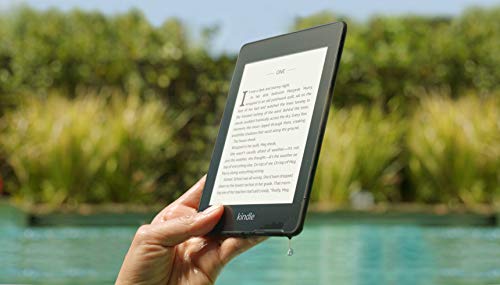
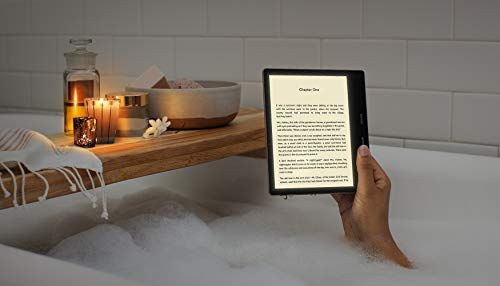
- •Waterproof (IPX8) so you can read in the bath or by the pool. Your Kindle has been tested to withstand accidental immersion in water.
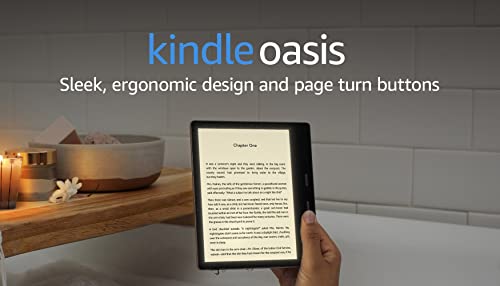
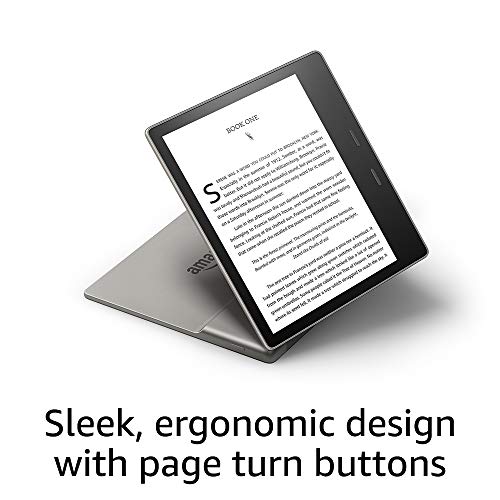
- •Thin and light ergonomic design with page turn buttons.
- •Reads like real paper with the latest e-ink technology for fast page turns.
- •Instant access to millions of books, magazines, and audiobooks.
Kindle Oasis – With 7” display and page turn buttons- Ad-Supported + 3 Months Free Kindle Unlimited (with auto-renewal)
List Price: $363.74$327.37DEALYou Save: $36.37 (10%)
Free shippingFree Returns – 30 daysFree Order CancellationSecure Payment2–3 Days DeliveryGet It October 26, 2026In Stock (1)No marketing spamNo account requiredFulfilment by FedEx / Amazon / UPS / ShipwirePayPal / Card Buyer Protection
Customer Reviews
Reviews sourced from verified Amazon purchasers4.5
out of 5
Based on 20 reviews
5★
50%
4★
50%
3★
0%
2★
0%
1★
0%
THIS OASIS CRITIC HAS TO ADMIT: NEW LIGHT IS A TOTAL GAME CHANGER!
Charles Nordlander✓ Verified Purchase•October 30, 2023
I wrote a lengthy critical review of the 2017 Oasis, which was the first Kindle that I've ever returned out of every top model. I mainly criticized the cold and slippery aluminum shell for intruding on, rather than disappearing from, the reading experience. But along with those criticisms, I praised its bigger 7" screen as the one aspect that I would miss. And now, with the upgrade of that screen to one with adjustable color temperature, I decided to give the 2019 Oasis a try, even though its design was unchanged from 2017.
Cutting right to the chase: the adjustable color temperature screen is the greatest advance in Kindles since self-illuminating screens were introduced on the first Paperwhite"¦ period, full-stop. And, at least for this reader, there's no going back after trying it out. It's that good, and that much of a game changer.
With both warmth and brightness (they have separate controls) turned up to about the midway point, reading on a Kindle transitioned for the first time from merely reading words, to the experience of reading words on a paper page in a book. This might sound like "Who cares?" nonsense to most people, but if you're in that small minority of the public buying a high-end Kindle, you understand what I mean, and it's that kind of difference that you're paying for.
The new lighting also transforms the experience of reading in a completely dark room. On existing Kindles, I could never find quite the right light level. If it was as bright as I wanted it to be, that felt too harsh on my eyes. But bringing brightness down to a level that felt comfortable seemed too dim. Now, by simply increasing the lighting warmth on the new Oasis, you can have brighter light with no harshness in a dark room, making reading much easier on the eyes.
Finally, I'm happy to say that Amazon seems to have (finally!) nailed the quality control issues that have plagued new Kindle lighting systems in the past: No splotches. No dark spots. No shadows. No weird color casts. Just smooth, even, beautiful lighting across the screen.
So, is this the perfect Kindle for me? No. The perfect Kindle would be this new 7" screen in a Voyager form factor. The ergonomics of the Oasis are still not great for me, although my satisfaction with the new screen appears to make the annoyances matter less. The 2019 Oasis is not only a keeper for me, but I'm actually trading in both my Voyager and original Oasis.
Thanks for taking the time to read my review and I hope you find it helpful in making a buying decision. Time permitting, I do try to answer any questions posted in the comments section.
Cutting right to the chase: the adjustable color temperature screen is the greatest advance in Kindles since self-illuminating screens were introduced on the first Paperwhite"¦ period, full-stop. And, at least for this reader, there's no going back after trying it out. It's that good, and that much of a game changer.
With both warmth and brightness (they have separate controls) turned up to about the midway point, reading on a Kindle transitioned for the first time from merely reading words, to the experience of reading words on a paper page in a book. This might sound like "Who cares?" nonsense to most people, but if you're in that small minority of the public buying a high-end Kindle, you understand what I mean, and it's that kind of difference that you're paying for.
The new lighting also transforms the experience of reading in a completely dark room. On existing Kindles, I could never find quite the right light level. If it was as bright as I wanted it to be, that felt too harsh on my eyes. But bringing brightness down to a level that felt comfortable seemed too dim. Now, by simply increasing the lighting warmth on the new Oasis, you can have brighter light with no harshness in a dark room, making reading much easier on the eyes.
Finally, I'm happy to say that Amazon seems to have (finally!) nailed the quality control issues that have plagued new Kindle lighting systems in the past: No splotches. No dark spots. No shadows. No weird color casts. Just smooth, even, beautiful lighting across the screen.
So, is this the perfect Kindle for me? No. The perfect Kindle would be this new 7" screen in a Voyager form factor. The ergonomics of the Oasis are still not great for me, although my satisfaction with the new screen appears to make the annoyances matter less. The 2019 Oasis is not only a keeper for me, but I'm actually trading in both my Voyager and original Oasis.
Thanks for taking the time to read my review and I hope you find it helpful in making a buying decision. Time permitting, I do try to answer any questions posted in the comments section.
Love it, but there are some issues…
NYC guy✓ Verified Purchase•October 28, 2023
I've had my Oasis for over 3 yrs now, and I generally love it, but after around 2 years it stopped taking a full charge.. only charges to 87% and won't go any further"¦ and yes I've tried every troubleshooting thing possible. Charging light never goes green even after 24hrs plus charging. Obviously the battery is going as I'm a heavy reader (probably 1-4 hrs a day) but was dismayed to find it can't be fixed or battery replaced by Amazon. Only option is do it yourself kit with 3rd party battery. Maybe I'll try that before giving up on this one.
Secondly, and def not a big issue, but a "huh!?" Issue is: When it's set to warmest setting (which I always have it on) it's still a yellow-greenish shade, which to me isn't "warm". Gold-amber is warm. Same thing with my boyfriend's Paperwhite (newest model).
I can't believe they can't make a true warm shade with the LED's in these things.
Otherwise, I LOVE my Oasis and the physical page turn buttons are must have for one handed reading (love that the screen flips if you change hands too!!)
Secondly, and def not a big issue, but a "huh!?" Issue is: When it's set to warmest setting (which I always have it on) it's still a yellow-greenish shade, which to me isn't "warm". Gold-amber is warm. Same thing with my boyfriend's Paperwhite (newest model).
I can't believe they can't make a true warm shade with the LED's in these things.
Otherwise, I LOVE my Oasis and the physical page turn buttons are must have for one handed reading (love that the screen flips if you change hands too!!)
Love it! Read how to save 25%, plus free perks and customizable buttons
IceNsnow✓ Verified Purchase•October 10, 2023
The media could not be loaded. I decided to finally upgrade my Kindle from the first Paperwhite when I found out I could get a 25% discount and a $5 Amazon gift card for trading in my very old and unused Kindle Keyboard 1st gen, as well as other bonuses of 6 months free Kindle Unlimited (approx $60) plus a 30 day Audible trial.
I'm very happy with it and it has some great features.
I do like the adjustable amber tint, but I also really like the ability to invert the colors to white print on a black background. This is even easier on the eyes, but it does have a noticeable (and irritating) white flash every few page turns when using the buttons, and almost with every page turn when advancing with the touch screen. I believe this is the e-ink refreshing. I will probably use the black inverted color only when I'm reading outside in bright sunlight.
I also am really happy to have buttons to turn the page again. It's the ultimate laziness to be able to just keep your thumb in the button and depress it to turn the page instead of having to actually move your thumb a half inch to touch the screen, but hey, why move a half inch when your can push down 1/16th of an inch? All that extra movement add up over the years.
The real reason I like the buttons is this: I live in Alaska and we have very long, cold nights. But even in the winter, we turn down the heat at night. I read in bed every single night, tucked all cozy and warm under my down comforter... except for having to have my hand out in order to touch the screen on my Paperwhite to turn the page. My hand starts to get very cold. It's uncomfortable. My half frozen hand takes away from my happy bedtime reading experience. With the Oasis, I can keep my hand under the blankets and just push the button. You don't know what a big deal this is until you spend night after night with a frozen hand.
I also like that you can select which button to the the page advance button and which is the page back button. The Oasis comes set up with the top button as the page advance and the bottom as the page back, but I switched them: the bottom is the advance, the top is the back. I hold my ereaders at the bottom sides, and had to stretch my thumb to advance the page when it was set for the top button. It's just easier and more comfortable to use the bottom button. And this is cool: the bottom button stays as my page advance button even when I rotate the Oasis 180 to use left handed!! Smart!!
Others have covered the size and weight so I won't go it I all that except to say it's comfortable to hold. I do use the official Amazon Premium leather cover and it fits perfectly, and the magnetic closure/sleep/wake functions work perfectly also.
Dislike: Nothing with the ereader itself, but with however Amazon picks the "special offers". From what I read, these offers are supposed to be tailored off of a person's reading history/preferences. I may be wrong.
The books they are featuring for me are "romance" genre. I am sooo not a romance genre girl. I don't believe I've ever purchased this genre in my life. I'm a hardcore sci-fi/dystopian. I have an adverse reaction when I see romance special offer.
Other than that, some of the complaints by others leaves me wondering.
I just don't think it's THAT big of deal that it has a micro usb. Really, it's just not that hard to figure out the big end of the cable from the small end. As for charging speed, charge mine while I'm sleeping at night so it doesn't matter if it takes 1 hour or 4. I suppose having to carry a micro usb cord and charger when other devices use a usb-c cord/charger may be annoying but I think I can find 2 square inches in my purse/pocket/bag/backpack for it.
Also remember that this is an e-reader. It's not a tablet, computer or smartphone, nor does it make any claims to be. Expecting an ereader to function basically like a computer/tablet/smartphone is expecting too much. It does an outstanding job at doing it's job as an ereader.
I have sent many different type of files to my Paperwhite using my kindle email address and it's worked excellent with that old ereader, so I expect this new Oasis will do excellent with those as well.
My suggestion is to read the description fully and know what you are getting and what you aren't.
If your reading experience will be destroyed because this doesn't have (nor claim to have) a usb-c, then this isn't the ereader for you.
If you want it to be like a tablet or smartphone or computer, this isn't the ereader for you.
But if you love reading and buy this for what it's made for, I can recommend it.
Definitely look into getting a discount by trading in any unused kindles, and take advantage of the free Kindle Unlimited and Audible while they are available to offset the cost even more.
I'm very happy with it and it has some great features.
I do like the adjustable amber tint, but I also really like the ability to invert the colors to white print on a black background. This is even easier on the eyes, but it does have a noticeable (and irritating) white flash every few page turns when using the buttons, and almost with every page turn when advancing with the touch screen. I believe this is the e-ink refreshing. I will probably use the black inverted color only when I'm reading outside in bright sunlight.
I also am really happy to have buttons to turn the page again. It's the ultimate laziness to be able to just keep your thumb in the button and depress it to turn the page instead of having to actually move your thumb a half inch to touch the screen, but hey, why move a half inch when your can push down 1/16th of an inch? All that extra movement add up over the years.
The real reason I like the buttons is this: I live in Alaska and we have very long, cold nights. But even in the winter, we turn down the heat at night. I read in bed every single night, tucked all cozy and warm under my down comforter... except for having to have my hand out in order to touch the screen on my Paperwhite to turn the page. My hand starts to get very cold. It's uncomfortable. My half frozen hand takes away from my happy bedtime reading experience. With the Oasis, I can keep my hand under the blankets and just push the button. You don't know what a big deal this is until you spend night after night with a frozen hand.
I also like that you can select which button to the the page advance button and which is the page back button. The Oasis comes set up with the top button as the page advance and the bottom as the page back, but I switched them: the bottom is the advance, the top is the back. I hold my ereaders at the bottom sides, and had to stretch my thumb to advance the page when it was set for the top button. It's just easier and more comfortable to use the bottom button. And this is cool: the bottom button stays as my page advance button even when I rotate the Oasis 180 to use left handed!! Smart!!
Others have covered the size and weight so I won't go it I all that except to say it's comfortable to hold. I do use the official Amazon Premium leather cover and it fits perfectly, and the magnetic closure/sleep/wake functions work perfectly also.
Dislike: Nothing with the ereader itself, but with however Amazon picks the "special offers". From what I read, these offers are supposed to be tailored off of a person's reading history/preferences. I may be wrong.
The books they are featuring for me are "romance" genre. I am sooo not a romance genre girl. I don't believe I've ever purchased this genre in my life. I'm a hardcore sci-fi/dystopian. I have an adverse reaction when I see romance special offer.
Other than that, some of the complaints by others leaves me wondering.
I just don't think it's THAT big of deal that it has a micro usb. Really, it's just not that hard to figure out the big end of the cable from the small end. As for charging speed, charge mine while I'm sleeping at night so it doesn't matter if it takes 1 hour or 4. I suppose having to carry a micro usb cord and charger when other devices use a usb-c cord/charger may be annoying but I think I can find 2 square inches in my purse/pocket/bag/backpack for it.
Also remember that this is an e-reader. It's not a tablet, computer or smartphone, nor does it make any claims to be. Expecting an ereader to function basically like a computer/tablet/smartphone is expecting too much. It does an outstanding job at doing it's job as an ereader.
I have sent many different type of files to my Paperwhite using my kindle email address and it's worked excellent with that old ereader, so I expect this new Oasis will do excellent with those as well.
My suggestion is to read the description fully and know what you are getting and what you aren't.
If your reading experience will be destroyed because this doesn't have (nor claim to have) a usb-c, then this isn't the ereader for you.
If you want it to be like a tablet or smartphone or computer, this isn't the ereader for you.
But if you love reading and buy this for what it's made for, I can recommend it.
Definitely look into getting a discount by trading in any unused kindles, and take advantage of the free Kindle Unlimited and Audible while they are available to offset the cost even more.
Great device if you have an older kindle and want to upgrade.
N87✓ Verified Purchase•September 24, 2023
This is my 2nd kindle and first Oasis the previous kindle I had was the Kindle Paperwhite 2015. I finally decided to bite the bullet and upgrade. To be fair there wasn't any reason for this other than I wanted to upgrade. My 2015 Kindle Paperwhite is still functional but wasn't syncing properly. I decided that I would upgrade to the Oasis as I honestly didn't see much difference with the newer Paperwhite 2019 except the new backlight and flush screen.
Ok first things first the Oasis is extremely thin and light. The bevel edge where the battery is located serves its function which allows readers to use it one handed. The back is aluminum versus the basic kindle/Paperwhite which have a rubber finish. The aluminum back can get cold if you prefer to use it without a case like I do. The screen auto rotates which allow those of us that like to switch to either the left or right hand while sitting or lying down. A 4 stars feature in my opinion. The screen is flush and the "pages" are crisp. You have page turn buttons which I think to be honest are an asset and preferable to the touchscreen as I would accidentally tap through too many pages on the Paperwhite. The page turn buttons come in handy as you can also disable the touchscreen while reading by tapping the dots while in your book on the right side of the screen which will bring up the options screen and disable touchscreen is on there. To enable the touchscreen again you press the power button twice which will bring up the lock screen to access the touchscreen again. The backlight features aren't really a necessity for me as I don't normally read in the dark but comes in handy when I am not in a well lit room. The kindle oasis is waterproof and you now have the ability to listen to audible books (only audible books) wirelessly via Bluetooth. Personally, for me this is a feature that I don't think is necessary as I tend to listen to audiobooks on my audible app or the Libby/overdrive app. Also, you can not listen to both the audible book and read the ebook which I think is ridiculous especially if amazon is advertising this as a premium feature. You should be able to listen and read simultaneously. The worst feature on the Oasis is the battery life. My 2015 Paperwhite's battery would last for days/week even when I wasn't using it or if I was continuously using it for a minimum of an hour a day. The Oasis battery drains fast I found on a full charge and reading for an hour at a 100 % it easily went down to 70%. I initially had an issue with it not charging to 100% but after factory resetting it I found the solution was that I wasn't using the micro usb charging cable that came with it. I was using the old one from the Paperwhite as they seemed similar but after using the correct charging cable the Oasis was charging to 100%. So anyone having issues with it not charging to 100% make sure it is being charged with the cable it came with!
The fix for extending the battery life is keeping the device on airplane mode, lowering your light settings. Now it drains less as I am at 73% after a week of usage after changing those settings. However, I believe a device as expensive as this should have an excellent battery without having to tweak and alter the very settings they claim make this a premium device the backlights. I believe if the battery life last longer and was durable like the Paperwhite this would be without a doubt their best device yet.
Some suggestions for new users to maximize your device's potential:
If you have Amazon Prime then you have access to a slew of ebooks through Prime Reading included for free (You could also sign up for kindle unlimited but you would have to pay the subscription).
Get a library card. You can now download the overdrive or Libby app (or both) on your phone and now you have instant access to library books sent straight to your device.
Sign up for amazon deals of the day under account settings to get free or discounted ebook suggestions daily so you don't ever have to buy full price books.
Look out for Great on Kindle books as these ebooks gives you credits towards you next ebook purchase albeit you will more likely than not have to purchase the ebook at full price but you can often get upwards to $5.00 in ebook credits toward others.
You have a week to return a ebook (a feature I did not know of until recently).
Lastly, buy the kindle with special features and save yourself an extra $20. The ads are not annoying like some claim. In fact the only time you see ads is on the lock screen and on the home page at the bottom and they are usually ads of ebooks on sale (most times tailored to your reading preference) so this is a benefit to the reader. And if the ads end up annoying you then you can always hide them under the settings option on your device or you can contact Amazon later and pay $20 to have them removed.
Also, get the 8 GB version unless your planning on storing audible books (which take up A LOT of space) and ebooks than the 8 GB is sufficient and will save you money.
In the end would I recommend this device? Absolutely, especially if you already have a older kindle, a basic kindle or a newer Paperwhite and wish for an upgrade. However, if this is your first ever kindle I would recommend the Kindle Paperwhite which is the perfect medium between all three devices. It has the backlight feature, smaller in size, and cheaper in price. In the end these devices really are for reading.
My opinion either way is these devices last a really long time so after a year or two they pay for themselves. If you have an older model and its still functional and want to save money then keep it until a better upgraded version comes out in a few years.
Ok first things first the Oasis is extremely thin and light. The bevel edge where the battery is located serves its function which allows readers to use it one handed. The back is aluminum versus the basic kindle/Paperwhite which have a rubber finish. The aluminum back can get cold if you prefer to use it without a case like I do. The screen auto rotates which allow those of us that like to switch to either the left or right hand while sitting or lying down. A 4 stars feature in my opinion. The screen is flush and the "pages" are crisp. You have page turn buttons which I think to be honest are an asset and preferable to the touchscreen as I would accidentally tap through too many pages on the Paperwhite. The page turn buttons come in handy as you can also disable the touchscreen while reading by tapping the dots while in your book on the right side of the screen which will bring up the options screen and disable touchscreen is on there. To enable the touchscreen again you press the power button twice which will bring up the lock screen to access the touchscreen again. The backlight features aren't really a necessity for me as I don't normally read in the dark but comes in handy when I am not in a well lit room. The kindle oasis is waterproof and you now have the ability to listen to audible books (only audible books) wirelessly via Bluetooth. Personally, for me this is a feature that I don't think is necessary as I tend to listen to audiobooks on my audible app or the Libby/overdrive app. Also, you can not listen to both the audible book and read the ebook which I think is ridiculous especially if amazon is advertising this as a premium feature. You should be able to listen and read simultaneously. The worst feature on the Oasis is the battery life. My 2015 Paperwhite's battery would last for days/week even when I wasn't using it or if I was continuously using it for a minimum of an hour a day. The Oasis battery drains fast I found on a full charge and reading for an hour at a 100 % it easily went down to 70%. I initially had an issue with it not charging to 100% but after factory resetting it I found the solution was that I wasn't using the micro usb charging cable that came with it. I was using the old one from the Paperwhite as they seemed similar but after using the correct charging cable the Oasis was charging to 100%. So anyone having issues with it not charging to 100% make sure it is being charged with the cable it came with!
The fix for extending the battery life is keeping the device on airplane mode, lowering your light settings. Now it drains less as I am at 73% after a week of usage after changing those settings. However, I believe a device as expensive as this should have an excellent battery without having to tweak and alter the very settings they claim make this a premium device the backlights. I believe if the battery life last longer and was durable like the Paperwhite this would be without a doubt their best device yet.
Some suggestions for new users to maximize your device's potential:
If you have Amazon Prime then you have access to a slew of ebooks through Prime Reading included for free (You could also sign up for kindle unlimited but you would have to pay the subscription).
Get a library card. You can now download the overdrive or Libby app (or both) on your phone and now you have instant access to library books sent straight to your device.
Sign up for amazon deals of the day under account settings to get free or discounted ebook suggestions daily so you don't ever have to buy full price books.
Look out for Great on Kindle books as these ebooks gives you credits towards you next ebook purchase albeit you will more likely than not have to purchase the ebook at full price but you can often get upwards to $5.00 in ebook credits toward others.
You have a week to return a ebook (a feature I did not know of until recently).
Lastly, buy the kindle with special features and save yourself an extra $20. The ads are not annoying like some claim. In fact the only time you see ads is on the lock screen and on the home page at the bottom and they are usually ads of ebooks on sale (most times tailored to your reading preference) so this is a benefit to the reader. And if the ads end up annoying you then you can always hide them under the settings option on your device or you can contact Amazon later and pay $20 to have them removed.
Also, get the 8 GB version unless your planning on storing audible books (which take up A LOT of space) and ebooks than the 8 GB is sufficient and will save you money.
In the end would I recommend this device? Absolutely, especially if you already have a older kindle, a basic kindle or a newer Paperwhite and wish for an upgrade. However, if this is your first ever kindle I would recommend the Kindle Paperwhite which is the perfect medium between all three devices. It has the backlight feature, smaller in size, and cheaper in price. In the end these devices really are for reading.
My opinion either way is these devices last a really long time so after a year or two they pay for themselves. If you have an older model and its still functional and want to save money then keep it until a better upgraded version comes out in a few years.
A life changer for me...
GenericReviewer✓ Verified Purchase•September 8, 2023
It is difficult to write a review as positive as I would like this one to be and not seem to be a shill. But here goes.....
This device is my first e-reader, and it has actually changed the way I live--literally (and figuratively, too, I guess). Succinctly, I have now canceled cable TV and rediscovered the pleasure of reading books again and, in the process, regained a healthier day/night sleep cycle. As an aside, I also no longer feel the need to joke I'm cultivating functional illiteracy.
I used to be an inveterate reader of books, but that changed over the years for a multitude of reasons: technical studies that meant slow reading; hours in front of a computer monitor for work, tiring the eyes; naturally declining vision no longer correctable simultaneously for all distances with contact lenses; a deep aversion to glasses riding on my ears, etc. Then came retirement and the discovery of streaming TV that led more than once to asking myself, "When did it become light again?"
Streaming TV, however, did lead me to the Kindle Oasis"”I got hooked on a book-based TV series that piqued my desire to go further in depth and read the books, and in preparation for a long trip, I bought the first book of the series. At over 600 pages long and in a standard size print, it was just unwieldy for long periods of holding it for reading. That led me to consider a Kindle, but I knew I wanted one I could also be read in bright sunlight. This one was what I chose. Within a week, I had bought, downloaded, and read several of the books (each 500-700 pages). The TV remained off the whole week, and I re-established a healthier pattern of turning in when I was tired. (I can still "watch" TV through half-lidded eyes, but I cannot continue reading that way.) Two weeks after getting my Kindle, I canceled cable TV. I still have streaming, but it's no longer as compelling. As pricy as this Kindle is, it will still save me money with the reduction in cable fees within 4 months (and that includes the prices of the purchased books).
Surprisingly, my Kindle Oasis has led me to discoveries about myself and poor reading habits that I'm now remedying - pleasurably. For example, I often used to come upon an unknown word and divine a meaning (probably imprecise) from the context or just skipped it altogether as being non-essential to the story. I just get too caught up in the book to interrupt the flow and reach for a reference. Now, however, I call up references on the fly without even putting the Kindle down. Words whose meaning I previously would have glossed over take on new significance (definition, etymology, usage, related terms and subject matter). I gain an greater appreciation for the author's word choice and learn a lot in the process. This really is a fundamentally more enriching and rewarding way to read.
Physically, the device (being so small) had the potential to be awkward to hold for extended periods, but the asymmetric form-factor actually makes it easier whether one is right- or left-handed. With a cover attached it feels much like a comfortably sized paperback book. I opted for the premium leather cover (separate review, but it's worth every single penny and possibly some), and it makes the Kindle even more comfortable in the hand. The Oasis fits in my jacket pocket, immediately ready anywhere I am. This experience with its small size even drove my decision about the size of tablet computer I would choose to replace my aging one (I chose the mini sized one and not the full-sized one after trying both).
The lighting is so uniform, it was difficult to believe the text was not back illuminated, but I did a little research and found (NYT article with diagrams and pictures) that it is, indeed, front illuminated with LED's around the border shining into a horizontal film (i.e., light-guide) "floating" above the page that "conducts" the light horizontally parallel to the reading surface and then down onto the page in an amazingly uniform distribution of illumination. And one can "tune" the color of the light towards warmer tones (i.e., towards the red end of the spectrum) that are easier for the eye to recover from in a dark environment--the reason visual astronomers have red-filtered lights to view star charts in the dark). It even looks like reading a beloved old book.
Charging is quick and simple but not entirely without a little awkwardness. . I was a little disappointed to see a micro-USB slot for charging. My aversion is based on the fact that it can be a little difficult for me to line up the plug with the charging slot even in full light. The Kindle Oasis maintains a charge for a long period, but I do try to remind myself to put it back into Airplane mode after pursuing a reference just because. I do wish there were a timer that would revert the Kindle back to Airplane mode after some period of non-use as a power saving mechanism.
All told, I'm glad this thing did not exist when I was a kid. The flashlight-under-the-covers-book-reading-trick got me into trouble enough with my parents, but this would have made me a chronic offender and them apoplectic.
I love gadgets. I have a lot. This is unquestionably my favorite.
This device is my first e-reader, and it has actually changed the way I live--literally (and figuratively, too, I guess). Succinctly, I have now canceled cable TV and rediscovered the pleasure of reading books again and, in the process, regained a healthier day/night sleep cycle. As an aside, I also no longer feel the need to joke I'm cultivating functional illiteracy.
I used to be an inveterate reader of books, but that changed over the years for a multitude of reasons: technical studies that meant slow reading; hours in front of a computer monitor for work, tiring the eyes; naturally declining vision no longer correctable simultaneously for all distances with contact lenses; a deep aversion to glasses riding on my ears, etc. Then came retirement and the discovery of streaming TV that led more than once to asking myself, "When did it become light again?"
Streaming TV, however, did lead me to the Kindle Oasis"”I got hooked on a book-based TV series that piqued my desire to go further in depth and read the books, and in preparation for a long trip, I bought the first book of the series. At over 600 pages long and in a standard size print, it was just unwieldy for long periods of holding it for reading. That led me to consider a Kindle, but I knew I wanted one I could also be read in bright sunlight. This one was what I chose. Within a week, I had bought, downloaded, and read several of the books (each 500-700 pages). The TV remained off the whole week, and I re-established a healthier pattern of turning in when I was tired. (I can still "watch" TV through half-lidded eyes, but I cannot continue reading that way.) Two weeks after getting my Kindle, I canceled cable TV. I still have streaming, but it's no longer as compelling. As pricy as this Kindle is, it will still save me money with the reduction in cable fees within 4 months (and that includes the prices of the purchased books).
Surprisingly, my Kindle Oasis has led me to discoveries about myself and poor reading habits that I'm now remedying - pleasurably. For example, I often used to come upon an unknown word and divine a meaning (probably imprecise) from the context or just skipped it altogether as being non-essential to the story. I just get too caught up in the book to interrupt the flow and reach for a reference. Now, however, I call up references on the fly without even putting the Kindle down. Words whose meaning I previously would have glossed over take on new significance (definition, etymology, usage, related terms and subject matter). I gain an greater appreciation for the author's word choice and learn a lot in the process. This really is a fundamentally more enriching and rewarding way to read.
Physically, the device (being so small) had the potential to be awkward to hold for extended periods, but the asymmetric form-factor actually makes it easier whether one is right- or left-handed. With a cover attached it feels much like a comfortably sized paperback book. I opted for the premium leather cover (separate review, but it's worth every single penny and possibly some), and it makes the Kindle even more comfortable in the hand. The Oasis fits in my jacket pocket, immediately ready anywhere I am. This experience with its small size even drove my decision about the size of tablet computer I would choose to replace my aging one (I chose the mini sized one and not the full-sized one after trying both).
The lighting is so uniform, it was difficult to believe the text was not back illuminated, but I did a little research and found (NYT article with diagrams and pictures) that it is, indeed, front illuminated with LED's around the border shining into a horizontal film (i.e., light-guide) "floating" above the page that "conducts" the light horizontally parallel to the reading surface and then down onto the page in an amazingly uniform distribution of illumination. And one can "tune" the color of the light towards warmer tones (i.e., towards the red end of the spectrum) that are easier for the eye to recover from in a dark environment--the reason visual astronomers have red-filtered lights to view star charts in the dark). It even looks like reading a beloved old book.
Charging is quick and simple but not entirely without a little awkwardness. . I was a little disappointed to see a micro-USB slot for charging. My aversion is based on the fact that it can be a little difficult for me to line up the plug with the charging slot even in full light. The Kindle Oasis maintains a charge for a long period, but I do try to remind myself to put it back into Airplane mode after pursuing a reference just because. I do wish there were a timer that would revert the Kindle back to Airplane mode after some period of non-use as a power saving mechanism.
All told, I'm glad this thing did not exist when I was a kid. The flashlight-under-the-covers-book-reading-trick got me into trouble enough with my parents, but this would have made me a chronic offender and them apoplectic.
I love gadgets. I have a lot. This is unquestionably my favorite.
Page 1 of 4