Kindle Oasis – With 7” display and page turn buttons- Ad-Supported + 3 Months Free Kindle Unlimited (with auto-renewal)





Key features
- •Our best 7", 300 ppi flush-front Paperwhite display.
- •Adjustable warm light to shift screen shade from white to amber.
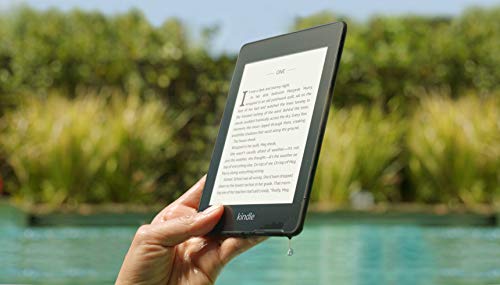
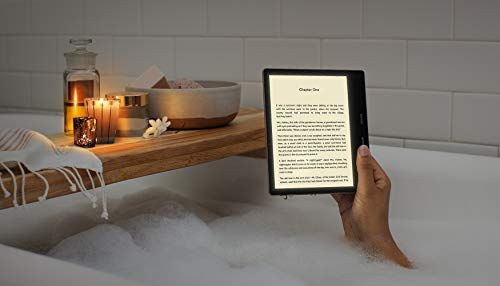
- •Waterproof (IPX8) so you can read in the bath or by the pool.
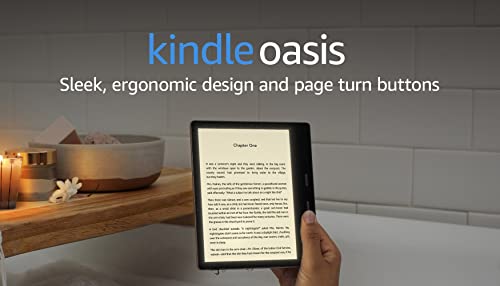
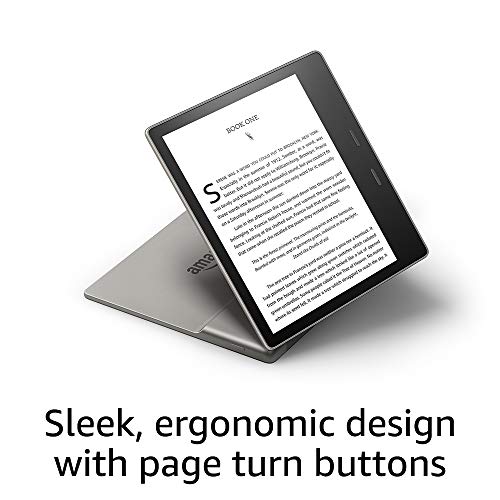
- •Thin and light ergonomic design with page turn buttons.
- •Reads like real paper with the latest e-ink technology for fast page turns.
- •Instant access to millions of books, newspapers, and audiobooks.
Kindle Oasis – With 7” display and page turn buttons- Ad-Supported + 3 Months Free Kindle Unlimited (with auto-renewal)
List Price: $407.39$366.65DEALYou Save: $40.74 (10%)
Free shippingFree Returns – 30 daysFree Order CancellationSecure Payment2–3 Days DeliveryGet It October 25, 2026In Stock (1)No marketing spamNo account requiredFulfilment by FedEx / Amazon / UPS / ShipwirePayPal / Card Buyer Protection
Customer Reviews
Reviews sourced from verified Amazon purchasers4.5
out of 5
Based on 10 reviews
5★
50%
4★
50%
3★
0%
2★
0%
1★
0%
Great device if you have an older kindle and want to upgrade.
N87✓ Verified Purchase•November 8, 2023
This is my 2nd kindle and first Oasis the previous kindle I had was the Kindle Paperwhite 2015. I finally decided to bite the bullet and upgrade. To be fair there wasn't any reason for this other than I wanted to upgrade. My 2015 Kindle Paperwhite is still functional but wasn't syncing properly. I decided that I would upgrade to the Oasis as I honestly didn't see much difference with the newer Paperwhite 2019 except the new backlight and flush screen.
Ok first things first the Oasis is extremely thin and light. The bevel edge where the battery is located serves its function which allows readers to use it one handed. The back is aluminum versus the basic kindle/Paperwhite which have a rubber finish. The aluminum back can get cold if you prefer to use it without a case like I do. The screen auto rotates which allow those of us that like to switch to either the left or right hand while sitting or lying down. A 4 stars feature in my opinion. The screen is flush and the "pages" are crisp. You have page turn buttons which I think to be honest are an asset and preferable to the touchscreen as I would accidentally tap through too many pages on the Paperwhite. The page turn buttons come in handy as you can also disable the touchscreen while reading by tapping the dots while in your book on the right side of the screen which will bring up the options screen and disable touchscreen is on there. To enable the touchscreen again you press the power button twice which will bring up the lock screen to access the touchscreen again. The backlight features aren't really a necessity for me as I don't normally read in the dark but comes in handy when I am not in a well lit room. The kindle oasis is waterproof and you now have the ability to listen to audible books (only audible books) wirelessly via Bluetooth. Personally, for me this is a feature that I don't think is necessary as I tend to listen to audiobooks on my audible app or the Libby/overdrive app. Also, you can not listen to both the audible book and read the ebook which I think is ridiculous especially if amazon is advertising this as a premium feature. You should be able to listen and read simultaneously. The worst feature on the Oasis is the battery life. My 2015 Paperwhite's battery would last for days/week even when I wasn't using it or if I was continuously using it for a minimum of an hour a day. The Oasis battery drains fast I found on a full charge and reading for an hour at a 100 % it easily went down to 70%. I initially had an issue with it not charging to 100% but after factory resetting it I found the solution was that I wasn't using the micro usb charging cable that came with it. I was using the old one from the Paperwhite as they seemed similar but after using the correct charging cable the Oasis was charging to 100%. So anyone having issues with it not charging to 100% make sure it is being charged with the cable it came with!
The fix for extending the battery life is keeping the device on airplane mode, lowering your light settings. Now it drains less as I am at 73% after a week of usage after changing those settings. However, I believe a device as expensive as this should have an excellent battery without having to tweak and alter the very settings they claim make this a premium device the backlights. I believe if the battery life last longer and was durable like the Paperwhite this would be without a doubt their best device yet.
Some suggestions for new users to maximize your device's potential:
If you have Amazon Prime then you have access to a slew of ebooks through Prime Reading included for free (You could also sign up for kindle unlimited but you would have to pay the subscription).
Get a library card. You can now download the overdrive or Libby app (or both) on your phone and now you have instant access to library books sent straight to your device.
Sign up for amazon deals of the day under account settings to get free or discounted ebook suggestions daily so you don't ever have to buy full price books.
Look out for Great on Kindle books as these ebooks gives you credits towards you next ebook purchase albeit you will more likely than not have to purchase the ebook at full price but you can often get upwards to $5.00 in ebook credits toward others.
You have a week to return a ebook (a feature I did not know of until recently).
Lastly, buy the kindle with special features and save yourself an extra $20. The ads are not annoying like some claim. In fact the only time you see ads is on the lock screen and on the home page at the bottom and they are usually ads of ebooks on sale (most times tailored to your reading preference) so this is a benefit to the reader. And if the ads end up annoying you then you can always hide them under the settings option on your device or you can contact Amazon later and pay $20 to have them removed.
Also, get the 8 GB version unless your planning on storing audible books (which take up A LOT of space) and ebooks than the 8 GB is sufficient and will save you money.
In the end would I recommend this device? Absolutely, especially if you already have a older kindle, a basic kindle or a newer Paperwhite and wish for an upgrade. However, if this is your first ever kindle I would recommend the Kindle Paperwhite which is the perfect medium between all three devices. It has the backlight feature, smaller in size, and cheaper in price. In the end these devices really are for reading.
My opinion either way is these devices last a really long time so after a year or two they pay for themselves. If you have an older model and its still functional and want to save money then keep it until a better upgraded version comes out in a few years.
Ok first things first the Oasis is extremely thin and light. The bevel edge where the battery is located serves its function which allows readers to use it one handed. The back is aluminum versus the basic kindle/Paperwhite which have a rubber finish. The aluminum back can get cold if you prefer to use it without a case like I do. The screen auto rotates which allow those of us that like to switch to either the left or right hand while sitting or lying down. A 4 stars feature in my opinion. The screen is flush and the "pages" are crisp. You have page turn buttons which I think to be honest are an asset and preferable to the touchscreen as I would accidentally tap through too many pages on the Paperwhite. The page turn buttons come in handy as you can also disable the touchscreen while reading by tapping the dots while in your book on the right side of the screen which will bring up the options screen and disable touchscreen is on there. To enable the touchscreen again you press the power button twice which will bring up the lock screen to access the touchscreen again. The backlight features aren't really a necessity for me as I don't normally read in the dark but comes in handy when I am not in a well lit room. The kindle oasis is waterproof and you now have the ability to listen to audible books (only audible books) wirelessly via Bluetooth. Personally, for me this is a feature that I don't think is necessary as I tend to listen to audiobooks on my audible app or the Libby/overdrive app. Also, you can not listen to both the audible book and read the ebook which I think is ridiculous especially if amazon is advertising this as a premium feature. You should be able to listen and read simultaneously. The worst feature on the Oasis is the battery life. My 2015 Paperwhite's battery would last for days/week even when I wasn't using it or if I was continuously using it for a minimum of an hour a day. The Oasis battery drains fast I found on a full charge and reading for an hour at a 100 % it easily went down to 70%. I initially had an issue with it not charging to 100% but after factory resetting it I found the solution was that I wasn't using the micro usb charging cable that came with it. I was using the old one from the Paperwhite as they seemed similar but after using the correct charging cable the Oasis was charging to 100%. So anyone having issues with it not charging to 100% make sure it is being charged with the cable it came with!
The fix for extending the battery life is keeping the device on airplane mode, lowering your light settings. Now it drains less as I am at 73% after a week of usage after changing those settings. However, I believe a device as expensive as this should have an excellent battery without having to tweak and alter the very settings they claim make this a premium device the backlights. I believe if the battery life last longer and was durable like the Paperwhite this would be without a doubt their best device yet.
Some suggestions for new users to maximize your device's potential:
If you have Amazon Prime then you have access to a slew of ebooks through Prime Reading included for free (You could also sign up for kindle unlimited but you would have to pay the subscription).
Get a library card. You can now download the overdrive or Libby app (or both) on your phone and now you have instant access to library books sent straight to your device.
Sign up for amazon deals of the day under account settings to get free or discounted ebook suggestions daily so you don't ever have to buy full price books.
Look out for Great on Kindle books as these ebooks gives you credits towards you next ebook purchase albeit you will more likely than not have to purchase the ebook at full price but you can often get upwards to $5.00 in ebook credits toward others.
You have a week to return a ebook (a feature I did not know of until recently).
Lastly, buy the kindle with special features and save yourself an extra $20. The ads are not annoying like some claim. In fact the only time you see ads is on the lock screen and on the home page at the bottom and they are usually ads of ebooks on sale (most times tailored to your reading preference) so this is a benefit to the reader. And if the ads end up annoying you then you can always hide them under the settings option on your device or you can contact Amazon later and pay $20 to have them removed.
Also, get the 8 GB version unless your planning on storing audible books (which take up A LOT of space) and ebooks than the 8 GB is sufficient and will save you money.
In the end would I recommend this device? Absolutely, especially if you already have a older kindle, a basic kindle or a newer Paperwhite and wish for an upgrade. However, if this is your first ever kindle I would recommend the Kindle Paperwhite which is the perfect medium between all three devices. It has the backlight feature, smaller in size, and cheaper in price. In the end these devices really are for reading.
My opinion either way is these devices last a really long time so after a year or two they pay for themselves. If you have an older model and its still functional and want to save money then keep it until a better upgraded version comes out in a few years.
A life changer for me...
GenericReviewer✓ Verified Purchase•October 23, 2023
It is difficult to write a review as positive as I would like this one to be and not seem to be a shill. But here goes.....
This device is my first e-reader, and it has actually changed the way I live--literally (and figuratively, too, I guess). Succinctly, I have now canceled cable TV and rediscovered the pleasure of reading books again and, in the process, regained a healthier day/night sleep cycle. As an aside, I also no longer feel the need to joke I'm cultivating functional illiteracy.
I used to be an inveterate reader of books, but that changed over the years for a multitude of reasons: technical studies that meant slow reading; hours in front of a computer monitor for work, tiring the eyes; naturally declining vision no longer correctable simultaneously for all distances with contact lenses; a deep aversion to glasses riding on my ears, etc. Then came retirement and the discovery of streaming TV that led more than once to asking myself, "When did it become light again?"
Streaming TV, however, did lead me to the Kindle Oasis"”I got hooked on a book-based TV series that piqued my desire to go further in depth and read the books, and in preparation for a long trip, I bought the first book of the series. At over 600 pages long and in a standard size print, it was just unwieldy for long periods of holding it for reading. That led me to consider a Kindle, but I knew I wanted one I could also be read in bright sunlight. This one was what I chose. Within a week, I had bought, downloaded, and read several of the books (each 500-700 pages). The TV remained off the whole week, and I re-established a healthier pattern of turning in when I was tired. (I can still "watch" TV through half-lidded eyes, but I cannot continue reading that way.) Two weeks after getting my Kindle, I canceled cable TV. I still have streaming, but it's no longer as compelling. As pricy as this Kindle is, it will still save me money with the reduction in cable fees within 4 months (and that includes the prices of the purchased books).
Surprisingly, my Kindle Oasis has led me to discoveries about myself and poor reading habits that I'm now remedying - pleasurably. For example, I often used to come upon an unknown word and divine a meaning (probably imprecise) from the context or just skipped it altogether as being non-essential to the story. I just get too caught up in the book to interrupt the flow and reach for a reference. Now, however, I call up references on the fly without even putting the Kindle down. Words whose meaning I previously would have glossed over take on new significance (definition, etymology, usage, related terms and subject matter). I gain an greater appreciation for the author's word choice and learn a lot in the process. This really is a fundamentally more enriching and rewarding way to read.
Physically, the device (being so small) had the potential to be awkward to hold for extended periods, but the asymmetric form-factor actually makes it easier whether one is right- or left-handed. With a cover attached it feels much like a comfortably sized paperback book. I opted for the premium leather cover (separate review, but it's worth every single penny and possibly some), and it makes the Kindle even more comfortable in the hand. The Oasis fits in my jacket pocket, immediately ready anywhere I am. This experience with its small size even drove my decision about the size of tablet computer I would choose to replace my aging one (I chose the mini sized one and not the full-sized one after trying both).
The lighting is so uniform, it was difficult to believe the text was not back illuminated, but I did a little research and found (NYT article with diagrams and pictures) that it is, indeed, front illuminated with LED's around the border shining into a horizontal film (i.e., light-guide) "floating" above the page that "conducts" the light horizontally parallel to the reading surface and then down onto the page in an amazingly uniform distribution of illumination. And one can "tune" the color of the light towards warmer tones (i.e., towards the red end of the spectrum) that are easier for the eye to recover from in a dark environment--the reason visual astronomers have red-filtered lights to view star charts in the dark). It even looks like reading a beloved old book.
Charging is quick and simple but not entirely without a little awkwardness. . I was a little disappointed to see a micro-USB slot for charging. My aversion is based on the fact that it can be a little difficult for me to line up the plug with the charging slot even in full light. The Kindle Oasis maintains a charge for a long period, but I do try to remind myself to put it back into Airplane mode after pursuing a reference just because. I do wish there were a timer that would revert the Kindle back to Airplane mode after some period of non-use as a power saving mechanism.
All told, I'm glad this thing did not exist when I was a kid. The flashlight-under-the-covers-book-reading-trick got me into trouble enough with my parents, but this would have made me a chronic offender and them apoplectic.
I love gadgets. I have a lot. This is unquestionably my favorite.
This device is my first e-reader, and it has actually changed the way I live--literally (and figuratively, too, I guess). Succinctly, I have now canceled cable TV and rediscovered the pleasure of reading books again and, in the process, regained a healthier day/night sleep cycle. As an aside, I also no longer feel the need to joke I'm cultivating functional illiteracy.
I used to be an inveterate reader of books, but that changed over the years for a multitude of reasons: technical studies that meant slow reading; hours in front of a computer monitor for work, tiring the eyes; naturally declining vision no longer correctable simultaneously for all distances with contact lenses; a deep aversion to glasses riding on my ears, etc. Then came retirement and the discovery of streaming TV that led more than once to asking myself, "When did it become light again?"
Streaming TV, however, did lead me to the Kindle Oasis"”I got hooked on a book-based TV series that piqued my desire to go further in depth and read the books, and in preparation for a long trip, I bought the first book of the series. At over 600 pages long and in a standard size print, it was just unwieldy for long periods of holding it for reading. That led me to consider a Kindle, but I knew I wanted one I could also be read in bright sunlight. This one was what I chose. Within a week, I had bought, downloaded, and read several of the books (each 500-700 pages). The TV remained off the whole week, and I re-established a healthier pattern of turning in when I was tired. (I can still "watch" TV through half-lidded eyes, but I cannot continue reading that way.) Two weeks after getting my Kindle, I canceled cable TV. I still have streaming, but it's no longer as compelling. As pricy as this Kindle is, it will still save me money with the reduction in cable fees within 4 months (and that includes the prices of the purchased books).
Surprisingly, my Kindle Oasis has led me to discoveries about myself and poor reading habits that I'm now remedying - pleasurably. For example, I often used to come upon an unknown word and divine a meaning (probably imprecise) from the context or just skipped it altogether as being non-essential to the story. I just get too caught up in the book to interrupt the flow and reach for a reference. Now, however, I call up references on the fly without even putting the Kindle down. Words whose meaning I previously would have glossed over take on new significance (definition, etymology, usage, related terms and subject matter). I gain an greater appreciation for the author's word choice and learn a lot in the process. This really is a fundamentally more enriching and rewarding way to read.
Physically, the device (being so small) had the potential to be awkward to hold for extended periods, but the asymmetric form-factor actually makes it easier whether one is right- or left-handed. With a cover attached it feels much like a comfortably sized paperback book. I opted for the premium leather cover (separate review, but it's worth every single penny and possibly some), and it makes the Kindle even more comfortable in the hand. The Oasis fits in my jacket pocket, immediately ready anywhere I am. This experience with its small size even drove my decision about the size of tablet computer I would choose to replace my aging one (I chose the mini sized one and not the full-sized one after trying both).
The lighting is so uniform, it was difficult to believe the text was not back illuminated, but I did a little research and found (NYT article with diagrams and pictures) that it is, indeed, front illuminated with LED's around the border shining into a horizontal film (i.e., light-guide) "floating" above the page that "conducts" the light horizontally parallel to the reading surface and then down onto the page in an amazingly uniform distribution of illumination. And one can "tune" the color of the light towards warmer tones (i.e., towards the red end of the spectrum) that are easier for the eye to recover from in a dark environment--the reason visual astronomers have red-filtered lights to view star charts in the dark). It even looks like reading a beloved old book.
Charging is quick and simple but not entirely without a little awkwardness. . I was a little disappointed to see a micro-USB slot for charging. My aversion is based on the fact that it can be a little difficult for me to line up the plug with the charging slot even in full light. The Kindle Oasis maintains a charge for a long period, but I do try to remind myself to put it back into Airplane mode after pursuing a reference just because. I do wish there were a timer that would revert the Kindle back to Airplane mode after some period of non-use as a power saving mechanism.
All told, I'm glad this thing did not exist when I was a kid. The flashlight-under-the-covers-book-reading-trick got me into trouble enough with my parents, but this would have made me a chronic offender and them apoplectic.
I love gadgets. I have a lot. This is unquestionably my favorite.
LOVE IT!
Jenn R.✓ Verified Purchase•October 22, 2023
All my life I've always been against e-readers. I just never got the point and I had an old Fire tablet that I used for reading a few times and it wasn't a great experience. But then the last time I went away on a long trip I actually carried 2 books with me and I realized how inefficient that was. I saw the kindles on sale for Prime Day and after thorough research decided on the Oasis for the page turning buttons. It took me a few tries to get accustomed to the Oasis but once I got the groove of it - I can say that now I am OBSESSED. I carry my kindle with me everywhere and I've enjoyed using all the settings like brightness/font size/rotating to use with either left or right hand. I can read in the dark/on a plane/at the beach/literally anywhere comfortably and I don't have to worry about denting or harming my books. I only read my physical books now at home where they're safe. I am in love with this kindle and would HIGHLY recommend it to anyone in the market.
The only one small thing I dislike is the lack of cute cases available. While there are a lot on the market, the ones that come with good functionality like stands/straps only have limited designs while the paperwhite has loads and loads of options. This isn't a deal breaker for me, only mentioning it as I've had struggles finding a good case. Other than that - 10/10
The only one small thing I dislike is the lack of cute cases available. While there are a lot on the market, the ones that come with good functionality like stands/straps only have limited designs while the paperwhite has loads and loads of options. This isn't a deal breaker for me, only mentioning it as I've had struggles finding a good case. Other than that - 10/10
Overall Wonderful Despite a Handful of Frustrations
Airmid✓ Verified Purchase•October 5, 2023
Before I start this review, I just want to say that I adore this e-reader regardless of any negative feedback. In fact, I took it over to show my mother and she loved it so much she got one for herself. For both of us, trying to read on a tablet for longer periods of time just isn't enjoyable. This is the first e-reader purchase for both of us after many years though I have had occasion to play with the newer generation of paperwhite/kindle in person before making this purchase.
First things first - this device uses E-Ink. It works by having a multitude of microcapsules that when charged display either black or white. Just from that description alone, it's pretty obvious why this has no color, though color is in the works by the E-Ink developer, it's just years away from being workable on these types of devices. Obviously, this works differently than a tablet and its main purpose, as with all e-readers, is to give a good reading experience and mimic a page of a book as best as possible while also being easier on the eyes.
Display: Very, very sharp on the Oasis. It's lovely to look at and I have found zero ghosting while reading. It's clear and crisp. While only an inch, the benefits of the 7 inch are noticeable but hard to explain outside of it just feels better reading-wise. The screen is matte and while not glare-proof it helps a good deal and the pages are lovely to look at.
Touch: Very responsive. Again, due to the tech of this product, it's kind of a wonder we have touchscreens with them. It's very responsive for an e-reader, more than any other that I've looked at. I can't say I was all that impressed with the Paperwhite's touch screen as it seemed to get finicky at times and could turn multiple pages on you, a problem I've not had with any other device. While sometimes it doesn't always register the touch, for the most part, it does, and highlighting, accessing the menu, shopping in the store, etc. have all been easy. Sometimes it doesn't register when scrolling but that's been the biggest issue encountered so far.
Page Turning - I am partial to the buttons and am a believer that these devices should come with them baseline. However, buttons or touch, the pages turn fast, fluid, and cleanly with close to no delay whatsoever.
Screen Brightness - The warm light is great and is the other reason I got this model over a Paperwhite (buttons were the other). I have issues with my eyes where blue light really bothers me. Not only does the Oasis seem to have less blue light in general compared to Paperwhite/Kindle/Older Oasis models, but the warm light works well. It doesn't take a lot to solve the issue and being able to adjust brightness and warmth separately is good. You are able to set the warmth to auto-activate from sunset to sunrise based on time zone, set your own time, or do it anytime easily.
Options: There are many ways to change the layout from font style, boldness, and size. I haven't seen it really mentioned, but you can set it horizontal also. Yes, you do need to go through settings to do this but given how this device works, that's not a surprise. There is a feature to save all your layouts so it's simple enough to hit the saved format for horizontal to switch to that or back again to vertical. The buttons come default as up = forward down = back, but these can be reversed. There is no scrolling option but I'm not someone who likes that when reading books, but keep that in mind, especially for certain media like comics/manga. You are able to have it display page numbers, the clock, percentage left/read, or none of the above.
Personal Library Access - Amazon, for the love of all creation fix this mess. I knew going in that it would be a pita but still. Even after going through each book and adding them separately back into their collections I still can't sort by them. I don't know what I did wrong but it's been a frustrating endeavor, and the inability to really have decent sort options can make it a pain for those who want to keep the library on this device instead of just a book or two at a time. Fortunately, the search works well but I shouldn't have to look one of my Fires to sort through my library and then bring it up on the Oasis. That's terrible and to my understanding has been a longstanding problem.
Wifi - I had no problems with accessing the Kindle store to browse or purchase books. This is probably the biggest area that had a delay, lack of sensitivity to input, and a large amount of screen refreshing, but again, given what it is, it wasn't an issue really. Wifi does drain the battery (even more so if downloading a lot of books, like at the start and it does give a warning for this) but that is a problem on most modern devices. I wish there was a battery saver option for this like there is for the Fire's as I would like to use the Translation feature at times while reading some books and that is only available via wifi. Fortunately, the dictionary is not so dependent.
Battery Life - The Kindle base model has 4 LEDs, the Paperwhite has 6. The Oasis - 25. That's a lot of LEDs (12 for white, 13 for the warm lighting system) and it is understandable that while in use this isn't going to have as long of a life as other models, especially older ones that don't have a backlight at all. When indoors, I tend to have everything set to as close to zero as possible as personal preference and would say that depending on reading habits you're looking at charging every few days to a little over a week. I would also say that one should never believe any company's rhetoric on battery life - it's usually under the most minimal of conditions. That being said, if you're coming from an older model of Kindle, especially the really early ones, you aren't going to get the same battery life due to the LEDs but it isn't as terrible as a tablet, for example. It does hibernate after a period of inactivity and takes a few seconds to wake back up when starting again. This isn't a bad thing to me but has been off-putting to others with the slight delay.
The Micro USB - I know this a point of contention with a lot of people but I didn't find it that big of a deal. I still have several devices include Kindles/Fires that use this. I would assume that when Amazon does make the switch to USB C that they want to ensure all their tablets/Kindles can make the switch over.
Shape - I love it. The only thing I can think of is that it would be nice if the metal was grooved a little in a couple of places on the back to help with a firmer grip and to reduce sliding potential. Otherwise, it's lovely to both me and my mother - easy to hold, easy to operate the buttons, etc.
Waterproofing - I can't speak to how this works and hope to never have to.
The Ads - Amazon, we are buying your top-of-the-line product. We should not have to pay you more to not have you advertise at us, especially since you have a recommended for you on the homepage that does the job somewhat better. When Kindles/Fires were launching way back when it did make some sense as the price difference was $40 and made the lower-end models especially more accessible to a wider range of people. But now, it's just gross. Yes, I have the one with the ads because I cannot justify giving you an extra $20 for something that is top of the line and already highly priced.
The Price - So, this is really expensive. There is an option to do payment plans on it, which is nice, but it's still pricy. If you have an e-reader that at least is functional, it might do for you to wait until Prime Day or Cyber Monday to get a deal and shave off $50-75. Is it worth it? That depends. If you're like me and need the warm light then this is the only Kindle that has it, along with the buttons. I look at it as an investment. The products I have gotten from Amazon have lasted years. On top of that, I am a reader and have been looking for something that would allow me to access my Kindle library easily while having the features I needed/wanted. If you're not reading a whole lot and/or do not need the buttons/warm light then this probably isn't the Kindle for you. Personally, I knew I would not be happy with the Paperwhite, and while there are things I dislike about the Oasis, as a whole I am happy that I own this.
Probably the biggest question to ask yourself before spending this kind of money is how much do you read and/or were you someone who used to read a lot? The biggest question is whether one will use it enough to justify having a device that is only for reading and if the features for them personally justify the purchase. For me, yes, for others, it may be a different answer.
I listened to and read many reviews on the Oasis and other Kindles and one of the comments was that with the Oasis that one might spend more money due to just buying more books to read. I can see that. It's a joy to read on this.
First things first - this device uses E-Ink. It works by having a multitude of microcapsules that when charged display either black or white. Just from that description alone, it's pretty obvious why this has no color, though color is in the works by the E-Ink developer, it's just years away from being workable on these types of devices. Obviously, this works differently than a tablet and its main purpose, as with all e-readers, is to give a good reading experience and mimic a page of a book as best as possible while also being easier on the eyes.
Display: Very, very sharp on the Oasis. It's lovely to look at and I have found zero ghosting while reading. It's clear and crisp. While only an inch, the benefits of the 7 inch are noticeable but hard to explain outside of it just feels better reading-wise. The screen is matte and while not glare-proof it helps a good deal and the pages are lovely to look at.
Touch: Very responsive. Again, due to the tech of this product, it's kind of a wonder we have touchscreens with them. It's very responsive for an e-reader, more than any other that I've looked at. I can't say I was all that impressed with the Paperwhite's touch screen as it seemed to get finicky at times and could turn multiple pages on you, a problem I've not had with any other device. While sometimes it doesn't always register the touch, for the most part, it does, and highlighting, accessing the menu, shopping in the store, etc. have all been easy. Sometimes it doesn't register when scrolling but that's been the biggest issue encountered so far.
Page Turning - I am partial to the buttons and am a believer that these devices should come with them baseline. However, buttons or touch, the pages turn fast, fluid, and cleanly with close to no delay whatsoever.
Screen Brightness - The warm light is great and is the other reason I got this model over a Paperwhite (buttons were the other). I have issues with my eyes where blue light really bothers me. Not only does the Oasis seem to have less blue light in general compared to Paperwhite/Kindle/Older Oasis models, but the warm light works well. It doesn't take a lot to solve the issue and being able to adjust brightness and warmth separately is good. You are able to set the warmth to auto-activate from sunset to sunrise based on time zone, set your own time, or do it anytime easily.
Options: There are many ways to change the layout from font style, boldness, and size. I haven't seen it really mentioned, but you can set it horizontal also. Yes, you do need to go through settings to do this but given how this device works, that's not a surprise. There is a feature to save all your layouts so it's simple enough to hit the saved format for horizontal to switch to that or back again to vertical. The buttons come default as up = forward down = back, but these can be reversed. There is no scrolling option but I'm not someone who likes that when reading books, but keep that in mind, especially for certain media like comics/manga. You are able to have it display page numbers, the clock, percentage left/read, or none of the above.
Personal Library Access - Amazon, for the love of all creation fix this mess. I knew going in that it would be a pita but still. Even after going through each book and adding them separately back into their collections I still can't sort by them. I don't know what I did wrong but it's been a frustrating endeavor, and the inability to really have decent sort options can make it a pain for those who want to keep the library on this device instead of just a book or two at a time. Fortunately, the search works well but I shouldn't have to look one of my Fires to sort through my library and then bring it up on the Oasis. That's terrible and to my understanding has been a longstanding problem.
Wifi - I had no problems with accessing the Kindle store to browse or purchase books. This is probably the biggest area that had a delay, lack of sensitivity to input, and a large amount of screen refreshing, but again, given what it is, it wasn't an issue really. Wifi does drain the battery (even more so if downloading a lot of books, like at the start and it does give a warning for this) but that is a problem on most modern devices. I wish there was a battery saver option for this like there is for the Fire's as I would like to use the Translation feature at times while reading some books and that is only available via wifi. Fortunately, the dictionary is not so dependent.
Battery Life - The Kindle base model has 4 LEDs, the Paperwhite has 6. The Oasis - 25. That's a lot of LEDs (12 for white, 13 for the warm lighting system) and it is understandable that while in use this isn't going to have as long of a life as other models, especially older ones that don't have a backlight at all. When indoors, I tend to have everything set to as close to zero as possible as personal preference and would say that depending on reading habits you're looking at charging every few days to a little over a week. I would also say that one should never believe any company's rhetoric on battery life - it's usually under the most minimal of conditions. That being said, if you're coming from an older model of Kindle, especially the really early ones, you aren't going to get the same battery life due to the LEDs but it isn't as terrible as a tablet, for example. It does hibernate after a period of inactivity and takes a few seconds to wake back up when starting again. This isn't a bad thing to me but has been off-putting to others with the slight delay.
The Micro USB - I know this a point of contention with a lot of people but I didn't find it that big of a deal. I still have several devices include Kindles/Fires that use this. I would assume that when Amazon does make the switch to USB C that they want to ensure all their tablets/Kindles can make the switch over.
Shape - I love it. The only thing I can think of is that it would be nice if the metal was grooved a little in a couple of places on the back to help with a firmer grip and to reduce sliding potential. Otherwise, it's lovely to both me and my mother - easy to hold, easy to operate the buttons, etc.
Waterproofing - I can't speak to how this works and hope to never have to.
The Ads - Amazon, we are buying your top-of-the-line product. We should not have to pay you more to not have you advertise at us, especially since you have a recommended for you on the homepage that does the job somewhat better. When Kindles/Fires were launching way back when it did make some sense as the price difference was $40 and made the lower-end models especially more accessible to a wider range of people. But now, it's just gross. Yes, I have the one with the ads because I cannot justify giving you an extra $20 for something that is top of the line and already highly priced.
The Price - So, this is really expensive. There is an option to do payment plans on it, which is nice, but it's still pricy. If you have an e-reader that at least is functional, it might do for you to wait until Prime Day or Cyber Monday to get a deal and shave off $50-75. Is it worth it? That depends. If you're like me and need the warm light then this is the only Kindle that has it, along with the buttons. I look at it as an investment. The products I have gotten from Amazon have lasted years. On top of that, I am a reader and have been looking for something that would allow me to access my Kindle library easily while having the features I needed/wanted. If you're not reading a whole lot and/or do not need the buttons/warm light then this probably isn't the Kindle for you. Personally, I knew I would not be happy with the Paperwhite, and while there are things I dislike about the Oasis, as a whole I am happy that I own this.
Probably the biggest question to ask yourself before spending this kind of money is how much do you read and/or were you someone who used to read a lot? The biggest question is whether one will use it enough to justify having a device that is only for reading and if the features for them personally justify the purchase. For me, yes, for others, it may be a different answer.
I listened to and read many reviews on the Oasis and other Kindles and one of the comments was that with the Oasis that one might spend more money due to just buying more books to read. I can see that. It's a joy to read on this.
a definite upgrade for me
Arthurian Tapestry✓ Verified Purchase•September 26, 2023
I have been a Kindle Voyage reader for several years now, and though I did try some newer kindle iterations, I ended up returning them simply because the most important aspect of the device, the richness of the e-ink seemed to have been lacking. After the Voyage, all the newer devices including the previous generation Oasis leaned towards a more faded out, greyer looking e-ink (which was partially resolved by allowing for boldness). So, not even the previous Oasis 2 and much less the cover charging Oasis 1 could dislodge me from the Voyage (which I have kept for reasons of portability and practicality with its origami stand up cover).
So what convinced me to get this Oasis, if I was already satisfied with the Voyage? Well, nothing really; it just so happened that my birthday coincided with the new Oasis release and my wife ordered it for me, after trading in a kindle keyboard (and I am glad she did). The contrast and richness of the fonts were just as good as the Voyage I kept. Furthermore, the screen was evenly lit even in its highest settings for brightness and amber. So the Oasis 3 surpassed my expectations (although I've kept my Voyage as my back up).
If I had already been an Oasis user, there would be no way I would have considered upgrading, as the changes from the previous model have been minimal. As a Voyage user, however, this was a significant upgrade and change in many ways:
1. First of all, storage. I have the 32 G model, but even the 8 G would have been quite an upgrade from my 4 G Voyage. Now I can add my annotated editions of literature, audiobooks and illustrated works without any qualm.
2. Larger 7" display: my eyes are not getting any younger, and the ability to have more text on the page does make more of a difference than I thought it would"”although it does so by losing the portability factor. The Voyage could slip into my back or front pocket quite easily, but in the end, I do prefer the larger screen. In any case, carrying the ergonomic Oasis still beats lugging an armful of books.
3. Waterproof: It is nice to know that this device is waterproof (just in case), and it does add some ease of mind, but I'll confess I've taken the Voyage with me pretty much everywhere in all kinds of weather"”even to the beach, pools, on cruises, the desert, (you name it) and it is still working pretty much the day I received it. I expect no less from the Oasis, but I won't have second thoughts of sitting with it in the tub.
4. Audible: I do read and like to be read to, so it is nice to have this option; I do use Audible a lot, and though I prefer the way Audible works in its phone app, it is nice to have all your books, audible or otherwise on one device. However, I do think Amazon has a ways to go towards perfecting the Audible experience on the e-readers.
5. Lighting: Voyage lighting was adequate (not perfect), as I found any light setting to be a bit much for these eyes; most of the time I read with lighting pretty much off. The Oasis has solved that by adding the amber warmth, so this was a needed upgrade for me.
6. There is also an inverted mode where the background becomes black and the fonts become lit. This actually looks gorgeous when setting the amber to the max.
7. The page turn buttons are infinitely more satisfying than the Voyage, although I think the old keyboard had the best buttons on any kindle that I've had.
8. The screen rotation, while nice for righties vs. lefties, does disappoint a wee bit in that it does not rotate to landscape automatically.
9. Battery life: I know there are complaints about battery here, but I suspect his may because the device was loaded up rather quickly and the indexing of the titles does drain the battery. So far have loaded less than a dozen titles and am easing into my Oasis set up, allowing for indexing to be done in little spurts. Of course, I cannot make any definite assessments on the battery until I go through a couple more charging cycles, but it looks to be about two weeks on a single charge with about half hour to an hour reading everyday with airplane mode (which really does prolong battery) unless I need to sync or use the store. Oh, and I set the mid-range 12 for both light settings.
Those were the main upgrades for me, but there are few things that I need to get used to:
1. The form factor (I've been using the Voyage for years, so this will take some time; the Voyage still takes the cake in this aspect).
2. I wish Amazon made an origami case for this one; I did use the stand up many times during a lunch break. It's really no biggie. I now use an Amazon Basics stand that works even better than the origami to keep the Oasis propped up at multiple angles for my reading pleasure.
3. I really do not see the benefit of a graphite versus whatever as this is covered with my waterproof charcoal case; however, I would have loved the front of the Oasis offered in solid white or cream, to mimic the extension of a page but this is easily resolvable with a third party skin.
4. Price: Let's not cushion this. For this price we should seriously be getting no ads thrown in, and a full charger (not just the cable). I would say that the cloth case should be thrown in as well, but that would be pushing it.
Suggestions to kindle software developers (Sorry to throw this into the review, but it worked last time when the developers actually contacted me to let me know that they had taken my suggestions and implemented it in one of the updates, so here it goes again):
Can we get the option to have pages (not actual pages but screenshots) remaining when reading in a chapter? I know not everyone cares for these options, but I find the time remaining to always be inaccurate as I vary in reading poetry versus prose on my kindle all the time, so it would be nice to have this option.
Also, the ability to scroll would be nice.
And while, we're at it, why not let us use our own screensavers? From our own books or a selection of literary images.
In short, the device really surpassed my expectations, and for something I really wasn't planning on getting, this one is definitely a keeper.
Still, for Voyage users, I would recommend trading in an older kindle, as the Voyage still has its own little benefits.
So what convinced me to get this Oasis, if I was already satisfied with the Voyage? Well, nothing really; it just so happened that my birthday coincided with the new Oasis release and my wife ordered it for me, after trading in a kindle keyboard (and I am glad she did). The contrast and richness of the fonts were just as good as the Voyage I kept. Furthermore, the screen was evenly lit even in its highest settings for brightness and amber. So the Oasis 3 surpassed my expectations (although I've kept my Voyage as my back up).
If I had already been an Oasis user, there would be no way I would have considered upgrading, as the changes from the previous model have been minimal. As a Voyage user, however, this was a significant upgrade and change in many ways:
1. First of all, storage. I have the 32 G model, but even the 8 G would have been quite an upgrade from my 4 G Voyage. Now I can add my annotated editions of literature, audiobooks and illustrated works without any qualm.
2. Larger 7" display: my eyes are not getting any younger, and the ability to have more text on the page does make more of a difference than I thought it would"”although it does so by losing the portability factor. The Voyage could slip into my back or front pocket quite easily, but in the end, I do prefer the larger screen. In any case, carrying the ergonomic Oasis still beats lugging an armful of books.
3. Waterproof: It is nice to know that this device is waterproof (just in case), and it does add some ease of mind, but I'll confess I've taken the Voyage with me pretty much everywhere in all kinds of weather"”even to the beach, pools, on cruises, the desert, (you name it) and it is still working pretty much the day I received it. I expect no less from the Oasis, but I won't have second thoughts of sitting with it in the tub.
4. Audible: I do read and like to be read to, so it is nice to have this option; I do use Audible a lot, and though I prefer the way Audible works in its phone app, it is nice to have all your books, audible or otherwise on one device. However, I do think Amazon has a ways to go towards perfecting the Audible experience on the e-readers.
5. Lighting: Voyage lighting was adequate (not perfect), as I found any light setting to be a bit much for these eyes; most of the time I read with lighting pretty much off. The Oasis has solved that by adding the amber warmth, so this was a needed upgrade for me.
6. There is also an inverted mode where the background becomes black and the fonts become lit. This actually looks gorgeous when setting the amber to the max.
7. The page turn buttons are infinitely more satisfying than the Voyage, although I think the old keyboard had the best buttons on any kindle that I've had.
8. The screen rotation, while nice for righties vs. lefties, does disappoint a wee bit in that it does not rotate to landscape automatically.
9. Battery life: I know there are complaints about battery here, but I suspect his may because the device was loaded up rather quickly and the indexing of the titles does drain the battery. So far have loaded less than a dozen titles and am easing into my Oasis set up, allowing for indexing to be done in little spurts. Of course, I cannot make any definite assessments on the battery until I go through a couple more charging cycles, but it looks to be about two weeks on a single charge with about half hour to an hour reading everyday with airplane mode (which really does prolong battery) unless I need to sync or use the store. Oh, and I set the mid-range 12 for both light settings.
Those were the main upgrades for me, but there are few things that I need to get used to:
1. The form factor (I've been using the Voyage for years, so this will take some time; the Voyage still takes the cake in this aspect).
2. I wish Amazon made an origami case for this one; I did use the stand up many times during a lunch break. It's really no biggie. I now use an Amazon Basics stand that works even better than the origami to keep the Oasis propped up at multiple angles for my reading pleasure.
3. I really do not see the benefit of a graphite versus whatever as this is covered with my waterproof charcoal case; however, I would have loved the front of the Oasis offered in solid white or cream, to mimic the extension of a page but this is easily resolvable with a third party skin.
4. Price: Let's not cushion this. For this price we should seriously be getting no ads thrown in, and a full charger (not just the cable). I would say that the cloth case should be thrown in as well, but that would be pushing it.
Suggestions to kindle software developers (Sorry to throw this into the review, but it worked last time when the developers actually contacted me to let me know that they had taken my suggestions and implemented it in one of the updates, so here it goes again):
Can we get the option to have pages (not actual pages but screenshots) remaining when reading in a chapter? I know not everyone cares for these options, but I find the time remaining to always be inaccurate as I vary in reading poetry versus prose on my kindle all the time, so it would be nice to have this option.
Also, the ability to scroll would be nice.
And while, we're at it, why not let us use our own screensavers? From our own books or a selection of literary images.
In short, the device really surpassed my expectations, and for something I really wasn't planning on getting, this one is definitely a keeper.
Still, for Voyage users, I would recommend trading in an older kindle, as the Voyage still has its own little benefits.
Page 1 of 2