meross Smart WiFi Garage Door Opener Remote, App Control, Works with Alexa, Google Assistant and SmartThings, No Hub Needed(Non HomeKit Versions)




Key features
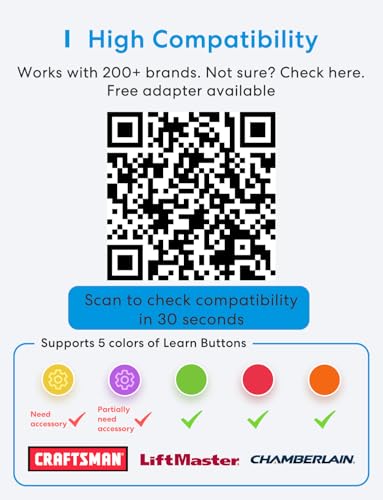
- •Compatibility Check: Please scroll down and check in the "Technical Specification - Application Guide" whether your garage door model is in the compatibility list. Also you can check if your garage door model is in the compatibility list on meross /'mɪrɚs/ official web.
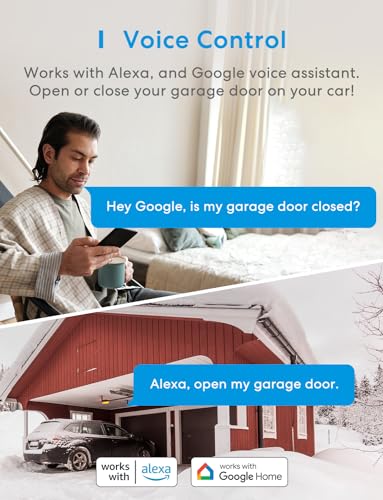
- •Remote and Voice Control: Never been so easy to control your garage door opener. Just tapping the meross /'mɪrɚs/ app from anywhere or speaking to your Alexa or Google assistant devices. To let in your family, guests or couriers through the garage door while you are cooking or not at home. No monthly fee or any other subscription fee!
- •Multiple Notification Modes: Stay alert by different notification modes such as garage door open/ close status, overtime notification and overnight notification to remind you close the garage door. And you can check the garage door open/ close operation records through the APP.
- •More Precise and Stable: It comes with a high sensitivity sensor which monitors the status of garage door more accurate and the signal stays stable.
- •Easy to Install: Installation is much easier than you may think. Pls make sure your wifi strength is acceptable near your garage door. This is the upgraded version, which has solved the interference issues our old verion may cause to some garage door remotes. If you still find it interference with your original garage door remotes, please contact [email protected] for help. We have a solution for you.
meross Smart WiFi Garage Door Opener Remote, App Control, Works with Alexa, Google Assistant and SmartThings, No Hub Needed(Non HomeKit Versions)
List Price: $50.27$45.24DEALYou Save: $5.03 (10%)
Free shippingFree Returns – 30 daysFree Order CancellationSecure Payment2–3 Days DeliveryGet It October 25, 2026In Stock (30)No marketing spamNo account requiredFulfilment by FedEx / Amazon / UPS / ShipwirePayPal / Card Buyer Protection
Customer Reviews
Reviews sourced from verified Amazon purchasers4.4
out of 5
Based on 10 reviews
5★
80%
4★
20%
3★
0%
2★
0%
1★
0%
Great product, great value!
Brady Cox✓ Verified Purchase•June 14, 2023
Researching wifi controlled garage door apps/products I soon found many of them were way too complicated and that is why I chose this one as it is much simpler. Also, the phone app is rated really well.
Unfortunately I have a yellow learn button and needed the adapter. The adapter turned out to be a garage door remote that plugs into the controller. You press the learn button on the garage door motor, sync the remote with the garage door and plug it into the controller. A little more complicated than the other basic garage learn buttons but it works.
Also, I attached the magnetic sensor to the chain at the motor with the supplied zip tie and some gorilla glue instead of running 15 feet of wire. So far it seems to be working great. Some of the other controllers don't tell you if the door is open or closed. This one has the sensor which is a huge plus!
I contacted Meross with my Amazon purchase order and got the adapter for free within 4 days! That was pretty awesome. The only downside to the remote adapter is it is battery powered and I will have to climb up the ladder and change the battery ever so often.
Unfortunately I have a yellow learn button and needed the adapter. The adapter turned out to be a garage door remote that plugs into the controller. You press the learn button on the garage door motor, sync the remote with the garage door and plug it into the controller. A little more complicated than the other basic garage learn buttons but it works.
Also, I attached the magnetic sensor to the chain at the motor with the supplied zip tie and some gorilla glue instead of running 15 feet of wire. So far it seems to be working great. Some of the other controllers don't tell you if the door is open or closed. This one has the sensor which is a huge plus!
I contacted Meross with my Amazon purchase order and got the adapter for free within 4 days! That was pretty awesome. The only downside to the remote adapter is it is battery powered and I will have to climb up the ladder and change the battery ever so often.
Fantastic! Fabulous! Awesome!
OkieJohn✓ Verified Purchase•June 10, 2023
I recently cleaned out and reorganized my garage and fixed the electric door opener. Hey....why not go one step further and make it smart? (Like the 52 other devices in my house!) But would it be work with my old Genie screw drive model with no learning buttons and such? Since Meross said their unit was compatible with the majority of garage door motors I just went ahead and ordered it, especially after watching this "dial2fast" installation guide on YouTube which was an excellent tutorial - especially for this Do It Yourself Dope!
The Meross unit arrived the morning after ordering and in 30 minutes I had it working and talking to Alexa. Most difficult part was figuring out that I had originally plugged into a not always on socket. Switched that and everything worked just as advertised.
The instructions say to manually close the door before installing the wire that runs to the magnetic switch / sensor. However, if I manually shut the door, it didn't go all the way down, so the original placement of the magnets didn't line up after I attached power since the motor pushed the door down all the way to the garage floor, so Alexa thought the door was open when it was closed. It was an easy fix by just moving the magnets in the correct position after electrically closing the door.
Amazing that this smart home integration could be done for under thirty bucks.
Highly recommended.
The Meross unit arrived the morning after ordering and in 30 minutes I had it working and talking to Alexa. Most difficult part was figuring out that I had originally plugged into a not always on socket. Switched that and everything worked just as advertised.
The instructions say to manually close the door before installing the wire that runs to the magnetic switch / sensor. However, if I manually shut the door, it didn't go all the way down, so the original placement of the magnets didn't line up after I attached power since the motor pushed the door down all the way to the garage floor, so Alexa thought the door was open when it was closed. It was an easy fix by just moving the magnets in the correct position after electrically closing the door.
Amazing that this smart home integration could be done for under thirty bucks.
Highly recommended.
Works great with Google Home
Steve✓ Verified Purchase•May 27, 2023
Got this mostly so I could tell when somebody forgets to close the garage door. I like that it can send a notification if it stays open for too long. It also lets me know when people are coming and going if I'm not home.
Installation was really easy. I just wired in parallel with the wall button, then ran the cable along the top of the track the same way the reverse sensor wires run. Some double-sided tape (included) attached the magnet to the carrier and a little more attached the sensor to the track.
I already had the Meross app installed since I have other devices from them, so it was just a matter of adding it to the device list.
The only thing I wish I could do is set a different notification tone on my phone so I know when it's a garage alert. Android likes to play the same tone for everything and I tend to tune it out. But that's probably more an issue with the phone than the device.
This was actually the second one I bought since I have two garage doors. I liked the first one good enough to get a second. I have several wall plugs and smart bulbs from Meross as well, and they have all worked well with Google Home. I'll probably continue to stick with the brand.
Installation was really easy. I just wired in parallel with the wall button, then ran the cable along the top of the track the same way the reverse sensor wires run. Some double-sided tape (included) attached the magnet to the carrier and a little more attached the sensor to the track.
I already had the Meross app installed since I have other devices from them, so it was just a matter of adding it to the device list.
The only thing I wish I could do is set a different notification tone on my phone so I know when it's a garage alert. Android likes to play the same tone for everything and I tend to tune it out. But that's probably more an issue with the phone than the device.
This was actually the second one I bought since I have two garage doors. I liked the first one good enough to get a second. I have several wall plugs and smart bulbs from Meross as well, and they have all worked well with Google Home. I'll probably continue to stick with the brand.
Make any Garage Door Smart!!!!
Kell Richardson✓ Verified Purchase•May 21, 2023
Works with most garage doors, it simply attaches into the door button control and sends the button press as needed. The over time alert and close functions are essential, I think. integrating it with smart things was easy and allows me to have the door open when I get into my subdivision. The only problem I have is with google integration. The google integration requires a passcode. The passcode is only supposed to be needed when using voice commands, so it can not open the door as you near. For that reason, I have to drop it a star on the remote control section, as I would rather use that than smart things. I don't use alexa so I can not speak to how it works with Alexa. Still though it is the most reliable solution and the price point is amazing!
My garage is now smart
Tony✓ Verified Purchase•May 11, 2023
All-in-all, this little device works well and consistently, giving me remote access to opening/closing my Genie garage door.
I purchased this MSG100 just a bit over a week ago. I was initially surprised to find some pieces missing (little screws, adhesive pads, test wire), so I reached out to Meross to see if there was anything they could do. They were able to send me a new package, this one with the missing pieces.
Now that I had everything, I was ready to set it up. It really wasn't that difficult. I was initially worried that I didn't know enough about garage doors to do this, but it really wasn't that difficult. I watched a YouTube video where someone mounted this that gave a good easy-to-understand visual.
They give you a little piece of wire that you can use to connect between two contacts on your garage door in order to test if the device is compatible with your opener. In my case, the terminals I needed to test had a number 1 and 2 next to them (see attached picture). If you would like to test before you decide to order, you can just use your own wire, or take a pair of pliers and bridge the connection. If your garage door opens/closes when you touch it to both of the terminals, then the Meross device will work.
Walking through the app will go over all of the directions. After testing, they recommend to go ahead and plug up the device to power inside your home to get it started with wifi setup. If you can plug it up in the garage, that will also let you test if your wifi will reach. Once I had the app setup, I moved on to installing it.
I used the provided adhesive pads to stick the device on top of the opener itself, and just bundled the cables together so they're all up there (see photo). The power cable is a USB plug that connects to a regular power adapter, and there should be an outlet just above your garage door opener. The control cable has two leads that now need to connect to those same two terminals that were tested before.
The final cable on the device has a red connector that attaches to the long cable included for the door sensor. This was probably to longest part since I had to run the cable across the rail to the door itself. There should already be some wire running across this rail to one of the control levers that stops the door when it's closed. I just followed that and put the new wire under the plastic clips holding the existing wire. In my case, I opted to attach the sensor using the included adhesive pads to the top of the plastic piece that slides along the underside of the rail (the emergency release lever part). This is what the guy did in the Youtube video. It was a shorter run and easier than attaching the sensor on the door, while also serving the same purpose. If you do the same, just keep in mind this plastic piece also hits the levers on the rail to stop it once it's closed, so just put it like in the picture attached so it doesn't conflict.
Once all was done, I just opened the app and tapping the garage door icon was opening and closing my garage door! It initially was giving an error saying that the garage door failed to open or close, even though it opened/closed just fine. This is because of the "Opening time" setting that you will need to adjust. This setting tells the app to wait a longer/shorter time before checking to see if it completed successfully. Since my door takes a while to open, I had to change the 15sec default to 20 seconds. Now I don't get the message, and successfully get notifications when the door opens and closes. These notifications work even if you use your manual remote or button in your car to open, which is cool.
And on top of that, it also integrates with Alexa. Just download the Meross Alexa Skill and link it, then you can open and close it with your voice.
At the end of the day, it works quite will so far and I am very happy with it. I was apprehensive at first due to my lack of knowledge, but it really was pretty simple. And Meross came through and did the right thing to get me the missing parts so I didn't have to return it. Just give them some time to respond.
Final note: If I did have one small gripe so far, it would be that once you have it integrated with Alexa, the Alexa app does not have an open/close button that you can tap. So if you do not want voice control, you can't use the Alexa app to control it, so you'll just have to use the Meross app. I'm not sure if it's an issue with the Alexa app or the Meross skill. The Alexa app does not treat the garage door opener like a smart plug with a simple on/off button. I can't dock them for that, but if Meross and/or Amazon are listening: you guys should get together and find a way to have a simple open/close button in the Alexa app just like you do in the Meross app. That way you can use the Alexa app as the hub even if you don't want to use voice.
I purchased this MSG100 just a bit over a week ago. I was initially surprised to find some pieces missing (little screws, adhesive pads, test wire), so I reached out to Meross to see if there was anything they could do. They were able to send me a new package, this one with the missing pieces.
Now that I had everything, I was ready to set it up. It really wasn't that difficult. I was initially worried that I didn't know enough about garage doors to do this, but it really wasn't that difficult. I watched a YouTube video where someone mounted this that gave a good easy-to-understand visual.
They give you a little piece of wire that you can use to connect between two contacts on your garage door in order to test if the device is compatible with your opener. In my case, the terminals I needed to test had a number 1 and 2 next to them (see attached picture). If you would like to test before you decide to order, you can just use your own wire, or take a pair of pliers and bridge the connection. If your garage door opens/closes when you touch it to both of the terminals, then the Meross device will work.
Walking through the app will go over all of the directions. After testing, they recommend to go ahead and plug up the device to power inside your home to get it started with wifi setup. If you can plug it up in the garage, that will also let you test if your wifi will reach. Once I had the app setup, I moved on to installing it.
I used the provided adhesive pads to stick the device on top of the opener itself, and just bundled the cables together so they're all up there (see photo). The power cable is a USB plug that connects to a regular power adapter, and there should be an outlet just above your garage door opener. The control cable has two leads that now need to connect to those same two terminals that were tested before.
The final cable on the device has a red connector that attaches to the long cable included for the door sensor. This was probably to longest part since I had to run the cable across the rail to the door itself. There should already be some wire running across this rail to one of the control levers that stops the door when it's closed. I just followed that and put the new wire under the plastic clips holding the existing wire. In my case, I opted to attach the sensor using the included adhesive pads to the top of the plastic piece that slides along the underside of the rail (the emergency release lever part). This is what the guy did in the Youtube video. It was a shorter run and easier than attaching the sensor on the door, while also serving the same purpose. If you do the same, just keep in mind this plastic piece also hits the levers on the rail to stop it once it's closed, so just put it like in the picture attached so it doesn't conflict.
Once all was done, I just opened the app and tapping the garage door icon was opening and closing my garage door! It initially was giving an error saying that the garage door failed to open or close, even though it opened/closed just fine. This is because of the "Opening time" setting that you will need to adjust. This setting tells the app to wait a longer/shorter time before checking to see if it completed successfully. Since my door takes a while to open, I had to change the 15sec default to 20 seconds. Now I don't get the message, and successfully get notifications when the door opens and closes. These notifications work even if you use your manual remote or button in your car to open, which is cool.
And on top of that, it also integrates with Alexa. Just download the Meross Alexa Skill and link it, then you can open and close it with your voice.
At the end of the day, it works quite will so far and I am very happy with it. I was apprehensive at first due to my lack of knowledge, but it really was pretty simple. And Meross came through and did the right thing to get me the missing parts so I didn't have to return it. Just give them some time to respond.
Final note: If I did have one small gripe so far, it would be that once you have it integrated with Alexa, the Alexa app does not have an open/close button that you can tap. So if you do not want voice control, you can't use the Alexa app to control it, so you'll just have to use the Meross app. I'm not sure if it's an issue with the Alexa app or the Meross skill. The Alexa app does not treat the garage door opener like a smart plug with a simple on/off button. I can't dock them for that, but if Meross and/or Amazon are listening: you guys should get together and find a way to have a simple open/close button in the Alexa app just like you do in the Meross app. That way you can use the Alexa app as the hub even if you don't want to use voice.
Page 1 of 2