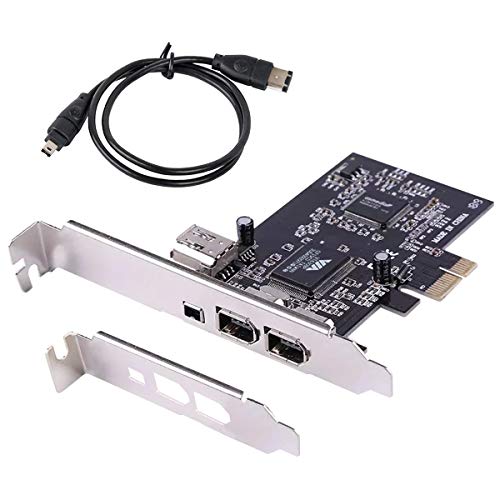
ELIATER PCIe Firewire Card for Windows 10, IEEE 1394A PCI Express Controller 4 Ports(3 x 6 Pin and 1 x 4 Pin), 1394a Firewire 400 Adapter for Windows 7/8/Mac OS with Low Profile Bracket and Cable


Key features
- •PCIe IEEE 1394 firewire adapter is backward compatible with devices in 400/200/100Mbps transmission speed.
- •Works with Various Types of FireWire 800 (1394b) and 1394a Devices Including Portable Hard Disk, DV Camcorder, Digital Camera, CD-RW/DVD-ROM Drive and Other Audio/Video Devices.
- •VIA chip, compliant with PCI Express Base Specification 1.0a and compliant with IEEE 1394-1995, 1394a-2000 and OHCI 1.1 Standards.
- •Plug and play. It support Windows 98se/me/2000/XP/server 2003/Vista/7 32 bit /64 bit /win8/win10/Mac OS.
- •No drive required, 1394 devices are built into Windows 98 2nd and above (included) operating systems, It does not need to download driver separately.
- •PCIe IEEE 1394 firewire adapter is backward compatible with devices in 400/200/100Mbps transmission speed.
- •Works with Various Types of FireWire 800 (1394b) and 1394a Devices Including Portable Hard Disk, DV Camcorder, Digital Camera, CD-RW/DVD-ROM Drive and Other Audio/Video Devices.
- •VIA chip, compliant with PCI Express Base Specification 1.0a and compliant with IEEE 1394-1995, 1394a-2000 and OHCI 1.1 Standards.
- •Plug and play. It support Windows 98se/me/2000/XP/server 2003/Vista/7 32 bit /64 bit /win8/win10/Mac OS.
- •No drive required, 1394 devices are built into Windows 98 2nd and above (included) operating systems, It does not need to download driver separately.
BrandELIATER
CategoryFireWire Port Cards
ELIATER PCIe Firewire Card for Windows 10, IEEE 1394A PCI Express Controller 4 Ports(3 x 6 Pin and 1 x 4 Pin), 1394a Firewire 400 Adapter for Windows 7/8/Mac OS with Low Profile Bracket and Cable
List Price: $38.76$34.88DEALYou Save: $3.88 (10%)
Free shippingFree Returns – 30 daysFree Order CancellationSecure Payment2–3 Days DeliveryGet It October 26, 2026In Stock (1)No marketing spamNo account requiredFulfilment by FedEx / Amazon / UPS / ShipwirePayPal / Card Buyer Protection
Customer Reviews
Reviews sourced from verified Amazon purchasers4.3
out of 5
Based on 10 reviews
5★
70%
4★
30%
3★
0%
2★
0%
1★
0%
Works in Windows 11 pro natively, no need to install drivers.
T.J. Turgeon✓ Verified Purchase•February 15, 2024
Needed a way to transfer D8 video from an old Sony camcorder. IEEE 1394a (FireWire) does not work through USB to FireWire adapters. This PCIe card is the solution. The drivers are already included in Windows 11. It was just plug and play. All of my video editing programs recognized the interface and connected to my camcorder without any issues.
Worked for Samsung MiniDV download
yanstep✓ Verified Purchase•January 3, 2024
I found some 20 year old MiniDV tapes and my Samsung SCD103 camcorder with firmware download port. This card installed into an HP Windowx 10 PC with no problems and no need to download drivers. Used Amcap software, with Type-1 firmware download to retrieve video -- which is free to use with 15 minute limit for clips. On thing to be careful with is to make sure you understand Capture versus Record in software, as the Record button means Record camera video and over write the tape. Capture shows video on tape and copies it on to computer hard drive. A Cap a little buggy but works, requires restart of software often, as it drops connection to camera.
The product comes with 2 back panels to fit computer desktops.
Dana Doo✓ Verified Purchase•December 28, 2023
This product came with 2 back panels to fit my computer. Changing the back panel with a Philips screw driver was a little challenging but after that it was easy to install. The device itself works perfectly. I recommend this seller.
Didn't connect to my DV Camcorder via provided firewire cable.
Kenneth Cooke✓ Verified Purchase•December 28, 2023
I know a lot about installing PCI cards and drivers. The card was recognized by my Windows 10 System and functioned normally. Unfortunately, the card never recognized or communicated with my Sony DV8 Camcorder. The company technical support staff was responsive when I asked for help. The card was cheap enough I am not going to sweat the fact it never connected to my device from last century.
It works but??
Mike✓ Verified Purchase•December 21, 2023
I bought this capture card after reading most positive reviews, to save some old memories from my DV camcorder tapes, it installed very easy on my windows 11 fast machine, it was recognized with no problems no need to download driver, windows automatically took care of it, i plugged in the camcorder via the cable that came with it, and opened my favorite program Vegas 18, to capture videos, I can see the video in the program and start capturing, but every 10 seconds or so sometimes 2 seconds, it gets disconnected for no apparent reason, I had to unplug and plug the cable to start recording again, but again it kept losing connection every couple seconds, I did hours of agonizing research online, I unnstalled, and reinstall the part, tried different programs, with no avail, I almost gave up, then I thought to change the cable as a last thing, luckily a new cable solved the problem, the cable that came with it was defective but not totally I wish it was totally defective, I would've changed it right away, now with the new good cable it works perfect, without the defective cable I would've gave it 5 stars, so always check the cable first.
Page 1 of 2