Digital Alarm Clock,6" Large LED Display with Dual USB Charger Ports | Auto Dimmer Mode | Easy Snooze Function, Modern Mirror Desk Wall Clock for Bedroom Home Office for All People (Black)




Key features
- •♥Unique Mirror Large Display Design--6.1" inch ultra-large LED display, you can see the time clearly even at a glance within 30 feet of your bedroom,and the display is also can be used as a mirror in daily use,simple and interesting.
- •♥Adjustable Brightness & Night Mode--The digital alarm clock provides 3-level brightness,adjust by manual or auto to a comfortable brightness and the LED light will automatically dim during your sleep time to protect your eyes at night and save energy. No blinding lights or any annoying sounds disturb your sleep,create an peaceful environment for sleep.
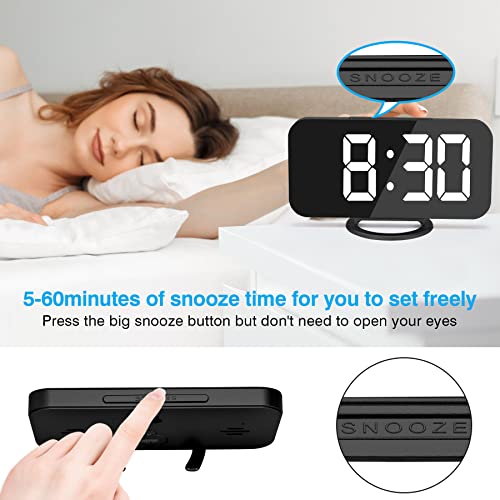
- •♥Snooze Function--Big snooze button helps you to easily turn off the buzzer without opening eyes, and get extra 5 minutes sleep, but simultaneously prevent oversleeping. The digital clock will alarm every 5 minutes until you turn off the snooze mode by pressing any other buttons, perfect for heavy sleepers.
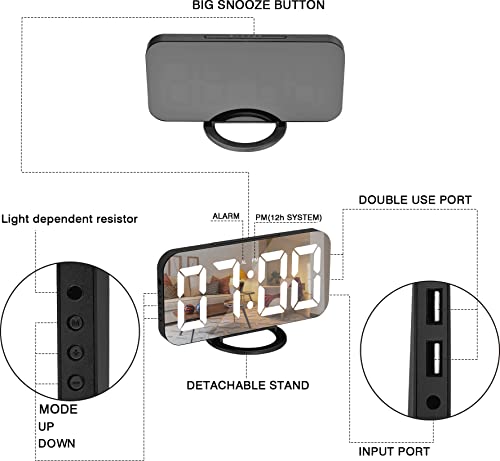
- •♥Dual USB Charging Ports & Battery Backup--Equipped with two USB charging ports on the digital alarm clock,you can charge cellphone,tablets and other electronics devices simultaneously when you charge the clock. No need to worry about low battery when you play your phone on the bed, very convenient for life.Backup battery (included) only stores time and alarms' settings.
- •♥100% Satisfaction Warranty--Made with PMMA material,not easy to be broken,very light and slim. Best gift for all people and perfect for home bedside office table decoration or daily use.100% Money Back Guarantee. If you are not completely satisfied with our product, simply return it with full refund. Buy absolutely no risk.
Digital Alarm Clock,6" Large LED Display with Dual USB Charger Ports | Auto Dimmer Mode | Easy Snooze Function, Modern Mirror Desk Wall Clock for Bedroom Home Office for All People (Black)
List Price: $42.93$38.64DEALYou Save: $4.29 (10%)
Free shippingFree Returns – 30 daysFree Order CancellationSecure Payment2–3 Days DeliveryGet It October 26, 2026In Stock (2)No marketing spamNo account requiredFulfilment by FedEx / Amazon / UPS / ShipwirePayPal / Card Buyer Protection
Customer Reviews
Reviews sourced from verified Amazon purchasers4.2
out of 5
Based on 10 reviews
5★
50%
4★
50%
3★
0%
2★
0%
1★
0%
Must be plugged in at all times
Amazon Customer✓ Verified Purchase•September 12, 2023
Feels cheap but looks cute. It must be plugged in at all times. Battery operation is only for time memory. It would've been nice if the power cord plugged in the back was not on the side where it's very visible. It just takes away from the overall aesthetic.
Large LED display is a must-have!
Clarissa✓ Verified Purchase•September 8, 2023
As someone who struggles with time management and waking up in the morning having an alarm clock like this is easy to see quickly definitely helps me out a lot throughout the day, especially in the morning also love the fact that you can change the brightness setting on it and when I unplug it doesn't lose track of time I don't have to reset it
Love it
Brooke Kuchinski✓ Verified Purchase•August 30, 2023
This clock is perfect for me. I have it on my bedside table. Best part is the two usb ports on the right side. I plug my cell phone in and I can use my phone when relaxing in bed while its charging, with plenty length for the cord since the clock is right on my level opposed to below in a wall outlet. I also have my second port to charge whatever device needed at that time. I keep my cords in my bedside table drawer, so very accessible.
You make brightness adjustments short pressing the plus and minus sign buttons on the left, or hold down the plus sign button to turn on and off the auto brightness mode. When auto mode is set, there are times of the day when the numbers are basically invisible, so that's not great. I've just had mine manually adjusted to the same brightness and it doesn't bother me at night. But today I decided to try the auto mode to see what hours I can't see the numbers. I just reread the instructions to remind myself how to use the alarm, and this peaked my interest in trying the auto brightness mode again.
This is the first time I am using the alarm. I work Friday sat and sun mornings and wake up those days at 0545. (Side note I like the military time function because of working night shifts in the past and I like to know easily if it is am or pm). I got the idea to try to get up early everyday to increase my productivity, so I will just leave the alarm setting as is. To turn the alarm off you push any putting (besides the snooze button). Pushing the big snooze button on the top of the clock will snooze in increments of 5 minutes and beep again. The snooze time is adjusted by pressing and holding the "M" button on the left side of the clock, which puts the click in the mode to adjust the settings of also the time, military time or standard time, the alarm time, alarm on or off, and the snooze time duration. To get to the snooze time duration setting, after entering the setting mode by long pressing the "M" button, you then toggle through settings by short pressing the "M" button.. when you get to the alarm time view, you must long hold the "M" button again to adjust the time, then short pressing the "M" button to switch to the snooze time duration, when finally you use the plus or minus buttons to toggle between increments of 5-60 min. When done press the "M" button again to exit setting mode. WHEW! Sounds like a lot, but it ISNT. Lol. Just lots of words.
If I decide I don't want to get up at the same time of day everyday , I will just enter setting mode by long pressing the "M" button, short pressing M until I get to alarm on or off setting and use the plus and minus arrows to turn it to off. I could switch between turning alarm and on off at the start and end of each weekend if I want. We will see. I usually use my cell for alarm anyways.
Long story short, I recommend this alarm for its simple and appealing look, and benefit of the two usb side ports.
I did not find a volume control button anywhere and haven't used the alarm yet so we will see how it sounds. I rated that part a 1 because I don't think a volume control option exists. And because the auto brightness mode renders the numbers invisible during some parts of the day, I scored the "˜ease to read' section a 4 because you can just opt for the manual brightness setting, (in which the different brightness levels are great for different purposes that can arise) but if a feature is offered it should be effective at all times. It is a clock so we should be able to always see the numbers imo.
Have a nice day!
You make brightness adjustments short pressing the plus and minus sign buttons on the left, or hold down the plus sign button to turn on and off the auto brightness mode. When auto mode is set, there are times of the day when the numbers are basically invisible, so that's not great. I've just had mine manually adjusted to the same brightness and it doesn't bother me at night. But today I decided to try the auto mode to see what hours I can't see the numbers. I just reread the instructions to remind myself how to use the alarm, and this peaked my interest in trying the auto brightness mode again.
This is the first time I am using the alarm. I work Friday sat and sun mornings and wake up those days at 0545. (Side note I like the military time function because of working night shifts in the past and I like to know easily if it is am or pm). I got the idea to try to get up early everyday to increase my productivity, so I will just leave the alarm setting as is. To turn the alarm off you push any putting (besides the snooze button). Pushing the big snooze button on the top of the clock will snooze in increments of 5 minutes and beep again. The snooze time is adjusted by pressing and holding the "M" button on the left side of the clock, which puts the click in the mode to adjust the settings of also the time, military time or standard time, the alarm time, alarm on or off, and the snooze time duration. To get to the snooze time duration setting, after entering the setting mode by long pressing the "M" button, you then toggle through settings by short pressing the "M" button.. when you get to the alarm time view, you must long hold the "M" button again to adjust the time, then short pressing the "M" button to switch to the snooze time duration, when finally you use the plus or minus buttons to toggle between increments of 5-60 min. When done press the "M" button again to exit setting mode. WHEW! Sounds like a lot, but it ISNT. Lol. Just lots of words.
If I decide I don't want to get up at the same time of day everyday , I will just enter setting mode by long pressing the "M" button, short pressing M until I get to alarm on or off setting and use the plus and minus arrows to turn it to off. I could switch between turning alarm and on off at the start and end of each weekend if I want. We will see. I usually use my cell for alarm anyways.
Long story short, I recommend this alarm for its simple and appealing look, and benefit of the two usb side ports.
I did not find a volume control button anywhere and haven't used the alarm yet so we will see how it sounds. I rated that part a 1 because I don't think a volume control option exists. And because the auto brightness mode renders the numbers invisible during some parts of the day, I scored the "˜ease to read' section a 4 because you can just opt for the manual brightness setting, (in which the different brightness levels are great for different purposes that can arise) but if a feature is offered it should be effective at all times. It is a clock so we should be able to always see the numbers imo.
Have a nice day!
Fits My Needs!!
Taylor✓ Verified Purchase•August 17, 2023
Got this for my treatment room to sit on a high shelf. It's plastic, the base is a bit flimsy but it's aesthetically pleasing and stays in place so I don't mind. Helps me to keep track of time quickly during treatments and I can adjust the brightness.
Love it!!
Chris✓ Verified Purchase•August 16, 2023
This is such a beautiful alarm clock. It was super easy to set up. I did accidentally set the alarm for pm rather than am the first night, but I figured it out, and fixed it. The alarm isn't very loud, and I can hardly hear it over my sound machine. It basically is as loud as my phone alarm which is why I ordered an alarm clock hoping it would be louder. 😅 Overall I still rate this a 5 star cause of how beautiful it is, how simple a set up it is, and that the alarm does get the job done.
Page 1 of 2


