Elgato Stream Deck XL – Advanced Studio Controller, 32 Macro Keys, Trigger Actions in apps and Software Like OBS, Twitch, YouTube and More, USB, Works with Mac and PC



Key features
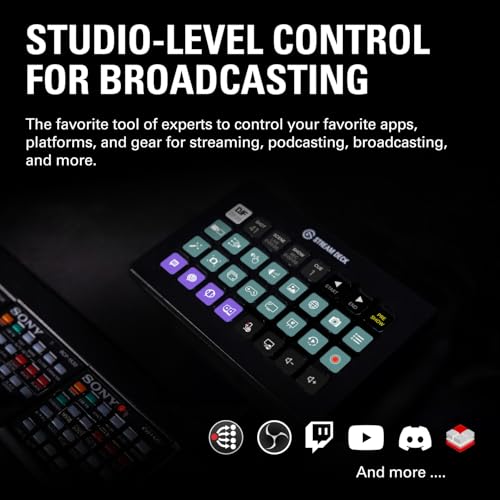
- •Advanced live production: easily control your favorite tools and platforms
- •32 customizable keys: instantly trigger unlimited actions with a tap
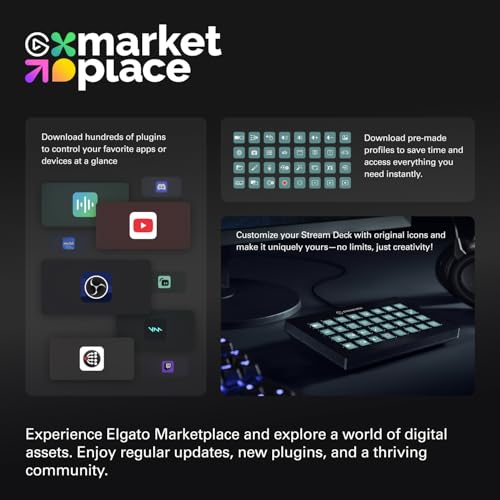
- •Powerful integrations: elgato game capture, obs, stream labs, Twitch, YouTube, Twitter, mixer, Spotify, Philips HUE, vmix, voice mod, and more
- •One-touch operation: change, scenes, launch media, switch cameras, Tweak lighting, adjust Audio, post tweets - anything
- •Visual feedback: know that your command has been executed
- •connectivity technology: USB
Elgato Stream Deck XL – Advanced Studio Controller, 32 Macro Keys, Trigger Actions in apps and Software Like OBS, Twitch, YouTube and More, USB, Works with Mac and PC
List Price: $363.74$327.37DEALYou Save: $36.37 (10%)
Free shippingFree Returns – 30 daysFree Order CancellationSecure Payment2–3 Days DeliveryGet It October 24, 2026In Stock (10)No marketing spamNo account requiredFulfilment by FedEx / Amazon / UPS / ShipwirePayPal / Card Buyer Protection
Customer Reviews
Reviews sourced from verified Amazon purchasers4.8
out of 5
Based on 20 reviews
5★
90%
4★
10%
3★
0%
2★
0%
1★
0%
Util, práctica y elegante
David✓ Verified Purchase•September 1, 2023
No creà que necesitarÃa una Stream Deck, pero es realmente útil y ni siquiera tienes que ser creador de contenido o steamer.
La uso para mà trabajo y uso personal, videojuegos y contenido multimedia.
Puedes incluso crear perfiles para flight simulador o truck simulador...lo que quieras!
Los atajos son muy prácticos para tu espacio de trabajo, abrir programas, configuración, luces, sonido etc, la cantidad de personalización es increÃble y tiene buena comunidad detrás. El nuevo diseño me gusta mucho y combina con mi setup jajaja.
El único punto negativo que veo es el precio, pero vale la pena esperar a algún descuento para adquirirla, muy recomendado!
La uso para mà trabajo y uso personal, videojuegos y contenido multimedia.
Puedes incluso crear perfiles para flight simulador o truck simulador...lo que quieras!
Los atajos son muy prácticos para tu espacio de trabajo, abrir programas, configuración, luces, sonido etc, la cantidad de personalización es increÃble y tiene buena comunidad detrás. El nuevo diseño me gusta mucho y combina con mi setup jajaja.
El único punto negativo que veo es el precio, pero vale la pena esperar a algún descuento para adquirirla, muy recomendado!
Your Compact Control Center for Streamlined Content Creation
Robert✓ Verified Purchase•August 16, 2023
The Elgato Stream Deck Mini is a compact and powerful tool that revolutionizes content creation for streamers, video editors, and creative enthusiasts alike. Despite its smaller size compared to the standard Stream Deck, this mini version proves to be a game-changer with its intuitive design and seamless integration with various applications.
First and foremost, the Stream Deck Mini's key feature is its six customizable LCD keys, each displaying icons of your choice. The key configurations are a breeze to set up using the user-friendly Stream Deck software, which allows you to assign a wide range of actions, hotkeys, and macros to the keys. From launching applications and switching scenes to triggering sound effects and social media commands, the possibilities are virtually limitless.
The compact form factor of the Stream Deck Mini is a major advantage, as it easily fits into any workspace without occupying much real estate. Its portability makes it ideal for content creators who are always on the move or have limited desk space. Despite its smaller size, the keys remain responsive and provide satisfying tactile feedback, ensuring quick and precise actions with every press.
The integration with popular software and streaming platforms is seamless, making the Stream Deck Mini an indispensable companion for streamers. Whether you're using OBS Studio, Streamlabs, or even Adobe applications like Photoshop and Premiere Pro, the Stream Deck Mini significantly streamlines your workflow and enhances productivity.
In addition to its practicality for live streaming, the Stream Deck Mini is also an asset for video editing enthusiasts. Customizing keys with various editing commands and shortcuts expedites the editing process, saving valuable time and effort.
One minor aspect to consider is the limitation of six keys, which may be insufficient for users with a wide array of commands and actions to manage. However, for those who don't require an extensive number of buttons or prefer a minimalistic setup, the Stream Deck Mini offers the perfect balance of functionality and simplicity.
In conclusion, the Elgato Stream Deck Mini is a must-have tool for streamers, content creators, and video editors seeking to optimize their workflow and take their production quality to the next level. Its compact size, user-friendly software, and seamless integration with various applications make it a standout product in its category. If you're looking to enhance your content creation process and gain more control over your tasks, the Stream Deck Mini is an investment that will undoubtedly pay off.
First and foremost, the Stream Deck Mini's key feature is its six customizable LCD keys, each displaying icons of your choice. The key configurations are a breeze to set up using the user-friendly Stream Deck software, which allows you to assign a wide range of actions, hotkeys, and macros to the keys. From launching applications and switching scenes to triggering sound effects and social media commands, the possibilities are virtually limitless.
The compact form factor of the Stream Deck Mini is a major advantage, as it easily fits into any workspace without occupying much real estate. Its portability makes it ideal for content creators who are always on the move or have limited desk space. Despite its smaller size, the keys remain responsive and provide satisfying tactile feedback, ensuring quick and precise actions with every press.
The integration with popular software and streaming platforms is seamless, making the Stream Deck Mini an indispensable companion for streamers. Whether you're using OBS Studio, Streamlabs, or even Adobe applications like Photoshop and Premiere Pro, the Stream Deck Mini significantly streamlines your workflow and enhances productivity.
In addition to its practicality for live streaming, the Stream Deck Mini is also an asset for video editing enthusiasts. Customizing keys with various editing commands and shortcuts expedites the editing process, saving valuable time and effort.
One minor aspect to consider is the limitation of six keys, which may be insufficient for users with a wide array of commands and actions to manage. However, for those who don't require an extensive number of buttons or prefer a minimalistic setup, the Stream Deck Mini offers the perfect balance of functionality and simplicity.
In conclusion, the Elgato Stream Deck Mini is a must-have tool for streamers, content creators, and video editors seeking to optimize their workflow and take their production quality to the next level. Its compact size, user-friendly software, and seamless integration with various applications make it a standout product in its category. If you're looking to enhance your content creation process and gain more control over your tasks, the Stream Deck Mini is an investment that will undoubtedly pay off.
Not just for streamers!
Kyle✓ Verified Purchase•August 13, 2023
I use it for Teams meetings at work, quick app shortcuts, and hotkeys for gaming (e.g. quickly typing chat messages). It is highly customizable, including adding folders and multiple pages of shortcuts, so I haven't felt too limited by the small size. And it doesn't take up much space or look bulky on my desk.
Util, práctica y elegante
David✓ Verified Purchase•August 4, 2023
No creà que necesitarÃa una Stream Deck, pero es realmente útil y ni siquiera tienes que ser creador de contenido o steamer.
La uso para mà trabajo y uso personal, videojuegos y contenido multimedia.
Puedes incluso crear perfiles para flight simulador o truck simulador...lo que quieras!
Los atajos son muy prácticos para tu espacio de trabajo, abrir programas, configuración, luces, sonido etc, la cantidad de personalización es increÃble y tiene buena comunidad detrás. El nuevo diseño me gusta mucho y combina con mi setup jajaja.
El único punto negativo que veo es el precio, pero vale la pena esperar a algún descuento para adquirirla, muy recomendado!
La uso para mà trabajo y uso personal, videojuegos y contenido multimedia.
Puedes incluso crear perfiles para flight simulador o truck simulador...lo que quieras!
Los atajos son muy prácticos para tu espacio de trabajo, abrir programas, configuración, luces, sonido etc, la cantidad de personalización es increÃble y tiene buena comunidad detrás. El nuevo diseño me gusta mucho y combina con mi setup jajaja.
El único punto negativo que veo es el precio, pero vale la pena esperar a algún descuento para adquirirla, muy recomendado!
Useful for More Than Just Gaming - Useful in the Studio, as Well
Deborah Anderson ✓ Verified Purchase•July 22, 2023
Even though this unit has several options, I have found myself starting out with the most basic, the simple website button, and even though you could do that with a simple browser bookmark, it is very convenient to use the Stream Deck to access a website (link) anytime, from any place.
For example, I have a cute button that allows me to access an emoji page so that I can add an emoji to a text, tweet (X post), or whatever with the click of Elgato Stream Deck button.
The next set of buttons will be for the OBS, LiveStreaming, Twitch, etc., as I continue to use them in my professional studio.
And, the mini allows me to travel with it, even with my laptop, programming the lower buttons to advance to the next screen with more programmable buttons, with a virtual unlimited allowable level of buttons! So, the sky is the limit.
I export my settings to my second Stream Deck so that I always have the same setup wherever I go, whether, in my office or on-the-go, I am never without my push-button options with this little unit. I don't know how I lived without it (them)!
For example, I have a cute button that allows me to access an emoji page so that I can add an emoji to a text, tweet (X post), or whatever with the click of Elgato Stream Deck button.
The next set of buttons will be for the OBS, LiveStreaming, Twitch, etc., as I continue to use them in my professional studio.
And, the mini allows me to travel with it, even with my laptop, programming the lower buttons to advance to the next screen with more programmable buttons, with a virtual unlimited allowable level of buttons! So, the sky is the limit.
I export my settings to my second Stream Deck so that I always have the same setup wherever I go, whether, in my office or on-the-go, I am never without my push-button options with this little unit. I don't know how I lived without it (them)!
Page 1 of 4


![Nero 11 Platinum [Old Version]](https://m.media-amazon.com/images/I/51FN826rLTL._SL500_.jpg)