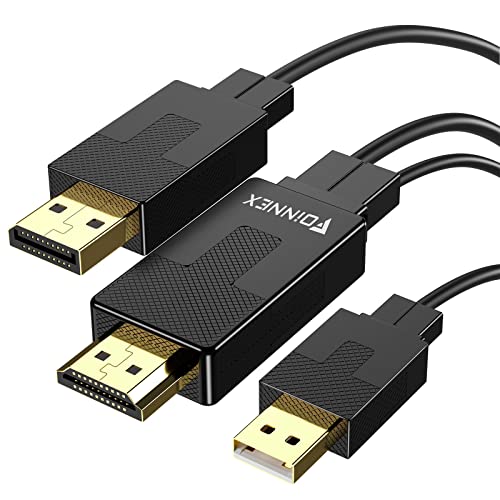
USB to HDMI Adapter, HD Audio Video Cable Converter, USB 3.0 to HDMI for Multiple Monitors 1080P, Compatible with Windows XP/10/8.1/8/7 (Not Support Mac, Linux, Vista, Chrome (Gray)


Key features
- •♥ USB to HDMI Adapter ♥ : USB 3.0 to HDMI Adapter is used to connected USB-enabled devices( such as laptop, desktop) with a HDMI-enabled devices( such as monitor, projector, TV) for multi-monitor solution, extending working space with split-screen, mirroring display, etc.
- •♥ Mirror & Extend Dual Mode ♥ : This USB to HDMI convertor have extend mode let your laptop for visibility of multiple tasks at the same time;Mirror mode gives your laptop to a large screen for a visual enjoyment. Suit for games entertainment, home theater, video conference, corporate training, etc.
- •♥ 1080P High Resolution ♥ : Leveraging the high-bandwidth (5Gbps) Super Speed USB 3.0 interface offering flawless high definition video transmission to your monitor or projector. Functions like an external graphics card. Supports resolutions up to 1920 x 1080 @ 60 Hz for enhanced visuals(Only USB 3.0 connector can achieve HD 1080P).
- •♥ Multi-screen Function ♥ : This adapter allows you to expand multiple displays at the same time, Simultaneously output audio and video to HDTV, projector, slide projector and other high-definition devices. Let you enjoy the fun of multiple screens.
- •♥ Easy to Use ♥ : Free installation. Plug-and-play. Built-in drive, Plug the USB to HDMI adapter into your computer, then open the USB device folder and double click to install the driver. You may also contact our customer service team should you need further assistance.
USB to HDMI Adapter, HD Audio Video Cable Converter, USB 3.0 to HDMI for Multiple Monitors 1080P, Compatible with Windows XP/10/8.1/8/7 (Not Support Mac, Linux, Vista, Chrome (Gray)
List Price: $38.39$34.55DEALYou Save: $3.84 (10%)
Free shippingFree Returns – 30 daysFree Order CancellationSecure Payment2–3 Days DeliveryGet It October 25, 2026In Stock (2)No marketing spamNo account requiredFulfilment by FedEx / Amazon / UPS / ShipwirePayPal / Card Buyer Protection
Customer Reviews
Reviews sourced from verified Amazon purchasers4.0
out of 5
Based on 20 reviews
5★
70%
4★
30%
3★
0%
2★
0%
1★
0%
Works Great - I know have 3 Screen Views
imagination.unlimited✓ Verified Purchase•August 18, 2023
The media could not be loaded. So, you have 1 HDMI port on your laptop but you have 2 physical monitors and you want 3 sperate screen views, what do you do.
You buy this adapter and plug it into your usb port - Srceen #1
you plug your HDMI cable into the port onl your laptops - Screen #2
You can now use your laptop build in screen speartesly - Screen # 3
So now you can
1 - do work on - Screen #1
2- play youtube on - Screen #2
3- scoll your all day new channel on- Screen # 3
All at the same exact time independantly !
You buy this adapter and plug it into your usb port - Srceen #1
you plug your HDMI cable into the port onl your laptops - Screen #2
You can now use your laptop build in screen speartesly - Screen # 3
So now you can
1 - do work on - Screen #1
2- play youtube on - Screen #2
3- scoll your all day new channel on- Screen # 3
All at the same exact time independantly !
Works good. Clear pictures
Kevin✓ Verified Purchase•August 16, 2023
Picture was great. Super simple to hook up.
Make sure to Install Driver
Robert Harlan✓ Verified Purchase•August 15, 2023
Some say the driver automatically installs. That may not have happened because I have Windows 11. Simply display the drives on your computer and opens the drive which represents the usb adaptor you just plugged in and open the folder called "windows" then click on the executable file which will launch an installation wizard which will walk you through the process. Done. If you don't do this, your adapter will do nothing, but if plugged in to your 3.0 usb a port and installed right, It should work perfectly as advertised.
Workes resonably well with a USB 2
WeegieB✓ Verified Purchase•August 12, 2023
Driver install requires you look for a file held on the devise. Depending on your USB port it will support more or less resolution. I'm getting 800x600 reliably, but 1280x... sometimes drops out when the computer is under load. I am using an older laptop. Probably would be flawless with a USB 3 support. No real complaints. Just want to be informative.
Works Great - I know have 3 Screen Views
imagination.unlimited✓ Verified Purchase•August 7, 2023
The media could not be loaded. So, you have 1 HDMI port on your laptop but you have 2 physical monitors and you want 3 sperate screen views, what do you do.
You buy this adapter and plug it into your usb port - Srceen #1
you plug your HDMI cable into the port onl your laptops - Screen #2
You can now use your laptop build in screen speartesly - Screen # 3
So now you can
1 - do work on - Screen #1
2- play youtube on - Screen #2
3- scoll your all day new channel on- Screen # 3
All at the same exact time independantly !
You buy this adapter and plug it into your usb port - Srceen #1
you plug your HDMI cable into the port onl your laptops - Screen #2
You can now use your laptop build in screen speartesly - Screen # 3
So now you can
1 - do work on - Screen #1
2- play youtube on - Screen #2
3- scoll your all day new channel on- Screen # 3
All at the same exact time independantly !
Page 1 of 4

![QGeeM USB C to HDMI Adapter 4K Cable, USB Type-C to HDMI Adapter [Thunderbolt 3/4] HDMI Adapter for Laptop MacBook Pro/Air, Galaxy S10/S9/S8, Dell XPS 13/15, Pixelbook, Surface Pro and More(Pink)](https://m.media-amazon.com/images/I/21V8dThK9rS._SL500_.jpg)


![WAVLINK USB 2.0 to VGA/DVI/HDMI Universal Video Graphics Card Adapter for Multiple Monitors Up to 1920x1080@60Hz for Windows, Mac OS & Chrome OS[Includes DVI-to-VGA,DVI-to-HDMI Converter]](https://m.media-amazon.com/images/I/41EpG2i9dhL._SL500_.jpg)