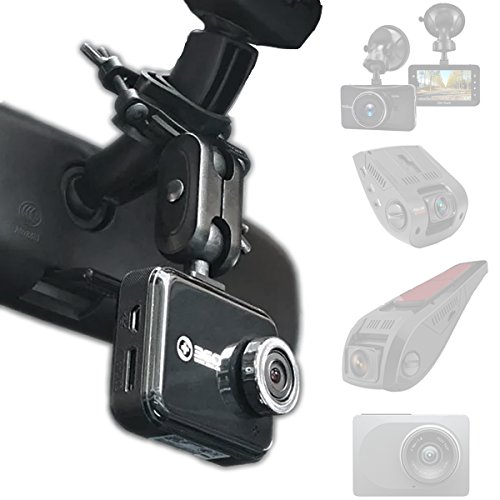
VIOFO Dash Cam A119 V3 2K 2560x1440P Quad HD+ 60FPS Front Car Dash Camera, 5MP STARVIS Sensor, 140-Degree Wide Angle, GPS Included, Buffered Parking Mode, True HDR, Motion Detection, Time Lapse


Key features
- •QUAD HD+ RECORDING: Featuring an entirely new chipset design & Sony sensor to support Quad HD+ recording in 2560 x 1600P / 2560 x 1440P at 30fps to create high quality, vivid and detailed images in various lighting environments.
- •SONY 5MP STARVIS SENSOR: Experience the new Sony Starvis 5MP technology with detailed, brighter and crystal-clear images captured in day-or-night time lighting for super clear and consistent night vision.
- •MOTION & COLLISION DETECTION: Using the camera's G-Sensor and State-of-the-Art motion detection technology, video footage is now intelligently captured in parking mode when moving objects and/or impacts are detected while the vehicle is parked. Files are flagged as important and protected onto the SD card for review.
- •PRE & POST BUFFERED RECORDING: Capture the whole story of the events leading up to and after events or collisions with intelligent recording technology that automatically saves footage both 15-seconds before and 30-seconds after a detected collision and/or event.
- •TRUE PARKING MODE: Forget the old and conventional style of parking mode 'frame-by-frame' recording. This camera's video segments are captured in full-continuous clips while the vehicle is parked, rather than strung together 'frame-by-frame'.
BrandVIOFO
CategoryOn-Dash Cameras
Colorblack
WarrantyLifetime customer support and 1-year limited manufacturer's warranty
VIOFO Dash Cam A119 V3 2K 2560x1440P Quad HD+ 60FPS Front Car Dash Camera, 5MP STARVIS Sensor, 140-Degree Wide Angle, GPS Included, Buffered Parking Mode, True HDR, Motion Detection, Time Lapse
List Price: $165.86$149.27DEALYou Save: $16.59 (10%)
Free shippingFree Returns – 30 daysFree Order CancellationSecure Payment2–3 Days DeliveryGet It October 26, 2026In Stock (30)No marketing spamNo account requiredFulfilment by FedEx / Amazon / UPS / ShipwirePayPal / Card Buyer Protection
Customer Reviews
Reviews sourced from verified Amazon purchasers4.4
out of 5
Based on 10 reviews
5★
70%
4★
30%
3★
0%
2★
0%
1★
0%
Good dashcam
Tram Phan✓ Verified Purchase•September 27, 2023
Does everything I need it to do. The size of it is not too cumbersome and intruding. The cable and installation tools it comes with are plenty and practical. It records well. The quality of the recordings could be better, but compared to other dashcams, it's the best in its price point.
If you decide to get a dashcam, I recommend this one
Alex K✓ Verified Purchase•September 24, 2023
Most dash cams want you to link it to an app to your phone, but this one you don't have to do that. It records constantly, just records over when full. When something happens you can pop out the SD card (sold separately) and download the video to your computer, or just slip the camera off it's mounting bracket and plug the camera into your computer. I was able to hide the wires easily, the length was more than enough. The dash cam came with a double usb accessory plug! I just ordered a 2nd one of these for another vehicle. I got a SanDisk 128GB Extreme microSDXC UHS-I Memory Card with Adapter to go with it. Both together were under $100-.
Research/Unboxing/Firmware/Settings/Battery/Wiring/Placement
Chi Kim✓ Verified Purchase•September 17, 2023
After 2 near accidents, I decided to get a dashcam just in case there's a dispute about the facts. I did a lot of research online; several top 10 ten dashcams articles and Youtube videos, and the consensus is that the A119 V3 is the best dashcam under $200. Linus Tech Tips summarized there's only two dashcams in this range; the A119 and everything else.
Unboxing
After ordering the dashcam, things got a little complicated. It came with a set of accessories and cables, but no instructions. Older versions of the A119 didn't come with the GPS mount (sold separately) and some of the additional accessories; the newest version of the A119 comes with the latest firmware, and a host of additional accessories. The dashcam, cables, and cigarette lighter adapter didn't need any instructions. The clips for hiding the cables, and trim tool made sense, but the GPS mounting unit as well as the 2 extra mounting units, 3M pads, and 2 transparent sheets for the glass didn't have any instructions. It would have been nice to have a short descriptor about each accessory. I can appreciate that they included extra non-GPS mounting unit if you have more than one vehicle, extra 3M mounting stickers if you make a mistake or want to readjust the placement, and the 2 screen protectors so you don't mess up your window. I had to watch a few installation videos to figure out that the screen protector is to protect the front windshield from the 3M adhesive and to make it easier to remove the mounts. The screen protector even has 2 sticky sides, but one side is for the glass, and the other less sticky side is for the mount. The instructions need to be updated to explain the additional accessories.
Firmware
Once you get your dashcam, check your firmware. The most recent version as of December 2022 is V2.6. The firmware improves the performance and resolution of the dashcam. If you watch older videos of the A119, they did not have the same high resolution video options. Newer videos take full advantage of the 4k resolution and WDR improvement. If you purchased your dashcam recently, it should come shipped with the latest firmware. But check to make sure you have the most recent version. Firmware updates are easy to perform using your memory card and menu setting.
Settings
The settings that come with the dashcam aren't necessarily the best settings for your dashcam. One problem with updating the firmware is that the optimal settings are constantly changing. If you look at older optimal settings, they are very different than the most current optimal settings. Make sure the settings that are recommended are for the latest firmware.
Battery
There are two options for powering the dashcam. You can have it temporarily powered when the ignition is on, and when you're driving. The other option is to have it powered on at all times. The first option uses the cigarette lighter adapter and the USB cable. The second option requires installing a wiring kit (sold separately) that gets plugged into your fusebox. Since the dashcam is always on, the second option allows you to use parking mode and act as a sentry for your vehicle. In parking mode, it can record continually, it can automatically record in intervals, or when motion or vibrations are detected.
When I asked installers about the powering options, they discouraged the second option in newer vehicles. The second option can potentially drain the battery to the point where your car won't start. One installer said if you keep it in a garage and there isn't much activity in the garage, it shouldn't affect your battery much. If you park on the street and there's lots of activity, the dashcam will be working all day, and can drain a weak battery. If you're planning to leave your car unattended outdoors for several weeks, it will definitely drain your battery.
Wiring
The problem with all dashcams is the ugly wiring that's required to hide the charging cables. If you're squeamish about opening and tucking in cables behind moldings and trim, the cables will dangle from the dashcam to your nearest 12V outlet. When I asked my mechanic about the cable work, he warned me about the potentially damaging airbags and sensors that are in the front windshield columns. There's always a good chance you can damage the plastic moldings and trim when you're prying them open. You can always run the cables tucked along the edge of the front windshield, and along the door jams to get near your 12V outlet or fusebox.
After watching dozens of videos about dashcam wiring, I came across the Dongar adapter which takes advantage of the rear view mirror electronics. It requires an electronic rear view mirror with dimming, compass, or garage door functions. The dongle splices a USB port from an existing power connector that goes from the mirror to the roof console. It uses the first power option and will only work when the ignition is on, or when you're driving, like the electronic rear view mirror. If your rear view mirror does not have any electronic function, you can not use the Dongar adapter.
Placement
Most dashcams will turn off after a few seconds, so you don't have to worry about the video distracting the driver. Make sure it's placed somewhere that doesn't interfere with your driving, but can capture as much video as possible. Most articles recommend placing it near the top of your windshield. Having the dashcam mounted near the top of the windshield does make it more inconspicuous than having it mounted near the dashboard. It should also be within reach in case you need to push the hazard button to lock the overwrite function.
Unboxing
After ordering the dashcam, things got a little complicated. It came with a set of accessories and cables, but no instructions. Older versions of the A119 didn't come with the GPS mount (sold separately) and some of the additional accessories; the newest version of the A119 comes with the latest firmware, and a host of additional accessories. The dashcam, cables, and cigarette lighter adapter didn't need any instructions. The clips for hiding the cables, and trim tool made sense, but the GPS mounting unit as well as the 2 extra mounting units, 3M pads, and 2 transparent sheets for the glass didn't have any instructions. It would have been nice to have a short descriptor about each accessory. I can appreciate that they included extra non-GPS mounting unit if you have more than one vehicle, extra 3M mounting stickers if you make a mistake or want to readjust the placement, and the 2 screen protectors so you don't mess up your window. I had to watch a few installation videos to figure out that the screen protector is to protect the front windshield from the 3M adhesive and to make it easier to remove the mounts. The screen protector even has 2 sticky sides, but one side is for the glass, and the other less sticky side is for the mount. The instructions need to be updated to explain the additional accessories.
Firmware
Once you get your dashcam, check your firmware. The most recent version as of December 2022 is V2.6. The firmware improves the performance and resolution of the dashcam. If you watch older videos of the A119, they did not have the same high resolution video options. Newer videos take full advantage of the 4k resolution and WDR improvement. If you purchased your dashcam recently, it should come shipped with the latest firmware. But check to make sure you have the most recent version. Firmware updates are easy to perform using your memory card and menu setting.
Settings
The settings that come with the dashcam aren't necessarily the best settings for your dashcam. One problem with updating the firmware is that the optimal settings are constantly changing. If you look at older optimal settings, they are very different than the most current optimal settings. Make sure the settings that are recommended are for the latest firmware.
Battery
There are two options for powering the dashcam. You can have it temporarily powered when the ignition is on, and when you're driving. The other option is to have it powered on at all times. The first option uses the cigarette lighter adapter and the USB cable. The second option requires installing a wiring kit (sold separately) that gets plugged into your fusebox. Since the dashcam is always on, the second option allows you to use parking mode and act as a sentry for your vehicle. In parking mode, it can record continually, it can automatically record in intervals, or when motion or vibrations are detected.
When I asked installers about the powering options, they discouraged the second option in newer vehicles. The second option can potentially drain the battery to the point where your car won't start. One installer said if you keep it in a garage and there isn't much activity in the garage, it shouldn't affect your battery much. If you park on the street and there's lots of activity, the dashcam will be working all day, and can drain a weak battery. If you're planning to leave your car unattended outdoors for several weeks, it will definitely drain your battery.
Wiring
The problem with all dashcams is the ugly wiring that's required to hide the charging cables. If you're squeamish about opening and tucking in cables behind moldings and trim, the cables will dangle from the dashcam to your nearest 12V outlet. When I asked my mechanic about the cable work, he warned me about the potentially damaging airbags and sensors that are in the front windshield columns. There's always a good chance you can damage the plastic moldings and trim when you're prying them open. You can always run the cables tucked along the edge of the front windshield, and along the door jams to get near your 12V outlet or fusebox.
After watching dozens of videos about dashcam wiring, I came across the Dongar adapter which takes advantage of the rear view mirror electronics. It requires an electronic rear view mirror with dimming, compass, or garage door functions. The dongle splices a USB port from an existing power connector that goes from the mirror to the roof console. It uses the first power option and will only work when the ignition is on, or when you're driving, like the electronic rear view mirror. If your rear view mirror does not have any electronic function, you can not use the Dongar adapter.
Placement
Most dashcams will turn off after a few seconds, so you don't have to worry about the video distracting the driver. Make sure it's placed somewhere that doesn't interfere with your driving, but can capture as much video as possible. Most articles recommend placing it near the top of your windshield. Having the dashcam mounted near the top of the windshield does make it more inconspicuous than having it mounted near the dashboard. It should also be within reach in case you need to push the hazard button to lock the overwrite function.
So far, so good
MarkV✓ Verified Purchase•July 22, 2023
I've had it for about a year and it's working fine. Never had a problem with it. This is in the hot South Florida heat. I often forget it's there, but when I remember and check on it, it's always working fine.
Great Dash Cam!
FM Bob✓ Verified Purchase•July 14, 2023
This is the 4th Viofo A119 V3 I have purchased, for myself and family members. These dash cams are simply great. Easy to install and set up and the video it provides is very, very good. I have had a couple of these in my cars over the past few years and have never had a problem with them. That is why I continue to purchase the Viofo brand dash cams when I need to (for family members), and have upgraded my A119 from a few years ago. The original was still working with no problems at all when I upgraded for my own vehicle. Never having to obtain warranty service for any of the Viofo cams, I am confident that if I ever need it, Viofo will be standing behind their products and will no doubt be very helpful. Viofo makes several different models of dash cams, but I can only vouch for the A119 models. However I am sure their other models are just as reliable as the A199's they sell. Prices are also good on their products. In my opinion, everyone should have a dash cam in their vehicle ... if you don't have one now, do yourself a favor and purchase one of the Viofo models. I am very happy with the A119 V3!
Page 1 of 2