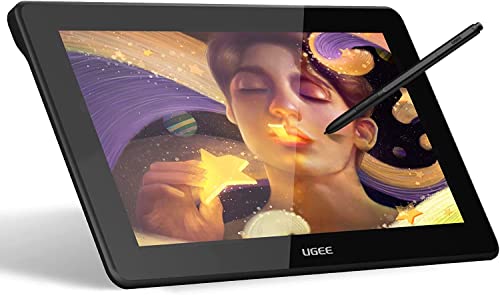
XPPen Updated Deco 01 V3 Drawing Tablet, 16384 Pressure Sensitivity, 8 Custom Shortcuts, 220 Report Rate for OSU Drawing Pad, Remote Teaching & Animation, Compatible with Android, Windows, macOS




Key features
- •Sufficient Working Space-The Deco 01 V2's expansive tablet is big and brilliant, yet still designed to break through the limit between shortcut keys and drawing area. 10 x 6.25-inch working area, so you get more space to create or get work done
- •Tilt Supported-Deco 01 V2 supports up to 60 degrees of tilt brush effect and delivers smoother and more natural lines and strokes, while also giving you the ability to add shading to your creation
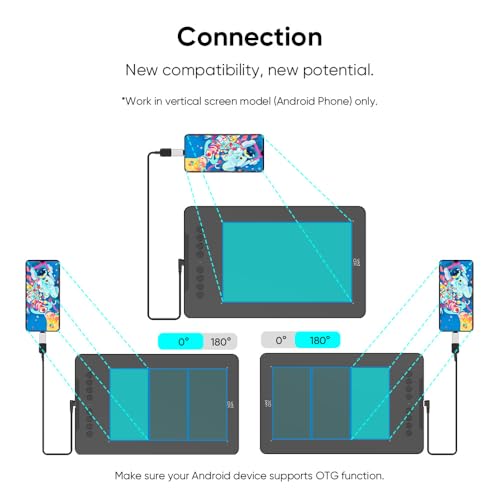
- •Android Supported-supports connections with Android Phones and Tablets 6.0 and above. It is compatible with most major software including: ibis Paint X, FlipaClip, Medibang, Autodesk Sketchbook, Zenbrush, Artrage, and more
- •Battery-free Stylus and 8 shortcut keys-The 8192 levels of instant pen pressure sensitivity_Providing you with groundbreaking control and fluidity to expand your creative output. No charging required. The eight, round, customizable shortcut keys that fits easily to your finger tip. With its blind spot reduction design, you can find the position of your express keys efficiently and the shortcut keys can be programmed to many different software programs
- •Wide Compatibility-The Deco 01 V2 can be used with Windows 10/8/7, MAC OS X 10.10 and above and Android 6.0 and above. This tablet is compatible with many major designer software such as Photoshop, SAI, Painter, Illustrator, Clip Studio, and more
XPPen Updated Deco 01 V3 Drawing Tablet, 16384 Pressure Sensitivity, 8 Custom Shortcuts, 220 Report Rate for OSU Drawing Pad, Remote Teaching & Animation, Compatible with Android, Windows, macOS
List Price: $77.27$69.54DEALYou Save: $7.73 (10%)
Free shippingFree Returns – 30 daysFree Order CancellationSecure Payment2–3 Days DeliveryGet It October 25, 2026In Stock (1)No marketing spamNo account requiredFulfilment by FedEx / Amazon / UPS / ShipwirePayPal / Card Buyer Protection
Customer Reviews
Reviews sourced from verified Amazon purchasers4.5
out of 5
Based on 10 reviews
5★
60%
4★
40%
3★
0%
2★
0%
1★
0%
Smooth as silk
Jon✓ Verified Purchase•March 7, 2024
I don't write a lot of reviews but I just now literally stopped in the middle of my work because I needed to share how awesome this is.
I have been working on this for a few months now, and I'm blown away by every part of it. Admittedly, I cannot comment too much on the buttons as I use a Tartarus Pro keypad for all my shortcuts, but otherwise, WOW.
The pen glides so smoothly and I have so much more control and accuracy than the two Wacoms I had prior. I also LOVE the 4 lit corners. Because of work, I'm going to be using this one more than my previous ones and I'm feeling I've really got an ally here! I am likely to report back after a long time to report how she holds up.
And the cost is ridiculous low to me. Highly satisfied.
I have been working on this for a few months now, and I'm blown away by every part of it. Admittedly, I cannot comment too much on the buttons as I use a Tartarus Pro keypad for all my shortcuts, but otherwise, WOW.
The pen glides so smoothly and I have so much more control and accuracy than the two Wacoms I had prior. I also LOVE the 4 lit corners. Because of work, I'm going to be using this one more than my previous ones and I'm feeling I've really got an ally here! I am likely to report back after a long time to report how she holds up.
And the cost is ridiculous low to me. Highly satisfied.
Excellent product for the price point.
Michael S.✓ Verified Purchase•February 29, 2024
Needed to replace my 15 year old W@com tablet, and when I looked at current prices, I started searching on Amazon for other options. Found this XP Deco model, read the reviews and took a chance. I wasn't expecting much for the price point, but this is an outstanding tablet. Really good quality. Plug and play works right out of the box. You can't beat this tablet for the price. If you need one, just go ahead and buy it. You won't be disappointed.
First time using one....
Anthony Iannone✓ Verified Purchase•February 8, 2024
Was definitely not what I was expecting, but that has all to do with my assumptions and not the device. Quality seems good, well packaged, fancier than most product packaging from same country typically, was actually impressed. Also, comes with some free software which I wasn't expecting. Only i can't tell you if I like it because I am using this on my chrome book, which the software is not available for unfortunately. However, it does indeed work, plug and play, with hp chromebook!
(Almost) too good to be true
S. W. Conklin✓ Verified Purchase•February 7, 2024
I'm going to preface this by saying that I only got my XP-PEN Deco 01 v2 today, so, what I'm going to say is based on a total of around three hours of use so far. If my experience with the tablet or company changes in the coming months, I'll update the review, so, here goes.
I use GIMP 2.10.22, and it's been my experience over the past decade I've been using GIMP, that it's usually either really fiddly to set up a tablet with GIMP (unless it's a Wacom, of course), or a tablet straight up just isn't compatible with the software. But with the Deco 01 v2, it was so incredibly easy. All I really had to do was was set the tablet up as normal, and then go into GIMP's input device settings and enable the Eraser function, choose a Brush Dynamics profile, and that was it. I was off and scribbling in about five minutes, when all was said and done. So, I'm super happy with my purchase of their product.
This is technically my third tablet, but the first one I've been able to actually get to work with GIMP without any real hassle. First tablet was a Genius MousePen 608, and that KINDA worked with GIMP, but not really (it kept losing cursor position and I'd have to restart GIMP what seemed like every 10 minutes or so to get the cursor tracking back). The next one was a Turcom TS-6580B, and I couldn't get that one to work with GIMP no matter what I did. It's actually still sitting on the chair where I left it almost five years ago. Can't find the pen, though, so it's not really useful, anyway, and it was an active stylus and thus required 1xAAA battery. This drawing tablet is amazing so far.
But yeah, the construction seems solid enough, the lit corners for the working area are a nice touch, especially if you're gonna be using it any at night, and having the little shortcut keys on the side is convenient. And I'm not gonna lie; the extras that are included with it certainly make it what I'd consider a decent value (other brands, you should be taking notes from these guys), and it comes at a decent price too, which, of course, is something to consider.
The only thing I could mildly complain about is that I wish the PN05 stylus that comes with the Deco 01 v2 had the eraser end, and that could potentially be alleviated by swapping it out for another stylus, but I don't know if any other styluses from XP-PEN (or from anyone else, for that matter) are compatible with the tablet. So, maybe if anyone knows, one way or another, you could let me know in a comment to this review.
I use GIMP 2.10.22, and it's been my experience over the past decade I've been using GIMP, that it's usually either really fiddly to set up a tablet with GIMP (unless it's a Wacom, of course), or a tablet straight up just isn't compatible with the software. But with the Deco 01 v2, it was so incredibly easy. All I really had to do was was set the tablet up as normal, and then go into GIMP's input device settings and enable the Eraser function, choose a Brush Dynamics profile, and that was it. I was off and scribbling in about five minutes, when all was said and done. So, I'm super happy with my purchase of their product.
This is technically my third tablet, but the first one I've been able to actually get to work with GIMP without any real hassle. First tablet was a Genius MousePen 608, and that KINDA worked with GIMP, but not really (it kept losing cursor position and I'd have to restart GIMP what seemed like every 10 minutes or so to get the cursor tracking back). The next one was a Turcom TS-6580B, and I couldn't get that one to work with GIMP no matter what I did. It's actually still sitting on the chair where I left it almost five years ago. Can't find the pen, though, so it's not really useful, anyway, and it was an active stylus and thus required 1xAAA battery. This drawing tablet is amazing so far.
But yeah, the construction seems solid enough, the lit corners for the working area are a nice touch, especially if you're gonna be using it any at night, and having the little shortcut keys on the side is convenient. And I'm not gonna lie; the extras that are included with it certainly make it what I'd consider a decent value (other brands, you should be taking notes from these guys), and it comes at a decent price too, which, of course, is something to consider.
The only thing I could mildly complain about is that I wish the PN05 stylus that comes with the Deco 01 v2 had the eraser end, and that could potentially be alleviated by swapping it out for another stylus, but I don't know if any other styluses from XP-PEN (or from anyone else, for that matter) are compatible with the tablet. So, maybe if anyone knows, one way or another, you could let me know in a comment to this review.
More versatile than it seems
Joshua S.✓ Verified Purchase•February 3, 2024
I'm probably one of the few reviewers who got this to replace my pointing device. I suck at drawing, but I wanted to learn, and my mouse at work was bothering me, so I figured I would try this out. Surprisingly, it was basically plug and play with Linux, Fedora 30. I did NOT use it for anything art related at work, just as a pointing and clicking device. The Digimend drivers should work fine for it, just google for them, although configuring specific settings is more advanced, and required me to use the command line, and I'm unsure if there's a way to map the buttons. But for something that supposedly only works for windows and mac, it was great on linux.
I have the protector on it in the picture, the keyboard is an Anne pro v2 60%, and the mouse is a Razer Mamba, so you can see the size comparison. Only changes I wish I could make would be allow me to switch between absolute mode and relative mode using the express keys; I think you have to go into the driver gui and click a radio button to pick the mode, but you're unable to bind it to a key. On Linux, I couldn't get the top button on the pen to register at all, so I had to create key binds to do middle click. Other than that, works great, the penholder is super convenient. I actually also ordered the XP-PEN gs640, the smaller one with no buttons, to use at work in relative mode, and that works great as well.
This has pressure sensitivity and tilt functions that seem to work great in Krita.
Definitely a worthwhile pick up if you're looking for an alternative input device or good quality, inexpensive drawing pad.
I have the protector on it in the picture, the keyboard is an Anne pro v2 60%, and the mouse is a Razer Mamba, so you can see the size comparison. Only changes I wish I could make would be allow me to switch between absolute mode and relative mode using the express keys; I think you have to go into the driver gui and click a radio button to pick the mode, but you're unable to bind it to a key. On Linux, I couldn't get the top button on the pen to register at all, so I had to create key binds to do middle click. Other than that, works great, the penholder is super convenient. I actually also ordered the XP-PEN gs640, the smaller one with no buttons, to use at work in relative mode, and that works great as well.
This has pressure sensitivity and tilt functions that seem to work great in Krita.
Definitely a worthwhile pick up if you're looking for an alternative input device or good quality, inexpensive drawing pad.
Page 1 of 2



![Drawing Glove for Tablet,[Pink 2Pack] Palm Rejection Artist Right Hand Glove Digital Art Accessories](https://m.media-amazon.com/images/I/41Jvp6-d4oL._SL500_.jpg)