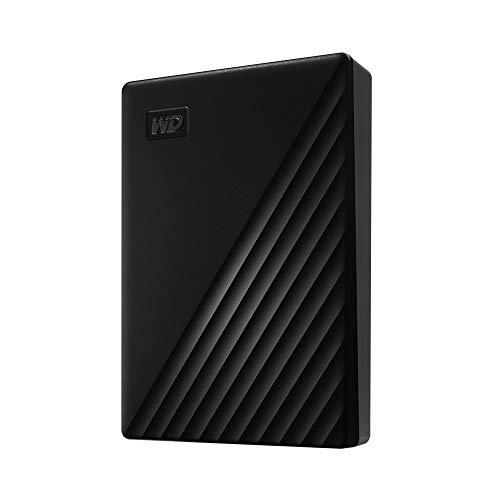
WD 5TB My Passport, Portable External Hard Drive, Black, backup software with defense against ransomware, and password protection, USB 3.1/USB 3.0 compatible - WDBPKJ0050BBK-WESN




Key features
- •Automatic backup Easy to use
- •Password Protection + 256 bit AES hardware encryption
- •Western Digital Discovery Software for Western Digital backup, password Protection and drive management
- •Superspeed USB port; USB 2.0 compatible
- •3 year manufacturer's limited warranty
WD 5TB My Passport, Portable External Hard Drive, Black, backup software with defense against ransomware, and password protection, USB 3.1/USB 3.0 compatible - WDBPKJ0050BBK-WESN
List Price: $202.97$182.67DEALYou Save: $20.30 (10%)
Free shippingFree Returns – 30 daysFree Order CancellationSecure Payment2–3 Days DeliveryGet It October 26, 2026In Stock (3)No marketing spamNo account requiredFulfilment by FedEx / Amazon / UPS / ShipwirePayPal / Card Buyer Protection
Customer Reviews
Reviews sourced from verified Amazon purchasers4.6
out of 5
Based on 10 reviews
5★
70%
4★
30%
3★
0%
2★
0%
1★
0%
Easy
KG✓ Verified Purchase•September 10, 2023
It was really plug and play. I was looking for user manuel online and only saw them for "MyPassport for MAC" so I got worried that I bought the wrong product. I have a PC. I started a chat with tech support and they were able to assure me that I has the right product and to just plug and play. I did, and all is good.
works seamlessly with macOs Sierra 10.12.6
Rory White✓ Verified Purchase•August 17, 2023
I see lots of controversy over which Mac operating systems this external hard drive works with. I just bought the drive (Western Digital WD 2TB My Passport for Mac, Portable External Hard Drive with backup software) and it worked instantly and seamlessly with my late 2015 iMac i7 27" currently with the older macOs Sierra 10.12.6 I'm about to upgrade my Os, which I always hate doing to be honest, and needed another hard drive to back up a terrabyte of data onto, and use as new Time Machine designated hard drive for continual back-ups. NOTICE: It will hook up to your computer with EITHER USB-1 or the newer oval USB-C: If you use, like on my older iMac the now classic USB-1 (rectangular looking thingie) connector, then when you unbox this hard drive, you might see the newer elongated oval USB-C connector as what you need to plug into your computer. This can cause a moment's alarm, but look closer and you'll notice that that connector on the included cable is actually a usb-c connector (wide rectangular thing) but snug attached to an included adapter with the usb-c (wide oval thingie). So just pull the adapter off and you have, voila!, the old USB-1 or whatever. Then plug in and select it's icon when it appears in whatever spot appears on your screen or in your Finder function, double click on it, and you will be asked (even with the Mac-Designated hard drive) to click on Mac, or to simply NOT click on the option to have reformatted for PC. Follow the instructions to upload and then install it, and then it's all systems go. I immediately designated it as my Time Machine linked function on my iMac and had it immediately back up almost as entire Terrabyte. It gave time estimate of 4 hours, and it took about that much time. So I am very happy. I got the 2 terrabyte unit, so I think I will be able to use it both in link with my Time Machine Continuous backup function, and also for simple dragging and dropping to store files. Anyway, i just started with this last night, and I will give updates if i have problems. Currently I'm very happy with it. excuse any typos. don't have time to edit right now.
Requires a non-standard USB cable (included, but inconvenient if it ever needs a new cable)....
Ann Dupuis✓ Verified Purchase•July 27, 2023
Disappointed that this external hard drive requires a non-standard USB cable... included, but if it's ever lost or fails we'll need to figure out how to replace it.
Plug and play for my Mac Air 2021
Mary Z✓ Verified Purchase•July 12, 2023
I use it for backups using the TimeMachine app. It was plug and play for me.
EXECELLENT EXTERNAL DRIVE
Bubba Gump✓ Verified Purchase•May 31, 2023
I bought 3 of the Western Digital 2 Terabyte HDDs to store irreplaceable files. The drives copy to perfection.
The only complaint is the drive is sloooooow, especially when comparing to SSD and other flash type media. The reason I bought the drives is for a solid backup when flash media can also fail without warning.
I copied files from thumb drives in being proactive.
The only complaint is the drive is sloooooow, especially when comparing to SSD and other flash type media. The reason I bought the drives is for a solid backup when flash media can also fail without warning.
I copied files from thumb drives in being proactive.
Page 1 of 2