Wacom Intuos Creative Pen Tablet - Small, Black (Renewed)




Key features
- •Includes all original accessories PLUS ONE YEAR Manufacturer Refurbished WARRANTY
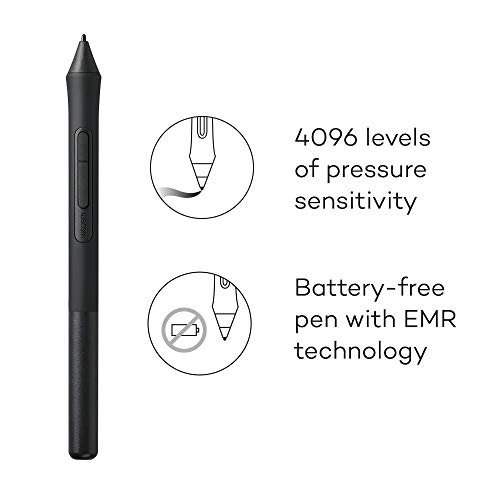
- •Graphics tablet to use in any software for digital art, photo editing and animation 4096 levels of pressure sensitivity and 2540 lip
- •Connect this digital drawing tablet to your computer via USB cable to your Mac or PC
- •Slim design and compact sized art tablet with a large drawing area (6.0 inches x 3.7 inches) Perfect for limited desktop areas and gives more room to create
- •Easy set up, for both left and right handed use. The pen doesn't need to be charged so you can start creating immediately. Four customizable Express Keys put your favorite shortcuts at your fingertips
Wacom Intuos Creative Pen Tablet - Small, Black (Renewed)
List Price: $69.75$62.78DEALYou Save: $6.97 (10%)
Free shippingFree Returns – 30 daysFree Order CancellationSecure Payment2–3 Days DeliveryGet It October 24, 2026In Stock (1)No marketing spamNo account requiredFulfilment by FedEx / Amazon / UPS / ShipwirePayPal / Card Buyer Protection
Customer Reviews
Reviews sourced from verified Amazon purchasers4.5
out of 5
Based on 10 reviews
5★
90%
4★
10%
3★
0%
2★
0%
1★
0%
I don't draw, but I make annotations on screen with it
J. Moseley✓ Verified Purchase•February 8, 2024
I don't draw, but I make annotations on screen with it. Simple shapes, words, etc. Works great for me.
Notes:
- For those wondering and have never interacted with one of these, yes. It does control the mouse pointer as expected but it also works while hovering (not touching, maybe 1-2 inches) over the pad. I was confused as to how you would know where to put the pen thing down to write. Had a hard time finding the answer to that question. Googled for a whole 2-3 mins. Now I know, and so do you.
- Also for never touched'ers, no, you do not need one of those hand protector things if you are doing something simple like me.
I am not a digital artist and don't strive to be one. I just need to be able to draw simple things on my screen and using the mouse is just wrong on so many levels.
Notes:
- For those wondering and have never interacted with one of these, yes. It does control the mouse pointer as expected but it also works while hovering (not touching, maybe 1-2 inches) over the pad. I was confused as to how you would know where to put the pen thing down to write. Had a hard time finding the answer to that question. Googled for a whole 2-3 mins. Now I know, and so do you.
- Also for never touched'ers, no, you do not need one of those hand protector things if you are doing something simple like me.
I am not a digital artist and don't strive to be one. I just need to be able to draw simple things on my screen and using the mouse is just wrong on so many levels.
Works great
Kristopher wood✓ Verified Purchase•January 27, 2024
Enough said this thing is great on the go
Very Nice
Yolandra Cozine✓ Verified Purchase•December 30, 2023
This is a great item , my daughter loved it
Zero problems getting the Intuos S running on Linux Mint
Doyle Grant✓ Verified Purchase•December 16, 2023
The 'Renewed' Wacom tablet looked like new when I took it out of the box it came in. The box was your typical plain brown cardboard box printed with a large Wacom logo. Inside the box everything was held securely by a custom cut and folded piece of packing cardboard. This box looked like it might normally be covered by a slip cover in the (un-renewed) retail packaging.
I had no problems getting the tablet running on Linux Mint - I just connected the enclosed USB cable to the tablet and plugged the cable into an empty USB port on my computer. I then opened up the 'System Settings' tool (a.k.a. 'control panel' in Windows) and there was a new 'Graphics Tablet' icon that I could click on to set up the tablet. Please note that I'm running Linux; I believe if you're running Windows or OSX you will need to install some drivers first.
While I don't need (and can't use because I'm running Linux) any of the software that comes with the tablet, I did register the tablet with Wacom. Wacom asks you to enter the 'Model Number' of the product you are registering, and shows you were you can find the model number on the retail packaging - which the renewed product does not come in.
However, the box does have a sticker on it that is printed with numbers and barcodes, none of which are labeled as the model number. On my second try to register the product, I found that the number printed on the bottom right of the label was the model number that Wacom wanted. In my case, the number they wanted started with 8AH00...
By the way, I did see a 'Software Library' option during the registration process which is where you download the software extras that are bundled with the tablet. Again, I did not do this.
So... Am I happy? Yup. Everything that came - tablet, pen, USB cord and packaging - all look unused and like new. The tablet is working well for me so far, although like any graphics tablet it will take me a while to get comfortable using it. If I wanted to buy a Intuos S would I buy a renewed one again? In a heartbeat. The savings I realized by buying a renewed tablet compared to the full 'new' price made this purchase - for me - a no brainer.
I had no problems getting the tablet running on Linux Mint - I just connected the enclosed USB cable to the tablet and plugged the cable into an empty USB port on my computer. I then opened up the 'System Settings' tool (a.k.a. 'control panel' in Windows) and there was a new 'Graphics Tablet' icon that I could click on to set up the tablet. Please note that I'm running Linux; I believe if you're running Windows or OSX you will need to install some drivers first.
While I don't need (and can't use because I'm running Linux) any of the software that comes with the tablet, I did register the tablet with Wacom. Wacom asks you to enter the 'Model Number' of the product you are registering, and shows you were you can find the model number on the retail packaging - which the renewed product does not come in.
However, the box does have a sticker on it that is printed with numbers and barcodes, none of which are labeled as the model number. On my second try to register the product, I found that the number printed on the bottom right of the label was the model number that Wacom wanted. In my case, the number they wanted started with 8AH00...
By the way, I did see a 'Software Library' option during the registration process which is where you download the software extras that are bundled with the tablet. Again, I did not do this.
So... Am I happy? Yup. Everything that came - tablet, pen, USB cord and packaging - all look unused and like new. The tablet is working well for me so far, although like any graphics tablet it will take me a while to get comfortable using it. If I wanted to buy a Intuos S would I buy a renewed one again? In a heartbeat. The savings I realized by buying a renewed tablet compared to the full 'new' price made this purchase - for me - a no brainer.
Great tablet, however...
wynter bennett✓ Verified Purchase•November 24, 2023
This tablet works smoothly and perfectly. However, I had a bit of trouble registering it to receive the bonus software. The automatic process didn't work as it should've so I had to contact wacom customer support to have them register it for me. They were quick to respond and quick to register it so that was great, however I was only able to claim one software and Clip Studio Paint Pro was not at all available for me to choose from. And that is the program I wanted most out of the three. Had I been able to choose that I would've been fine not having the others but Paint Essenials 7 is what I got and it's not exactly the most useful for me... so for that I am a bit disappointed. I'll be contacting support again to see if they can give me the other program but I have my doubts that they will.
Page 1 of 2



![Drawing Glove for Tablet,[Pink 2Pack] Palm Rejection Artist Right Hand Glove Digital Art Accessories](https://m.media-amazon.com/images/I/41Jvp6-d4oL._SL500_.jpg)