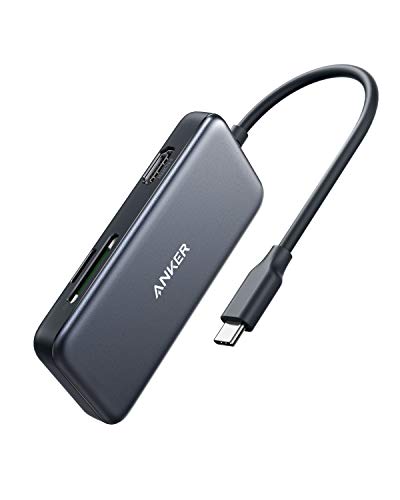
Hiearcool USB C Hub for MacBook – 7-in-1 USBC Adapter with 4K HDMI, 100W PD, USB 3.0 5Gbps Ports, SD/TF Card Reader – USB-C Dongle for Office, Meetings, Travel & Home Setup-Space Grey


Key features
- •Rule All in One: The intelligent USB C Adapter has perfectly combined all the functions you need in one. USB C to HDMI hub equipped with USB3.0 x2, 4K@30 HDMI, SD/TF Card Adapter, and Up to 100W/20V/5A Type C PD charging port(data transfer not supported).Ideal as a Mac Book Pro USB C Hub/USB C Laptop Hub for traveling.
- •Up Close Your Real-Game with Nintendo: As a flexibility USB C Adapter not only for USB C laptop, Cellphone, and tablet but also born for Nintendo. Win more games with lifelike 4K 3840 x 2160@30Hz HDMI images in an immersive 3D gaming experience with the USB C Hub on your TV/Monitor. (Connect the Original Power Adapter of Switch 15V 2.6A to the USB C Hub and undock your controllers before using.)
- •100W Power Delivery Supported: Equipped with the newest generation super-smart chip, Supports USB-C pass-through 100W charging. Allows USB-C device to be charged while using the USB-C hub at the same time. Our MacBook Pro USB C Adapter is designed to preventing overload, over-voltage, over-current, short circuit, overcharge, voltage regulation, temperature protection, your primary choice of USB C Adapter under safety.
- •Achieve Your Work efficiently: One side for all to keep all the wires in order and allow more accessibility to multiport. Extended USB-C cable for more convenience and two high-speed USB-A 3.0 ports capable of 5Gb/s transfer speed for quick data transfer & Charging up to [email protected]. Plug and Play, No Software, Drivers required.
- •Travel Size SD/TF USB C Adapter: Durable Aluminium Alloy Casting and 2.4ounce Pocket Size, Share the Significant moment instantly with up to 5Gbps read and write. Share your happiness on social media in seconds via Hiearcool USB C Hub,300 photos in 30 seconds. Maximum capacity up to 2TB cards.Without worrying about insufficient storage.Compatible with 6 different Memory Card : SD Card / SDHC / SDXC / Micro SD / Micro SDHC / Micro SDXC.
Hiearcool USB C Hub for MacBook – 7-in-1 USBC Adapter with 4K HDMI, 100W PD, USB 3.0 5Gbps Ports, SD/TF Card Reader – USB-C Dongle for Office, Meetings, Travel & Home Setup-Space Grey
List Price: $38.78$34.90DEALYou Save: $3.88 (10%)
Free shippingFree Returns – 30 daysFree Order CancellationSecure Payment2–3 Days DeliveryGet It August 10, 2026In Stock (1)No marketing spamNo account requiredFulfilment by FedEx / Amazon / UPS / ShipwirePayPal / Card Buyer Protection
Customer Reviews
Reviews sourced from verified Amazon purchasers4.6
out of 5
Based on 10 reviews
5★
70%
4★
30%
3★
0%
2★
0%
1★
0%
It was perfect for my use. May not be for others?
Cathy✓ Verified Purchase•October 6, 2023
Used for personal. Fits on my desk or table top when travelling. Cord length okay.
Excellent
Kelly Claro✓ Verified Purchase•October 3, 2023
I bought this over a year ago as I needed more slots and it has been perfect! Great quality and lasting and exactly what I need!
Amazing little device at a decent price.
Jade O.✓ Verified Purchase•September 30, 2023
This USB C hub has been great for what I've used it for. My PC doesn't have an SD card reader and only two USB 3.0 Type A ports at the front. It also comes with a USB C charger for phones and Apple devices, and an HDMI port that I have used to connect my laptop to a dual monitor setup without having to use a docking station. Plus, the build quality is fantastic, no cheap plastic here. Overall, nifty thing that I've had for two years now, and use in my everyday tech life. Very much pleased with it.
Good but 4 concerns
Rachelle C✓ Verified Purchase•September 1, 2023
I've used this usbc hub for almost a year now with my macbook pro M1 and it has done everything I needed to perfectly. I just have 4 concerns that I'd like to point out:
1) The metal casing of this usbc hub can get very warm when using for a while. This may be normal but definitely something to just be a little cautious about.
2) Drains battery quite a bit quicker. Since this is relying on the computer battery for power, it makes sense that the battery drains quicker. Again, this may be a normal issue, it's just noticeable.
3) Last, I have never used the passthrough charging. I refuse to use the passthrough charging because of all the rumors about macbooks being destroyed by it. MacOS has had an BigSur update that addresses this issue and claims to have fixed the problems. I just use the other usbc port on my computer to charge.
4) Connecting a USB wireless mouse to this will result in laggy and choppy usage. I don't understand why it's such an unsteady connection for wireless mouse specifically. Using the USB ports for other things like connecting phones, tablets, and hard drives has never been an issue. (I just use a bluetooth mouse now)
If it is very important to you to have pass-throguh charging or connecting a wireless mouse, I recommend going with a more trustable namebrand, like anker. But, everything has worked great for me so far.
ports it has:
- 1 usbc port for power ONLY (no data transfer or connections)
- 2 usb 3.0 ports (can be used to charge other devices as well as connect devices)
- 1 HDMI port
- 1 SD card slot
- 1 micro SD card slot
1) The metal casing of this usbc hub can get very warm when using for a while. This may be normal but definitely something to just be a little cautious about.
2) Drains battery quite a bit quicker. Since this is relying on the computer battery for power, it makes sense that the battery drains quicker. Again, this may be a normal issue, it's just noticeable.
3) Last, I have never used the passthrough charging. I refuse to use the passthrough charging because of all the rumors about macbooks being destroyed by it. MacOS has had an BigSur update that addresses this issue and claims to have fixed the problems. I just use the other usbc port on my computer to charge.
4) Connecting a USB wireless mouse to this will result in laggy and choppy usage. I don't understand why it's such an unsteady connection for wireless mouse specifically. Using the USB ports for other things like connecting phones, tablets, and hard drives has never been an issue. (I just use a bluetooth mouse now)
If it is very important to you to have pass-throguh charging or connecting a wireless mouse, I recommend going with a more trustable namebrand, like anker. But, everything has worked great for me so far.
ports it has:
- 1 usbc port for power ONLY (no data transfer or connections)
- 2 usb 3.0 ports (can be used to charge other devices as well as connect devices)
- 1 HDMI port
- 1 SD card slot
- 1 micro SD card slot
After using it for 3 years...
George Vasquez✓ Verified Purchase•August 23, 2023
Hiearcool USB C Hub
I bought this primarily to connect my monitor to a Macbook and use the USB slot for charging my phone. However, over the years, having the SD card ports and USB-C have become a nice-to-have as I didn't have to go out and buy extra adapters. One of the SD port came in handy when I purchased a dashcam. I also use both USB-C ports to charge my Apple gear. The short cable length means your desktop will not look messy, so consider it a plus. Worth the money.
I bought this primarily to connect my monitor to a Macbook and use the USB slot for charging my phone. However, over the years, having the SD card ports and USB-C have become a nice-to-have as I didn't have to go out and buy extra adapters. One of the SD port came in handy when I purchased a dashcam. I also use both USB-C ports to charge my Apple gear. The short cable length means your desktop will not look messy, so consider it a plus. Worth the money.
Page 1 of 2