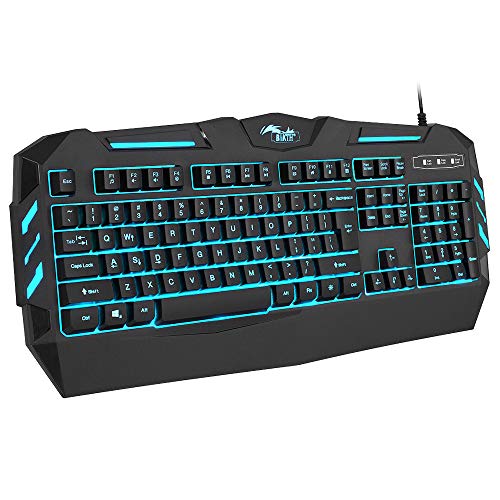
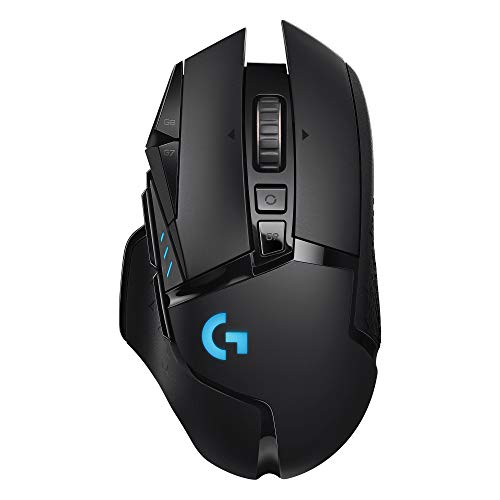
Wireless Gaming Keyboard and Mouse,Blue Backlit Rechargeable Keyboard Mouse with 3800mAh Battery Metal Panel,Mechanical Feel Keyboard and 7 Color Gaming Mute Mouse for PC Gamer




Key features
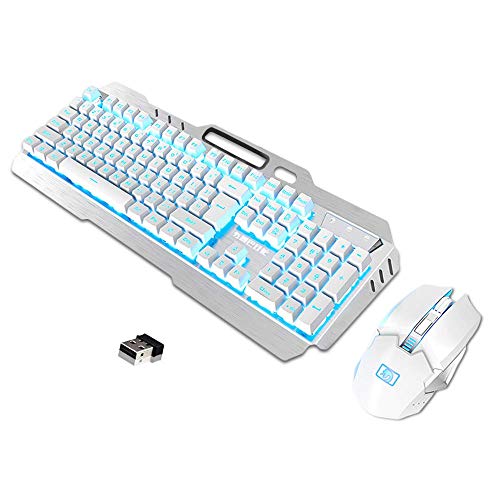
- •【Rechargeable Keyboard and Mouse Set】The keyboard is made of aluminum alloy brushed panel, which is sturdy and durable. It can be waterproof, and the keyboard builts-in 3000mAh battery. The mouse builts-in 800mAh battery ,eliminates the trouble of frequently changing batteries. No operation automatically sleeps within 5 minutes, any key wakes up.
- •【2.4G Wireless Transmission】2.4G wireless technology enables the keyboard to achieve long-range wireless control. Plug & Play, keyboard and mouse share an Intelligent Nano Receiver, convenient and fast. The keyboard features a streamlined layout that is ergonomically designed for gaming or office or home use.
- •【Ice Blue Backlight】Cool backlight effect, it is an excellent visual experience in night operation, FN+DEL switches three backlight states (normally bright-breath-off), The keyboard can adjust backlight brightness and breathing frequency.
- •【Fashionable and practical style design】game style floating keycap, with a variety of multimedia key combinations, two-color injection keycaps. The characteristic mobile phone bracket design on the keyboard can perfectly solve the problem of placing the mobile phone during the game, and can communicate more conveniently with the teammates when playing the game.
- •【Cool mouse】 The mouse has a unique metal material roller, intelligent colorful light breathing light, 6-button button with the latest electroplated Electropland technology double flank, adjustable 4-speed DPI (800-1200-1600-2400), accurate positioning, touch Feel good, the game is more sensational.
Wireless Gaming Keyboard and Mouse,Blue Backlit Rechargeable Keyboard Mouse with 3800mAh Battery Metal Panel,Mechanical Feel Keyboard and 7 Color Gaming Mute Mouse for PC Gamer
List Price: $77.27$69.54DEALYou Save: $7.73 (10%)
Free shippingFree Returns – 30 daysFree Order CancellationSecure Payment2–3 Days DeliveryGet It October 26, 2026In Stock (1)No marketing spamNo account requiredFulfilment by FedEx / Amazon / UPS / ShipwirePayPal / Card Buyer Protection
Customer Reviews
Reviews sourced from verified Amazon purchasers4.1
out of 5
Based on 10 reviews
5★
20%
4★
80%
3★
0%
2★
0%
1★
0%
Great Keyboard - LOUSY instructions
LBD✓ Verified Purchase•October 15, 2023
I wore the letters off of my last keyboard, so I decided to invest in a gaming keyboard. I'm under the assumption that they're made to really last (let's hope!). And let's face it, these beasts are GORGEOUS. But if you're getting the impression that I'm not a gamer, you'd be right. I'm a middle-aged housewife with a thing for backlit neon rainbows, so I thought... why not? Why should the 20-something guys have all the fun?
The Good:
Pretty. Oh so... so very... So very very very pretty! The photo doesn't do it justice, but that's the best my camera could do with the shifting colors.
The feel of the keyboard is surprisingly responsive. I expected the keys to be thuddy rather than springy. They are, sort of, but instead of being a bother I actually find that I like the old fashioned "solid" feel of it. This set does not feel like a flimsy piece of plastic that's designed to break in 3 months.
Speed: I type between 80-100 WPM, depending on how cold my office is. I was worried that a keyboard designed for video games wouldn't be able to keep up with me, but it turns out that speed is no issue with this beast.
Neutral
It's heavy. To get that nice "solid feel" they made the keyboard of metal rather than plastic. The weight is listed, but I didn't pay any attention to it until it arrived. It's not so much that it breaks my wrist or strains my keyboard shelf, but it's certainly hefty enough that it might be featured in one of my upcoming novels (Death by Rainbow, anyone?) I'm assuming it's this heavy to keep it anchored during rapidfire game play.
The bad:
NOISY! In fact, the space key is driving me nuts. Every time I hit it, it lets off a sort of random clunk/squeak that's really obnoxious. Otherwise the keys give off a noise you'd expect from a mechanical keyboard. It's not suitable if you're using this in a shared bedroom or any other location where silence is golden. In fact, you might want to invest in noise-cancelling headphones.
The instructions are instructions in name only. I'm guessing they are contractually obligated to provide them, but that contract doesn't specify that they need to make sense. It took me quite a while to figure out how to charge the keyboard - reading the instructions just made it take longer. I thought I knew what they wanted, but when I checked with the information provided it seemed to indicate something else! It was only by ignoring the booklet completely that I was able to get it plugged in correctly.
When I finally located the receiver I thought it was really clever. They buried it in the base of the mouse so it won't get lost. But not knowing that in advance and having gibberish for instructions, I spent quite a while looking for it under the assumption that I somehow dropped it during unboxing.
If you're using this primarily for typing the "enter" key will take some getting used to. The shape is inverted from what I'm used to. Typically "enter" is double-wide on the middle row. Sometimes the key will extend up to the top row in a backwards "L" shape. On this keyboard it's just the opposite - the "L" shape is inverted so that the narrow part is level with the middle row (location of the "home" keys"). Instead of the double-wide "enter" there's an extra "slash" key (or "backslash", if you prefer). All morning I've been hitting \\\ every time I want to hit "enter" instead. I'm already getting used to it, but it's still a bit unexpected.
My gripes with this keyboard, overall, are pretty petty. If I can get the "clunk / squeak" spacebar under control the rest of it really isn't worth mentioning. Overall it's a dazzling addition to my office and a pleasant surprise for the money. Just... don't read the instructions. Just... don't.
So I came here, hoping to find some answers. Should you decide to purchase this combo bookmark THIS listing. The instructions here are detailed and make sense, and this is the only place I found them.
The Good:
Pretty. Oh so... so very... So very very very pretty! The photo doesn't do it justice, but that's the best my camera could do with the shifting colors.
The feel of the keyboard is surprisingly responsive. I expected the keys to be thuddy rather than springy. They are, sort of, but instead of being a bother I actually find that I like the old fashioned "solid" feel of it. This set does not feel like a flimsy piece of plastic that's designed to break in 3 months.
Speed: I type between 80-100 WPM, depending on how cold my office is. I was worried that a keyboard designed for video games wouldn't be able to keep up with me, but it turns out that speed is no issue with this beast.
Neutral
It's heavy. To get that nice "solid feel" they made the keyboard of metal rather than plastic. The weight is listed, but I didn't pay any attention to it until it arrived. It's not so much that it breaks my wrist or strains my keyboard shelf, but it's certainly hefty enough that it might be featured in one of my upcoming novels (Death by Rainbow, anyone?) I'm assuming it's this heavy to keep it anchored during rapidfire game play.
The bad:
NOISY! In fact, the space key is driving me nuts. Every time I hit it, it lets off a sort of random clunk/squeak that's really obnoxious. Otherwise the keys give off a noise you'd expect from a mechanical keyboard. It's not suitable if you're using this in a shared bedroom or any other location where silence is golden. In fact, you might want to invest in noise-cancelling headphones.
The instructions are instructions in name only. I'm guessing they are contractually obligated to provide them, but that contract doesn't specify that they need to make sense. It took me quite a while to figure out how to charge the keyboard - reading the instructions just made it take longer. I thought I knew what they wanted, but when I checked with the information provided it seemed to indicate something else! It was only by ignoring the booklet completely that I was able to get it plugged in correctly.
When I finally located the receiver I thought it was really clever. They buried it in the base of the mouse so it won't get lost. But not knowing that in advance and having gibberish for instructions, I spent quite a while looking for it under the assumption that I somehow dropped it during unboxing.
If you're using this primarily for typing the "enter" key will take some getting used to. The shape is inverted from what I'm used to. Typically "enter" is double-wide on the middle row. Sometimes the key will extend up to the top row in a backwards "L" shape. On this keyboard it's just the opposite - the "L" shape is inverted so that the narrow part is level with the middle row (location of the "home" keys"). Instead of the double-wide "enter" there's an extra "slash" key (or "backslash", if you prefer). All morning I've been hitting \\\ every time I want to hit "enter" instead. I'm already getting used to it, but it's still a bit unexpected.
My gripes with this keyboard, overall, are pretty petty. If I can get the "clunk / squeak" spacebar under control the rest of it really isn't worth mentioning. Overall it's a dazzling addition to my office and a pleasant surprise for the money. Just... don't read the instructions. Just... don't.
So I came here, hoping to find some answers. Should you decide to purchase this combo bookmark THIS listing. The instructions here are detailed and make sense, and this is the only place I found them.
Pretty good for the price
Gus Cross✓ Verified Purchase•September 15, 2023
If you are buying this expecting it to be the best ever don't buy it. There are obviously better keyboards.
But for the money, I honestly tank this pretty high. I lost my old version of this but it worked great for years and is very easy to clean.
The mechanical keys are great and have never had an issue. The keys aren't too loud either.
The LED lighting could be more interactive but the colors are fun and again for the price is great.
The mouse is good and the buttons and scroll are consistent.
But for the money, I honestly tank this pretty high. I lost my old version of this but it worked great for years and is very easy to clean.
The mechanical keys are great and have never had an issue. The keys aren't too loud either.
The LED lighting could be more interactive but the colors are fun and again for the price is great.
The mouse is good and the buttons and scroll are consistent.
Half decent keyboard, mice is good
Michael G✓ Verified Purchase•September 14, 2023
This is a first impression review as I just started using this keyboard and mouse combo. This is also the first time using a mechanical like keyboard. It is not a true mechanical keyboard.
The keyboard and mouse were well packaged. My keyboard was shipped with the power button on, but it was still charged. I couldn't get the keyboard to light up until I connected the USB Receiver to the computer. It lit up and worked without any interaction from me. So that was good and the same as any other wireless keyboard and mouse combo I've ever used.
The keyboard is a little bulky. I was using a Logitech MK520 wireless keyboard before this one and this one is a good half inch to three quarters of an inch taller. Probably not the most ergonomic keyboard. My desk has a shelf for the keyboard and mouse. Using the keyboard will strain my wrists if I don't rest my hands on the shelf, which I am not used to doing, but it is working out okay.
The keyboard does not have any Media Keys, which is a bummer. My Logitech had buttons for Pause, Forward, Back, Volume Up and Down and Mute. I use those keys a lot, so it will be a big change. It may actually be a game changer for this keyboard. We'll see how it goes when I start to use Media Players. There also is no way that I can find that indicates when the Keyboard is fully charged. I guess I'll just let it charge for 12 hours and hope that's enough.
The backlighting is nice and is the main reason I bought the combo. I would prefer the option for a single color, but it that's not a huge deal. I mostly wanted the backlighting to better see the keys as the keyboard usually sits halfway under the desk on the keyboard shelf. The keys are hard to see though when the backlight is off, which isn't a huge deal since the lights come on with the first key stroke.
For me, the phone holder is useless since I have a keyboard shelf under the desk, but I don't think my Pixel 3 XL would fit with the Otterbox Defender case on it. However, if my phone did fit and I didn't have the keyboard shelf, I think it would be very handy to have the phone right there to check notifications. The Cigarette Lighter slot seems odd, seriously, people still smoke?
I like the mouse. It fits well in my hand. It is so quiet, I love it. My previous mouse was a Logitech M310 and it was annoyingly loud. Great mouse, but too noisy. On the Mamba mouse, the scroll wheel is actually louder than the button clicks. The wheel isn't loud though, just barely audible for me. The forward and back buttons on the mouse are great to have and they are well placed. I haven't messed with the DPI setting, but since there isn't anyway to know which setting it is on, I'm not sure I will use it. I am not a gamer, so not all that important.
I am not a gamer, so lag isn't a huge deal, but I have noticed a little lag with the mouse. I haven't noticed any yet with the keyboard. It could be interference, since the USB receiver is not far from my wireless router. I currently have it plugged into a USB hub. I may end up moving it in to one of the laptop's USB ports since that is further from the router if the lag gets to be too annoying.
All and all, I like typing on the keyboard. I'm not sure how it will effect my wrists long term, it will take a long time for me to get use to keeping my wrists on the keyboard's shelf. I like the mouse and as long as the lag is from interference, which I can fix, I will be happy with it.
I really wish the keyboard had hot keys for Media players. According to an answer from the Seller in the Q&A section, the FN Key + F8 will bring up media controls, but it doesn't work for me. The instructions say to use FN+ Page Up/Down to control the brightness of the backlighting. I found that FN + Up/Down arrow actually controls the brightness.
The keyboard and mouse were well packaged. My keyboard was shipped with the power button on, but it was still charged. I couldn't get the keyboard to light up until I connected the USB Receiver to the computer. It lit up and worked without any interaction from me. So that was good and the same as any other wireless keyboard and mouse combo I've ever used.
The keyboard is a little bulky. I was using a Logitech MK520 wireless keyboard before this one and this one is a good half inch to three quarters of an inch taller. Probably not the most ergonomic keyboard. My desk has a shelf for the keyboard and mouse. Using the keyboard will strain my wrists if I don't rest my hands on the shelf, which I am not used to doing, but it is working out okay.
The keyboard does not have any Media Keys, which is a bummer. My Logitech had buttons for Pause, Forward, Back, Volume Up and Down and Mute. I use those keys a lot, so it will be a big change. It may actually be a game changer for this keyboard. We'll see how it goes when I start to use Media Players. There also is no way that I can find that indicates when the Keyboard is fully charged. I guess I'll just let it charge for 12 hours and hope that's enough.
The backlighting is nice and is the main reason I bought the combo. I would prefer the option for a single color, but it that's not a huge deal. I mostly wanted the backlighting to better see the keys as the keyboard usually sits halfway under the desk on the keyboard shelf. The keys are hard to see though when the backlight is off, which isn't a huge deal since the lights come on with the first key stroke.
For me, the phone holder is useless since I have a keyboard shelf under the desk, but I don't think my Pixel 3 XL would fit with the Otterbox Defender case on it. However, if my phone did fit and I didn't have the keyboard shelf, I think it would be very handy to have the phone right there to check notifications. The Cigarette Lighter slot seems odd, seriously, people still smoke?
I like the mouse. It fits well in my hand. It is so quiet, I love it. My previous mouse was a Logitech M310 and it was annoyingly loud. Great mouse, but too noisy. On the Mamba mouse, the scroll wheel is actually louder than the button clicks. The wheel isn't loud though, just barely audible for me. The forward and back buttons on the mouse are great to have and they are well placed. I haven't messed with the DPI setting, but since there isn't anyway to know which setting it is on, I'm not sure I will use it. I am not a gamer, so not all that important.
I am not a gamer, so lag isn't a huge deal, but I have noticed a little lag with the mouse. I haven't noticed any yet with the keyboard. It could be interference, since the USB receiver is not far from my wireless router. I currently have it plugged into a USB hub. I may end up moving it in to one of the laptop's USB ports since that is further from the router if the lag gets to be too annoying.
All and all, I like typing on the keyboard. I'm not sure how it will effect my wrists long term, it will take a long time for me to get use to keeping my wrists on the keyboard's shelf. I like the mouse and as long as the lag is from interference, which I can fix, I will be happy with it.
I really wish the keyboard had hot keys for Media players. According to an answer from the Seller in the Q&A section, the FN Key + F8 will bring up media controls, but it doesn't work for me. The instructions say to use FN+ Page Up/Down to control the brightness of the backlighting. I found that FN + Up/Down arrow actually controls the brightness.
Nice lights can't make up for poor performance. *Edit* Positive Updated Impressions!!!
Michael Alexander✓ Verified Purchase•August 11, 2023
First off, let's get to the good before the very bad. Both the keyboard and mouse look great, and the lighting effect looks really good. The devices look and feel sturdy, especially the metal base for the keyboard. The sleep functions for both devices work well, and they can be charged easily with the included USB charge cable or any common cable. However, this wireless combo has some serious problems with lag and feedback. The keyboard sometimes gives out altogether or registers multiple button presses from a single keystroke. It's annoying. Also vexing is the mouse not responding to multiple button presses then all of a sudden deciding it will work after six or seven taps. This product is too expensive to perform like this, and my old Logitech mouse and keyboard work better. I really wanted to love this set (the rainbow effect is seriously nice and I love the metal base for the keyboard), but the price and performance have forced me to initiate a return. Too bad, really
2/4/2020
I wrote my earlier review after just receiving the keyboard and mouse using it for a couple of weeks off and on. I'd plugged the small USB wireless receiver that controls the mouse and keyboard directly into the back of my PC, which is right next to my desk and monitor. This setup caused the issues that led to my first negative review. At that point, I'd decided that I was going to send the set back and get a refund. Then, I'd remembered having the exact same issues with other wireless mouse and/or keyboard sets I own from Logitech. That is, "issues" I'd eventually solve. What always helped me out with wireless peripherals with small receivers like the one included in this set was attaching said receiver to a separate Logitech usb dongle that I attached to the back of my PC. This always solved issues with connectivity before, and it has once again solved the issues I was having with this set. I have not returned this set because it is working very well now. I am updating my review to inform anyone of the process of initial negative impressions v.s. eventual satisfaction. With that said, the instructions that come with this set are so incoherent that one is better off simply searching online for similar products and skimming random tech-specific web forums to understand how to best take advantage of this set. The basics are the on/off switches on the keyboard and mouse, gathering a couple of 5volt charge cables, and charging the devices for 5-8 hrs. The mouse will always run out of juice first after about a week and a half of average use. The keyboard runs out in about 3 weeks of average use. Other than those tidbits, the keyboard looks and feels great, and the mouse has a quiet, non-clicky feel to it that takes a little getting used to if one is used to clicky mouse devices. Try looking into getting a separate usb dongle if you're considering purchasing this set or are having connectivity issues with this or any set like it.
2/4/2020
I wrote my earlier review after just receiving the keyboard and mouse using it for a couple of weeks off and on. I'd plugged the small USB wireless receiver that controls the mouse and keyboard directly into the back of my PC, which is right next to my desk and monitor. This setup caused the issues that led to my first negative review. At that point, I'd decided that I was going to send the set back and get a refund. Then, I'd remembered having the exact same issues with other wireless mouse and/or keyboard sets I own from Logitech. That is, "issues" I'd eventually solve. What always helped me out with wireless peripherals with small receivers like the one included in this set was attaching said receiver to a separate Logitech usb dongle that I attached to the back of my PC. This always solved issues with connectivity before, and it has once again solved the issues I was having with this set. I have not returned this set because it is working very well now. I am updating my review to inform anyone of the process of initial negative impressions v.s. eventual satisfaction. With that said, the instructions that come with this set are so incoherent that one is better off simply searching online for similar products and skimming random tech-specific web forums to understand how to best take advantage of this set. The basics are the on/off switches on the keyboard and mouse, gathering a couple of 5volt charge cables, and charging the devices for 5-8 hrs. The mouse will always run out of juice first after about a week and a half of average use. The keyboard runs out in about 3 weeks of average use. Other than those tidbits, the keyboard looks and feels great, and the mouse has a quiet, non-clicky feel to it that takes a little getting used to if one is used to clicky mouse devices. Try looking into getting a separate usb dongle if you're considering purchasing this set or are having connectivity issues with this or any set like it.
Great Quality Keyboard!
Sergio Jimenez✓ Verified Purchase•August 10, 2023
I've been using this keyboard for a few weeks now and it has been an amazing keyboard! It's not to loud at all which is great for people who are on phones while working. Mouse is a good size and has a great weight aswell so it's very smooth! Keyboard is metal so it has a great quality look to it. The only down side is that you may need wrist support pads ad this Keyboard does sit a little high so it can get a little uncomfortable at times. Great battery life as well and haven't had any issues! Great quality, great price, and most importantly, amazing looks!
Page 1 of 2