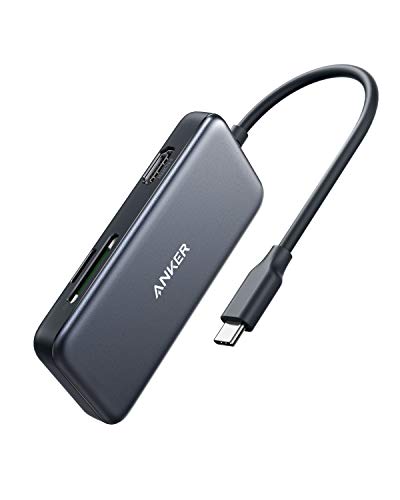
USB C Adapter for MacBook Pro/Air M1 M2 M3 2023 2022 2021 2020 2019,MOKiN USB C Hub MacBook Pro Accessories with 3 USB 3.0 Ports,USB C to SD/TF Card Reader and 100W Thunderbolt 3 PD Port


Key features
- •MacBook Pro Adapter USB C (6 in 1): A tiny and powerful USB C hub turns your new MacBook Pro Air into 6 ports for your daily use: 3 USB 3.0 ports+Micro Sd/TF Card Reader+USB-C 100W Power Delivery Port
- •Effortless USB 3.0 Data Transfer for MacBook Pro: This Mac adapter usb c allows you to connect keyboard, mouse, hard drive, etc to MacBook, up to 5Gbps data transmission speed, providing convenience to your life and work and improving your work efficiency, won't support apple usb super drive
- •Powerful USB C /Thunderbolt 100W Power-delivery function to keep your laptop charging all the time. Quickly to charge your MacBook Pro and provide stable transferring data, worry-free about power storage
- •Convenient and Fast Speed Micro SD/TF Card Reader for Photographer,Easily expand SD and TF slots to your Mac, speed up to 104Mb/s, supports up to 256G SD card. You can view your photos and videos anytime, anywhere, quickly and easily. The miro sd and tf card reader can be read at the same time
- •【Aluminum Design】Slim & Elegent & Portable with a sleek anodized aluminium body provides better heat dissipation. Designed for new usb c MacBook Pro Air 13" 15" 16" 2017 2018 2019 2020. An ideal MacBook pro accesorries and easy to travel with
USB C Adapter for MacBook Pro/Air M1 M2 M3 2023 2022 2021 2020 2019,MOKiN USB C Hub MacBook Pro Accessories with 3 USB 3.0 Ports,USB C to SD/TF Card Reader and 100W Thunderbolt 3 PD Port
List Price: $36.82$33.14DEALYou Save: $3.68 (10%)
Free shippingFree Returns – 30 daysFree Order CancellationSecure Payment2–3 Days DeliveryGet It October 26, 2026In Stock (1)No marketing spamNo account requiredFulfilment by FedEx / Amazon / UPS / ShipwirePayPal / Card Buyer Protection
Customer Reviews
Reviews sourced from verified Amazon purchasers4.3
out of 5
Based on 10 reviews
5★
30%
4★
70%
3★
0%
2★
0%
1★
0%
Excelente y entrega a tiempo.
Andres Franco Gomez✓ Verified Purchase•July 23, 2023
El producto cumple con sus especificaciones, lo único es que me faltó leer ya que buscaba inomque tuviese conexión HDMI y este no lo tiene. Pero de resto muy bien
Does not insert well if you have a MacBook case.
Jtpq✓ Verified Purchase•July 20, 2023
Overall, the quality wasn't bad. If you're like me and do not like removing your case for it to fit and function, this is not for you. It was also delivered in a dirty box :( I don't think this is the seller's fault though.
UPDATED: Fritzed out in the middle of work meeting
Elz✓ Verified Purchase•July 4, 2023
UPDATE: Although I am not satisfied with the product itself, this seller's willingness to address the issue is stallar. I was refunded completely, as one would expect after receiving what I think was probably a defective product. Even though I ended up buying a different brand, based on their customer service I might buy from them again.
INITIAL REVIEW:
I bought this in March and it is August. It worked until it didn't. I was in the middle of a Zoom meeting with my boss and it just fritzed out. Done. Thankfully the monitors I had attached to it weren't harmed that I am aware of and still seem to work. How disappointing. Any product should last more than 5 months.
INITIAL REVIEW:
I bought this in March and it is August. It worked until it didn't. I was in the middle of a Zoom meeting with my boss and it just fritzed out. Done. Thankfully the monitors I had attached to it weren't harmed that I am aware of and still seem to work. How disappointing. Any product should last more than 5 months.
Regardless of the price, this is a good overall unit
morgan23✓ Verified Purchase•June 24, 2023
Long story short. First of all I'm not a shill for this product. However, I bought one for my wife, which worked great, then I bought two for myself, so I could set up a basically identical experience at work and at home. Again, long story short, it works!
However, pay close attention to the disclaimer: "100W Power Charging Port (87W Safety)"
This means that you can only plug a 100W charger in to it safely. Most chargers are 120W nowadays.
I plugged a 120W charger (Dell) in to this hub, my primary hub, and got good results for about 2 months. The unit was in a closed desk drawer. After a few months, it won't display video out unless my charger is plugged in to the laptop instead of the hub. I think my charger overloaded the hub. It seems like having my charger plugged in to the hub, then having the hub plugged in to my computer, the video wont display on the output monitors. I attribute this to overloading the hub with a bigger charger than expected.
Anyway, that didn't happen with the second hub using an off brand laptop charger. A generic charger from amazon and the hub being out in the open result in a low heat, seamless experience.
This is a good hub. It still works. The one I have at work seems great after four or five months. The one I broke with a big charger still works, as long as I don't plug the big charger in to it anymore (I just plug the charger in to the computer directly). Even though I get a warning at work that its only charging at 100W instead of the factory default of 120W, that's what the hub documentation says it should be, and it still keeps my laptop charged.
::IMPORTANT::
Final note: I also thought that the video out (HDMI) was failing, but after a bit of research I found that the way to solve most video problems with this hub is to do a HARD reboot of your laptop (Windows 11). Not a Restart, but a full Power Off, then press the button to turn your computer on. Re-post and share because that basically fixes everything that can go wrong with this device.
However, pay close attention to the disclaimer: "100W Power Charging Port (87W Safety)"
This means that you can only plug a 100W charger in to it safely. Most chargers are 120W nowadays.
I plugged a 120W charger (Dell) in to this hub, my primary hub, and got good results for about 2 months. The unit was in a closed desk drawer. After a few months, it won't display video out unless my charger is plugged in to the laptop instead of the hub. I think my charger overloaded the hub. It seems like having my charger plugged in to the hub, then having the hub plugged in to my computer, the video wont display on the output monitors. I attribute this to overloading the hub with a bigger charger than expected.
Anyway, that didn't happen with the second hub using an off brand laptop charger. A generic charger from amazon and the hub being out in the open result in a low heat, seamless experience.
This is a good hub. It still works. The one I have at work seems great after four or five months. The one I broke with a big charger still works, as long as I don't plug the big charger in to it anymore (I just plug the charger in to the computer directly). Even though I get a warning at work that its only charging at 100W instead of the factory default of 120W, that's what the hub documentation says it should be, and it still keeps my laptop charged.
::IMPORTANT::
Final note: I also thought that the video out (HDMI) was failing, but after a bit of research I found that the way to solve most video problems with this hub is to do a HARD reboot of your laptop (Windows 11). Not a Restart, but a full Power Off, then press the button to turn your computer on. Re-post and share because that basically fixes everything that can go wrong with this device.
Compacted and Good Quality
Daniel King✓ Verified Purchase•May 19, 2023
The item was smaller than expected which was nice. Wish we could use the charger with the item but I knew this before the purchase and there was other options. Overall great product. Would have been 5 stars but the thickness of the item does not allow the Mac book to lay completely flat... literally tenths if an inch to thick.
Page 1 of 2