Contour Design ShuttlePRO v2 USB Multimedia Controller for Windows and Mac (Black, Old Version) Bundle with Blucoil Mini USB Type-A Hub with 4 USB Ports, and 5-Pack of Reusable Cable Ties


Key features
- •HELPS YOU NAVIGATE AND EDIT FASTER - ShuttlePRO v2 combines the function of a mouse and keyboard in 1 compact controller. It emulates keyboard shortcuts and lets you scroll back and forth video timelines.
- •WORKS WITH VARIOUS APPS/SOFTWARE - The USB multimedia controller is compatible with popular video (Adobe Premiere), audio (Audacity, Reaper), photo (Photoshop, Manga Studio, Maya) applications.
- •COMPATIBLE WITH MAC AND WINDOWS You can download and install the necessary drivers for macOS 10.9~10.13, 10.14, and Windows 7~10 at Contour Design's support page.
- •PROVIDES CUSTOMIZABLE BUTTONS - You can modify the 15 programmable buttons' actions per software. Even if you switch between Lightroom or Photoshop, ShuttlePRO v2 will automatically detect and load the correct configuration thanks to AppDetection.
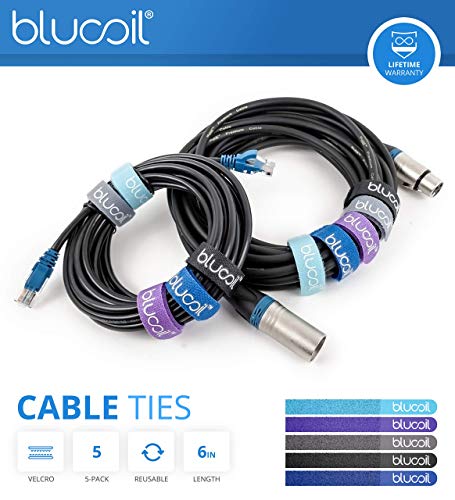
- •INCLUDES - Contour Design ShuttlePRO v2 USB Multimedia Controller for Windows and Mac (Black, Old Version). Blucoil Mini USB Type-A Hub with 1 Micro USB and 4 USB 3.0 Ports. Blucoil 5-Pack of Reusable Velcro Cable Ties.
Brandblucoil
CategoryInput Devices
Contour Design ShuttlePRO v2 USB Multimedia Controller for Windows and Mac (Black, Old Version) Bundle with Blucoil Mini USB Type-A Hub with 4 USB Ports, and 5-Pack of Reusable Cable Ties
List Price: $145.49$130.94DEALYou Save: $14.55 (10%)
Free shippingFree Returns – 30 daysFree Order CancellationSecure Payment2–3 Days DeliveryGet It October 25, 2026In Stock (1)No marketing spamNo account requiredFulfilment by FedEx / Amazon / UPS / ShipwirePayPal / Card Buyer Protection
Customer Reviews
Reviews sourced from verified Amazon purchasers4.5
out of 5
Based on 10 reviews
5★
80%
4★
20%
3★
0%
2★
0%
1★
0%
If you edit video you need this or something like it
Chad✓ Verified Purchase•October 15, 2023
I say "or something like it" in the headline because there is a similar product from the same company that is less expensive and has fewer features but would realistically work just as well for you.
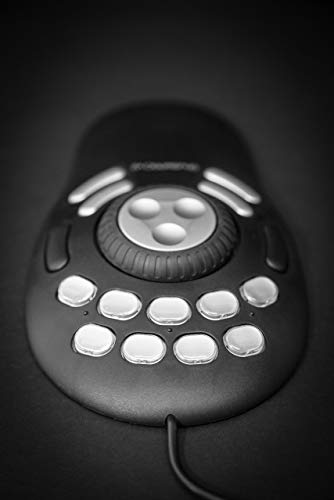
The pros to this product are pretty evident. It has 15 programmable buttons and two dials. The dial shuttles your timeline on video editing software. One dial does a single frame. That is a feature I so needed! It turns out, that is the main feature I needed which means their more affordable product would have worked just fine for me. The buttons are clear and come with labels you can put under them to customize it. It is plug and play and comes with commands for almost all the programs you are going to use. You can important commands too. All the buttons can be made to do what you want them to do. So if you have something you do often in video editing (or photo editing for that matter) you can assign it to a button.
The cons are less obvious. The first one is - that's a lot of buttons! You have to remember what they do or look at the label and you have to be the one to put the label there. That's a lot of work and effort and you might not remember right away so you fumble around. etc.
I ended up getting two Stream Decks which have programmable buttons but each button is a screen so it has the icon you choose. I mainly use this for the dials and the stream deck for my programmable buttons.
That's why I say you need this or something like it. The function it serves is fantastic. If you are patient with the programming and the labeling (I wasn't) then it works great. Fantastic. Wonderful. I still use it every time I edit, I just use the dials is all. If you edit a lot this will save you so much time and effort either this product or another.
If you are looking to get this vs the more affordable counterpart I recommend that one for ease of set up reasons but in terms of getting my money worth I am happy. I will eventually program all the buttons and use them, but I am lazy so they will likely remain unlabeled.
The pros to this product are pretty evident. It has 15 programmable buttons and two dials. The dial shuttles your timeline on video editing software. One dial does a single frame. That is a feature I so needed! It turns out, that is the main feature I needed which means their more affordable product would have worked just fine for me. The buttons are clear and come with labels you can put under them to customize it. It is plug and play and comes with commands for almost all the programs you are going to use. You can important commands too. All the buttons can be made to do what you want them to do. So if you have something you do often in video editing (or photo editing for that matter) you can assign it to a button.
The cons are less obvious. The first one is - that's a lot of buttons! You have to remember what they do or look at the label and you have to be the one to put the label there. That's a lot of work and effort and you might not remember right away so you fumble around. etc.
I ended up getting two Stream Decks which have programmable buttons but each button is a screen so it has the icon you choose. I mainly use this for the dials and the stream deck for my programmable buttons.
That's why I say you need this or something like it. The function it serves is fantastic. If you are patient with the programming and the labeling (I wasn't) then it works great. Fantastic. Wonderful. I still use it every time I edit, I just use the dials is all. If you edit a lot this will save you so much time and effort either this product or another.
If you are looking to get this vs the more affordable counterpart I recommend that one for ease of set up reasons but in terms of getting my money worth I am happy. I will eventually program all the buttons and use them, but I am lazy so they will likely remain unlabeled.
Superb ergonomics, extending my productive career
Psycho Gerbil 420✓ Verified Purchase•October 13, 2023
I'm a middle-aged engineer and my fingers are wearing out from years of CAD. I make my living on a computer and cannot just quit. I had to switch to a joystick-shaped mouse from 3M which is a nice product, but it has no scroll wheel; so I bought this. After a couple of days, this became even better than my old mouse scroll wheel. Zooming in and out of a drawing is a snap and since I use my left hand on this, my right hand is improving and mostly functional for non-computer activities.
It is a pain to program some of the features. The wheel doesn't scroll through some documents like I'd prefer. I use different operating systems and it behaves differently depending on the operating system.
Overall, this will extend my productive career many years and is an invaluable tool. I have bought several and have them at all of my different development computers and CAD systems. Don't expect software perfection, but it's good and makes all the difference!
It is a pain to program some of the features. The wheel doesn't scroll through some documents like I'd prefer. I use different operating systems and it behaves differently depending on the operating system.
Overall, this will extend my productive career many years and is an invaluable tool. I have bought several and have them at all of my different development computers and CAD systems. Don't expect software perfection, but it's good and makes all the difference!
Works great with Clip Studio Paint
Kwolfe✓ Verified Purchase•October 4, 2023
I'm a digital artist (and comic/graphic novel writer). I use a drawing tablet w/ display on a tilted drawing desk, and I needed a way to manage keyboard shortcuts without using a bulky keyboard (desk real estate is tight). This thing fit the bill!
I originally purchased the ShuttleXpress, thinking it would suffice. I quickly realized that, although a good product, it did not suit my needs, so I upgraded to the Pro V2. I'm very glad I did.
PROs:
- Easy to install and configure. All this needs is the free driver, and you're off. If you can accomplish a task with a keyboard stroke or a spin of the mouse wheel, you can set up that task on the Shuttle. The software comes with presets for many major creative programs. Clip Studio Paint was not one of them, but Contour's website offers many downloadable libraries. I found one for CSP, installed it, and even tweaked it to suit my own needs. You can also create your own presets for any software that uses keyboard shortcuts. Be advised that I use this with Windows, not Mac.
- Ergonomic. This thing has a pretty large footprint, but it's not so large as to be in the way. It's relatively flat, and it matches my hand well. It's design is symmetric, so it should be suitable for lefties and righties. The outer jog wheel snaps back to center nicely. It does not feel cheap at all.
- Build quality. The Pro V2 is made of plastic, rubber, and metal. The inner wheel is metal and has three finger indentations, which make finding the wheel easy without taking your eyes from your work. I tried the ShuttleXpress as well, which was plastic and had only one indent (harder to find the wheel by touch, but not THAT hard). So, I feel like the Pro V2 excels here. The metal feels great, and using it is easier than the cheaper Xpress. The Pro V2's outer jog wheel is also nice.
- Stays in place. Both the Pro V2 and the Xpress have small rubber grips underneath, which keep both models in place while working. I use a tilting drawing desk, and neither product slipped down at my typical 30 degree working angle. Any tilt past 45 degrees taxes the grip (but 45 is quite an extreme working angle in my opinion).
- Extras. The extra USB hub is nice. The Velcro coil wraps are fine too. Who doesn't need more cable warps, right?
CONs:
- The Pro V2 might be too large for people with small hands. My wife tried it. Her hands are smaller than mine, and she felt it was a bit of a reach to handle all the buttons.
- Not necessarily a con, but something to consider. This thing has 15 programmable buttons. 15! That sounds great, but that is a lot of presets to remember. You can, however, add small labels to many of these buttons to help you remember your setup.
Compared to it's little brother, the ShuttleXpress:
The ShuttleXpress cut a few corners for cost here, which is understandable. For light work and people who don't need many presets, the Xpress is a good product, although the spinner and jog wheel materials provide less of a quality feel when using. The additional finger indentations, metal spinner and rubberized jog wheel on the Pro V2 are big pluses for me. The Pro V2 is easier to use in the sense that it provides a better ergonomic feel. Is that alone worth twice the price of the Xpress? Maybe not that alone, but you go from five programmable buttons to 15. Five did not cut it for me, so I returned the Xpress and upgraded. I'm happy I did.
I originally purchased the ShuttleXpress, thinking it would suffice. I quickly realized that, although a good product, it did not suit my needs, so I upgraded to the Pro V2. I'm very glad I did.
PROs:
- Easy to install and configure. All this needs is the free driver, and you're off. If you can accomplish a task with a keyboard stroke or a spin of the mouse wheel, you can set up that task on the Shuttle. The software comes with presets for many major creative programs. Clip Studio Paint was not one of them, but Contour's website offers many downloadable libraries. I found one for CSP, installed it, and even tweaked it to suit my own needs. You can also create your own presets for any software that uses keyboard shortcuts. Be advised that I use this with Windows, not Mac.
- Ergonomic. This thing has a pretty large footprint, but it's not so large as to be in the way. It's relatively flat, and it matches my hand well. It's design is symmetric, so it should be suitable for lefties and righties. The outer jog wheel snaps back to center nicely. It does not feel cheap at all.
- Build quality. The Pro V2 is made of plastic, rubber, and metal. The inner wheel is metal and has three finger indentations, which make finding the wheel easy without taking your eyes from your work. I tried the ShuttleXpress as well, which was plastic and had only one indent (harder to find the wheel by touch, but not THAT hard). So, I feel like the Pro V2 excels here. The metal feels great, and using it is easier than the cheaper Xpress. The Pro V2's outer jog wheel is also nice.
- Stays in place. Both the Pro V2 and the Xpress have small rubber grips underneath, which keep both models in place while working. I use a tilting drawing desk, and neither product slipped down at my typical 30 degree working angle. Any tilt past 45 degrees taxes the grip (but 45 is quite an extreme working angle in my opinion).
- Extras. The extra USB hub is nice. The Velcro coil wraps are fine too. Who doesn't need more cable warps, right?
CONs:
- The Pro V2 might be too large for people with small hands. My wife tried it. Her hands are smaller than mine, and she felt it was a bit of a reach to handle all the buttons.
- Not necessarily a con, but something to consider. This thing has 15 programmable buttons. 15! That sounds great, but that is a lot of presets to remember. You can, however, add small labels to many of these buttons to help you remember your setup.
Compared to it's little brother, the ShuttleXpress:
The ShuttleXpress cut a few corners for cost here, which is understandable. For light work and people who don't need many presets, the Xpress is a good product, although the spinner and jog wheel materials provide less of a quality feel when using. The additional finger indentations, metal spinner and rubberized jog wheel on the Pro V2 are big pluses for me. The Pro V2 is easier to use in the sense that it provides a better ergonomic feel. Is that alone worth twice the price of the Xpress? Maybe not that alone, but you go from five programmable buttons to 15. Five did not cut it for me, so I returned the Xpress and upgraded. I'm happy I did.
Ask them for the new Big Sur Driver (Mac OS)
Melissa Rose Benavides✓ Verified Purchase•September 25, 2023
LIFE CHANGING TOOL HERE! I've worked in major market radio for 10+ years and wanted a personal audio editing controller like VOXPRO (but VOXPRO is $1500.)
This does the same stuff for $100!!
I use it to edit audio in Adobe Audition 2021 on a brand new 2021 MacBook Pro running Big Sur OSX.
I had to email them about a driver because Big Sur wasn't on their website driver list... but they got back to me within an hour and it worked perfectly.
ADVANTAGES
-Fully customizable buttons "” or they have default settings for all the major video, photo, audio editing programs.
-Edit way faster
-Less wear and tear on your actual keyboard (I know it's built for that, but still. It's nice to know you're not wearing those keys out
-Even better accuracy (actually I've noticed this as my biggest advantage. With the jog wheel and the outer ring wheel you can realllly get down into the smallest parts of the the audio very easily "” and also get out just as easily and quickly. Might sound small but how many times have you brushed by making something totally perfect because you don't want to waste time zooming in and zooming out?
A+++. Life changing. Work changing. Almost as simple as plug-and-play if you have Big Sur.
I've heavily researched this thing and haven't seen a single complaint!
This does the same stuff for $100!!
I use it to edit audio in Adobe Audition 2021 on a brand new 2021 MacBook Pro running Big Sur OSX.
I had to email them about a driver because Big Sur wasn't on their website driver list... but they got back to me within an hour and it worked perfectly.
ADVANTAGES
-Fully customizable buttons "” or they have default settings for all the major video, photo, audio editing programs.
-Edit way faster
-Less wear and tear on your actual keyboard (I know it's built for that, but still. It's nice to know you're not wearing those keys out
-Even better accuracy (actually I've noticed this as my biggest advantage. With the jog wheel and the outer ring wheel you can realllly get down into the smallest parts of the the audio very easily "” and also get out just as easily and quickly. Might sound small but how many times have you brushed by making something totally perfect because you don't want to waste time zooming in and zooming out?
A+++. Life changing. Work changing. Almost as simple as plug-and-play if you have Big Sur.
I've heavily researched this thing and haven't seen a single complaint!
Completely Customizable, Works with latest Mac OSX
Derek Munson✓ Verified Purchase•August 24, 2023
I own a media production company and do a lot of video editing for local & regional clients; I didn't want to dump a boatload of money into a full editing console, but wanted something to help me speed up my workflow and editing time in Premiere Pro. I was a little hesitant to buy this because I'd seen reports that it didn't work with the latest versions of Mac OSX operating systems, but I can happily report that it works just fine.
The controller is completely customizable and easy to set up (I spent probably 45-60 minutes to customize every button action and place the custom labels under the button caps and everything), and it's worked like a dream since day one. I would highly recommend this to all the amateur, semi-pro, and even professional videographers and media producers who could use a boost on their editing!
The controller is completely customizable and easy to set up (I spent probably 45-60 minutes to customize every button action and place the custom labels under the button caps and everything), and it's worked like a dream since day one. I would highly recommend this to all the amateur, semi-pro, and even professional videographers and media producers who could use a boost on their editing!
Page 1 of 2


![TourBox Lite, [2024 New] Comic Concept Art Animation, Colorgrade, Video Editing, ClipStudioPaint, Photoshop, Blender, DaVinciResolve, FCPX, Premiere, Lightroom, Drawing Tablet, Custom Keyboard](https://m.media-amazon.com/images/I/31pm1gXpmCL._SL500_.jpg)