MOTOSPEED Macro Mechanical Numeric Keypad USB Wired 21 Keys Mini Numpad Portable Keypad RGB Backlight Gaming Keypad Extended Layout for Cashier(Fully Programmable Keys)



Key features
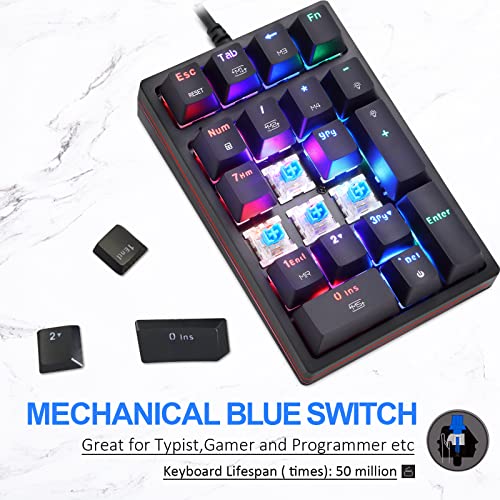
- •【RGB backlight and Blue Switches 】 Support 13 backlight model.By simultaneously pressing the FN key and another key, you can change the backlight and brightness,Professional mechanical Blue switches with tactile bump and audible click, Provide fast and precise key presses.
- •【Plug & Play】 No drivers required,USB-a interface. Supports Esc,Tab,Back Space, Delete ,FN etc. With shortcut key which can open the computer calculator directly
- •【Extreme Durability 】 Ensures 50 million times keystrokes, Never Faded Key Characters. Aluminum and ABS construction stand up to tough conditions
- •【Ergonomic Design】 The stepped keycap, fit your hands easily to prevent fatigue. Spring type ergonomic design, care for your wrist . Works with PC and desktop computers that have Windows 2000 / XP / Vista / 7 / 8 / 10, Android/Linux
- •【Expand Your Desktop】 21 keys mechanical numeric keypad is suitable for laptop users, banking, financial securities, business workers or other keyboards without numeric section. Small and light, easier for you to carry anywhere
MOTOSPEED Macro Mechanical Numeric Keypad USB Wired 21 Keys Mini Numpad Portable Keypad RGB Backlight Gaming Keypad Extended Layout for Cashier(Fully Programmable Keys)
List Price: $45.38$40.84DEALYou Save: $4.54 (10%)
Free shippingFree Returns – 30 daysFree Order CancellationSecure Payment2–3 Days DeliveryGet It October 25, 2026In Stock (1)No marketing spamNo account requiredFulfilment by FedEx / Amazon / UPS / ShipwirePayPal / Card Buyer Protection
Customer Reviews
Reviews sourced from verified Amazon purchasers4.4
out of 5
Based on 10 reviews
5★
50%
4★
50%
3★
0%
2★
0%
1★
0%
Pretty. Wish it came with instructions.
Dan✓ Verified Purchase•August 26, 2023
So the reason this didn't get 5 stars comes down to 2 things. First, the USB cable is hardwired, so you can't replace it with something nicer looking. Which you would think would be a design priority for an RGB numpad accessory. Like, for people who are wanting an RGB numpad, I'm imaging TKL or 60% rgb keyboards, many of them with nice coiled wrapped cables with a USB passthrough that you want to hook up your numpad when you need it, then remove when you don't. So the fixed USB cord seems odd.
There is no tactile indicator on any of the keys on the numpad. I generally like a nubbin on the 5 key for no-look typing. Seems like a big miss, unless the goal is to make you look down at your hand to type and see how awesome your numpad looks (really awesome).
Also, there were no instructions in the box and at the time, none of the QR codes on the box took me anywhere useful. The reason why this matters is that the way to adjust RGB lighting on the numpad is not intuitive. See below for the different functions that I'm aware of:
Fn+Tab adjusts the base ring pattern and effect. (M1)
Fn+/ cycles through the colors on the base ring (M2)
Fn+0 toggles between the motion of the ring affect and keeping it steady (M3)
Fn+Fn+* cycles through colors of the effects under the keycaps (M4)
Fn+- Dims
Fn++ Brightens
Fn+1 seems to toggle between individual key lighting effects when typing on that key. Not100% sure. I think it toggles between individual keystrokes on that key colorshifting or locking individual key colors. (MR)
Fn+Del toggles RBG on and off
There is no tactile indicator on any of the keys on the numpad. I generally like a nubbin on the 5 key for no-look typing. Seems like a big miss, unless the goal is to make you look down at your hand to type and see how awesome your numpad looks (really awesome).
Also, there were no instructions in the box and at the time, none of the QR codes on the box took me anywhere useful. The reason why this matters is that the way to adjust RGB lighting on the numpad is not intuitive. See below for the different functions that I'm aware of:
Fn+Tab adjusts the base ring pattern and effect. (M1)
Fn+/ cycles through the colors on the base ring (M2)
Fn+0 toggles between the motion of the ring affect and keeping it steady (M3)
Fn+Fn+* cycles through colors of the effects under the keycaps (M4)
Fn+- Dims
Fn++ Brightens
Fn+1 seems to toggle between individual key lighting effects when typing on that key. Not100% sure. I think it toggles between individual keystrokes on that key colorshifting or locking individual key colors. (MR)
Fn+Del toggles RBG on and off
Good RGB 10-Key
Jason✓ Verified Purchase•August 5, 2023
I like it. It's a simply, mechanically-switched RGB 10-Key. It's exactly what I was lookin for to go with my Freestyle RGB. I think it matches quite nice and it puts the 10-key out of the way when I don't need it. The RGB-ness is really nice and it continues onto the side strip. The product images show a simple red line on the side of the unit but in reality, it's a continuation of the RGB light show.
I can't comment on longevity or any of the other "special" functions of it. There isn't any mention of drivers or anything else to install in the instructions so I can't comment on that either. The instructions come with a set of key shortcuts to change the light effects/speed/direction/brightness and they all seem to do what's described. The only thing I'd like different is brown switches but that's a nitpick. I got the red switches and it's similar enough.
I'm using a Mac for now and everything seems to work just fine.
I can't comment on longevity or any of the other "special" functions of it. There isn't any mention of drivers or anything else to install in the instructions so I can't comment on that either. The instructions come with a set of key shortcuts to change the light effects/speed/direction/brightness and they all seem to do what's described. The only thing I'd like different is brown switches but that's a nitpick. I got the red switches and it's similar enough.
I'm using a Mac for now and everything seems to work just fine.
It's great! I love that you can personalize your own LED lighting setup!
DR L✓ Verified Purchase•June 23, 2023
They keys on this number pad feel smooth, responsive and look great day or night. I'm pairing it up with a Black Widow Chroma TE V2 keyboard and have no problems with the sound or the feel of it. For the price, it's working out much better than I expected. I returned a different 10 number key pad (blue switch) out for this one (red switch) because the blue switch keys were really too loud and pen-clicky for my use. Also it had no led color options whatsoever. Just a blue led. All day all night long..
If you're into any of the LED lighting (once you figure out how to set up the options) you will appreciate the many varied options you can have. It takes a few minutes to figure out but once you do, it's rather impressive. Looks great with other high end gear.
- NOTE
The ONLY GRIPE I have with it (as others have pointed out) is when you wake the computer from sleep mode, the led keys are NOT lighting up. You have to PRESS (FN - 1) twice to enable the LED lights. At least it remembers your lighting setup. I just wish it would light up on it's own. It's a small nuance, not complaining. Hopefully they can make an updated version to correct this, and maybe have larger / better instructions.
Overall it's an impressive number pad that I really enjoy using. I do plan on buying another one soon for another computer!
If you're into any of the LED lighting (once you figure out how to set up the options) you will appreciate the many varied options you can have. It takes a few minutes to figure out but once you do, it's rather impressive. Looks great with other high end gear.
- NOTE
The ONLY GRIPE I have with it (as others have pointed out) is when you wake the computer from sleep mode, the led keys are NOT lighting up. You have to PRESS (FN - 1) twice to enable the LED lights. At least it remembers your lighting setup. I just wish it would light up on it's own. It's a small nuance, not complaining. Hopefully they can make an updated version to correct this, and maybe have larger / better instructions.
Overall it's an impressive number pad that I really enjoy using. I do plan on buying another one soon for another computer!
Love it, definitely recommend!
Christian✓ Verified Purchase•June 16, 2023
I love this keypad. The keys feel satisfying to press and the color schemes it has available match perfectly with my keyboard and PC fans. Love this product, would happily purchase again. Thanks!
Excelente
ArgD.✓ Verified Purchase•June 16, 2023
Un excelente producto.
Page 1 of 2