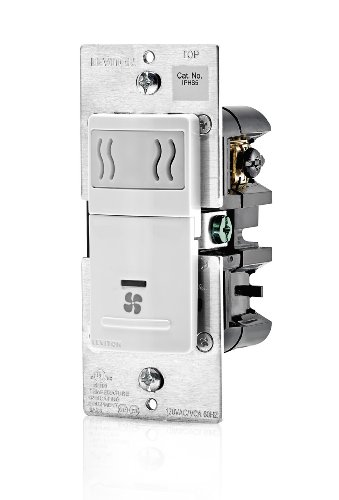
TREATLIFE Smart Ceiling Fan Control and Dimmer Light Switch, 2.4GHz WiFi Only, Neutral Wire Required, Single Pole Fan & Light Switch Combo, Works with Alexa, Google Home & SmartThings, Remote Control


Key features
- •REQUIREMENT: Not compatible with fans having built-in remote control system. Not for use with exhaust fans. Max ceiling fan load of 1.5A (Offers 4 fan speeds control), max light load of 150W dimmable LED/CFL or 300W incandescent bulbs. 2.4G Wi-Fi only (NOT 5G); single-pole use only (NOT 3-way). If you encounter any problems or have questions to ask please contact us first.
- •EASY INSTALLATION: NEUTRAL WIRE REQUIRED – please confirm that the wiring in your home is compatible before purchasing (older homes may not have neutral wires). Requires separate wires for fan and light. No Hub needed. No canopy module required. FCC certified.
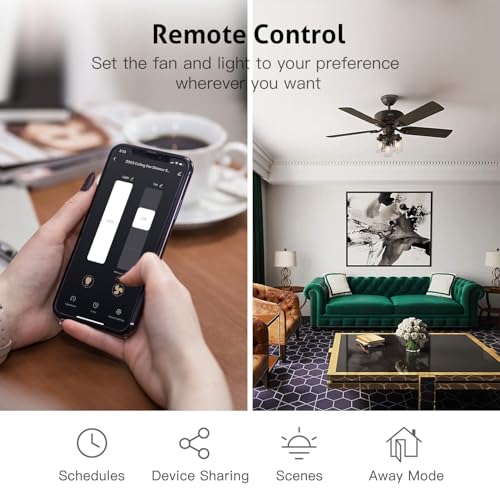
- •SMART BRIGHTNESS & FAN SPEED CONTROL: Adjust fan speed and dim your lights from anywhere with smartphone using the Smart Life App. Provides 4 fan speeds with smooth, flicker-free dimming(10%-100%) for increased comfort. Gentle On & Off Lighting for comfortable visual effect.
- •HOME AUTOMATION: Create schedules to automatically turn the light and fan on/off with the preset brightness/speed at specific times; or set the light to turn on and off randomly when you are on vacation to trick potential intruders. You can share the dimmer switches for family members.
- •HANDS-FREE VOICE CONTROL: Forget reaching up to the pull chains. Works with Alexa and Google Assistant to conveniently control the light and fan with one simple voice command. Perfect for times when your hands are full or entering a dark room.
TREATLIFE Smart Ceiling Fan Control and Dimmer Light Switch, 2.4GHz WiFi Only, Neutral Wire Required, Single Pole Fan & Light Switch Combo, Works with Alexa, Google Home & SmartThings, Remote Control
List Price: $69.82$62.84DEALYou Save: $6.98 (10%)
Free shippingFree Returns – 30 daysFree Order CancellationSecure Payment2–3 Days DeliveryGet It October 24, 2026In Stock (2)No marketing spamNo account requiredFulfilment by FedEx / Amazon / UPS / ShipwirePayPal / Card Buyer Protection
Customer Reviews
Reviews sourced from verified Amazon purchasers4.4
out of 5
Based on 10 reviews
5★
90%
4★
10%
3★
0%
2★
0%
1★
0%
Works great--once you get through the installation...
U2Bigg✓ Verified Purchase•August 10, 2023
I have a number of Hunter fan/light wall controls in our home, which have generally worked well--so when it came time to add another fan as we finished our basement, I tried to get another. Unfortunately for them, they're out of them during COVID--and after waiting months for them to get new stock, I finally gave up and tried this model instead. And I'm very glad I did! My family loves being able to control the fan and light via our Alexa.
However, all that praise comes AFTER I got past installation...
When I was first ordering this control, I noticed that its Amazon page mentions multiple times (including directly in the item title!) "neutral wire required". Again, on the carton, boldly highlighted in yellow, "Neutral wire required....confirm whether there is a neutral wire inside the switchbox before opening the package." Again multiple times in the instruction manual--"neutral wire required". Am I misunderstanding something, or don't ALL fans and lights--and for that matter, ALL household circuits--use a neutral wire? That's an awful lot of emphasis for something that is standard.
What ISN'T mentioned nearly as prominently is the fact that this control requires a SECOND LOAD wire between the control and the fan. MANY fans are wired with only one load wire--typically 14-2 wiring. (That is, one load wire-black, one neutral wire-white, and one ground wire-bare copper.) The light and fan are then controlled by pull chains at the fan. 14-2 wiring won't work with this control--you need 14-3 wiring, which has an additional load wire (typically red). THIS IS THE WARNING WHICH SHOULD BE EMPHASIZED FOR CUSTOMERS, NOT THE NEUTRAL WIRE.
The next step is figuring out which wires are which--at both the switch, and at the fan. At the switch, the manual schematic shows that the yellow wire from the switch should be connected to a yellow wire from the wall, the red wire from the control should be connected to the red wire from the wall, and black to black, white to white, and green to green. It further states that "The wire colors indicated in this manual are the usual colors..." NOT TRUE! Most 14-3 wiring has a black wire, a red wire, a white wire, and a bare copper wire leading to the fan. (They don't use yellow because in certain fluorescent lighting, white and yellow can be hard to differentiate.) The power supply wire is typically 14-2--consisting of black, white, and bare. So the correct wiring is:
--Black wire on control to the black wire in the 14-2 bundle in the wall
--White wire on control to both white wires in the wall
--Green wire on control to both bare copper wires in the wall
--Red wire on control to the red wire* in the wall
--Yellow wire on control to the black wire* in the 14-3 bundle in the wall
* These two may need to be switched--it depends on how the wires are connected in your fan
TreatLife really should update their wiring schematic to more clearly explain this wiring. Having done a number of fan and control installations, I can say that most other manufacturers explain this much better. Someone with electrical experience will have no problems--but without clearer instructions, many lay people will struggle.
Once you get this done, the next fun step was getting the app installed and running. The controller only supports 2.4Ghz networks. My router is dual band--5Ghz/2.4Ghz, so it would seem there would be no problem there. However, my phone automatically chooses which one to be on--there's no way to force it to the other--and it was choosing to be 5Ghz. So I couldn't talk to the controller. Both the manual and the app provide instructions on how to get your router to be only 2.4Ghz, but my router couldn't use those instructions. After some internet research, I ended up walking down the street for about a block until I was far enough away that my phone lost the 5Ghz signal, and thus connected to 2.4Ghz. A hassle--but, hopefully, only a one-time hassle.
Once you connect, and then go through the process to connect the controller to your Alexa, the Alexa actually finds TWO devices--one of which is named something like "DS03 Ceiling Fan Controller", and the other whose name is a series of Oriental characters. (I'm not familiar enough with languages of that part of the world to know if they're Mandarin, Japanese, or something else.) The controller actually treats the fan and the light as two separate devices--the device with the non-alpha name is the light. Once you realize that and rename it to what you want, the rest was quite easy. Although I will mention that if you look for assistance on either their website or their app, you do get to some pages which are a little hard to understand, as they were written by someone who clearly isn't a native English speaker. They made a valiant effort--but TechLife may want to invest in better translators and/or tech writers.
So, with installation complete--both I and my family love this controller. The manual controls are easy, clear, and logical, and the Alexa controls work consistently well. A couple of the small chiclet buttons on the control feel like they may be a bit flimsy, so it'll be interesting to see how they hold up--but that may just be me adjusting to the latest in modern technology. :) I know I've probably dwelt a bit too much on the negatives in this review, so let me end by saying that it really is an impressive controller. I look forward to installing more of TechLife's products in my home--perhaps even replacing some of my beloved Hunter fan controls!
However, all that praise comes AFTER I got past installation...
When I was first ordering this control, I noticed that its Amazon page mentions multiple times (including directly in the item title!) "neutral wire required". Again, on the carton, boldly highlighted in yellow, "Neutral wire required....confirm whether there is a neutral wire inside the switchbox before opening the package." Again multiple times in the instruction manual--"neutral wire required". Am I misunderstanding something, or don't ALL fans and lights--and for that matter, ALL household circuits--use a neutral wire? That's an awful lot of emphasis for something that is standard.
What ISN'T mentioned nearly as prominently is the fact that this control requires a SECOND LOAD wire between the control and the fan. MANY fans are wired with only one load wire--typically 14-2 wiring. (That is, one load wire-black, one neutral wire-white, and one ground wire-bare copper.) The light and fan are then controlled by pull chains at the fan. 14-2 wiring won't work with this control--you need 14-3 wiring, which has an additional load wire (typically red). THIS IS THE WARNING WHICH SHOULD BE EMPHASIZED FOR CUSTOMERS, NOT THE NEUTRAL WIRE.
The next step is figuring out which wires are which--at both the switch, and at the fan. At the switch, the manual schematic shows that the yellow wire from the switch should be connected to a yellow wire from the wall, the red wire from the control should be connected to the red wire from the wall, and black to black, white to white, and green to green. It further states that "The wire colors indicated in this manual are the usual colors..." NOT TRUE! Most 14-3 wiring has a black wire, a red wire, a white wire, and a bare copper wire leading to the fan. (They don't use yellow because in certain fluorescent lighting, white and yellow can be hard to differentiate.) The power supply wire is typically 14-2--consisting of black, white, and bare. So the correct wiring is:
--Black wire on control to the black wire in the 14-2 bundle in the wall
--White wire on control to both white wires in the wall
--Green wire on control to both bare copper wires in the wall
--Red wire on control to the red wire* in the wall
--Yellow wire on control to the black wire* in the 14-3 bundle in the wall
* These two may need to be switched--it depends on how the wires are connected in your fan
TreatLife really should update their wiring schematic to more clearly explain this wiring. Having done a number of fan and control installations, I can say that most other manufacturers explain this much better. Someone with electrical experience will have no problems--but without clearer instructions, many lay people will struggle.
Once you get this done, the next fun step was getting the app installed and running. The controller only supports 2.4Ghz networks. My router is dual band--5Ghz/2.4Ghz, so it would seem there would be no problem there. However, my phone automatically chooses which one to be on--there's no way to force it to the other--and it was choosing to be 5Ghz. So I couldn't talk to the controller. Both the manual and the app provide instructions on how to get your router to be only 2.4Ghz, but my router couldn't use those instructions. After some internet research, I ended up walking down the street for about a block until I was far enough away that my phone lost the 5Ghz signal, and thus connected to 2.4Ghz. A hassle--but, hopefully, only a one-time hassle.
Once you connect, and then go through the process to connect the controller to your Alexa, the Alexa actually finds TWO devices--one of which is named something like "DS03 Ceiling Fan Controller", and the other whose name is a series of Oriental characters. (I'm not familiar enough with languages of that part of the world to know if they're Mandarin, Japanese, or something else.) The controller actually treats the fan and the light as two separate devices--the device with the non-alpha name is the light. Once you realize that and rename it to what you want, the rest was quite easy. Although I will mention that if you look for assistance on either their website or their app, you do get to some pages which are a little hard to understand, as they were written by someone who clearly isn't a native English speaker. They made a valiant effort--but TechLife may want to invest in better translators and/or tech writers.
So, with installation complete--both I and my family love this controller. The manual controls are easy, clear, and logical, and the Alexa controls work consistently well. A couple of the small chiclet buttons on the control feel like they may be a bit flimsy, so it'll be interesting to see how they hold up--but that may just be me adjusting to the latest in modern technology. :) I know I've probably dwelt a bit too much on the negatives in this review, so let me end by saying that it really is an impressive controller. I look forward to installing more of TechLife's products in my home--perhaps even replacing some of my beloved Hunter fan controls!
Best fan AND light decor format smart dimmer ðŸ‘
Jason B.✓ Verified Purchase•August 5, 2023
The media could not be loaded. This is by far the best design on the market for a smart fan/light dimmer switch. I have compared countless manufacturers including Lutron, Leviton, Modern Forms, WeMo/Belkin and others. This dimmer has independent fan AND light controls in a single gang format that is affordable and stands alone against other dimmers in the "smart switch" market.
TL;DR: Best combo fan/light smart dimmer available. Responsive customer support. No hidden "gotcha" issues.
Installed 2-Jan-2020.
Experiences thus far ...
Strengths:
👠Easy Install "“ Safety first. Always cut the power breaker off before you start! Also, as noted, this dimmer requires a neutral connection. Check that you have a "white" wire in your box before you order. Most have it but check. Even if your original switch isn't connected to the neutral wire (not typically required of standard dimmers) you can tap into what's in the box so long as it's there (likely found as a bundle of white wires). The Treatlife dimmer has standard color coded wires with convenient labels for reconnecting or installing the switch. I was able to remove the original manual slider controls box (Lutron) and replace with the the Treatlife dimmer within 20 minutes.
👠Great/easy integration with Amazon Alexa "“ Once connected Alexa discovered the fan and light as separate devices with accurate device types ("fan" and "light"). I was able to easily add these to Alexa groups (rooms) and routines with just a few clicks. As a "light" device the the Treatlife is automatically included when you say "turn on/off the lights in here" for group control from an Alexa device. Documentation says it supports Google Home also but we don't use that and I haven't tested it.
👠Easy WiFi connection "“ Connecting to the 2.4Ghz wifi was quick and easy. My mobile was likely on the 5Ghz network but I use the same SSID for 2.4 and 5. Pairing to the 2.4Ghz was easy for me.
👠Consolidated App "“ As a Tuya compatible device I was able to add this switch to my existing Smart Life app without having to install a new app or create a new ID. The Treatlife app appears to offer all the same features, including firmware updates. Using either looks to work just fine which is great!
👠Intuitive controls "“ Controlling two devices with only four buttons might be a challenge. Treatlife has solved it! If both devices (fan & light) are on, a simple double tap on the fan or light button allows you to make adjustments (bright/dim or faster/slower) easily. Dim LED indicators give you a visual reference to how the current brightness/speed depending on which device is being controlled. This is a great feature!
👠Quick support response "“ I had no issue with the dimmer but did have a question about a promotional insert. [email protected] responded with a personal message within 20 minutes on a Saturday evening. Wow!
Weaknesses:
Haven't found any. I'll update this section over the coming weeks/months if I see anything.
Considerations:
These points are only worth considering as you look at what works for your situation. None are weaknesses as they're all clearly mentioned in the dimmer specs.
"¢ Supports 2.4Ghz Wi-Fi only. Common requirement for most devices. Most home WiFi supports this and is actually best for devices in rooms beyond where you have an access point. Don't worry about it, just be aware.
"¢ Doesn't support Apple HomeKit. Really hope to see a future bridge or hub that can add this support but for now... 😕.
"¢ Good mix of other switches and devices. When you start down the smart switch path you're investing in an "eco-system" of devices. Treatlife has several great solutions beyond the dimmer. They also integrate with other Tuya/Smart Life based products which brings a vast array of device options into a single app solution.
Happy to answer questions. Just post a comment.
TL;DR: Best combo fan/light smart dimmer available. Responsive customer support. No hidden "gotcha" issues.
Installed 2-Jan-2020.
Experiences thus far ...
Strengths:
👠Easy Install "“ Safety first. Always cut the power breaker off before you start! Also, as noted, this dimmer requires a neutral connection. Check that you have a "white" wire in your box before you order. Most have it but check. Even if your original switch isn't connected to the neutral wire (not typically required of standard dimmers) you can tap into what's in the box so long as it's there (likely found as a bundle of white wires). The Treatlife dimmer has standard color coded wires with convenient labels for reconnecting or installing the switch. I was able to remove the original manual slider controls box (Lutron) and replace with the the Treatlife dimmer within 20 minutes.
👠Great/easy integration with Amazon Alexa "“ Once connected Alexa discovered the fan and light as separate devices with accurate device types ("fan" and "light"). I was able to easily add these to Alexa groups (rooms) and routines with just a few clicks. As a "light" device the the Treatlife is automatically included when you say "turn on/off the lights in here" for group control from an Alexa device. Documentation says it supports Google Home also but we don't use that and I haven't tested it.
👠Easy WiFi connection "“ Connecting to the 2.4Ghz wifi was quick and easy. My mobile was likely on the 5Ghz network but I use the same SSID for 2.4 and 5. Pairing to the 2.4Ghz was easy for me.
👠Consolidated App "“ As a Tuya compatible device I was able to add this switch to my existing Smart Life app without having to install a new app or create a new ID. The Treatlife app appears to offer all the same features, including firmware updates. Using either looks to work just fine which is great!
👠Intuitive controls "“ Controlling two devices with only four buttons might be a challenge. Treatlife has solved it! If both devices (fan & light) are on, a simple double tap on the fan or light button allows you to make adjustments (bright/dim or faster/slower) easily. Dim LED indicators give you a visual reference to how the current brightness/speed depending on which device is being controlled. This is a great feature!
👠Quick support response "“ I had no issue with the dimmer but did have a question about a promotional insert. [email protected] responded with a personal message within 20 minutes on a Saturday evening. Wow!
Weaknesses:
Haven't found any. I'll update this section over the coming weeks/months if I see anything.
Considerations:
These points are only worth considering as you look at what works for your situation. None are weaknesses as they're all clearly mentioned in the dimmer specs.
"¢ Supports 2.4Ghz Wi-Fi only. Common requirement for most devices. Most home WiFi supports this and is actually best for devices in rooms beyond where you have an access point. Don't worry about it, just be aware.
"¢ Doesn't support Apple HomeKit. Really hope to see a future bridge or hub that can add this support but for now... 😕.
"¢ Good mix of other switches and devices. When you start down the smart switch path you're investing in an "eco-system" of devices. Treatlife has several great solutions beyond the dimmer. They also integrate with other Tuya/Smart Life based products which brings a vast array of device options into a single app solution.
Happy to answer questions. Just post a comment.
GREAT customer service!
Andrew Jung✓ Verified Purchase•July 30, 2023
After 11 months, had an issue with the switch where the light would flicker when asking Alexa to have the ceiling fan turned on. Contacted customer service at Treatlife and Fiona was able to review with me some things to check to determine what was the issue and where was the issue coming from, light bulbs or switch. After a couple of emails we were able to determine it was a defective switch. Fiona ordered a replacement switch which arrived very quickly. Fiona was very easy and professional to work with to help me resolve this issue. Thank you Fiona!
Every Smart Home-r's dream switch
Dodds Family✓ Verified Purchase•July 23, 2023
Why pay hundreds for a fan with Wifi Smart Home compatibility when you can just go buy any fan (with or without a remote) and then spend an extremely reasonable price for a smart SWITCH instead!? That's exactly what I did. I looked at the prices of ceiling fans with smart assistant compatibility and they were all in the neighborhood of $250-$450! Instead of paying that premium price, I went out and found a regular old ceiling fan for less than $130 that fit the look and style that I liked. Then after determining that the included remote was NOT something I liked, I looked into this option for integrating my "dumb" fan into my Google Home. Compatibility is pretty flawless if you are familiar with integrating smart home devices with Google Home. It requires you to link your Treatlife account with your Google Home, which is only a few taps away in the Google Home App.
Let's look at the process for installation:
1. Do you have a NEUTRAL (White) wire in your switch box? Yes? You're good to go! Press buy now and read the rest of this review after it hits your doorstep. No? Hire an electrician to help you assess the solution to this problem and then go from there.
1a: Turn off power at your circuit breaker so you don't electrocute yourself!
2. Is your fan currently configured to work with a compatible remote (not on your wifi network)? Yes? You'll need to actually rewire your fan at the ceiling junction box to remove the receiver for the fan's native remote (simple process if you have basic electrical wiring knowledge). This process will require you to confirm at your switch box which wires control the fan and which wires control the light in your fan.
3. Remove the existing switch(es) controlling your ceiling fan/light.
4. Unbox your Treatlife Ceiling Fan Dimmer Switch and open up the installation instructions.
5. Confirm wiring format of your switch box and use the provided wire nuts to connect the switch to the appropriate wires on the smart switch.
6. Turn on power at the breaker.
7. Download the Treatlife app to configure the switch on your network per the included instructions with the switch.
8. Enjoy being able to control your fan/light without a stupid remote that will likely get lost everytime you actually need it!
Pros:
Easy installation
Compatibility with nearly ANY ceiling fan, regardless of age
Compatibility with dimmable LED/Incandescent/CFL bulbs
Compatibility with Google Home/Alexa Smart Home
COST!!!
Switch Combination: Turning TWO switches into a single smart switch
App control: You can add a direct link to the switch controls to your smart phone's home screen
Routines: I set up a routine through the Treatlife App that sets my ceiling fan to a specific fan speed and brightness every day at sunset so my room is lit as soon as it's dark in the evening
Cons:
Requires Neutral Wire (may preclude some owners of older homes from converting to Smart Home Network)
Some areas of the app are poorly translated from Chinese or not translated at all
Some wonkiness with Google Home (telling Google to turn on the ceiling fan light sometimes does not turn on the light)
If you have a 2-gang box for your existing fan (one switch for light, one switch for fan) you'll need to get a specific plate cover that includes one decorator cutout and a blank section to avoid having an empty hole on your wall. The included "plate cover" won't work to cover that gaping hole in your wall if you're converting two switches to one.
Overall, after a few days of use, I'm very happy with the switch. It continues to work without a wifi network, so if your internet goes out, you can still operate the switch at the wall. This switch ticked all the boxes for me and what I needed and also allows me to control my fan without a clunky standalone remote that won't be where I want it when I want to control my fan/light.
Let's look at the process for installation:
1. Do you have a NEUTRAL (White) wire in your switch box? Yes? You're good to go! Press buy now and read the rest of this review after it hits your doorstep. No? Hire an electrician to help you assess the solution to this problem and then go from there.
1a: Turn off power at your circuit breaker so you don't electrocute yourself!
2. Is your fan currently configured to work with a compatible remote (not on your wifi network)? Yes? You'll need to actually rewire your fan at the ceiling junction box to remove the receiver for the fan's native remote (simple process if you have basic electrical wiring knowledge). This process will require you to confirm at your switch box which wires control the fan and which wires control the light in your fan.
3. Remove the existing switch(es) controlling your ceiling fan/light.
4. Unbox your Treatlife Ceiling Fan Dimmer Switch and open up the installation instructions.
5. Confirm wiring format of your switch box and use the provided wire nuts to connect the switch to the appropriate wires on the smart switch.
6. Turn on power at the breaker.
7. Download the Treatlife app to configure the switch on your network per the included instructions with the switch.
8. Enjoy being able to control your fan/light without a stupid remote that will likely get lost everytime you actually need it!
Pros:
Easy installation
Compatibility with nearly ANY ceiling fan, regardless of age
Compatibility with dimmable LED/Incandescent/CFL bulbs
Compatibility with Google Home/Alexa Smart Home
COST!!!
Switch Combination: Turning TWO switches into a single smart switch
App control: You can add a direct link to the switch controls to your smart phone's home screen
Routines: I set up a routine through the Treatlife App that sets my ceiling fan to a specific fan speed and brightness every day at sunset so my room is lit as soon as it's dark in the evening
Cons:
Requires Neutral Wire (may preclude some owners of older homes from converting to Smart Home Network)
Some areas of the app are poorly translated from Chinese or not translated at all
Some wonkiness with Google Home (telling Google to turn on the ceiling fan light sometimes does not turn on the light)
If you have a 2-gang box for your existing fan (one switch for light, one switch for fan) you'll need to get a specific plate cover that includes one decorator cutout and a blank section to avoid having an empty hole on your wall. The included "plate cover" won't work to cover that gaping hole in your wall if you're converting two switches to one.
Overall, after a few days of use, I'm very happy with the switch. It continues to work without a wifi network, so if your internet goes out, you can still operate the switch at the wall. This switch ticked all the boxes for me and what I needed and also allows me to control my fan without a clunky standalone remote that won't be where I want it when I want to control my fan/light.
Works great to control both a Ceiling Fan and Light in ONE dual switch.
SethG✓ Verified Purchase•July 21, 2023
As many others seem to say, "I have been looking for a smart switch that controls both the fan and light". Till now I had to buy separate smart switches to control both. This switch works great in fact I purchased a second one with in a month of installing the first. Install was very easy as the wires on the back of the switch are identified as to their function so you won't mistake which to connect to your home wires.
To install this switch to control both fan and light, first turn the breaker off for your switch. You can tag all the wires with the included stickers showing what they control. You need a hot/Line/power wire usually black to feed the electric to both the light and fan through the switch and you need a Neutral Wire usually white. They will attach to the black and white wires from the switch with the wire nuts provided. You will also need a ground wire usually green or bare copper which attaches to the green wire from switch. You then need load wires which are the wires coming from the light and fan. The fan power wire will connect to the yellow wire from switch and the light load wire will connect to the red wire from the switch.
Now your switch is wired. The neutral wire and ground wire from the light and fan get attached to the ones from the switch and line/power wires. All neutral wires are connected together and all ground wires are connected together. I usually connect the wires together with wire caps like the ones provided and I then usually use electrical tape to wrap around the wires and the cap holding them together. Electrical tape comes in colors so I use the color that matches the wire for easy identification. Keep in mind this double switch is probably bigger then one you may be replacing in wall, so the switch and wires will all need to fit in the electric box in your wall.
I could not find what the warranty on the switch was and so I contacted Treatlife via email as it is the only way to contact them. I got contacted by their tech, Frank Chire, who told me the warranty on the switches was 1 year. He was very helpful with other questions I had and made me feel that if anything went wrong with the switches or I had any other questions or concerns he would take care of them.
The switches integrate with Alexa as well as other switches I have installed. You need to download the Smart Life app to your phone and if you want the switch to work with Alexa then you need to enable the Smart life skill in the Alexa app. The switch was detected by the app without any issues. Once installed on the app you can change the switches name and don't forget to name the individual light and fan switches to something that makes sense to what they control and where they are located.
The switch has a light built in which works opposite of most in the sense that if the light or fan is on the internal light is lit. If the fan or switch is off the internal light for that switch is off. I like a lighted switch so I can see it in the dark to turn it on, this defeats that purpose. If you are using it with Alexa then you can just tell Alexa to turn it on. It is a bit bright. This can hopefully be fixed with a software/firmware update that will allow the app to set when the internal light goes on based on the switches state on or off and it should also allow the option to have it off all the time.
The other issue I have is the dimmer at the top is shared between both switches which is a bit cumbersome. It may be a nice design change to have you hold the individual switch down on the bottom of that switch to lower it and the top of the switch, (it would be like a rocker switch), to raise.
Overall the best switch on the market for controlling both the fan and light of a ceiling fan and at a very good price.
The Treatlife DS03 Fan and Light combined switch Pros and Cons:
Pros:
Easy Install with the wires marked as to their function.
Two switches in one.
Works well with Alexa for making a smart home.
Low price for a smart switch.
Tech support from my interaction seems to care about customer satisfaction.
Everything but screw drivers are included, Switch, Cover Plate, Wire nuts, and labels for your wires.
1 year warranty.
Cons are all just my personal feelings and do not affect the switches operation:
The internal light on the switches is not controllable as to when or if it is on and works opposite of what I am used to.
The single dimmer portion of the switch is a bit cumbersome to use.
Treatlife can only be contacted via email no phone number.
I will revisit this review if the switches give me any issues.
For now 5 stars. Great value.
To install this switch to control both fan and light, first turn the breaker off for your switch. You can tag all the wires with the included stickers showing what they control. You need a hot/Line/power wire usually black to feed the electric to both the light and fan through the switch and you need a Neutral Wire usually white. They will attach to the black and white wires from the switch with the wire nuts provided. You will also need a ground wire usually green or bare copper which attaches to the green wire from switch. You then need load wires which are the wires coming from the light and fan. The fan power wire will connect to the yellow wire from switch and the light load wire will connect to the red wire from the switch.
Now your switch is wired. The neutral wire and ground wire from the light and fan get attached to the ones from the switch and line/power wires. All neutral wires are connected together and all ground wires are connected together. I usually connect the wires together with wire caps like the ones provided and I then usually use electrical tape to wrap around the wires and the cap holding them together. Electrical tape comes in colors so I use the color that matches the wire for easy identification. Keep in mind this double switch is probably bigger then one you may be replacing in wall, so the switch and wires will all need to fit in the electric box in your wall.
I could not find what the warranty on the switch was and so I contacted Treatlife via email as it is the only way to contact them. I got contacted by their tech, Frank Chire, who told me the warranty on the switches was 1 year. He was very helpful with other questions I had and made me feel that if anything went wrong with the switches or I had any other questions or concerns he would take care of them.
The switches integrate with Alexa as well as other switches I have installed. You need to download the Smart Life app to your phone and if you want the switch to work with Alexa then you need to enable the Smart life skill in the Alexa app. The switch was detected by the app without any issues. Once installed on the app you can change the switches name and don't forget to name the individual light and fan switches to something that makes sense to what they control and where they are located.
The switch has a light built in which works opposite of most in the sense that if the light or fan is on the internal light is lit. If the fan or switch is off the internal light for that switch is off. I like a lighted switch so I can see it in the dark to turn it on, this defeats that purpose. If you are using it with Alexa then you can just tell Alexa to turn it on. It is a bit bright. This can hopefully be fixed with a software/firmware update that will allow the app to set when the internal light goes on based on the switches state on or off and it should also allow the option to have it off all the time.
The other issue I have is the dimmer at the top is shared between both switches which is a bit cumbersome. It may be a nice design change to have you hold the individual switch down on the bottom of that switch to lower it and the top of the switch, (it would be like a rocker switch), to raise.
Overall the best switch on the market for controlling both the fan and light of a ceiling fan and at a very good price.
The Treatlife DS03 Fan and Light combined switch Pros and Cons:
Pros:
Easy Install with the wires marked as to their function.
Two switches in one.
Works well with Alexa for making a smart home.
Low price for a smart switch.
Tech support from my interaction seems to care about customer satisfaction.
Everything but screw drivers are included, Switch, Cover Plate, Wire nuts, and labels for your wires.
1 year warranty.
Cons are all just my personal feelings and do not affect the switches operation:
The internal light on the switches is not controllable as to when or if it is on and works opposite of what I am used to.
The single dimmer portion of the switch is a bit cumbersome to use.
Treatlife can only be contacted via email no phone number.
I will revisit this review if the switches give me any issues.
For now 5 stars. Great value.
Page 1 of 2