Raven Pro Document Scanner - Huge Touchscreen, High Speed Color Duplex Feeder (ADF), Wireless Scan to Cloud, WiFi, Ethernet, USB, Home or Office Desktop


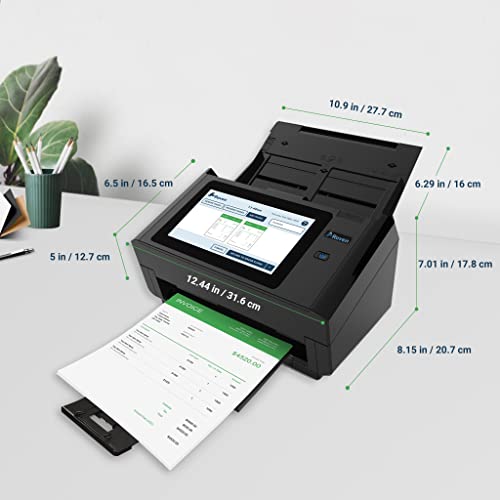
Key features
- •SCAN TO CLOUD — scan up to 60ppm directly into integrated cloud services (Raven Cloud, Dropbox, Google Drive, Evernote, Box, SharePoint, OneDrive, Quickbooks Online), USB, FTP, SMB Share, Email or Fax
- •SEARCHABLE DOCUMENTS — all scanned documents produce searchable PDFs with OCR to detect printed or handwritten text. Free Raven Cloud subscription included for unlimited secure cloud storage.
- •WIRELESS SCANNING — Wi-Fi and Ethernet connectivity allows you to scan and send documents wirelessly without the need for a computer
- •TOUCHSCREEN DISPLAY — Large 8" LED screen provides more visibility and incredible touch experience for easier navigation and document editing without a computer
- •SCAN STACKS AUTOMATICALLY — Adjustable anti-jam 100-page Automatic Document Feeder with ultrasonic detection handles standard documents, receipts, business cards and ID cards into an expandable output tray
BrandRaven
CategoryDocument Scanners
ColorBlack
WarrantyAll of our Raven Scanners include a one (1) year warranty covering any defects in the hardware or software on the scanner. This includes free overnight replacements whenever a warranty claim occurs.
Raven Pro Document Scanner - Huge Touchscreen, High Speed Color Duplex Feeder (ADF), Wireless Scan to Cloud, WiFi, Ethernet, USB, Home or Office Desktop
List Price: $945.53$850.98DEALYou Save: $94.55 (10%)
Free shippingFree Returns – 30 daysFree Order CancellationSecure Payment2–3 Days DeliveryGet It October 25, 2026In Stock (1)No marketing spamNo account requiredFulfilment by FedEx / Amazon / UPS / ShipwirePayPal / Card Buyer Protection
Customer Reviews
Reviews sourced from verified Amazon purchasers4.5
out of 5
Based on 10 reviews
5★
80%
4★
20%
3★
0%
2★
0%
1★
0%
Perfect for a Mac running Mac OS Catalina!
James Astro✓ Verified Purchase•August 20, 2023
I have a home office that has been fully digitized. I scan everything, and keep almost no paper documents. Over the years I have scanned more than 6000 documents, and they are stored as searchable PDF files on my MacBook Pro. I used to have 3 filing cabinets full of papers. Now I have just a handful of paper originals that fit into 1/3 of a cabinet. If you haven't started scanning your documents yet, then you should start now. It'll completely change the way you manage documents.
In this review I'll be comparing all of the scanners that I have used:
"¢ Fujitsu iX500
"¢ Epson DS-870
"¢ Raven Scanner Pro
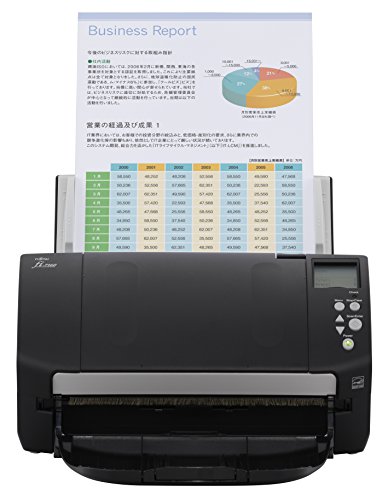
Fujitsu ScanSnap iX500
I started with the ScanSnap iX500 several years ago. It was a great scanner back when I first purchased it. It was fast, accurate, and quiet. Unfortunately the iX500 software has become less reliable over time. Each time there was a new Mac OS update, I had to download the latest iX500 drivers, reinstall them, and fix compatibility problems. Then last Spring (2019), the iX500 required completely new software called ScanSnap Home. I didn't like the new user interface, and it had some annoying bugs, but I managed to tolerate it for a few months.
Finally, Mac OS Catalina came out, and the iX500 took a turn for the worse. Once again I had to install new iX500 software. Unfortunately there was a significant bug this time: The drivers caused one of the CPU cores on my Mac to run at 100% all the time. This would happen whether the ScanSnap application was running or not. My computer was slower because of this, and the fans would run full-time to keep things cool. I tried uninstalling and reinstalling the drivers a couple of times, but that didn't help. In short, if you are running Mac OS Catalina, then stay away from the iX500.
Epson DS-870
Next I tried the Epson DS-870. It had some good reviews online, and it seemed quite promising. However, after using it for a couple of days, I can't recommend it for Mac users. The biggest problem is that you can't scan documents using the front control panel on the scanner. Each time that I used the front panel to scan documents, it would scan all of the pages, and then freeze. The only way to fix the problem was to reboot the scanner. I imagine this feature must have worked at some point, but it never worked for me. Perhaps it wasn't compatible with Mac OS Catalina? I'm not sure. I installed the latest Epson drivers that claimed to be Catalina compatible, but that didn't help.
My workaround was to scan using the Epson Document Capture app on my Mac. That worked fairly reliably. However, there were a few times when the scanning software displayed communication errors. I was never able to debug what caused that, but it seemed to happen when I launched the software first, then turned on the scanner, and a tried to initiate a scan.
Anyway, I found that I could get it working if I did everything in just the right order, and avoided using the front panel on the scanner. This all seemed too finicky, and I didn't have any confidence that the scanner would keep working with future Mac OS updates. I'll be returning this scanner soon.
Raven Scanner Pro
Finally, I decided to try the Raven Scanner Pro. If you haven't researched this scanner yet, then go take a look. It's a completely new concept, and I freakin love it! This scanner has totally changed the way I do scanning. Best of all, it's 100% compatible with Mac OS Catalina. Why? Because you don't have to install any software.This scanner sends documents directly to the cloud. You don't even need a computer to use it.
Most old-school scanners like the ScanSnap iX500 or Epson DS-870 are controlled by your computer. Naturally this requires drivers and scanning software, and that's where all of the compatibility problems come from. Well, the Raven Scanner Pro avoids those issues by scanning directly to the cloud. You can scan to Raven Cloud, DropBox, Evernote, Box, e-mail, Google Drive, OneDrive, SharePoint, or a USB stick.
At first I thought this would be a problem for me, because I don't like storing too many documents in the cloud. It's too much of a security risk. After all, what will happen if somebody hacks into my DropBox account, and gains access to everything that I scanned during the last few years. That sounds frightening.
Well, here is what I do instead. I scan directly from the Raven Scanner to DropBox, the files magically appear on my Mac a few moments later. Then I rename the files, and drag them into folders on my Mac. They only exist in the cloud temporarily. In other words, I'm just using the cloud as a conduit for getting files from the scanner to my Mac.
This scanner completely changed my workflow too. Previously I would do this with my old-school scanners:
1) Turn on my Mac.
2) Launch the scanner app.
3) Turn on the scanner.
4) Drop a document into the scanner, and scan it.
5) Wait for image analysis and OCR to finish.
6) Save the document.
7) Turn off the scanner.
8) Turn off the Mac.
My new workflow with the Raven is so much simpler:
1) Turn on the scanner.
2) Drop a document into the scanner, and scan it. Walk away, I'm done.
Then later in the week, after scanning documents over multiple days, I finally turn on my Mac, rename and move the files around, and I'm done. I basically use DropBox as an in-box of scanned documents, and I wait until a few of them have accumulated before I organize them.
All that being said, the Raven Scanner Pro isn't perfect. Here are a few issue:
"¢ It takes up a little more desk space than the ScanSnap iX500 and Epson DS-870.
"¢ The scanning quality is good, but not quite as good as the Epson.
"¢ It can't scan receipts that are longer than 15".
"¢ It has a bright flashing blue light when it's asleep.
"¢ DropBox uploads are pretty slow.
"¢ When uploading to Raven Cloud, your web browser doesn't refresh automatically to show the new file.
"¢ Scanning at 400 DPI or higher is quite slow.
"¢ It makes some fan noise. It's not crazy loud or anything, but it's not silent like my other scanners were.
Fortunately I found some solutions:
"¢ If you have receipts longer than 15", just cut them in half before scanning.
"¢ There is a product on Amazon called "LightDims". Use it to dim the flashing blue light, and that problem will be solved.
"¢ You don't have to wait for DropBox uploads to finish. Just keep scanning other documents, and it'll upload in the background.
"¢ Scanning at 400 DPI or higher doesn't seem necessary. 300 DPI looks great, and it's very fast.
"¢ Set the scanner to sleep after a few minutes. That will shut off the fan. Or you can put the scanner to sleep by pressing the button.
I also had good experience with their tech support. I sent them some questions online, and received helpful answers within 20 minutes.
I also get the impression that their software is being actively improved. When I first purchased the scanner it only had options for 200, 400, or 600 DPI. That was a problem initially, because I wanted at least 300 DPI. The 200 DPI setting was too low-res, and 400 DPI was too slow. Well, now they offer 300 DPI and it's really fast. Based on my experience so far, I bet we'll see additional improvements at a decent rate.
Anyway, in case you can't tell, I really love the Raven Scanner Pro. I'll never go back to old-school scanners that require drivers on my Mac. I would give the Raven scanner a star rating of 4.2, but I'll round that up to a 5.
And if you're running a Mac with Catalina, stay away from the ScanSnap iX500 or Epson DS-870.
In this review I'll be comparing all of the scanners that I have used:
"¢ Fujitsu iX500
"¢ Epson DS-870
"¢ Raven Scanner Pro
Fujitsu ScanSnap iX500
I started with the ScanSnap iX500 several years ago. It was a great scanner back when I first purchased it. It was fast, accurate, and quiet. Unfortunately the iX500 software has become less reliable over time. Each time there was a new Mac OS update, I had to download the latest iX500 drivers, reinstall them, and fix compatibility problems. Then last Spring (2019), the iX500 required completely new software called ScanSnap Home. I didn't like the new user interface, and it had some annoying bugs, but I managed to tolerate it for a few months.
Finally, Mac OS Catalina came out, and the iX500 took a turn for the worse. Once again I had to install new iX500 software. Unfortunately there was a significant bug this time: The drivers caused one of the CPU cores on my Mac to run at 100% all the time. This would happen whether the ScanSnap application was running or not. My computer was slower because of this, and the fans would run full-time to keep things cool. I tried uninstalling and reinstalling the drivers a couple of times, but that didn't help. In short, if you are running Mac OS Catalina, then stay away from the iX500.
Epson DS-870
Next I tried the Epson DS-870. It had some good reviews online, and it seemed quite promising. However, after using it for a couple of days, I can't recommend it for Mac users. The biggest problem is that you can't scan documents using the front control panel on the scanner. Each time that I used the front panel to scan documents, it would scan all of the pages, and then freeze. The only way to fix the problem was to reboot the scanner. I imagine this feature must have worked at some point, but it never worked for me. Perhaps it wasn't compatible with Mac OS Catalina? I'm not sure. I installed the latest Epson drivers that claimed to be Catalina compatible, but that didn't help.
My workaround was to scan using the Epson Document Capture app on my Mac. That worked fairly reliably. However, there were a few times when the scanning software displayed communication errors. I was never able to debug what caused that, but it seemed to happen when I launched the software first, then turned on the scanner, and a tried to initiate a scan.
Anyway, I found that I could get it working if I did everything in just the right order, and avoided using the front panel on the scanner. This all seemed too finicky, and I didn't have any confidence that the scanner would keep working with future Mac OS updates. I'll be returning this scanner soon.
Raven Scanner Pro
Finally, I decided to try the Raven Scanner Pro. If you haven't researched this scanner yet, then go take a look. It's a completely new concept, and I freakin love it! This scanner has totally changed the way I do scanning. Best of all, it's 100% compatible with Mac OS Catalina. Why? Because you don't have to install any software.This scanner sends documents directly to the cloud. You don't even need a computer to use it.
Most old-school scanners like the ScanSnap iX500 or Epson DS-870 are controlled by your computer. Naturally this requires drivers and scanning software, and that's where all of the compatibility problems come from. Well, the Raven Scanner Pro avoids those issues by scanning directly to the cloud. You can scan to Raven Cloud, DropBox, Evernote, Box, e-mail, Google Drive, OneDrive, SharePoint, or a USB stick.
At first I thought this would be a problem for me, because I don't like storing too many documents in the cloud. It's too much of a security risk. After all, what will happen if somebody hacks into my DropBox account, and gains access to everything that I scanned during the last few years. That sounds frightening.
Well, here is what I do instead. I scan directly from the Raven Scanner to DropBox, the files magically appear on my Mac a few moments later. Then I rename the files, and drag them into folders on my Mac. They only exist in the cloud temporarily. In other words, I'm just using the cloud as a conduit for getting files from the scanner to my Mac.
This scanner completely changed my workflow too. Previously I would do this with my old-school scanners:
1) Turn on my Mac.
2) Launch the scanner app.
3) Turn on the scanner.
4) Drop a document into the scanner, and scan it.
5) Wait for image analysis and OCR to finish.
6) Save the document.
7) Turn off the scanner.
8) Turn off the Mac.
My new workflow with the Raven is so much simpler:
1) Turn on the scanner.
2) Drop a document into the scanner, and scan it. Walk away, I'm done.
Then later in the week, after scanning documents over multiple days, I finally turn on my Mac, rename and move the files around, and I'm done. I basically use DropBox as an in-box of scanned documents, and I wait until a few of them have accumulated before I organize them.
All that being said, the Raven Scanner Pro isn't perfect. Here are a few issue:
"¢ It takes up a little more desk space than the ScanSnap iX500 and Epson DS-870.
"¢ The scanning quality is good, but not quite as good as the Epson.
"¢ It can't scan receipts that are longer than 15".
"¢ It has a bright flashing blue light when it's asleep.
"¢ DropBox uploads are pretty slow.
"¢ When uploading to Raven Cloud, your web browser doesn't refresh automatically to show the new file.
"¢ Scanning at 400 DPI or higher is quite slow.
"¢ It makes some fan noise. It's not crazy loud or anything, but it's not silent like my other scanners were.
Fortunately I found some solutions:
"¢ If you have receipts longer than 15", just cut them in half before scanning.
"¢ There is a product on Amazon called "LightDims". Use it to dim the flashing blue light, and that problem will be solved.
"¢ You don't have to wait for DropBox uploads to finish. Just keep scanning other documents, and it'll upload in the background.
"¢ Scanning at 400 DPI or higher doesn't seem necessary. 300 DPI looks great, and it's very fast.
"¢ Set the scanner to sleep after a few minutes. That will shut off the fan. Or you can put the scanner to sleep by pressing the button.
I also had good experience with their tech support. I sent them some questions online, and received helpful answers within 20 minutes.
I also get the impression that their software is being actively improved. When I first purchased the scanner it only had options for 200, 400, or 600 DPI. That was a problem initially, because I wanted at least 300 DPI. The 200 DPI setting was too low-res, and 400 DPI was too slow. Well, now they offer 300 DPI and it's really fast. Based on my experience so far, I bet we'll see additional improvements at a decent rate.
Anyway, in case you can't tell, I really love the Raven Scanner Pro. I'll never go back to old-school scanners that require drivers on my Mac. I would give the Raven scanner a star rating of 4.2, but I'll round that up to a 5.
And if you're running a Mac with Catalina, stay away from the ScanSnap iX500 or Epson DS-870.
Raven Pro Document Scanner Exceeded Expectations...
Bayview Research Group, LLC✓ Verified Purchase•August 4, 2023
I recently acquired the Raven Pro Document Scanner, and I couldn't be more pleased with my purchase! Setting it up was an absolute breeze, thanks to its user-friendly design. Within minutes, I had it connected wirelessly to my computer, ready to tackle my scanning tasks.
One of the standout features is the impressive touchscreen - it's huge and incredibly responsive, making navigation a joy. I appreciate how intuitive it is; even without referring to the manual, I was able to explore its functions and settings effortlessly.
Speed is of the essence for me, and the Raven Pro certainly delivers on that front. The high-speed color duplex feeder is a game-changer. It effortlessly handles stacks of documents, quickly scanning both sides in vibrant color. This not only saves me time but also ensures that I maintain the quality of the original documents.
In terms of performance and convenience, the Raven Pro Document Scanner has exceeded my expectations. Its wireless connectivity, easy setup, massive touchscreen, and rapid scanning capabilities make it an essential tool for anyone seeking efficiency and reliability in their document management. Highly recommend!
One of the standout features is the impressive touchscreen - it's huge and incredibly responsive, making navigation a joy. I appreciate how intuitive it is; even without referring to the manual, I was able to explore its functions and settings effortlessly.
Speed is of the essence for me, and the Raven Pro certainly delivers on that front. The high-speed color duplex feeder is a game-changer. It effortlessly handles stacks of documents, quickly scanning both sides in vibrant color. This not only saves me time but also ensures that I maintain the quality of the original documents.
In terms of performance and convenience, the Raven Pro Document Scanner has exceeded my expectations. Its wireless connectivity, easy setup, massive touchscreen, and rapid scanning capabilities make it an essential tool for anyone seeking efficiency and reliability in their document management. Highly recommend!
By Far The BEST SCANNER EVER and It KEEPS GETTING BETTER! July 2020 Review. BUY ONE!
Mr Gadget✓ Verified Purchase•July 21, 2023
It is absolutely ridiculous how good this scanner is now. It was brilliant when I bought 2 of these in Oct 2019, but I am amazed at how they continually upgrade and improve since then. I bought this to replace my Fujitsu iX500 which was a great scanner in its day and served me well for years, but there really is no comparison. As my attached picture shows, I have not opened the Fujitsu since I have gotten this. Let me summarize the PROS and CONS that come to mind:
PROS:
1. Extremely easy to use - Place papers to be scanned on document feeder, press giant "SCAN" button on giant touchscreen.
2. Crazy Fast! Regardless of number of colors or resolution, this thing is fast, fast, fast!
3. Stack as many pages as you want! My old Fujitsu did 15-20 pages Max, this one scans 100. Saves me tons of time during tax time - I just through in a giant stack of paper and it rips through the entire stack.
4. Built in OCR! This makes finding documents later easy.
5. Can handle thick materials (pro version)! I have scanned credit cards, thick cardboard.
6. No computer needed! So convenient. My old Fujitsu required computer connection which was dicey. These scans can go to computers and cloud locations at the same time.
7. Scans to multiple destinations at the same time with no extra effort! I can save copies directly to laptop, email account, and multiple clouds at the same time. I like to save to Hotmail /Outlook Web email account, Raven Cloud, Dropbox, Box, OneDrive, our home Macbook Pro (wirelessly using SMB protocol!), and even iCloud (folder on my MacBook that syncs to iCloud). Multiple copies so I can find them and use them where I want, all at the same time. You can even save to specific folders on any source.
8. On-Screen Naming. After you scan, you can name the document (and/or individual pages if you want) and that name(s) goes with the document to all selected destinations so you can retrieve it later.
9. Auto-Detection works great - I recommend you use this setting all the time. When you press scan it does not matter if your stack of documents has material on one side or both, the scanner finds all pages with material and creates a scan of each.
10. Excellent scanning in Color, Grayscale, or Black and White! You decide what will work best based on your file side needs. Because I like to just set and forget, I mostly scan in color and it just figures things out from there. Super fast and documents are reasonable size in my opinion.
11. Nice selection of scanning resolutions - 200DPI, 300DPI, 400DPI, 600DPI. I like about 300 or 400 which works great if I later print copies on my laser printer.
12. Scan to Fax - no phone connection needed! - What, free fax scanning using only internet connection? That is so sick. Works great for me for business.
13. Scan to email address(es)! Mentioning this again because it is so brilliant. You can send over the internet to one or more emails at the touch of a button. Works great with contact directly which I will list separately.
14. Contact Directory! You can save email and fax numbers for contacts you need to send stuff to and choose one or more of these to scan to on the fly.
15. Secure! I am connected to my WPA 2 network at home.
16. History Provided! at the touch of a button see exactly who you sent what to and when.
17. Delivery Confirmation! You are scanning and sending to one or more destinations at the same time. You get on screen confirmation when it has been delivered and it is immortalized in the history as well.
18. Outstanding Support! It is obvious that these guys are customer focused. They answer phones in the US, speak clear English, and are very helpful. Email support is fast and excellent too in my opinion. I have not tried web chat which they also seem to offer.
19. Continued improvements! This thing is like an Iphone or Tesla with continued upgrades and new features. I have only had it for about 8 months and they have added so many excellent new features. Some examples off the top of my head - address book added to make sending to one or more contacts simple, history added to have documentations that materials were sent and received, and resolution has been improved (used to top out at 400DPI and they increased to 600DPI with firmware upgrade alone), wireless Macintosh connectivity by SMB, speed dramatically improved to name a few! I have seen so many excellent upgrades in such a short time that I really trust these guys to deliver what they say. Just today I called for a tech issue and asked about paper handling length which is currently limited to legal sized, and they tell me that they are removing that limitation in 2 weeks.
CONS: Quite honestly, I have to strain to think of any!
1. Paper handling length - currently limited to legal sized length, but this limitation will be fixed in 2 weeks by firmware release according to the tech team that I called today originally about another issue, and then I decided to ask about the only 2 CONS that I can possibly think of.
2. No WPA Enterprise 2 support - Tech support says no ETA on this one, though it is on their list. I use WPA 2 at home and it works great with my wifi, but work uses WPA 2 Enterprise (which requires username and password as well as SSID). Thus, I have to connect this by ethernet to my company network.
That's it!
This scanner is beyond excellent!
I work for a large company with a lot of resources. There is truly nothing like this. There are so many applications. We use it at home to get rid of all paper. We scan anything that we want to keep and it is easily retrieved from the "cloud" whenever we need it. At work, we use this as a Kiosk for our patients to be able to scan their own documents and have it automatically and rapidly sent to the business center which can be anywhere from 5 to 30 miles away! Put in document stack of papers and hit "Scan Button". You do not even have to name it. It generates a PDF which is rapidly opened, read, and processed in the way that is needed.
I highly recommend this scanner for business or personal use. My wife who is not a techie loves this thing as much as I do! (I am a techie).
PROS:
1. Extremely easy to use - Place papers to be scanned on document feeder, press giant "SCAN" button on giant touchscreen.
2. Crazy Fast! Regardless of number of colors or resolution, this thing is fast, fast, fast!
3. Stack as many pages as you want! My old Fujitsu did 15-20 pages Max, this one scans 100. Saves me tons of time during tax time - I just through in a giant stack of paper and it rips through the entire stack.
4. Built in OCR! This makes finding documents later easy.
5. Can handle thick materials (pro version)! I have scanned credit cards, thick cardboard.
6. No computer needed! So convenient. My old Fujitsu required computer connection which was dicey. These scans can go to computers and cloud locations at the same time.
7. Scans to multiple destinations at the same time with no extra effort! I can save copies directly to laptop, email account, and multiple clouds at the same time. I like to save to Hotmail /Outlook Web email account, Raven Cloud, Dropbox, Box, OneDrive, our home Macbook Pro (wirelessly using SMB protocol!), and even iCloud (folder on my MacBook that syncs to iCloud). Multiple copies so I can find them and use them where I want, all at the same time. You can even save to specific folders on any source.
8. On-Screen Naming. After you scan, you can name the document (and/or individual pages if you want) and that name(s) goes with the document to all selected destinations so you can retrieve it later.
9. Auto-Detection works great - I recommend you use this setting all the time. When you press scan it does not matter if your stack of documents has material on one side or both, the scanner finds all pages with material and creates a scan of each.
10. Excellent scanning in Color, Grayscale, or Black and White! You decide what will work best based on your file side needs. Because I like to just set and forget, I mostly scan in color and it just figures things out from there. Super fast and documents are reasonable size in my opinion.
11. Nice selection of scanning resolutions - 200DPI, 300DPI, 400DPI, 600DPI. I like about 300 or 400 which works great if I later print copies on my laser printer.
12. Scan to Fax - no phone connection needed! - What, free fax scanning using only internet connection? That is so sick. Works great for me for business.
13. Scan to email address(es)! Mentioning this again because it is so brilliant. You can send over the internet to one or more emails at the touch of a button. Works great with contact directly which I will list separately.
14. Contact Directory! You can save email and fax numbers for contacts you need to send stuff to and choose one or more of these to scan to on the fly.
15. Secure! I am connected to my WPA 2 network at home.
16. History Provided! at the touch of a button see exactly who you sent what to and when.
17. Delivery Confirmation! You are scanning and sending to one or more destinations at the same time. You get on screen confirmation when it has been delivered and it is immortalized in the history as well.
18. Outstanding Support! It is obvious that these guys are customer focused. They answer phones in the US, speak clear English, and are very helpful. Email support is fast and excellent too in my opinion. I have not tried web chat which they also seem to offer.
19. Continued improvements! This thing is like an Iphone or Tesla with continued upgrades and new features. I have only had it for about 8 months and they have added so many excellent new features. Some examples off the top of my head - address book added to make sending to one or more contacts simple, history added to have documentations that materials were sent and received, and resolution has been improved (used to top out at 400DPI and they increased to 600DPI with firmware upgrade alone), wireless Macintosh connectivity by SMB, speed dramatically improved to name a few! I have seen so many excellent upgrades in such a short time that I really trust these guys to deliver what they say. Just today I called for a tech issue and asked about paper handling length which is currently limited to legal sized, and they tell me that they are removing that limitation in 2 weeks.
CONS: Quite honestly, I have to strain to think of any!
1. Paper handling length - currently limited to legal sized length, but this limitation will be fixed in 2 weeks by firmware release according to the tech team that I called today originally about another issue, and then I decided to ask about the only 2 CONS that I can possibly think of.
2. No WPA Enterprise 2 support - Tech support says no ETA on this one, though it is on their list. I use WPA 2 at home and it works great with my wifi, but work uses WPA 2 Enterprise (which requires username and password as well as SSID). Thus, I have to connect this by ethernet to my company network.
That's it!
This scanner is beyond excellent!
I work for a large company with a lot of resources. There is truly nothing like this. There are so many applications. We use it at home to get rid of all paper. We scan anything that we want to keep and it is easily retrieved from the "cloud" whenever we need it. At work, we use this as a Kiosk for our patients to be able to scan their own documents and have it automatically and rapidly sent to the business center which can be anywhere from 5 to 30 miles away! Put in document stack of papers and hit "Scan Button". You do not even have to name it. It generates a PDF which is rapidly opened, read, and processed in the way that is needed.
I highly recommend this scanner for business or personal use. My wife who is not a techie loves this thing as much as I do! (I am a techie).
Disruptive...what an innovative company should do
Jeremy✓ Verified Purchase•July 4, 2023
I bought this scanner to replace a perfectly good Futijsu scanner that had been turned into a paperweight because the company refuses to update their macOS ScanSnap tool to work with both my scanner and current macOS version. As far as I can tell the replacement model of the scanner really brings little new to the table except support for the current version of both the macOS and their ScanSnap tool. So I revolted and decided to find something else and not put any more money into supporting this nonsense.
I really like this scanner. It has handled everything I have thrown at it and has only jammed up when I really pushed my luck and overloaded it or challenged it with some really rough papers.
The OCR is really quite good, I have been able to easily locate documents with searches and simplify the amount of folder structure I maintain now.
The user interface is also quite good. My 11 year old now uses it with ease to scan documents to her teacher. i love the independence from a computing device. I do think some of the UI could be further improved to handle those situations where there is a high volume of scanning going on. For example, one cannot completely turn off the window/screen that shows progress of the upload of the scan to the final destination. You can click out of it or you can have it automatically go away once the upload is deemed successful, but there are times I just want to move on and not make extra clicks. I can use the history page to confirm upload before I toss any scanned documents. Or I also look at my google drive in real time to monitor upload.
I also love that I can fully navigate the folder structure of my google drive, but if I want to change the folder, I have to start at the top of the folder hierarchy every time. A very helpful employee, Cody, who did a product review call with me taught me about using groups to create my favorite folders to access on Google Drive, but some simple refinement of traversing the folder hierarchy would make much of that moot.
The image quality is certainly at expectation for a document scanner at this price point, though to be clear its not intended to scan your irreplaceable family photos at super fidelity.
I did schedule and receive a call from the company to ask for my feedback on the product. They are taking the time to invest in true product management and listen to the market and their customers for feedback. The great thing about this product is that many of the things I had ideas to make it even better are software addressable.
Do be aware the pro scanner is a bit of a footprint on my desk and I wish the inlet tray could fold on a hinge. The large screen is great, but it is not the best for off angle viewing. However, overall I am happy with having a choice of color on the pro model and the build quality. As minor things, the Raven sticker on the front of the unit is fairly cheap looking, a better label/sticker to promote the brand is in order. Additionally, the plastic stop at the end of the exit tray is a little weak and does need to be handled carefully.
I do think the cloud portal one must use to truly leverage this scanner is a bit of a risk proposition and does weigh on the minds of those that may love the innovation but feel there is risk with security or long term stability of the company. When speaking with the company, making the unit truly stand alone and still able send documents to a google drive or similar is on their list, but down the priority list a bit. I was given the impression that if the company ever felt it was not viable to press on, they would cease other enhancements and take steps to untether the devices from the Raven cloud so that they are not paper weights. However, this company is making a fantastic product and I think they will do well long term.
Now that all said, in choosing the Raven Pro vs. the original scanner, I feel the later would probably also meet my needs, but given how cloud dependent this scanner is, I valued the option to be able leverage the twain compatibility in the unlikely event something happens to the underlying company.
Overall this scanner brings things to the table that are truly innovative in a document scanner and I highly recommend it after scanning thousands of pages of documents over the past few weeks.
P.S. I had to buy dozens of "the other guys'" scanners for enterprise projects in our IT department due to vendor compatibility needs. However, there is potential long term in this product that would upend that. If there was innovation put forth to enable enterprise wifi access, identity management (auto provision to send data to each users' OneDrive when they are logged in), etc, I could not only cut down on the # of devices I procured, I could likely end up with a much more supportable setup.
I really like this scanner. It has handled everything I have thrown at it and has only jammed up when I really pushed my luck and overloaded it or challenged it with some really rough papers.
The OCR is really quite good, I have been able to easily locate documents with searches and simplify the amount of folder structure I maintain now.
The user interface is also quite good. My 11 year old now uses it with ease to scan documents to her teacher. i love the independence from a computing device. I do think some of the UI could be further improved to handle those situations where there is a high volume of scanning going on. For example, one cannot completely turn off the window/screen that shows progress of the upload of the scan to the final destination. You can click out of it or you can have it automatically go away once the upload is deemed successful, but there are times I just want to move on and not make extra clicks. I can use the history page to confirm upload before I toss any scanned documents. Or I also look at my google drive in real time to monitor upload.
I also love that I can fully navigate the folder structure of my google drive, but if I want to change the folder, I have to start at the top of the folder hierarchy every time. A very helpful employee, Cody, who did a product review call with me taught me about using groups to create my favorite folders to access on Google Drive, but some simple refinement of traversing the folder hierarchy would make much of that moot.
The image quality is certainly at expectation for a document scanner at this price point, though to be clear its not intended to scan your irreplaceable family photos at super fidelity.
I did schedule and receive a call from the company to ask for my feedback on the product. They are taking the time to invest in true product management and listen to the market and their customers for feedback. The great thing about this product is that many of the things I had ideas to make it even better are software addressable.
Do be aware the pro scanner is a bit of a footprint on my desk and I wish the inlet tray could fold on a hinge. The large screen is great, but it is not the best for off angle viewing. However, overall I am happy with having a choice of color on the pro model and the build quality. As minor things, the Raven sticker on the front of the unit is fairly cheap looking, a better label/sticker to promote the brand is in order. Additionally, the plastic stop at the end of the exit tray is a little weak and does need to be handled carefully.
I do think the cloud portal one must use to truly leverage this scanner is a bit of a risk proposition and does weigh on the minds of those that may love the innovation but feel there is risk with security or long term stability of the company. When speaking with the company, making the unit truly stand alone and still able send documents to a google drive or similar is on their list, but down the priority list a bit. I was given the impression that if the company ever felt it was not viable to press on, they would cease other enhancements and take steps to untether the devices from the Raven cloud so that they are not paper weights. However, this company is making a fantastic product and I think they will do well long term.
Now that all said, in choosing the Raven Pro vs. the original scanner, I feel the later would probably also meet my needs, but given how cloud dependent this scanner is, I valued the option to be able leverage the twain compatibility in the unlikely event something happens to the underlying company.
Overall this scanner brings things to the table that are truly innovative in a document scanner and I highly recommend it after scanning thousands of pages of documents over the past few weeks.
P.S. I had to buy dozens of "the other guys'" scanners for enterprise projects in our IT department due to vendor compatibility needs. However, there is potential long term in this product that would upend that. If there was innovation put forth to enable enterprise wifi access, identity management (auto provision to send data to each users' OneDrive when they are logged in), etc, I could not only cut down on the # of devices I procured, I could likely end up with a much more supportable setup.
Amazing: this is the new "Nest" of scanners
Marc C.✓ Verified Purchase•June 10, 2023
I received the scanner this morning. I have to say, after having scanned 1000+ pages with this device today, I am completely blown away. It is to scanners what Nest is to thermostats; what DropCam was to security camera systems. It's about time someone created an Apple-esque alternative to the garbage software / UI devices made by legacy companies like Fujitsu and Brother. Seriously, you'd think that large companies with huge budgets for R&D would create something intuitive like this Raven scanner. These large companies released devices with 90's era client-side software. It's garbage, especially for folks who wants nothing to do with computer drivers; that want to scan directly to the cloud.
Setup: unboxing was easy; it took about 10 minutes to unbox, remove the safety take holding the components together, and plug it in. I chose wifi for the device's Internet connectivity.
From power-on, the impressive, large touch screen prompted me to enter my wifi credentials. It also prompted me to create a Raven account. The device also automatically downloaded a couple of firmware updates.
I was interested in using this scanner computer-free, with scans being uploaded to a cloud service. After the scanner set-up, I was prompted to visit Raven's website so that I could link my scanner with a cloud service provider. I'm guessing the reason why this needs to be done on a computer or mobile device is because most cloud service providers have somewhat strict security requirements that typically require a modern browser to authenticate into the cloud accounts and link to hardware such as the scanner. The process was simple and straightforward. I logged into my Raven account, chose a cloud provider, entered my credentials for the cloud provider - which granted the scanner limited rights to access files in the scanner folder I created - and then everything was set. From turning on the scanner the first time to scanning to the cloud took about 15 minutes. I could tell from some of the dialog prompts - system ones like firmware downloads - the folks at Raven based the scanner's computer on an open source version of Android OS. That's a good choice, rather than having to cobble something else together on their own based on Linux.
Here's the boring part: making the scans. It was ridiculously intuitive, fast, and easy. Blindingly fast. It was evident that the scanner was scanning both sides of the original documents at the same time, since the documents didn't need to be re-fed into the unit. After the scan was complete, the device showed thumbnails of the scans on the large screen, which provided me with an opportunity to double check that everything scanned well. You also have the chance to reorder pages, change the orientation, brightness / contrast, add additional pages, etc. An important note: the double sided scan function will automatically check and remove blank pages. Very very nice.
So I'd say I scanned a bit more than a thousand pages today from the moment I set-up the device from the time I wrote my review. Everything from letter sized pages, to receipts, to business cards, card-stock etc. All the pages fed *perfectly* except for just 3 pages. The first one was on a narrow Home Depot receipt on thin thermal-type paper. I fed it in on the narrow edge. The paper became scrunched up / torn on the two rubber roller wheels inside the scanner. I had to fish out some shards of paper. Fortunately I was able to get the torn shards separated from the wheels. (I figured out later that you *can* scan these types of receipts, but they need to be scanned edge wide, it feed it via the wide side, not the narrow side. Then it works great.) The second misfeed was where two regular letter-side pages were double-fed, ie the scanner sucked in two pages at once instead of one. I happened to be watching so no big deal. The third misfeed was a 3-foot long pamphlet. About 18 inches into the feed, the scanner indicated that there was an error, even though it appears to be feeding just fine. I tried it again and received the same error. I figured I was pushing my luck trying to scan something so long.
All things considered, I was *very* impressed with this scanner. It was so fast and so intuitive, I am seriously going to recommend it to everyone I know who are looking for scanners. From my tech-challenged mother-in-law to my most geeky tech savvy friends.
While everything was pretty much perfect today, here are some observations. I gather these could be addressed in a future firmware update:
Bugs:
- when reordering pages after a scan, hitting the "cancel" button would still result in the pages being reordered.
- when naming files uploaded to Google Cloud, sometimes dashes ("-") would be missing from the filenames. The dashes would appear to be replaced by spaces when accessing the files from within Google Cloud on the web. For example, a scan named "2019-10-27 Work - Invoices" would appear as "2019 10 27 Work Invoices". It didn't happen all the time, and I didn't see whether the bug manifested itself with other cloud providers.
Feature request:
- the ability to send scans to different accounts within the same cloud service, ie to my Google Drive account or my wife's Google Drive account.
- the ability to feed originals longer than 18" or so inches.
- when adding pages to a scan, sometimes I would feed a new page, but then accidentally upload the pages to the cloud instead of hitting the button to add a page. If possible, it would be nice if the scanner could detect that a page had been fed into the document tray, and then prompt the user if the user hit the upload to cloud button rather than the add-page button. A prompt like: "are you sure you want to upload to the cloud? I've added a page to the document feeder tray.")
- it would be nice to be able to choose a different color option for pages that are added to an initial scan.
Anyway, at the end of the day, I'd say this is the best small-format scanner I've ever used, period, hands-down. I rarely write reviews on Amazon, but for this device its worth it. I should also note that unlike some items for sale on Amazon, there was nothing in the box or manual "bribing" purchasers to leave a positive review, ie there was no offer to provide free accessories in exchange for a positive review. My review is based on a very positive experience.
Setup: unboxing was easy; it took about 10 minutes to unbox, remove the safety take holding the components together, and plug it in. I chose wifi for the device's Internet connectivity.
From power-on, the impressive, large touch screen prompted me to enter my wifi credentials. It also prompted me to create a Raven account. The device also automatically downloaded a couple of firmware updates.
I was interested in using this scanner computer-free, with scans being uploaded to a cloud service. After the scanner set-up, I was prompted to visit Raven's website so that I could link my scanner with a cloud service provider. I'm guessing the reason why this needs to be done on a computer or mobile device is because most cloud service providers have somewhat strict security requirements that typically require a modern browser to authenticate into the cloud accounts and link to hardware such as the scanner. The process was simple and straightforward. I logged into my Raven account, chose a cloud provider, entered my credentials for the cloud provider - which granted the scanner limited rights to access files in the scanner folder I created - and then everything was set. From turning on the scanner the first time to scanning to the cloud took about 15 minutes. I could tell from some of the dialog prompts - system ones like firmware downloads - the folks at Raven based the scanner's computer on an open source version of Android OS. That's a good choice, rather than having to cobble something else together on their own based on Linux.
Here's the boring part: making the scans. It was ridiculously intuitive, fast, and easy. Blindingly fast. It was evident that the scanner was scanning both sides of the original documents at the same time, since the documents didn't need to be re-fed into the unit. After the scan was complete, the device showed thumbnails of the scans on the large screen, which provided me with an opportunity to double check that everything scanned well. You also have the chance to reorder pages, change the orientation, brightness / contrast, add additional pages, etc. An important note: the double sided scan function will automatically check and remove blank pages. Very very nice.
So I'd say I scanned a bit more than a thousand pages today from the moment I set-up the device from the time I wrote my review. Everything from letter sized pages, to receipts, to business cards, card-stock etc. All the pages fed *perfectly* except for just 3 pages. The first one was on a narrow Home Depot receipt on thin thermal-type paper. I fed it in on the narrow edge. The paper became scrunched up / torn on the two rubber roller wheels inside the scanner. I had to fish out some shards of paper. Fortunately I was able to get the torn shards separated from the wheels. (I figured out later that you *can* scan these types of receipts, but they need to be scanned edge wide, it feed it via the wide side, not the narrow side. Then it works great.) The second misfeed was where two regular letter-side pages were double-fed, ie the scanner sucked in two pages at once instead of one. I happened to be watching so no big deal. The third misfeed was a 3-foot long pamphlet. About 18 inches into the feed, the scanner indicated that there was an error, even though it appears to be feeding just fine. I tried it again and received the same error. I figured I was pushing my luck trying to scan something so long.
All things considered, I was *very* impressed with this scanner. It was so fast and so intuitive, I am seriously going to recommend it to everyone I know who are looking for scanners. From my tech-challenged mother-in-law to my most geeky tech savvy friends.
While everything was pretty much perfect today, here are some observations. I gather these could be addressed in a future firmware update:
Bugs:
- when reordering pages after a scan, hitting the "cancel" button would still result in the pages being reordered.
- when naming files uploaded to Google Cloud, sometimes dashes ("-") would be missing from the filenames. The dashes would appear to be replaced by spaces when accessing the files from within Google Cloud on the web. For example, a scan named "2019-10-27 Work - Invoices" would appear as "2019 10 27 Work Invoices". It didn't happen all the time, and I didn't see whether the bug manifested itself with other cloud providers.
Feature request:
- the ability to send scans to different accounts within the same cloud service, ie to my Google Drive account or my wife's Google Drive account.
- the ability to feed originals longer than 18" or so inches.
- when adding pages to a scan, sometimes I would feed a new page, but then accidentally upload the pages to the cloud instead of hitting the button to add a page. If possible, it would be nice if the scanner could detect that a page had been fed into the document tray, and then prompt the user if the user hit the upload to cloud button rather than the add-page button. A prompt like: "are you sure you want to upload to the cloud? I've added a page to the document feeder tray.")
- it would be nice to be able to choose a different color option for pages that are added to an initial scan.
Anyway, at the end of the day, I'd say this is the best small-format scanner I've ever used, period, hands-down. I rarely write reviews on Amazon, but for this device its worth it. I should also note that unlike some items for sale on Amazon, there was nothing in the box or manual "bribing" purchasers to leave a positive review, ie there was no offer to provide free accessories in exchange for a positive review. My review is based on a very positive experience.
Page 1 of 2