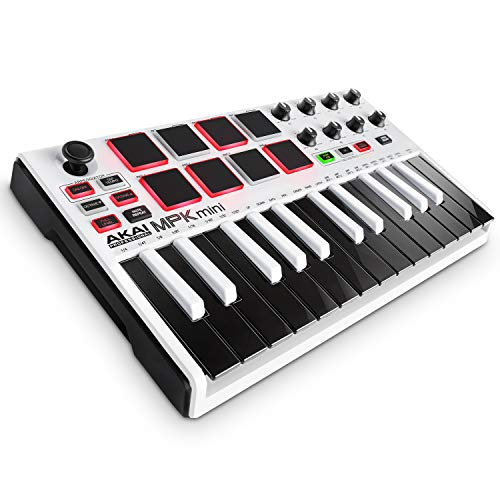
Akai Professional MPK Mini MK3 - 25 Key USB MIDI Keyboard Controller With 8 Backlit Drum Pads, 8 Knobs, Music Production Software and Native Instruments Sound Package (NKS Integration)


Key features
- •Music Production and Beat Maker Essential – USB powered MIDI controller with 25 mini MIDI keyboard velocity-sensitive keys for studio production, virtual synthesizer control and beat production
- •Total Control of your Production - Innovative 4-way thumbstick for dynamic pitch and modulation control, plus a built-in arpeggiator with adjustable resolution, range and modes
- •The MPC Experience - 8 backlit velocity-sensitive MPC-style MIDI beat pads with Note Repeat & Full Level for programming drums, triggering samples and controlling virtual synthesizer / DAW controls
- •Complete Command of your Virtual Instruments and FX - 8 360-degree knobs assign to all your music studio plugins for mixing, tweaking synth controls and more
- •1500+ Sounds and Everything You Need for Pro Production – Complete Music Production Starter Kit including MPC Beats, 6 Virtual Instruments and 2GB of sound content
Akai Professional MPK Mini MK3 - 25 Key USB MIDI Keyboard Controller With 8 Backlit Drum Pads, 8 Knobs, Music Production Software and Native Instruments Sound Package (NKS Integration)
List Price: $144.05$129.65DEALYou Save: $14.40 (10%)
Free shippingFree Returns – 30 daysFree Order CancellationSecure Payment2–3 Days DeliveryGet It October 24, 2026In Stock (3)No marketing spamNo account requiredFulfilment by FedEx / Amazon / UPS / ShipwirePayPal / Card Buyer Protection
Customer Reviews
Reviews sourced from verified Amazon purchasers4.6
out of 5
Based on 10 reviews
5★
90%
4★
10%
3★
0%
2★
0%
1★
0%
A fine upgrade that beats the mpk mini 3
Musicandtheartofbeing✓ Verified Purchase•January 1, 2024
The media could not be loaded. I can fit both hands on this 37 keyed midi controller that I've been using with Ableton Live . The stop and play, rewind ,etc.buttons make it easy to record with. The knobs go all the way around. The pads feel good ,they have 2 banks and several functions and the action on the keys is just right. There's a sequencer on there and it's capable of hooking up to synthesizers and drum machines with 5 pin in/out/USB/3.55mm but I haven't got that far with her yet but I will. The downside is there's not much literature on the mpk plus so good luck with that ,just a smattering of YouTube videos and some Reddit articles. Overall, I got it at a fair price and it's fun to play even though I haven't figured the whole thing out yet . I bought it to replace my Akai mpk mini 3 and I'm glad I got the mpk plus instead. I like it much better . It's more diverse and you can do more with it in a lot of different ways and it's still compact enough that it won't take up much room in your studio. Plus it's compatible with pretty much every DAW out there. So,if I were you and I needed a keyboard controller then I'd get this one because that's what I did. ðŸ˜
Interesting little device!
Michael Watts✓ Verified Purchase•November 21, 2023
Student is enjoying this! It was a bit tricky setting up but pretty guided with instructions on how to do so. Very fun creating on!
Buyer beware
Aleksander Bekker✓ Verified Purchase•November 17, 2023
While the keyboard itself is a steal for the price, the software suite the suppose to come with it does not materialize, Hybrid, Mini grand and Velvet only get registered as demo versions and serial code generator link you get after having to sign up for a couple websites just does not work. I wasted couple of hours just to end up finding a post not so resent on one of the sites that that the full version registration "has a problem"... As far as the keyboard. goes, keys are not the best, and scales function works terribly in a transpose mode....
If you're buying this, you know what it is. A few cons though!
Ben Souza✓ Verified Purchase•November 8, 2023
It's a MIDI keyboard, you need software on a MAC/PC/tablet in order to use it, and I have a lot of thoughts on whether you should buy it. As usual, I have a 2min version and a 5min version of my thoughts. Please at least read the 2min before you buy!
2 MINUTE VERSION
PROS: it's a good MIDI keyboard, okay? The buttons do the things they are supposed to without breaking. It's well-built. The included virtual instruments are pretty decent (big CON on these down below). It's *highly* customizable. But. . .
CONS: the keys are dinky. If you're expecting that, great, but I myself was expecting them to be at least a little bigger. Velocity curves are super janky out of the box. This is especially true for the pads. There are many undocumented features that I discovered through forums and tinkering. I could not find any supported software to configure the device, whereas previous models had full software to configure nearly aspect of the keyboard. The included virtual instruments sound great but do not come with VST versions for me to deploy in my DAW. The lack of documentation and supported software made this feel like a rushed product meant to secure sales. *Shrugs* Maybe the users and AKAI will create more documentation and discover easier ways to tweak this thing as it matures
5 MINUTE VERSION
I'll start off by saying that I don't feel like I wasted money on this MIDI keyboard. Not by any stretch. But getting it to *work* has proven to be an investment of my time in addition to the buying price.
First of all, do not buy this if you are learning how to play piano. Do yourself a favor and get something with full-sized keys. Piano is all muscle memory and you do not want to hurt yourself early on in your career. This doesn't have anything to do with the device itself but more pianos and keyboards in general. This is not a *learning* device for new piano players. But! It is a good *first* MIDI keyboard for producers because you will learn how these keyboards work, and learn how to troubleshoot them.
The problem is, you have to troubleshoot it before you even start using it.
The velocity curves are awful out of the box. The small keys with small travel do not help. If I do a CMinor run with the default settings, it is guaranteed that one note will be soft for no reason and one will be LOUD. Imagine this for whole songs, where you record the MIDI clip and then have to go through the MIDI data with a fine-tooth comb. That is actual production hell and please don't do that to yourself.
To add insult to injury, there is no documented way to modify the velocity data in the keyboard itself, and there is no AKAI-supported software to do so. This documentation and this software exists for the Mk 2 version of this keyboard, so why it doesn't exist for the Mk 3 is absolutely baffling. It's a GREAT product, AKAI, so please include every little minute detail of what I can do with this thing in the packaging! I shouldn't have to bookmark forum pages that have documentation that is not included in the user manual or on your website.
*Clears throat*
Anyway, the velocity issue is most notable with the pads. You have to smack the absolutely dogcrap out of the pads to get them to register higher velocities. I was shaking my whole desk and still not hitting 100 Velocity with them. If you're drumming, especially with dynamic drums, this means everything will sound soft.
Luckily enough, Ableton has a Velocity effect that can modify Velocity data as it enters the DAW. This fixed the keys as I could set a minimum velocity and maximum so the dynamics are more balanced. However, the pads still register too low on Velocity, so I ended up putting them on 'FULL LEVEL' so they always play at 127 (max) velocity. If I need dynamic drums, I go in and edit the velocity levels in the MIDI clip manually. I said earlier that this was production hell, and that opinion hasn't changed, but that is the only way the pads work for me because I cannot find any documentation on how to edit the 'pad' velocity anywhere. Keep in mind not every DAW has this ability, so Ableton is saving my booty here.
For the keys, you can hold the FULL LEVEL button until a screen comes up with v1-4 and some numbers. You can increase V2 to increase the key velocity. Cool, right? Here's the thing: totally undocumented feature. There's a forum post about it, so if I go ham on these settings and that forum post gets edited or deleted, POOF. No documentation on the original settings and I will have to factory reset the whole keyboard. I hope you are seeing the problem now.
Is it worth the money? Absolutely, not a dollar less. It's a wonderful product. If you buy it, be prepared for initial and ongoing troubleshooting to get it to work for you. If you are a budding producer, this will be great experience for you but will definitely prove frustrating. I hope they release official software for this soon, because I will be happy to edit this review when that happens.
2 MINUTE VERSION
PROS: it's a good MIDI keyboard, okay? The buttons do the things they are supposed to without breaking. It's well-built. The included virtual instruments are pretty decent (big CON on these down below). It's *highly* customizable. But. . .
CONS: the keys are dinky. If you're expecting that, great, but I myself was expecting them to be at least a little bigger. Velocity curves are super janky out of the box. This is especially true for the pads. There are many undocumented features that I discovered through forums and tinkering. I could not find any supported software to configure the device, whereas previous models had full software to configure nearly aspect of the keyboard. The included virtual instruments sound great but do not come with VST versions for me to deploy in my DAW. The lack of documentation and supported software made this feel like a rushed product meant to secure sales. *Shrugs* Maybe the users and AKAI will create more documentation and discover easier ways to tweak this thing as it matures
5 MINUTE VERSION
I'll start off by saying that I don't feel like I wasted money on this MIDI keyboard. Not by any stretch. But getting it to *work* has proven to be an investment of my time in addition to the buying price.
First of all, do not buy this if you are learning how to play piano. Do yourself a favor and get something with full-sized keys. Piano is all muscle memory and you do not want to hurt yourself early on in your career. This doesn't have anything to do with the device itself but more pianos and keyboards in general. This is not a *learning* device for new piano players. But! It is a good *first* MIDI keyboard for producers because you will learn how these keyboards work, and learn how to troubleshoot them.
The problem is, you have to troubleshoot it before you even start using it.
The velocity curves are awful out of the box. The small keys with small travel do not help. If I do a CMinor run with the default settings, it is guaranteed that one note will be soft for no reason and one will be LOUD. Imagine this for whole songs, where you record the MIDI clip and then have to go through the MIDI data with a fine-tooth comb. That is actual production hell and please don't do that to yourself.
To add insult to injury, there is no documented way to modify the velocity data in the keyboard itself, and there is no AKAI-supported software to do so. This documentation and this software exists for the Mk 2 version of this keyboard, so why it doesn't exist for the Mk 3 is absolutely baffling. It's a GREAT product, AKAI, so please include every little minute detail of what I can do with this thing in the packaging! I shouldn't have to bookmark forum pages that have documentation that is not included in the user manual or on your website.
*Clears throat*
Anyway, the velocity issue is most notable with the pads. You have to smack the absolutely dogcrap out of the pads to get them to register higher velocities. I was shaking my whole desk and still not hitting 100 Velocity with them. If you're drumming, especially with dynamic drums, this means everything will sound soft.
Luckily enough, Ableton has a Velocity effect that can modify Velocity data as it enters the DAW. This fixed the keys as I could set a minimum velocity and maximum so the dynamics are more balanced. However, the pads still register too low on Velocity, so I ended up putting them on 'FULL LEVEL' so they always play at 127 (max) velocity. If I need dynamic drums, I go in and edit the velocity levels in the MIDI clip manually. I said earlier that this was production hell, and that opinion hasn't changed, but that is the only way the pads work for me because I cannot find any documentation on how to edit the 'pad' velocity anywhere. Keep in mind not every DAW has this ability, so Ableton is saving my booty here.
For the keys, you can hold the FULL LEVEL button until a screen comes up with v1-4 and some numbers. You can increase V2 to increase the key velocity. Cool, right? Here's the thing: totally undocumented feature. There's a forum post about it, so if I go ham on these settings and that forum post gets edited or deleted, POOF. No documentation on the original settings and I will have to factory reset the whole keyboard. I hope you are seeing the problem now.
Is it worth the money? Absolutely, not a dollar less. It's a wonderful product. If you buy it, be prepared for initial and ongoing troubleshooting to get it to work for you. If you are a budding producer, this will be great experience for you but will definitely prove frustrating. I hope they release official software for this soon, because I will be happy to edit this review when that happens.
Delivery and item are excellent
Timothy✓ Verified Purchase•November 5, 2023
I've received MPK mini plus already. It took couple of days to study and perform mpc beats and write some compositions i always wanted to record. The item had no disfunctions. Everything works good.
Page 1 of 2