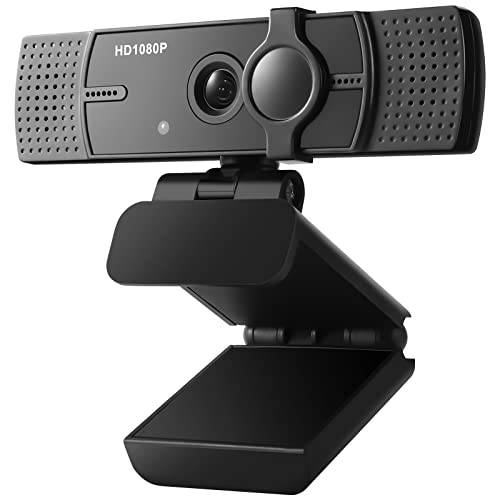
NexiGo N980P 1080P 60FPS Webcam with Microphone and Software Control, USB Computer Camera, Built-in Dual Noise Reduction Mics, 120° Wide-Angle for Zoom/Skype/FaceTime/Teams, PC Mac Laptop Desktop


Key features
- •【60FPS Smooth Streaming】Chatting in full 1080p FHD at up to 60 frames per second for a smooth, fluid video that keeps up with your every move. Record stunning videos on the move or even in harsh lighting conditions.
- •【1080P High-Definition Video】 CMOS with 2 megapixel 1080p and built-in Dual Omni-directional microphones. Delivers superb audio and detailed 1080P video for Skype/Zoom conferencing and YouTube recordings.
- •【Intelligent Adjustment】 The NexiGo Webcam accurately tunes color casts so the images you see are accurate to real life. NexiGo Auto-Brightness Technology and a precision 120 degrees/F2.1 lens provide sharp video even in a dim office.
- •【USB Plug and Play】Works in USB Video Device Class (UVC) mode with Plug and play USB connectivity. Ready for Skype, Zoom, Facetime, or any supported video-calling clients.
- •【Widely Compatible & Multi Application】The NexiGo webcam is compatible with Multiple Operating Systems. The webcam can be compatible with the current popular video/meeting softwares.
NexiGo N980P 1080P 60FPS Webcam with Microphone and Software Control, USB Computer Camera, Built-in Dual Noise Reduction Mics, 120° Wide-Angle for Zoom/Skype/FaceTime/Teams, PC Mac Laptop Desktop
List Price: $88.54$79.69DEALYou Save: $8.85 (10%)
Free shippingFree Returns – 30 daysFree Order CancellationSecure Payment2–3 Days DeliveryGet It October 26, 2026In Stock (300)No marketing spamNo account requiredFulfilment by FedEx / Amazon / UPS / ShipwirePayPal / Card Buyer Protection
Customer Reviews
Reviews sourced from verified Amazon purchasers4.4
out of 5
Based on 10 reviews
5★
70%
4★
30%
3★
0%
2★
0%
1★
0%
Great Performance From Reasonably-Priced 1080p 60fps WebCam
MQF4✓ Verified Purchase•December 15, 2023
Here's a webcam for work-from-home (WFH) users which does more than what it costs!
This is second webcam I bought after trying out a less expensive $30 Unzano 1080p 30fps unit. Mind you the Unzano did the job and I would give it 5 stars too. However, I landed this 1080p 60fps NexiGo webcam since I was on a lookout for 60fps unit under the $100 price range. I bought this last 9/25/2020 for $69 and it has since dropped to $53 as of this writing.
For starters, the quality on this camera is superb as long as you provide enough light. For web conferencing you probably want to light yourself up instead of looking like a vampire. After a lot of YouTube viewing of lighting techniques, I settled for two-point lighting with this camera - a filtered lamp behind and just a tad above and behind the camera and another soft light from lamp to my front left in same plane as first light source. I'm no stickler nor an expert with color profiles since I do not provide web content. So if ever there are any color issues, I have not observed any. My most important requirement is really clarity and response time which this unit excels in.
For game streamers, I would think this is still a decent camera. I do not use OBS but I tried it out anyway and OBS recognizes the 60fps setting on this webcam. It plays well with other web conferencing software like Zoom, WebEx, MS Teams, Skype. I also tried it with Viber and Messenger with no issues.
Installation was straightforward in Windows 10 and it is recognized as a standard USB device. No software needed to be installed as it is compatible with webcam Windows-provided driver. Note that this is not autofocus webcam. I only took one star away from rating because I think it was asking me to rate something that manufacturer already declared as not being able to do. You will need to manually turn the outer lens ring to focus on your most probable head position and webcam distance. Once that's set, you probably do not normally need to fiddle with it. I included an image with this review taken from the built-in webcam photo option with the webcam located 2 feet from my face and with 2-point lighting I described above.
At 2 feet distance (or even nearer) built-in dual mics from Webcam do not pick up sound that well. This is not a big deal for me because I already decided to forego with this and use a lapel mic for my web conferences.
I included image for my physically-configured webcam. Webcam is supported from an articulating boom arm and drops the camera just below the top of my monitor. This allows me to still see some of my desktop windows while I am in conference mode. The webcam by itself has the standard up-down-left-right flexibility so you can really fine-tune the position especially if you mount it to boom arm or any desktop stand and couple it to other tripod attachments you have.
Since webcam does not have a lens cover, I scavenged some Lego parts and made myself a folding lens cover which I mounted on top of camera using some 3M adhesive tape. I also cobbled together a holder for my cardioid lapel mic which I clip just below the webcam so it does not appear in field-of-view. This configuration with webcam around 1 to 1.5 ft. from my face and with mic level set at around 85% gives me the optimum conferencing settings for both video and audio.
I am currently happy with this webcam especially since it does not break the bank as other standard brand webcams like Logitech, Razer or Microsoft. I would highly recommend this webcam for WFH users who are in the market for reasonably-priced webcam that does the job.
This is second webcam I bought after trying out a less expensive $30 Unzano 1080p 30fps unit. Mind you the Unzano did the job and I would give it 5 stars too. However, I landed this 1080p 60fps NexiGo webcam since I was on a lookout for 60fps unit under the $100 price range. I bought this last 9/25/2020 for $69 and it has since dropped to $53 as of this writing.
For starters, the quality on this camera is superb as long as you provide enough light. For web conferencing you probably want to light yourself up instead of looking like a vampire. After a lot of YouTube viewing of lighting techniques, I settled for two-point lighting with this camera - a filtered lamp behind and just a tad above and behind the camera and another soft light from lamp to my front left in same plane as first light source. I'm no stickler nor an expert with color profiles since I do not provide web content. So if ever there are any color issues, I have not observed any. My most important requirement is really clarity and response time which this unit excels in.
For game streamers, I would think this is still a decent camera. I do not use OBS but I tried it out anyway and OBS recognizes the 60fps setting on this webcam. It plays well with other web conferencing software like Zoom, WebEx, MS Teams, Skype. I also tried it with Viber and Messenger with no issues.
Installation was straightforward in Windows 10 and it is recognized as a standard USB device. No software needed to be installed as it is compatible with webcam Windows-provided driver. Note that this is not autofocus webcam. I only took one star away from rating because I think it was asking me to rate something that manufacturer already declared as not being able to do. You will need to manually turn the outer lens ring to focus on your most probable head position and webcam distance. Once that's set, you probably do not normally need to fiddle with it. I included an image with this review taken from the built-in webcam photo option with the webcam located 2 feet from my face and with 2-point lighting I described above.
At 2 feet distance (or even nearer) built-in dual mics from Webcam do not pick up sound that well. This is not a big deal for me because I already decided to forego with this and use a lapel mic for my web conferences.
I included image for my physically-configured webcam. Webcam is supported from an articulating boom arm and drops the camera just below the top of my monitor. This allows me to still see some of my desktop windows while I am in conference mode. The webcam by itself has the standard up-down-left-right flexibility so you can really fine-tune the position especially if you mount it to boom arm or any desktop stand and couple it to other tripod attachments you have.
Since webcam does not have a lens cover, I scavenged some Lego parts and made myself a folding lens cover which I mounted on top of camera using some 3M adhesive tape. I also cobbled together a holder for my cardioid lapel mic which I clip just below the webcam so it does not appear in field-of-view. This configuration with webcam around 1 to 1.5 ft. from my face and with mic level set at around 85% gives me the optimum conferencing settings for both video and audio.
I am currently happy with this webcam especially since it does not break the bank as other standard brand webcams like Logitech, Razer or Microsoft. I would highly recommend this webcam for WFH users who are in the market for reasonably-priced webcam that does the job.
The Nexigo Iris provides superior, fantastic, and astounding 4k visual quality.
Shawn✓ Verified Purchase•December 3, 2023
I'd been looking for a new webcam with all of the features I wanted.
A camera that would last far into the future, and the Nexigo Iris met my needs.
I was aware with the name (NEXIGO) and knew they had established a solid reputation as one of the leading webcam businesses around.
I knew the 4k camera's quality might not be upscaled like the other brands on the market, and after some research, I learned it was a true 4k webcam.
The camera setup was quite basic and straightforward.
The camera comes with one sturdy cable, a USB 3.0 cable with a USB-C to USB-A adapter. No HDMI cable included. USB 3.0 cable gives it the power and transfer speed to make a webcam record at 4k 30fps or 1080p at 60fps.Since many people don't understand how it works, you MUST have an USB 3.0 port on your computer to use the 4k features (and yes, it's compatible with USB 2.0 ports, but you won't be able to use all of its power).
HDMI allows the camera to operate in "monitor view," which mirrors the camera's view onto an external monitor.
The camera includes a cover clip that you can slide to open or close for privacy, as well as a remote control with all of the camera settings.
The device is plug & play, simple to use, and has a decent weight to give it a premium feel and appearance.
When you begin utilizing the webcam, you will see autofocus and auto light correction with high dynamic range (HDR) in action. The innovative onboard AI tracking system monitors motions and makes rapid changes on the fly.
There are three fields of view, you are not confined to a single default. The three aspects are 55-degree, 81-degree, and 90-degree. If you're not sure what each has to offer, here's a quick rundown. The 55-degree view displays a close-up of your face, the 81-degree view is more balanced with your face and some of the background, and the 90-degree view shows more of the scene with you in the center.
This cam is amazing and unbelievably nice.
I was blown away by the crisp clean 60fps @1080p as soon as my feed went live. I increased the resolution to 4k and it was just as flawless with no stutter or frame loss.
It has a high-quality dual stereo omnidirectional microphone with noise cancellation to eliminate background noise and improve voice clarity. So far, I haven't experienced any issues with my voice being distorted, echoing, or producing a hollow sound. The mic has a range of up to 20 feet.
Here are just some of the features and technical specs:
Digital zoom up to 10x digital zoom
Autofocus 10 - 90 inches focus ranges
AI Auto tracking and auto framing
Picture-in-Picture Mode
Onboard flash memory
Low Light Correction
Image sensor is a Sony STARVIS back illuminated sensor
Has three different fields of view - 55V, 81H or 90D.
10-layer glass lens
Supports 4K Ultra HD 2160p/30fps
USB 3.0 Output: MJPEG/H.264
3840 x 2160@30/25fps,
1920 x 1080@60/50/30/25fps,
1280 x 720@60/50/30/25fps, etc.
YUY2/NV12
1920 x 1080@60/50/30/25fps,
1280 x 720@60/50/30/25fps, etc.
HDMI Output: 30fps mode
3840 x 2160fps@30/25fps, 1920 x 1080@30/25fps
60fps mode
1920 x 1080@60/50fps, 1280 x 720@60/50fps
Multi OS support
Windows 7 (Supports 1080p or lower), Windows 8.1/10/11 or later, and MacOS 10.10 or later are also supported.
Zoom, Microsoft Teams, Skype for Business, Google Meet, Slack, Webex, OBS, Xsplit, and many other applications are supported.
Color parameters can be changed using software. Download the free program from the URL indicated on the box or visit the Nexigo website.
Overall:
Excellent sound quality, crystal-clear video, autofocus, auto tracking, auto light correction, three customizable fields of view, high dynamic range (HDR), the camera's image quality is remarkable, and it offers a good choice of resolutions for still image and video capture.
A little pricey, and in the past, it didn't actually translate to 'quality,' because webcams have a fairly low threshold. But this broke the norm; it delivers on what consumers have desired in webcams for over a decade. It is completely worth the money. This thing is fantastic.
A camera that would last far into the future, and the Nexigo Iris met my needs.
I was aware with the name (NEXIGO) and knew they had established a solid reputation as one of the leading webcam businesses around.
I knew the 4k camera's quality might not be upscaled like the other brands on the market, and after some research, I learned it was a true 4k webcam.
The camera setup was quite basic and straightforward.
The camera comes with one sturdy cable, a USB 3.0 cable with a USB-C to USB-A adapter. No HDMI cable included. USB 3.0 cable gives it the power and transfer speed to make a webcam record at 4k 30fps or 1080p at 60fps.Since many people don't understand how it works, you MUST have an USB 3.0 port on your computer to use the 4k features (and yes, it's compatible with USB 2.0 ports, but you won't be able to use all of its power).
HDMI allows the camera to operate in "monitor view," which mirrors the camera's view onto an external monitor.
The camera includes a cover clip that you can slide to open or close for privacy, as well as a remote control with all of the camera settings.
The device is plug & play, simple to use, and has a decent weight to give it a premium feel and appearance.
When you begin utilizing the webcam, you will see autofocus and auto light correction with high dynamic range (HDR) in action. The innovative onboard AI tracking system monitors motions and makes rapid changes on the fly.
There are three fields of view, you are not confined to a single default. The three aspects are 55-degree, 81-degree, and 90-degree. If you're not sure what each has to offer, here's a quick rundown. The 55-degree view displays a close-up of your face, the 81-degree view is more balanced with your face and some of the background, and the 90-degree view shows more of the scene with you in the center.
This cam is amazing and unbelievably nice.
I was blown away by the crisp clean 60fps @1080p as soon as my feed went live. I increased the resolution to 4k and it was just as flawless with no stutter or frame loss.
It has a high-quality dual stereo omnidirectional microphone with noise cancellation to eliminate background noise and improve voice clarity. So far, I haven't experienced any issues with my voice being distorted, echoing, or producing a hollow sound. The mic has a range of up to 20 feet.
Here are just some of the features and technical specs:
Digital zoom up to 10x digital zoom
Autofocus 10 - 90 inches focus ranges
AI Auto tracking and auto framing
Picture-in-Picture Mode
Onboard flash memory
Low Light Correction
Image sensor is a Sony STARVIS back illuminated sensor
Has three different fields of view - 55V, 81H or 90D.
10-layer glass lens
Supports 4K Ultra HD 2160p/30fps
USB 3.0 Output: MJPEG/H.264
3840 x 2160@30/25fps,
1920 x 1080@60/50/30/25fps,
1280 x 720@60/50/30/25fps, etc.
YUY2/NV12
1920 x 1080@60/50/30/25fps,
1280 x 720@60/50/30/25fps, etc.
HDMI Output: 30fps mode
3840 x 2160fps@30/25fps, 1920 x 1080@30/25fps
60fps mode
1920 x 1080@60/50fps, 1280 x 720@60/50fps
Multi OS support
Windows 7 (Supports 1080p or lower), Windows 8.1/10/11 or later, and MacOS 10.10 or later are also supported.
Zoom, Microsoft Teams, Skype for Business, Google Meet, Slack, Webex, OBS, Xsplit, and many other applications are supported.
Color parameters can be changed using software. Download the free program from the URL indicated on the box or visit the Nexigo website.
Overall:
Excellent sound quality, crystal-clear video, autofocus, auto tracking, auto light correction, three customizable fields of view, high dynamic range (HDR), the camera's image quality is remarkable, and it offers a good choice of resolutions for still image and video capture.
A little pricey, and in the past, it didn't actually translate to 'quality,' because webcams have a fairly low threshold. But this broke the norm; it delivers on what consumers have desired in webcams for over a decade. It is completely worth the money. This thing is fantastic.
Zoomable high quality picture with accurate skin tone colors without the need for a light ring!
University Professor✓ Verified Purchase•November 29, 2023
I spent hundreds of dollars on webcams only to be disappointed. Ring lighting has helped but does not give me the picture quality I want. The first time I used this webcam people said "you have gotten some sun, look how tan you are!". This comment really hit home since I had not been in the sun. This camera was more true to skin tone than my other three webcams which tend to wash me out (NexiGo N940E, EMEET C980, or even my Logitech C922 Pro). It's the best quality I've experienced outside of using a DSLR camera. I've included screenshots at regular range and zoomed in for you to see the quality of the pictures.
This webcam was easy to plug and play using just the basic features before needing to download the software for the advanced features. When I plugged it in, the camera seemed to wake up, and spun its head around like R2D2. At first, I thought something might be wrong, but then it settled with its lens on me ready to go to work. After using it for a day or two, I took the time to download the software and read the manual on how to use the remote. The software ended up being the same as the software I use for my NexiGo N940E, so I already had some experience using it. The remote was new though. It took me a while to figure out how to turn on the remote and use each feature.
There are several reviews here that have mentioned problems with zooming in and out. I have found this works really well in the software, but once in a while can be a little glitchy on different online platforms. The remote doesn't seem compatible on certain platforms. I have a workaround I use. If I am feeling really picky about my zoom and focus points, I usually open up the software, set up my camera, and the settings remain true in the webinar platforms. The quality is so much more superior to my other cameras, I still gave it a 5-star rating overall.
Pros
*Works well in low light
*Works well in front of a bright window
*The remote gives me a lot of options
*It has a lens cover
*It tilts and pans
*The zoom is excellent
*Skin tone is spot on
*Has a tripod mount
Cons
*Its bulky
*I have to set it on something (like a stack of books or a big box) for the right placement
*I haven't attached it to the wall because the IR is on the bottom of the camera - meaning the remote probably won't work with the wall mount
*Might be too high a price for the average user
*Learning curve needed to use the remote and camera settings
*While the sound quality of the mic seems fine for the person listening to me, the audio level is too low for me sometimes. I tend to still wear a headset.
This webcam was easy to plug and play using just the basic features before needing to download the software for the advanced features. When I plugged it in, the camera seemed to wake up, and spun its head around like R2D2. At first, I thought something might be wrong, but then it settled with its lens on me ready to go to work. After using it for a day or two, I took the time to download the software and read the manual on how to use the remote. The software ended up being the same as the software I use for my NexiGo N940E, so I already had some experience using it. The remote was new though. It took me a while to figure out how to turn on the remote and use each feature.
There are several reviews here that have mentioned problems with zooming in and out. I have found this works really well in the software, but once in a while can be a little glitchy on different online platforms. The remote doesn't seem compatible on certain platforms. I have a workaround I use. If I am feeling really picky about my zoom and focus points, I usually open up the software, set up my camera, and the settings remain true in the webinar platforms. The quality is so much more superior to my other cameras, I still gave it a 5-star rating overall.
Pros
*Works well in low light
*Works well in front of a bright window
*The remote gives me a lot of options
*It has a lens cover
*It tilts and pans
*The zoom is excellent
*Skin tone is spot on
*Has a tripod mount
Cons
*Its bulky
*I have to set it on something (like a stack of books or a big box) for the right placement
*I haven't attached it to the wall because the IR is on the bottom of the camera - meaning the remote probably won't work with the wall mount
*Might be too high a price for the average user
*Learning curve needed to use the remote and camera settings
*While the sound quality of the mic seems fine for the person listening to me, the audio level is too low for me sometimes. I tend to still wear a headset.
Excellent conference camera at an attractive price
Mars Trader✓ Verified Purchase•November 28, 2023
Overall this is an impressive conference camera system. I am using it now in all of my group meetings and everyone who is involved is happy with the results.
The unit arrives in a sturdy box with padding and a carry handle. This is a consistent professional experience with Nexigo products. The box is well-suited to be a regular storage and carry solution for the camera meaning that I don't need to invest in a separate container for it. All that was needed was two spots of velcro to hold down the top flap.
As with other Nexigo products I own, the user manual is easy to read and well-written.
The system is simple in three parts: The main camera, the power supply, and the computer connection cable. There is literally nothing to think about. Plug it all in, the camera and audio are immediately detected, and it works. It's that easy. It connected perfectly on first attempt with my Zoom app on a Thinkpad T470S running Windows 10. I was also pleased to see that the unit has a USB-C connector rather than an obsolete micro-USB, which in any case is the best choice to support high-quality video.
I watched several reviews on YouTube and felt that all were positive on fair points. The camera image is clear and the exposure is correct. The audio is adequate for meetings. I saw a complaint that audio should be louder for music. If you want louder audio, it's easy to connect to another audio output such speakers in a room monitor screen.
The targeting system is impressive. Within a few seconds of anyone starting to speak, the camera shifts to that person, or, if they are far from the camera, to their general direction. There is some zoom capability but on a rectangular or oblong table, it may not provide perfect close-ups of the speaker. There is a tiny blind spot (a small distortion) between the two 180 degree cameras but I found it to be nearly impossible to sit at the point of distortion, so I think it is unimportant.
The cameras are elevated or stored by pushing on the core to unlatch and raise, or lower and latch. Perhaps that latch might break after repeated use. Nexigo suggests to leave the cameras in the extended position. That is acceptable for units that will be permanently stationed in rooms.
Note that I have personally used many conferencing systems including immersive systems from HP, Cisco, PolyCom, PictureTel and more. The Nexigo provides a pleasant, portable and productive (albeit limited) experience "“ at a fraction of the cost of high end systems.
I think the Nexigo Meeting Camera 360 is worth the investment and certainly less expensive than buying a full immersive conferencing system. The ease of use overrides most any concern I might have. It's a good choice for individuals and companies that need a solid, basic conference media platform.
Since none of my improvement ideas are essential, I rank it as a 5 for doing exactly what it's intended to do.
There are features and functions that could be improved. They would be nice to have but are not "show stoppers."
It would be nice to provide a stronger electronic zoom to bring people closer in the frame if they are sitting at the far ends of a long table. However, the zoom is adequate. More zoom might require more precision in determining the locations of people at a distance.
I realize it would be an additional cost but it would be nice if the power adapter was a round disk that could fit under the camera, similar to the UE Megaboom design. It's not a big deal just a nice idea.
I didn't realize that a long press on the main button would put the unit into update mode. Even more interesting, through a series of erroneous long presses, I caused the unit to freeze. However, unplugging and re-plugging the power instantly resolved the issue.
Note that I received some consideration from Nexigo in exchange for a test evaluation and review.
The unit arrives in a sturdy box with padding and a carry handle. This is a consistent professional experience with Nexigo products. The box is well-suited to be a regular storage and carry solution for the camera meaning that I don't need to invest in a separate container for it. All that was needed was two spots of velcro to hold down the top flap.
As with other Nexigo products I own, the user manual is easy to read and well-written.
The system is simple in three parts: The main camera, the power supply, and the computer connection cable. There is literally nothing to think about. Plug it all in, the camera and audio are immediately detected, and it works. It's that easy. It connected perfectly on first attempt with my Zoom app on a Thinkpad T470S running Windows 10. I was also pleased to see that the unit has a USB-C connector rather than an obsolete micro-USB, which in any case is the best choice to support high-quality video.
I watched several reviews on YouTube and felt that all were positive on fair points. The camera image is clear and the exposure is correct. The audio is adequate for meetings. I saw a complaint that audio should be louder for music. If you want louder audio, it's easy to connect to another audio output such speakers in a room monitor screen.
The targeting system is impressive. Within a few seconds of anyone starting to speak, the camera shifts to that person, or, if they are far from the camera, to their general direction. There is some zoom capability but on a rectangular or oblong table, it may not provide perfect close-ups of the speaker. There is a tiny blind spot (a small distortion) between the two 180 degree cameras but I found it to be nearly impossible to sit at the point of distortion, so I think it is unimportant.
The cameras are elevated or stored by pushing on the core to unlatch and raise, or lower and latch. Perhaps that latch might break after repeated use. Nexigo suggests to leave the cameras in the extended position. That is acceptable for units that will be permanently stationed in rooms.
Note that I have personally used many conferencing systems including immersive systems from HP, Cisco, PolyCom, PictureTel and more. The Nexigo provides a pleasant, portable and productive (albeit limited) experience "“ at a fraction of the cost of high end systems.
I think the Nexigo Meeting Camera 360 is worth the investment and certainly less expensive than buying a full immersive conferencing system. The ease of use overrides most any concern I might have. It's a good choice for individuals and companies that need a solid, basic conference media platform.
Since none of my improvement ideas are essential, I rank it as a 5 for doing exactly what it's intended to do.
There are features and functions that could be improved. They would be nice to have but are not "show stoppers."
It would be nice to provide a stronger electronic zoom to bring people closer in the frame if they are sitting at the far ends of a long table. However, the zoom is adequate. More zoom might require more precision in determining the locations of people at a distance.
I realize it would be an additional cost but it would be nice if the power adapter was a round disk that could fit under the camera, similar to the UE Megaboom design. It's not a big deal just a nice idea.
I didn't realize that a long press on the main button would put the unit into update mode. Even more interesting, through a series of erroneous long presses, I caused the unit to freeze. However, unplugging and re-plugging the power instantly resolved the issue.
Note that I received some consideration from Nexigo in exchange for a test evaluation and review.
Brilliant picture with lots of options
random nerd#29410✓ Verified Purchase•November 20, 2023
So I've been using this webcam full-time for about 6 months now. Overall, I think it's a great product with incredible resolution. As I primary work from home, I am on calls pretty much constantly. Having a dependable camera that produces clear video is quite helpful.
Set up took me a little while to do - while it's only a single cable (to a computer via USB. It also has HDMI) to connect, there are a lot of options in the on-screen menu. You can even reverse the on-screen menu itself.
I've used this on a mix of macOS and Windows 11 operating systems, on multiple hardware platforms. Overall, I have been very pleased with its performance. You can adjust just about every aspect of the video feed, but I saw really impressive output straight out of the box. Even when strong mid-afternoon light made its way into my office, the picture has always remained clear and well-adjusted. When it had its first full workday, I was asked by several people on video calls "Hey, did you get a new webcam? The picture is great!" which I was impressed to hear. Especially coming from a C920.
I haven't tried the standalone mode (connect via HDMI). I definitely recommend this webcam if image quality is very important to you. My lone gripe is the camera can be a little slow to start on macOS. Never a problem joining a call, just not an "immediate" video signal.
Set up took me a little while to do - while it's only a single cable (to a computer via USB. It also has HDMI) to connect, there are a lot of options in the on-screen menu. You can even reverse the on-screen menu itself.
I've used this on a mix of macOS and Windows 11 operating systems, on multiple hardware platforms. Overall, I have been very pleased with its performance. You can adjust just about every aspect of the video feed, but I saw really impressive output straight out of the box. Even when strong mid-afternoon light made its way into my office, the picture has always remained clear and well-adjusted. When it had its first full workday, I was asked by several people on video calls "Hey, did you get a new webcam? The picture is great!" which I was impressed to hear. Especially coming from a C920.
I haven't tried the standalone mode (connect via HDMI). I definitely recommend this webcam if image quality is very important to you. My lone gripe is the camera can be a little slow to start on macOS. Never a problem joining a call, just not an "immediate" video signal.
Page 1 of 2