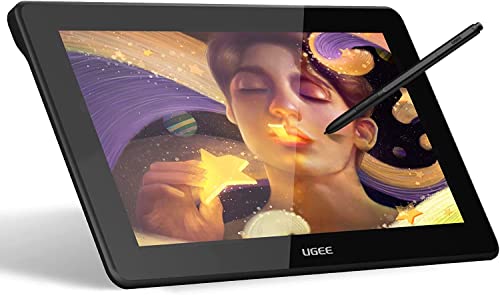
VEIKK VK1200 Drawing Tablet with Screen,11.6 Inch Full-Laminated Graphic Drawing Monitor,2 Battery-Free Pen and Tilt Function,6 Customized Keys,Anti-Glare Glass(Must be Connected to a PC to Work)




Key features
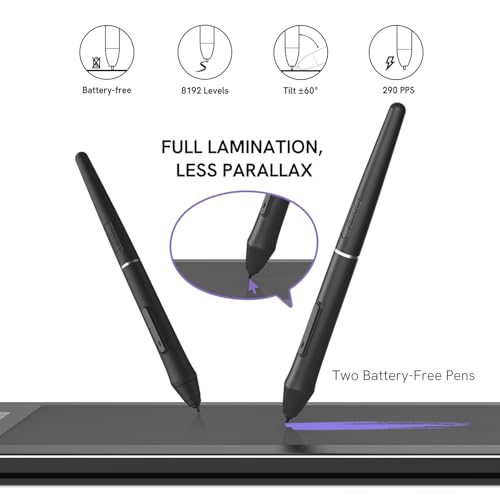
- •【Full-Laminated Technology】 VEIKK VK1200 drawing tablet with screen chooses full laminated screen which combining the glass and screen seamlessly. This ensures the accuracy of the cursor position and the lowest parallax. VK1200's active area is 11.6 inch with anti-glare film, it can protect the screen from scratches and offer a real paper-like drawing experience.1920x1080 HD IPS drawing monitor with120% sRGB gamut.
- •【Tilt Function and 8192 levels pressure battery-free pen】VK1200 drawing tablet monitor provides the battery-free pen with 8192 levels pen pressure, and it supports up to 60 degrees tilt function. The pen don't have battery and no need to charge for uninterrupted use.
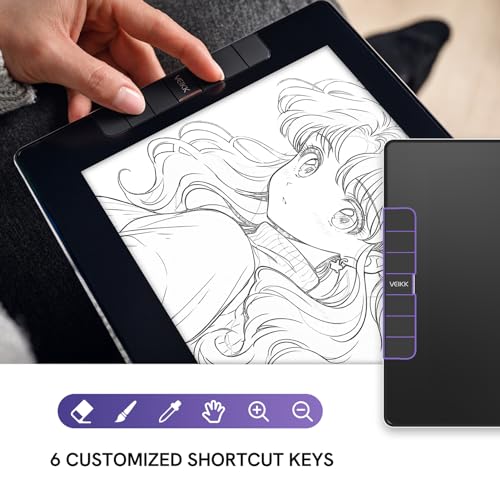
- •【Customizable Shortcut Keys】6 shortcut keys can be customized according to your drawing habit in different softwares. It can improve the efficiency and create a highly ergonomic and convenient work platform.
- •【Small and Stylish】VK1200 pen display adopts full screen design, it is all screen infinity display,almost no frame. With the same active area of 11.6 inch, VK1200 drawing tablet with screen is more compact, stylish and easy to carry on the go. VK1200 graphics tablet display is All-Metal Body, the back adopts anti-slip design to provide better drawing experience.
- •【More accessories】 VK1200 drawing tablet comes with TWO pens in the package for longer time using experience.VK1200 drawing display also includes extra 28 pen nibs,1 artist glove,1 pen holder and clean cloth etc. All VEIKK drawing tablet and drawing tablet with screen have 1 year hardware warranty and lifetime technical support.
VEIKK VK1200 Drawing Tablet with Screen,11.6 Inch Full-Laminated Graphic Drawing Monitor,2 Battery-Free Pen and Tilt Function,6 Customized Keys,Anti-Glare Glass(Must be Connected to a PC to Work)
List Price: $218.24$196.42DEALYou Save: $21.82 (10%)
Free shippingFree Returns – 30 daysFree Order CancellationSecure Payment2–3 Days DeliveryGet It October 26, 2026In Stock (1)No marketing spamNo account requiredFulfilment by FedEx / Amazon / UPS / ShipwirePayPal / Card Buyer Protection
Customer Reviews
Reviews sourced from verified Amazon purchasers4.4
out of 5
Based on 10 reviews
5★
70%
4★
30%
3★
0%
2★
0%
1★
0%
Pleasantly surprised
Andrew✓ Verified Purchase•October 25, 2023
Wanted to see if I could tolerate working digitally and didn't want to make a huge investment just for a trial run. So far I'm quite happy. Feels durable, nice to draw on. I don't feel any urgency to upgrade.
I do wish the calibration was a little more robust. I have to redo it every time I turn the tablet on and It never feels 100% perfect.
Doubles as a second monitor, which is neat.
I do wish the calibration was a little more robust. I have to redo it every time I turn the tablet on and It never feels 100% perfect.
Doubles as a second monitor, which is neat.
GREAT and sturdy
Laura Ousley✓ Verified Purchase•October 24, 2023
I am an artist that works with several mediums. I got my start like many with paper and pencil after switching to digital there hasnt been a tablet that felt as natural as this one. I will say after working a decade on digital art i have really enjoyed the feel and nature of this tablet. And for an honest review set up was a little complicated when having multiple monitors. This tablet is small and versatile and in my opinion work amazing for on the go art with a laptop. Another thing i really like about the VK1200 compared to some other tablets out there is that it feels very sturdy and the sleek design is amazing. It has 6 shortcut keys that come preset to common shortcuts BUT you can set them up to how ever you want them. I personally use ctrl+z most. The packaging was amazing and i could tell well thought out.
I really love the matte screen protector that is also preapplied to the tablet it runs smooth and makes it feel like you are drawing on a cloud or naturall paper. I used it with a few art programs and is worked amazing with all of them - I mainly draw in Paint tool sai and it worked amazing with that too. Another thing i love is that it includes 2 pens with it - one of my biggest problems is losing my art tablet pen and i feel that this is a helpful thing. The pens are both the same so one can sit in the little holder and the other can sit in its cloth/felt holder. Very very useful if you loose your art pens like me. the pens also have 2 shortcut buttons on it that is easily reachable with your index finger.
Some cons to this tablet, I have my PC on my left and the cords are just long enough. It was still able to work just not as long as i like but i think thats more on my set up and not the tablet itself. The pen Holder was a nice edition to this product, For me would like it a little more sturdy and maybe have anti slip on the bottom instead of the nib remover HOWEVER. --- The nice thing is there is a second nib remover that is included and extra nibs - It also has a spot inside the holder for nibs to be stored at a handy location.
Over all i know everyones question would be "Do you recommend this tablet?" The answer is YES - It has been really easy to use and has great pressure sensitivity and the refresh rate is really nice. For a on the go with laptop or on your desktop it works amazing and with a price you really cant beat for a display tablet.
I really love the matte screen protector that is also preapplied to the tablet it runs smooth and makes it feel like you are drawing on a cloud or naturall paper. I used it with a few art programs and is worked amazing with all of them - I mainly draw in Paint tool sai and it worked amazing with that too. Another thing i love is that it includes 2 pens with it - one of my biggest problems is losing my art tablet pen and i feel that this is a helpful thing. The pens are both the same so one can sit in the little holder and the other can sit in its cloth/felt holder. Very very useful if you loose your art pens like me. the pens also have 2 shortcut buttons on it that is easily reachable with your index finger.
Some cons to this tablet, I have my PC on my left and the cords are just long enough. It was still able to work just not as long as i like but i think thats more on my set up and not the tablet itself. The pen Holder was a nice edition to this product, For me would like it a little more sturdy and maybe have anti slip on the bottom instead of the nib remover HOWEVER. --- The nice thing is there is a second nib remover that is included and extra nibs - It also has a spot inside the holder for nibs to be stored at a handy location.
Over all i know everyones question would be "Do you recommend this tablet?" The answer is YES - It has been really easy to use and has great pressure sensitivity and the refresh rate is really nice. For a on the go with laptop or on your desktop it works amazing and with a price you really cant beat for a display tablet.
A must buy for a beginning artist !!
Lemon✓ Verified Purchase•October 19, 2023
Are you a beginning artist? Need a gift for a friend or family member? Then this is the tablet for you! The Veikk 1200 is probably one of Veikks best products, and is an excellent and affordable display tablet. And easily a great alternative to overly expensive name brand displays like Wacom Cintiqs. Trust me, stick with Veikk and you'll no longer have to pay triple the amount for a tablet.
First off, what's included.
-the tablet monitor (6 hotkeys included)
-start up guide and driver download card
-2 battery free pens /pouches
- 1 pen holder
-20 EXTRA pen nibs
- 1 nib remover
-a smudge glove
-2 tablet wires/connectors
-1 cleaning cloth
PLEASE NOTE, this tablet does not function as a standalone product. You must have a working PC or Laptop to use this. Luckily, this display is compatible with both windows and macs. SECOND, there are no added/pre downloaded art programs with this monitor. You must have one pre-installed onto your PC. Which gives you plenty of options to choose from, as this display is compatible with most art programs (I used Medibang personally).
I was pleasantly surprised with just how much is included with the tablet. I think the best part is the fact that there's not one, but TWO pen styluses, along with 20 EXTRA nibs, a pen holder, and a cleaning cloth and smudge glove. These are items that I don't usually see included with other tablet brands like Wacom; and are REALLY useful in the long run. So it's great that you don't need to buy it separately, because it's already included. Additionally, I'm very thankful for the fact that all these extra goodies are easily accessible. (see pic included) They're placed right underneath the tablet/plastic case, ready for use. In my experience with other tablet brands, IF they even include extra pen nibs, they're usually hidden inside the tablet itself without any instructions to get them out. Which just adds a lot of unneeded confusion for beginners who wouldn't know how to open their tablet up just for extra nibs. But luckily, Veikk includes its extra nibs inside a plastic bag,(along with the other goodies) that can't be missed. No stress, no confusion. Now onto the display itself.
The display has a dimension of 318x189x12mm and an active area of 11.6 inches. Which you might think is small, but trust me, it has as much active space as any other tablet, without being needlessly bulky. It's very portable in fact, and fits in any book bag or case for on the go needs. The display has a matte protector, along with 6 customizable hotkeys, 2 adjustable brightness buttons, and a power button. Having a matte protector and adjustable brightness buttons are just great on the eyes. If your eyes are sensitive, then you can easily adjust the screen to your liking! Additionally, the screen feels very smooth and natural with the pen stylus. Almost as if I'm drawing on paper. And finally, the 6 hotkeys are just fantastic. If you're like me and constantly use keyboard shortcuts, then these will be incredibly useful. Simply adjust them to the desired keys, and you're good to go. No more having to reach for a keyboard and mouse to do simple commands.
Now finally, onto the installation and download. Like mentioned earlier. Veikk includes a driver download card which links their website. Once you're on the website, all you need to do is download the correct software for your PC (Windows or Mac version), and complete the installation once it has been downloaded. Quick and easy. Once installed, connect your tablet and turn it on, and you can set up your monitor display and calibration and get right to drawing.
In short, this is definitely one of Veikks best products. A portable and easy to use display, with plenty of adjustable features, easy driver downloads, and a lot of added goodies for the long run. If I were to have any complaints, personally I believe a tablet stand would be really useful for this display; and as of now, Veikk doesn't seem to offer any. However, you can easily just buy one for cheap. Despite that, I have no other issues with this product and would highly recommend it to anyone looking into digital art.
First off, what's included.
-the tablet monitor (6 hotkeys included)
-start up guide and driver download card
-2 battery free pens /pouches
- 1 pen holder
-20 EXTRA pen nibs
- 1 nib remover
-a smudge glove
-2 tablet wires/connectors
-1 cleaning cloth
PLEASE NOTE, this tablet does not function as a standalone product. You must have a working PC or Laptop to use this. Luckily, this display is compatible with both windows and macs. SECOND, there are no added/pre downloaded art programs with this monitor. You must have one pre-installed onto your PC. Which gives you plenty of options to choose from, as this display is compatible with most art programs (I used Medibang personally).
I was pleasantly surprised with just how much is included with the tablet. I think the best part is the fact that there's not one, but TWO pen styluses, along with 20 EXTRA nibs, a pen holder, and a cleaning cloth and smudge glove. These are items that I don't usually see included with other tablet brands like Wacom; and are REALLY useful in the long run. So it's great that you don't need to buy it separately, because it's already included. Additionally, I'm very thankful for the fact that all these extra goodies are easily accessible. (see pic included) They're placed right underneath the tablet/plastic case, ready for use. In my experience with other tablet brands, IF they even include extra pen nibs, they're usually hidden inside the tablet itself without any instructions to get them out. Which just adds a lot of unneeded confusion for beginners who wouldn't know how to open their tablet up just for extra nibs. But luckily, Veikk includes its extra nibs inside a plastic bag,(along with the other goodies) that can't be missed. No stress, no confusion. Now onto the display itself.
The display has a dimension of 318x189x12mm and an active area of 11.6 inches. Which you might think is small, but trust me, it has as much active space as any other tablet, without being needlessly bulky. It's very portable in fact, and fits in any book bag or case for on the go needs. The display has a matte protector, along with 6 customizable hotkeys, 2 adjustable brightness buttons, and a power button. Having a matte protector and adjustable brightness buttons are just great on the eyes. If your eyes are sensitive, then you can easily adjust the screen to your liking! Additionally, the screen feels very smooth and natural with the pen stylus. Almost as if I'm drawing on paper. And finally, the 6 hotkeys are just fantastic. If you're like me and constantly use keyboard shortcuts, then these will be incredibly useful. Simply adjust them to the desired keys, and you're good to go. No more having to reach for a keyboard and mouse to do simple commands.
Now finally, onto the installation and download. Like mentioned earlier. Veikk includes a driver download card which links their website. Once you're on the website, all you need to do is download the correct software for your PC (Windows or Mac version), and complete the installation once it has been downloaded. Quick and easy. Once installed, connect your tablet and turn it on, and you can set up your monitor display and calibration and get right to drawing.
In short, this is definitely one of Veikks best products. A portable and easy to use display, with plenty of adjustable features, easy driver downloads, and a lot of added goodies for the long run. If I were to have any complaints, personally I believe a tablet stand would be really useful for this display; and as of now, Veikk doesn't seem to offer any. However, you can easily just buy one for cheap. Despite that, I have no other issues with this product and would highly recommend it to anyone looking into digital art.
Sleek and compact tablet monitor with extra unexpected features at a great value
Josh✓ Verified Purchase•October 13, 2023
The media could not be loaded. The very first thing I noticed when I took this product out of the box is how compact it is, it's an 11.6 inch display tablet, which is similar to tablets I've used before, but this one is considerably less bulky than those. It's very sleek and doesn't really have any wasted real-estate. This should be able to fit in a laptop bag no problem.
It's got a sleek chrome backing plate with four rubber pads so you can safely set it on a table or desk without worrying about scratching the back. I personally use a tablet stand, and the grips keep it from sliding around.
There's 6 shortcut buttons you can program on the side that don't stick out too much.
The cables slot into the left side of the tablet and consist of 1 usb-c to hdmi and one usb-c to 2x usb, which powers it. My pc has plenty of usb power to power this tablet without needing an ac adapter, but your mileage may vary.
One item of note is that the cables are somewhat short, that's perfect for if you're a laptop user or you keep your pc on your desk, but if your pc is a bit far away you may want to order an HDMI and usb extension cable. I had spare extension cables so that wasn't a huge problem.
Onto what comes in the box: You get the unit itself, of course, a drawing glove, a screen wipe, tons of nibs (like seriously, you're never going to run out of these), and TWO tablet pens with a stand. Some other companies charge out the nose for pens, so it's really nice to have two come in the box for once.
The pen itself is very stylish, it's lightweight and feels very good in the hand. There isn't an eraser end, but personally I never use those anyway.
The screen on the unit itself is bright and responsive, provided you callibrate it first, which is something you will have to do with any tablet monitor.
The pressure sensitivity on this is actually awesome, it can pick up the slightest difference in hardness, and out of my 4 hours or so of testing I've not once seen any issues with shoelacing (lines suddenly changing size) or dragging after letting go.
One thing to keep in mind, is that this is a 1080p tablet compressed into a somewhat smaller viewing space than a typical PC monitor, so you will want to set your scaling to 100% on windows for it to avoid text blur, that will be the case with any compact monitor tablet, otherwise it's image is actually pretty sharp compared to others I have used.
The colors on the tablet appear to be pretty much identical to my main screen without having to mess with settings. Many tablets have an over abundance of blue in their color gamut, so this was nice to see.
The screen feels smooth while using it but not so smooth it feels off. A feature I noticed that I didn't know about before is the ability to flip the screen in 90 degree increments in the tablet software, meaning if you were drawing a portrait, you could stand it up on its side to get more active space, which is pretty cool.
The last thing I want to touch on is its heat, or rather, it's lack thereof. I had it on for the entirety of testing time and then some and it remained cool to the touch,
so if that's anything to go by, there should be absolutely no risk of overheating.
All in all this is an excellent compact monitor tablet, for a very reasonable price, and is my favorite product I've tried from this company thus far.
I'm very impressed, and I highly recommend this.
It's got a sleek chrome backing plate with four rubber pads so you can safely set it on a table or desk without worrying about scratching the back. I personally use a tablet stand, and the grips keep it from sliding around.
There's 6 shortcut buttons you can program on the side that don't stick out too much.
The cables slot into the left side of the tablet and consist of 1 usb-c to hdmi and one usb-c to 2x usb, which powers it. My pc has plenty of usb power to power this tablet without needing an ac adapter, but your mileage may vary.
One item of note is that the cables are somewhat short, that's perfect for if you're a laptop user or you keep your pc on your desk, but if your pc is a bit far away you may want to order an HDMI and usb extension cable. I had spare extension cables so that wasn't a huge problem.
Onto what comes in the box: You get the unit itself, of course, a drawing glove, a screen wipe, tons of nibs (like seriously, you're never going to run out of these), and TWO tablet pens with a stand. Some other companies charge out the nose for pens, so it's really nice to have two come in the box for once.
The pen itself is very stylish, it's lightweight and feels very good in the hand. There isn't an eraser end, but personally I never use those anyway.
The screen on the unit itself is bright and responsive, provided you callibrate it first, which is something you will have to do with any tablet monitor.
The pressure sensitivity on this is actually awesome, it can pick up the slightest difference in hardness, and out of my 4 hours or so of testing I've not once seen any issues with shoelacing (lines suddenly changing size) or dragging after letting go.
One thing to keep in mind, is that this is a 1080p tablet compressed into a somewhat smaller viewing space than a typical PC monitor, so you will want to set your scaling to 100% on windows for it to avoid text blur, that will be the case with any compact monitor tablet, otherwise it's image is actually pretty sharp compared to others I have used.
The colors on the tablet appear to be pretty much identical to my main screen without having to mess with settings. Many tablets have an over abundance of blue in their color gamut, so this was nice to see.
The screen feels smooth while using it but not so smooth it feels off. A feature I noticed that I didn't know about before is the ability to flip the screen in 90 degree increments in the tablet software, meaning if you were drawing a portrait, you could stand it up on its side to get more active space, which is pretty cool.
The last thing I want to touch on is its heat, or rather, it's lack thereof. I had it on for the entirety of testing time and then some and it remained cool to the touch,
so if that's anything to go by, there should be absolutely no risk of overheating.
All in all this is an excellent compact monitor tablet, for a very reasonable price, and is my favorite product I've tried from this company thus far.
I'm very impressed, and I highly recommend this.
Wonderful Monitor Tablet!
kcfoxx92806✓ Verified Purchase•October 5, 2023
If you're looking for an affordable monitor tablet, I would definitely recommend the Veikk VK1200. While it is not their largest model, it keeps true to the quality I've come to expect from Veikk products. It would be absolutely perfect for a budding artist, or professional/hobbyist looking to upgrade from a standard tablet without burning a hole in their wallet.
The VK1200 comes perfectly packaged. Inside the package is a glove, cleaning cloth, power + HDMI cord, two pens, and a pen stand that will also hold some of the extra nibs. In fact, this tablet comes with so many nibs that I don't expect to run out any time soon!
The tablet itself feels very sturdy, and it is overall just incredibly pretty and sleek. I love that the screen has a matte feel to it opposed to just glass. It makes drawing on it feel more natural, and creates just enough resistance that my pen doesn't slide everywhere.
The hotkeys are easy to program and an absolute time saver. I couldn't live without them. I like to program not only an undo and redo button, but a flip button as well so I can flip my screen horizontally with ease.
The power cord is a USB, so be sure you have enough USB ports, or that you purchase a dock. The HDMI cord is, of course, an HDMI cord. I work from a desktop, and I didn't realize I only had one HDMI port so I ended up having to purchase an adapter, but that was fine!
It does not come with a stand at this price point either, which is also fine. I found a relatively inexpensive tablet stand on Amazon, and it works great!
There is hardly any parallax with this monitor (Meaning that the cursor isn't directly aligned with the tip of the pen). The only time I notice the parallax is when I try to tap on a setting/tab/option within clip studio, but that is only if I'm holding my pen at too much of an angle.
Which brings me to the pen. It is very light and battery free. I love it. It's big, but feels comfortable in my hand. Let me not forget that the nib seems to have a bit of bounce to it when you press down, which I also like.
Over all, this tablet is amazing. I really enjoy drawing on it. I've drawn the picture included in here with this tablet and I had absolutely no issue. I could not recommend Veikk products more. I will definitely be using this little guy on bigger projects that my iPad cannot handle!
The VK1200 comes perfectly packaged. Inside the package is a glove, cleaning cloth, power + HDMI cord, two pens, and a pen stand that will also hold some of the extra nibs. In fact, this tablet comes with so many nibs that I don't expect to run out any time soon!
The tablet itself feels very sturdy, and it is overall just incredibly pretty and sleek. I love that the screen has a matte feel to it opposed to just glass. It makes drawing on it feel more natural, and creates just enough resistance that my pen doesn't slide everywhere.
The hotkeys are easy to program and an absolute time saver. I couldn't live without them. I like to program not only an undo and redo button, but a flip button as well so I can flip my screen horizontally with ease.
The power cord is a USB, so be sure you have enough USB ports, or that you purchase a dock. The HDMI cord is, of course, an HDMI cord. I work from a desktop, and I didn't realize I only had one HDMI port so I ended up having to purchase an adapter, but that was fine!
It does not come with a stand at this price point either, which is also fine. I found a relatively inexpensive tablet stand on Amazon, and it works great!
There is hardly any parallax with this monitor (Meaning that the cursor isn't directly aligned with the tip of the pen). The only time I notice the parallax is when I try to tap on a setting/tab/option within clip studio, but that is only if I'm holding my pen at too much of an angle.
Which brings me to the pen. It is very light and battery free. I love it. It's big, but feels comfortable in my hand. Let me not forget that the nib seems to have a bit of bounce to it when you press down, which I also like.
Over all, this tablet is amazing. I really enjoy drawing on it. I've drawn the picture included in here with this tablet and I had absolutely no issue. I could not recommend Veikk products more. I will definitely be using this little guy on bigger projects that my iPad cannot handle!
Page 1 of 2



![Drawing Glove for Tablet,[Pink 2Pack] Palm Rejection Artist Right Hand Glove Digital Art Accessories](https://m.media-amazon.com/images/I/41Jvp6-d4oL._SL500_.jpg)