ScanSnap iX1600 Wireless or USB High-Speed Cloud Enabled Document, Photo & Receipt Scanner with Large Touchscreen and Auto Document Feeder for Mac or PC, White


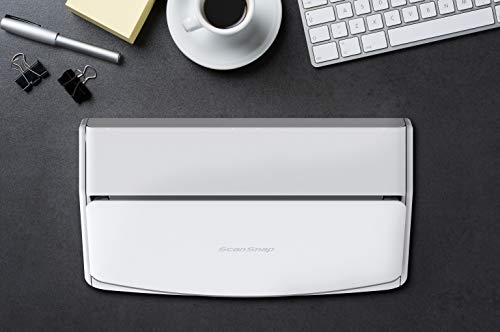
Key features
- •Optimized user experience: ScanSnap iX1600 features an intuitive 4.3inch touch screen for complete end to end scanning and data utilization
- •Customize your preference: The scanner supports up to 30 customizable profiles; Customize the profile on the touch screen based on your scanning needs and personalize scanning icons using color, icons or letters
- •Scan anywhere you want whenever you want: Wi-Fi compatibility allows you to directly connect to your smart devices or cloud services without a PC, and allows for flexible placement wherever its convenient
- •Ideal for team sharing: One scanner supports up to 4 user licenses each allowing user profile and icon customizations
- •Stress-free usability for any users: Friendly user interface enables even the most technology challenged users to scan and complete their tasks with peace of mind
ScanSnap iX1600 Wireless or USB High-Speed Cloud Enabled Document, Photo & Receipt Scanner with Large Touchscreen and Auto Document Feeder for Mac or PC, White
List Price: $581.99$523.79DEALYou Save: $58.20 (10%)
Free shippingFree Returns – 30 daysFree Order CancellationSecure Payment2–3 Days DeliveryGet It October 24, 2026In Stock (4)No marketing spamNo account requiredFulfilment by FedEx / Amazon / UPS / ShipwirePayPal / Card Buyer Protection
Customer Reviews
Reviews sourced from verified Amazon purchasers4.7
out of 5
Based on 10 reviews
5★
90%
4★
10%
3★
0%
2★
0%
1★
0%
Incredible Scanner
philbw✓ Verified Purchase•October 31, 2023
If I could give this scanner 6 stars I would. I have experience with Fujitsu scanners. Our company has had two humble ScanSnap S1500s in service for over a decade, each having scanned 50,000+ documents on all original parts (and still going). We also experimented with a Fujitsu N7100 network scanner (I think we paid $1700 for that scanner new). I like this scanner better than all of them.
First of all, the old S1500s only worked with ScanSnap Manager and the older Fujitsu software. This one works with both the old software and their flagship ScanSnap Home software. I honestly thought I'd hate the new software and was planning to just use ScanSnap Manager again. I begrudgingly gave ScanSnap Home a chance and I must say, it's substantially better. First of all, the older software was made up of multiple parts that all had to work together. ScanSnap Home has one clean interface that acts as a document manager, a scanner config, and so on.
The flexibility is where this thing really shines. At first glance the touchscreen appears to be laid out how they think you'll want it. In reality you can customize every button, change it's icon, change it's action, etc You can have ScanSnap Home manage the docs or have it scan elsewhere and not even show the document in ScanSnap Home. I have my scanner setup here at home in a dual role. I use the default ScanSnap Home button to scan to my local NAS (as a directory on my computer, not direct [more on that later]) . I have other buttons that scan to various OneDrive locations that sync with SharePoint. For those documents it just scans direct, and I don't have it showing on my computer. Everything just works perfectly.
Setup was a breeze. I initially set it up with a USB cable then decided to put it on the Wifi just for fun. I figured I'd setup the mobile app but never got around to it. Then one day the USB cable was unplugged and I went to scan something, not even thinking about it, and it just worked. My computer found the scanner over the network without any additional configuration. Even over Wifi and uploading to either my NAS or OneDrive scanning is pretty much instant. I've scanned 50 page documents and after the last page went through it was fully OCR'd and available to open within about a second.
Here's the only downsides (which I didn't dock points for because this is not an expensive scanner by comparison). Although you can (with a firmware update) scan direct to a network share without the use of a computer the scanner doesn't perform any OCR on it's own. Our expensive N7100 could perform OCR on it's own but honestly it was slower. To really leverage this scanner's true capabilities, you should use it with a computer. The ScanSnap Home software is able to perform OCR on the incoming documents faster than anything I've ever used. On that note, you do have to check a box in the settings for the PDF files to actually have it save the PDF as searchable.
My suggestion for when you get it is to bypass the manual altogether and just dive in. Pretty much everything is self-explanatory. If you go to Settings / Scan Settings in ScanSnap Home you'll be pretty much good to go.
First of all, the old S1500s only worked with ScanSnap Manager and the older Fujitsu software. This one works with both the old software and their flagship ScanSnap Home software. I honestly thought I'd hate the new software and was planning to just use ScanSnap Manager again. I begrudgingly gave ScanSnap Home a chance and I must say, it's substantially better. First of all, the older software was made up of multiple parts that all had to work together. ScanSnap Home has one clean interface that acts as a document manager, a scanner config, and so on.
The flexibility is where this thing really shines. At first glance the touchscreen appears to be laid out how they think you'll want it. In reality you can customize every button, change it's icon, change it's action, etc You can have ScanSnap Home manage the docs or have it scan elsewhere and not even show the document in ScanSnap Home. I have my scanner setup here at home in a dual role. I use the default ScanSnap Home button to scan to my local NAS (as a directory on my computer, not direct [more on that later]) . I have other buttons that scan to various OneDrive locations that sync with SharePoint. For those documents it just scans direct, and I don't have it showing on my computer. Everything just works perfectly.
Setup was a breeze. I initially set it up with a USB cable then decided to put it on the Wifi just for fun. I figured I'd setup the mobile app but never got around to it. Then one day the USB cable was unplugged and I went to scan something, not even thinking about it, and it just worked. My computer found the scanner over the network without any additional configuration. Even over Wifi and uploading to either my NAS or OneDrive scanning is pretty much instant. I've scanned 50 page documents and after the last page went through it was fully OCR'd and available to open within about a second.
Here's the only downsides (which I didn't dock points for because this is not an expensive scanner by comparison). Although you can (with a firmware update) scan direct to a network share without the use of a computer the scanner doesn't perform any OCR on it's own. Our expensive N7100 could perform OCR on it's own but honestly it was slower. To really leverage this scanner's true capabilities, you should use it with a computer. The ScanSnap Home software is able to perform OCR on the incoming documents faster than anything I've ever used. On that note, you do have to check a box in the settings for the PDF files to actually have it save the PDF as searchable.
My suggestion for when you get it is to bypass the manual altogether and just dive in. Pretty much everything is self-explanatory. If you go to Settings / Scan Settings in ScanSnap Home you'll be pretty much good to go.
Wow. What a machine
m✓ Verified Purchase•October 27, 2023
I had bought a Fujitsu scanner many years ago, and it was never reliable in what I hoped it would handle: batch scanning loose papers. This scanned 40 pages of tiny Japanese text in a minute, and the included ABBYY OCR software's accuracy is superior to Acrobat Pro's. (ABBYY has been pioneers in OCR since 1983, so this is not entirely surprising.) I then loaded a stack of slightly curled 4 by 6 glossy color photographs from the 1980s, which yielded color scans just as effortlessly. I can't believe that this thing works as well as it does, and I think it is worth every cent I paid for it. I love the wireless connection too, and the scanner's sleek, small footprint on my desk is a plus.
Fast, easy, and excellently feeds stacks of papers.
Brittany Arnold✓ Verified Purchase•October 21, 2023
Don't normally write reviews, but this scanner is fantastic. It pulls through single sheets (not 2 or 3 accidentally) of paper from a stack very easily without marking or creasing them. It also scans on both sides of the paper at once, during a single pass, and automatically deletes blank pages from the uploaded file. Love this thing.
I love this machine.
Bob T✓ Verified Purchase•October 13, 2023
Easy installation and set up. This device is fast, accurate, and tireless. It copies both sides of the page and I have run as many as 55 double-sided pages without an issue. The software will eliminate blank pages. And it can handle the odd-sized sheet amongst the 8.5 x 11.
Great scanner
GK✓ Verified Purchase•October 6, 2023
This Scansnap iX1600 replaces my 2009 era Scan snap S1500 that died after roughly 14 years of faithful service.
The newer model is faster, has a touch screen, and WiFi. The PC-side software is different, but easy to use. Hoping this one lasts long too.
The newer model is faster, has a touch screen, and WiFi. The PC-side software is different, but easy to use. Hoping this one lasts long too.
Page 1 of 2


![Nero 11 Platinum [Old Version]](https://m.media-amazon.com/images/I/51FN826rLTL._SL500_.jpg)