BUFFALO LinkStation 710 2TB 1-Bay NAS Network Attached Storage with HDD Hard Drives Included NAS Storage That Works as Home Cloud or Network Storage Device for Home




Key features
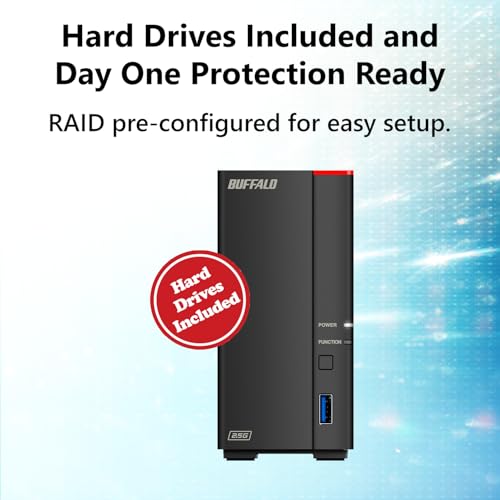
- •HASSLE-FREE INSTALLATION – Hard drive included, and no computer needed for setup. Simply connect the NAS to your router for instant shared network storage for all your devices at the same time. Product is compatible with PC, MacOS, Android, and iOS.
- •2X AS FAST TRANSFER SPEEDS - 2.5GbE gives you twice as fast transfer speeds as 1GbE without needing special cabling.
- •SUBSCRIPTION-FREE PERSONAL CLOUD – Store and back up videos, music, and photos and access them from anywhere without paying any monthly storage charges.
- •PURPOSE-BUILT STORAGE WITH DATA SECURITY FOCUS – Storage designed to keep your data safe, the NAS features a closed system to reduce vulnerabilities from 3rd party apps and SSL encryption for secure file transfers.
- •CLOUD INTEGRATION - Sync with Dropbox, Azure and OneDrive to create a hybrid cloud for extra data security, cost savings, and flexible scalability.
- •SECURELY SHARE FILES WITH FAMILY & FRIENDS – Create individual access of folders to ensure your data remains private while securely share storage space or files with others.
BUFFALO LinkStation 710 2TB 1-Bay NAS Network Attached Storage with HDD Hard Drives Included NAS Storage That Works as Home Cloud or Network Storage Device for Home
List Price: $305.54$274.99DEALYou Save: $30.55 (10%)
Free shippingFree Returns – 30 daysFree Order CancellationSecure Payment2–3 Days DeliveryGet It October 26, 2026In Stock (11)No marketing spamNo account requiredFulfilment by FedEx / Amazon / UPS / ShipwirePayPal / Card Buyer Protection
Customer Reviews
Reviews sourced from verified Amazon purchasers4.1
out of 5
Based on 10 reviews
5★
80%
4★
20%
3★
0%
2★
0%
1★
0%
Dependable, consistent speeds
enigmata✓ Verified Purchase•March 9, 2024
Pros are installs easily without much setup and easy to set network share. Plugs into router and is very set and forget. Great for a small network or home LAN backup
Cons are speed is a little limited at around 25-30MB/sec and not a whole lot of features
Cons are speed is a little limited at around 25-30MB/sec and not a whole lot of features
Excellent value for this amount of RAID1 storage.
William Ketzeback✓ Verified Purchase•February 28, 2024
Love that I got 6TB of RAID1 storage. The web based UI is a bit clunky for my taste and I have yet to figure out how to set up the SSL security so I can access it from anywhere away from my home (manual is not full of examples unfortunately so there is a bit of googling to be done). After a week of running it I had a minor heart attack when the enclosure showed a red error light on the front after backing up about 10,000+ photos. Logging in however it just indicated that a notification was waiting. In this case it was that there was a firmware update available. Whew! It took me a few hours to get daily Email notifications (again took a lot of googling and trial and error on my part to get it to work with TSL) showing health status setup but now I feel less on edge and realize it was a good purchase. I would recommend the Buffalo NAS system to others.
Great home NAS drive
John M Esposito✓ Verified Purchase•February 28, 2024
I have a small photography business as well as a techno geek. I also have a PC, but assume they will work just as well with Mac.
I Believe in having at least 3 backups for my photos and other critical data so besides the cloud, I wanted to have a local copy. I started with one 4Tb drive and now have 5. All of them are Buffalo Link Stations. (Please note if I would have know how much storage I need I may have gone a different route). I have 2-4Tb drives and 2-6Tb drives. Installation was easy. I connected them to my network switch, turned them on and after a few minutes to boot, they were on line and discoverable. Besides my desk top PC, I also have 2-Surface Tables that can access the drives.
The software that comes with the drives helps with any configuration you want to do, Including if you want to backup to another drive, though I found this to be a little clunky and the backup program I use does a better job. Also, you may want to go in the config and turn off the trash can storage, as this could be a pain if you delete a lot of data as it does take up space. I found that I would run out of space when I did automatic backup and cleaning.
All in all a very good drive for a small home business or just to store critical data
I Believe in having at least 3 backups for my photos and other critical data so besides the cloud, I wanted to have a local copy. I started with one 4Tb drive and now have 5. All of them are Buffalo Link Stations. (Please note if I would have know how much storage I need I may have gone a different route). I have 2-4Tb drives and 2-6Tb drives. Installation was easy. I connected them to my network switch, turned them on and after a few minutes to boot, they were on line and discoverable. Besides my desk top PC, I also have 2-Surface Tables that can access the drives.
The software that comes with the drives helps with any configuration you want to do, Including if you want to backup to another drive, though I found this to be a little clunky and the backup program I use does a better job. Also, you may want to go in the config and turn off the trash can storage, as this could be a pain if you delete a lot of data as it does take up space. I found that I would run out of space when I did automatic backup and cleaning.
All in all a very good drive for a small home business or just to store critical data
Easy Setup and Working Great on Day One
Galdor✓ Verified Purchase•February 7, 2024
The NAS just arrived a little bit ago. I found the quick setup guide to be very easy to follow mostly because all the steps are so simple. If you need more detailed instructions, the full manual is available for download. I'd say it took me about 5 minutes to hook it up to the network, turn it on, download the software, install it on my PC, and have it up and running. It took me about 10 more minutes to read about setting up folders and set up what I wanted. It was so simple I probably could have skipped the instructions. Then it took me about 15 minutes to set up the DLNA server, which I am completely new to, and have it running on my Roku TV with the Roku Media Player.
So far it seems to be working flawlessly, ofcourse we will have to see if that lasts.
Pros:
1) Extremely cheap when you consider it comes with two 2TB hard drives installed.
2) Super easy setup
3) Super easy and very simple web interface
4) Have it working on multiple computers and my DLNA Roku very quickly
5) EULA was super short and simple unlike some other NAS companies that I saw have EULAs requiring that you allow them the right to audit your use of the device, access your site, see your books, etc. Are you kidding me?
6) Has a USB connection for an external drive which I think will come in handy
Cons
1) Maybe lacking in utilities compared to some other companies. I just wanted very basic functionality so I'm actually happy without all the extras.
2) Speeds copying data over the network to the drive so far have been about 17 MB/s for one computer and combined 24 MB/s when copying from two computers at once. I don't know how much of that is the device and how much is the other drives I'm copying from. But, it does seem a little on the slow side to me.
So far it seems to be working flawlessly, ofcourse we will have to see if that lasts.
Pros:
1) Extremely cheap when you consider it comes with two 2TB hard drives installed.
2) Super easy setup
3) Super easy and very simple web interface
4) Have it working on multiple computers and my DLNA Roku very quickly
5) EULA was super short and simple unlike some other NAS companies that I saw have EULAs requiring that you allow them the right to audit your use of the device, access your site, see your books, etc. Are you kidding me?
6) Has a USB connection for an external drive which I think will come in handy
Cons
1) Maybe lacking in utilities compared to some other companies. I just wanted very basic functionality so I'm actually happy without all the extras.
2) Speeds copying data over the network to the drive so far have been about 17 MB/s for one computer and combined 24 MB/s when copying from two computers at once. I don't know how much of that is the device and how much is the other drives I'm copying from. But, it does seem a little on the slow side to me.
Working great so far
levi1998✓ Verified Purchase•January 23, 2024
Unboxed, connected to router, enabled DLNA, copied files to it and voila, I have a music server. Can see files with several different devices. Quick, mostly intuitive setup. Recommended.
Page 1 of 2
Related products


WD 4TB My Cloud Personal Network Attached Storage - NAS - WDBCTL0040HWT-NESN
List: $531.05$477.95DEAL