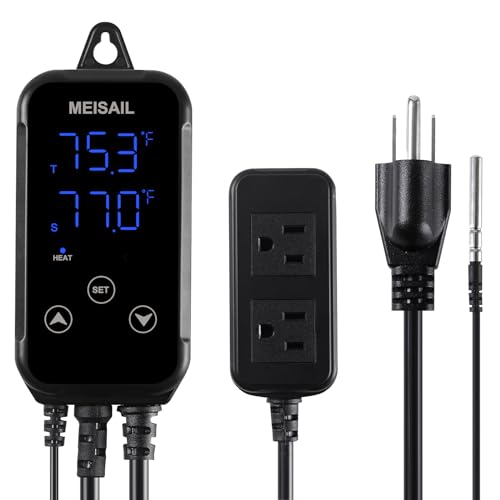
2 Pieces 12V Electronic Temperature Controller Programmable -50 to 110 Degree Celsius Heating/Cooling Thermostat Control Switch Module Ntc Waterproof Sensor Probe Dual Color LED Display Monitor


Key features
- •What will receive: you will get 2 pieces of DC 12V 200 mA temperature controllers, the measurement temperature is from -50 to 110℃(-58 to 230℉), the control and backlash precision: 0.1 Celsius, the refresh rate: 0.5 s, the module size: 48 x 29 x 32 mm/ 1.89 x 1.14 x 1.26 inch
- •Dual color LED display: this digital thermostat control module of dual color LED display, which show the measured temperature (red) and set temperature (blue) at the same time, which can be applied for cooling/ heating mode, you can test indoor or outdoor temperature
- •Waterproof design: the NTC (10K 0.5%) probe is waterproof, and you can control the temperature at will, can also control heating or cooling according to different needs
- •Reliable to use: the electronic temperature control switch module has been tested for consistency and reliability, and its control accuracy is 0.1 degrees Celsius, backlash precision is 0.1 degrees Celsius with high temperature protection
- •Wide application: the electronic thermostat can be widely applied in intelligent home and industrial equipment, suitable for household appliances, automatic irrigation, office machines, audio, automobiles, aquarium, fish tank etc.
2 Pieces 12V Electronic Temperature Controller Programmable -50 to 110 Degree Celsius Heating/Cooling Thermostat Control Switch Module Ntc Waterproof Sensor Probe Dual Color LED Display Monitor
List Price: $25.20$22.68DEALYou Save: $2.52 (10%)
Free shippingFree Returns – 30 daysFree Order CancellationSecure Payment2–3 Days DeliveryGet It October 26, 2026In Stock (1)No marketing spamNo account requiredFulfilment by FedEx / Amazon / UPS / ShipwirePayPal / Card Buyer Protection
Customer Reviews
Reviews sourced from verified Amazon purchasers3.9
out of 5
Based on 10 reviews
5★
40%
4★
60%
3★
0%
2★
0%
1★
0%
Works very well
Joaquin Alvarado✓ Verified Purchase•February 24, 2024
This thermostat is very basic but it works very well. Mine didn't come with wiring directions but now they show the diagram on the product description on AMAZON (but it still isn't very clear). One thing they don't explain is why there is a jumper between the ground inputs, as depicted on the top portion of the wiring diagram. What I found is that if you attach a switch (on/off basic switch) between the negative input and negative jumper input (right next to it), you can use that to keep the fan or heater element from turning on and still have the thermometer on and showing the temperature. Why would you want this? In my case, I don't want the fan or heater to turn on while I adjust the thermostat to the temperature I want it to turn on. I can just look at the red dot on the thermostat to see if it turns on or off while not pushing power to the fan or heating element. This will also keep the fan or heater from turning on accidentally and running your batteries down.
I have this installed in three different areas in my coach.
1. Electricity bay to keep the inverter and other electronics cool. It runs an exhaust fan.
2. Battery bay to keep the lithium batteries at the appropriate operating temperature. It runs an exhaust fan and heating element.
3. Water bay to keep the water pump from freezing in the winter. It runs a heating element.
I have this installed in three different areas in my coach.
1. Electricity bay to keep the inverter and other electronics cool. It runs an exhaust fan.
2. Battery bay to keep the lithium batteries at the appropriate operating temperature. It runs an exhaust fan and heating element.
3. Water bay to keep the water pump from freezing in the winter. It runs a heating element.
Saved my buddy a ton of money.
Tellinit Likeitis✓ Verified Purchase•February 18, 2024
My friend had the cooling fan on his RZR 800 stop working. We did all of the troubleshooting steps and narrowed the problem down to the main computer not sending the turn-on signal to the relay. Fixing this problem would normally require replacing the MCU for the machine and would cost big bucks. Most in his shoes would have installed a toggle switch and just turned it on while driving. However, this solution isn't great, as it increases wear on the fan motor and if the driver forgets to do it, engine damage can result.
So, we used this controller instead. We just found a nice little crevice in the radiator and used some RTV to hold the probe in place. Once everything was wired (using an appropriate fuse on the power line), we set it for cooling and the turn-on temp at 190F with a swing of 20F.
It now works better than the original circuit (much faster to react). He can ride his machine again without worrying about a manual switch and it has been working fine for about a month now. Hopefully it lasts, but for what it costs, attaching a new controller is a small thing if it dies.
I ordered 4 so I could keep the others on my shelf for some other catastrophe.
So, we used this controller instead. We just found a nice little crevice in the radiator and used some RTV to hold the probe in place. Once everything was wired (using an appropriate fuse on the power line), we set it for cooling and the turn-on temp at 190F with a swing of 20F.
It now works better than the original circuit (much faster to react). He can ride his machine again without worrying about a manual switch and it has been working fine for about a month now. Hopefully it lasts, but for what it costs, attaching a new controller is a small thing if it dies.
I ordered 4 so I could keep the others on my shelf for some other catastrophe.
One more attempt to a full user manual
jcag✓ Verified Purchase•February 2, 2024
I have read and reviewed every post. Below is a culmination of all that, as well as my own observation while examining every function this controller has to offer. Below are the results of that. Enjoy as this controller works well when the owner knows how to use it. I get the frustration as I was just about ready to send my back when I took these last steps.
Here are my results.
DC 12V Electronic Temperature Controller Programmable
Product Description:
Product Name: Programmable, Dual LED Display Temperature Controller
Operating Voltage: DC12V 200mA
Measurement Range: -50 to 110 Celsius (-58 to 230 F)
Elaboration Precision: +/-0.1 Celsius (.18 F)
Control Precision: 0.1 Celsius (.18 F)
Backlash Precision: 0.1 Celsius (.18 F)
Refresh Rate: 0.5s
High Temperature Protection: 0 to 60 Celsius (32 to 230 F)
Temperature Sensor Type: 10K 0.5% NTC
Operating Temperature: -10 to 60 Celsius (14 to 140 F)
Compatible Load: 5A / 15A 220VAC; 20A 14VDC
Power Consumption: Less than/equal to 35mA (Static), Less than/equal to 65mA (relay closured)
Module Size: 48x29x32mm / 1.89x1.14x1.26 inch (L x W x H)
Temperature Setting:
Momentarily press SET key and the LED will flash. Press SET (+) or C/F (-) key to set required temperature value. Wait for 3s, and module will automatically save the parameters and exit.
RED Indicator Light:
Light ON: relay closed
Light OUT: relay off (disconnected)
LED Display:
Red: Measuring Temperature; Blue: Setting temperature
LLL: Means the sensor is not connected or open
HH: Indicates that the temperature exceeds the measurement range of the module
--: Indicates that the module is under high temperature protection
Programmable Thermostat Introductions (Code, Explain, Setting range, Factory setting):
"¢ Press and hold SET for 5 seconds to enter Programming mode for P0 thru P8
"¢ Press + or - to switch between P0 to P8 program choices
"¢ Momentarily press SET and C/F once to start (Programming) mode for that choice
"¢ Press + or - to switch between choices within that Program e.g. (P8: ON or OFF)
"¢ Momentarily press SET and C/F once to mark change
"¢ Press SET once to remember change
"¢ Long press SET or 10 seconds w/o button press, controller will automatically confirm and come out of Program Mode.
o P0, Heating/Cooling: H/C, C
P1, Return difference: 0.1-30, 2
P2, Set limit maximum: +110, 110
P3, Set limit minimum: -50, -50
P4, Temperature correction: -15 - +15, 0
P5, Delay start: 0-10, 0
P6, High temperature alarm: -50 - +110, OFF
P7, Celsius/Fahrenheit: CS/FH, CS
P8, Factory reset: ON-OFF, OFF
Package Content:
1 Temperature monitoring controller
1 Operating manual
-------------------------------------------------------------------------------------------------------------------------
Here are my results.
DC 12V Electronic Temperature Controller Programmable
Product Description:
Product Name: Programmable, Dual LED Display Temperature Controller
Operating Voltage: DC12V 200mA
Measurement Range: -50 to 110 Celsius (-58 to 230 F)
Elaboration Precision: +/-0.1 Celsius (.18 F)
Control Precision: 0.1 Celsius (.18 F)
Backlash Precision: 0.1 Celsius (.18 F)
Refresh Rate: 0.5s
High Temperature Protection: 0 to 60 Celsius (32 to 230 F)
Temperature Sensor Type: 10K 0.5% NTC
Operating Temperature: -10 to 60 Celsius (14 to 140 F)
Compatible Load: 5A / 15A 220VAC; 20A 14VDC
Power Consumption: Less than/equal to 35mA (Static), Less than/equal to 65mA (relay closured)
Module Size: 48x29x32mm / 1.89x1.14x1.26 inch (L x W x H)
Temperature Setting:
Momentarily press SET key and the LED will flash. Press SET (+) or C/F (-) key to set required temperature value. Wait for 3s, and module will automatically save the parameters and exit.
RED Indicator Light:
Light ON: relay closed
Light OUT: relay off (disconnected)
LED Display:
Red: Measuring Temperature; Blue: Setting temperature
LLL: Means the sensor is not connected or open
HH: Indicates that the temperature exceeds the measurement range of the module
--: Indicates that the module is under high temperature protection
Programmable Thermostat Introductions (Code, Explain, Setting range, Factory setting):
"¢ Press and hold SET for 5 seconds to enter Programming mode for P0 thru P8
"¢ Press + or - to switch between P0 to P8 program choices
"¢ Momentarily press SET and C/F once to start (Programming) mode for that choice
"¢ Press + or - to switch between choices within that Program e.g. (P8: ON or OFF)
"¢ Momentarily press SET and C/F once to mark change
"¢ Press SET once to remember change
"¢ Long press SET or 10 seconds w/o button press, controller will automatically confirm and come out of Program Mode.
o P0, Heating/Cooling: H/C, C
P1, Return difference: 0.1-30, 2
P2, Set limit maximum: +110, 110
P3, Set limit minimum: -50, -50
P4, Temperature correction: -15 - +15, 0
P5, Delay start: 0-10, 0
P6, High temperature alarm: -50 - +110, OFF
P7, Celsius/Fahrenheit: CS/FH, CS
P8, Factory reset: ON-OFF, OFF
Package Content:
1 Temperature monitoring controller
1 Operating manual
-------------------------------------------------------------------------------------------------------------------------
Can't program it?? Revised my review, figured out.
Travis W Linds✓ Verified Purchase•January 9, 2024
Revision. I was able to find a video online that said how to program. No Instructuons sucks but the do work well.
'm typically really good at figuring out how to program things, and I followed all the instructions and I cannot get this unit to change from cooling mode to heating mode. Parameter zero I need to change from c to h and I cannot figure out how.
'm typically really good at figuring out how to program things, and I followed all the instructions and I cannot get this unit to change from cooling mode to heating mode. Parameter zero I need to change from c to h and I cannot figure out how.
No-frills, no nonsense thermostat switches
Scott I.✓ Verified Purchase•January 8, 2024
I bought these to run the fans and water pumps in my chicken coops. The thermostat turns the fans on when the temperature gets high enough in the coop, and I have one that turns the pump on in the water tank when the temperature in the water gets low enough (to keep the water from freezing and breaking the pipes.) It's not intuitive or easy to wire and program the thermostat, and the instructions are poorly written, but once it's done, the thermostats work just fine.
Page 1 of 2