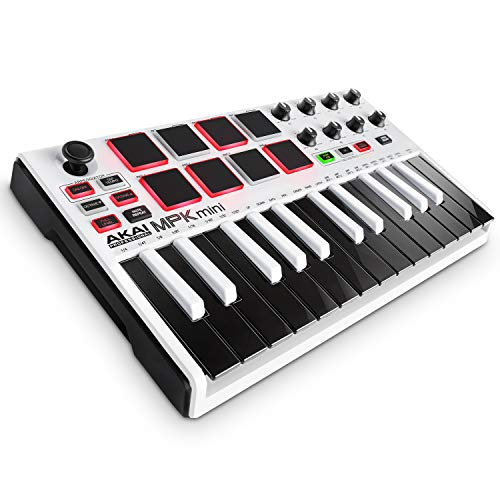
Akai Professional MPK Mini MK3-25 Key USB MIDI Keyboard Controller With 8 Backlit Drum Pads, 8 Knobs, Music Production Software and Native Instruments Sound Package (NKS Integration), Grey






Key features
- •Music Production and Beat Maker Essential – USB powered MIDI controller with 25 mini MIDI keyboard velocity-sensitive keys for studio production, virtual synthesizer control and beat production
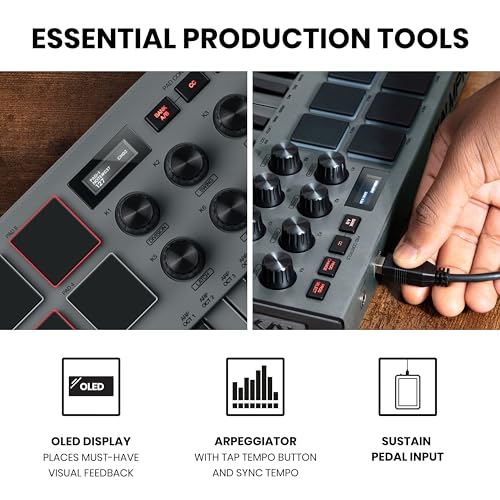
- •Total Control of your Production - Innovative 4-way thumbstick for dynamic pitch and modulation control, plus a built-in arpeggiator with adjustable resolution, range and modes
- •The MPC Experience - 8 backlit velocity-sensitive MPC-style MIDI beat pads with Note Repeat & Full Level for programming drums, triggering samples and controlling virtual synthesizer / DAW controls
- •Complete Command of your Virtual Instruments and FX - 8 360-degree knobs assign to all your music studio plugins for mixing, tweaking synth controls and more
- •1500 plus Sounds and Everything You Need for Pro Production – Complete Music Production Starter Kit including MPC Beats, 6 Virtual Instruments and 2GB of sound content
Akai Professional MPK Mini MK3-25 Key USB MIDI Keyboard Controller With 8 Backlit Drum Pads, 8 Knobs, Music Production Software and Native Instruments Sound Package (NKS Integration), Grey
List Price: $123.68$111.31DEALYou Save: $12.37 (10%)
Free shippingFree Returns – 30 daysFree Order CancellationSecure Payment2–3 Days DeliveryGet It October 24, 2026In Stock (2)No marketing spamNo account requiredFulfilment by FedEx / Amazon / UPS / ShipwirePayPal / Card Buyer Protection
Customer Reviews
Reviews sourced from verified Amazon purchasers4.7
out of 5
Based on 10 reviews
5★
50%
4★
50%
3★
0%
2★
0%
1★
0%
Thick Pads / Easy to Program / Compact
Art Ei✓ Verified Purchase•September 4, 2023
The pads on the MPK Mini Mk3 must be among the highest quality pads among compact MIDI controllers at a similar prize. They have that classic MPC-type fat/thick feel to them. They have a high sensitivity to velocity, but the controller also has a "full level" button. The MPK Mini also has a "note repeat" button, which I find really useful for sequencing closed hi-hats, etc. I also like to program the 8 encoders to control hardware synths, etc. By the way, the app for this MPK Mini is really easy to use, you can assign the pads and keys/encoders different MIDI channels, and you can save presets.
I only wish it had a real MIDI out, instead of only a USB port.
I only wish it had a real MIDI out, instead of only a USB port.
Great looking starter MIDI keyboard
ETR2k3✓ Verified Purchase•September 1, 2023
The MPK Mini has been one of the best entry level MIDI keyboards for years, and the Mk3 has improved upon that further. This color combo looks absolutely fantastic in person, and the included software suite and training videos are perfect for a newbie music producer to play around with. I've been working with keyboards and synthesizers for years, and it's impressive to see the number of features they've packed into this board at such a low price.
I still daily drive this.
Bailey Paul✓ Verified Purchase•July 20, 2023
I am getting a Hydrasynth Explorer tomorrow, so that may end up replacing this, but this has been one of my favorite midi controllers ever so far. I just wish I bought a cooler color, but maybe this grey color is cool, I haven't seen the variations in a while.
Go DJ
Mr Lewis✓ Verified Purchase•July 10, 2023
This product came fast and is everything that was advertised see you guys in the club we're making it out the hood with this one
Great keyboard, docs so so, software setup process is third world torture
Scott A. Franco✓ Verified Purchase•July 5, 2023
So I got this today, and started using it. I write software for Windows, Linux and Mac OS X. So I had real concerns about the keyboard. I downloaded the manual, which amounts to a one page product brochure that then gets repeated in several languages. I wanted to make sure it was useful with my software, especially Linux, where none of the provided programs will run. To fulfil that, I just needed the controls to output general MIDI and there you go.
The first issue is the manual does not go into what the controls or pads actually SEND, other than "MIDI CC messages". Which ones? It does not go into it. Are they preprogrammed? The Amazon page talks about needing to set it up with the software. Bad sign. I asked the maker if they provided programming instructions to set it up with my software. "Its proprietary" was the (very unsatisfactory) answer. Are you charging software developers? Getting part of their profits? IIIII doubt it. But you go girl.
After more research, I found other keyboards that DID go into what midi messages their keyboards provided, how to reprogram them, everything. For example, M-AUDIO does that. Now for the odd part. They are owned by the same company, InMusic!
I decided that this keyboard had what I wanted, if I could just make it work on all systems. My main worry is that it would not function at all without the software. I asked another question: If I program it, with the provided software on, say, Windows, would it say programmed even with the power removed. That way I could at least program it on one system and move it to others. The answer was yes, so I decided to risk it.
Now that I have the keyboard, I see that there is no problem at all. The display tells you exactly what it is sending, what CC messages and what numbers. In fact, in case you need to know, it sends CC 70 to CC 77 for the rotary controls, and drum channel notes 36 to 43 on the drum pads. This is nowhere in the manual (and much better than the frankly snotty "proprietary" answer I got).
Now on to the software provided. They give you a lot, and the basics are in MPC beats, which I am happy with. They also give you three programs that say "get activation code". I went through a signup process to download these. Then asked for an activation code. They take you to another, unrelated site and you have to sign up AGAIN with them. then they sent a verification code to my email. Apparently I didn't get to it fast enough, and now their site says "my email is invalid". And gives me no option to fix it. Thanks.
Now, how about the unit itself. I'm pretty happy with that. I am not a musician, I use this to make sounds for games and other programs. I have a 49 key controller and a 61 key full synth, both of which are unwieldy to use at my computer desk. So having a very short and compact keyboard was a good idea. Plus, the pads and controls give me the means to control DAWs and test out my software. The keys and pads have a very nice feel to me, and I like the infinite range controls. The whole thing takes up very little space on my desk and thus can remain there, instead of me taking out one of my larger keyboards to play with.
To sum up, AKAI, fix your documentation. Look at the M-AUDIO docs for your example. And get someone competent to do the activation code thing. My 2 cents.
The first issue is the manual does not go into what the controls or pads actually SEND, other than "MIDI CC messages". Which ones? It does not go into it. Are they preprogrammed? The Amazon page talks about needing to set it up with the software. Bad sign. I asked the maker if they provided programming instructions to set it up with my software. "Its proprietary" was the (very unsatisfactory) answer. Are you charging software developers? Getting part of their profits? IIIII doubt it. But you go girl.
After more research, I found other keyboards that DID go into what midi messages their keyboards provided, how to reprogram them, everything. For example, M-AUDIO does that. Now for the odd part. They are owned by the same company, InMusic!
I decided that this keyboard had what I wanted, if I could just make it work on all systems. My main worry is that it would not function at all without the software. I asked another question: If I program it, with the provided software on, say, Windows, would it say programmed even with the power removed. That way I could at least program it on one system and move it to others. The answer was yes, so I decided to risk it.
Now that I have the keyboard, I see that there is no problem at all. The display tells you exactly what it is sending, what CC messages and what numbers. In fact, in case you need to know, it sends CC 70 to CC 77 for the rotary controls, and drum channel notes 36 to 43 on the drum pads. This is nowhere in the manual (and much better than the frankly snotty "proprietary" answer I got).
Now on to the software provided. They give you a lot, and the basics are in MPC beats, which I am happy with. They also give you three programs that say "get activation code". I went through a signup process to download these. Then asked for an activation code. They take you to another, unrelated site and you have to sign up AGAIN with them. then they sent a verification code to my email. Apparently I didn't get to it fast enough, and now their site says "my email is invalid". And gives me no option to fix it. Thanks.
Now, how about the unit itself. I'm pretty happy with that. I am not a musician, I use this to make sounds for games and other programs. I have a 49 key controller and a 61 key full synth, both of which are unwieldy to use at my computer desk. So having a very short and compact keyboard was a good idea. Plus, the pads and controls give me the means to control DAWs and test out my software. The keys and pads have a very nice feel to me, and I like the infinite range controls. The whole thing takes up very little space on my desk and thus can remain there, instead of me taking out one of my larger keyboards to play with.
To sum up, AKAI, fix your documentation. Look at the M-AUDIO docs for your example. And get someone competent to do the activation code thing. My 2 cents.
Page 1 of 2