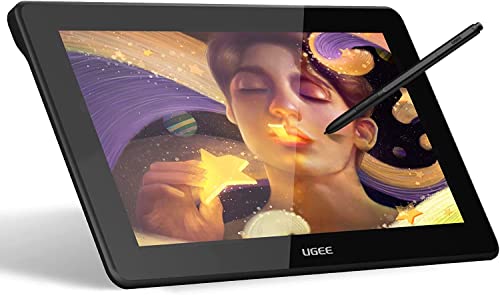
UGEE S640 Graphics Drawing Tablet, Digital Draw Art Pad with Pen Battery-Free Stylus Tilt Function 8192 Levels Pressure Sensitivity 10 Express Keys for Mac, Windows PC and Android


Key features
- •【Instead of Mouse & Keyboard】This computer graphics tablets is ideal for online working,teaching & meeting. It has 10 hot keys that can be customized according to your preferences,to set zoom in,zoom out,undo,save,delete.8192 pressure Sensitivity battery free pen with 8 replacement refills. It can working long times for drawing,OSU gaming,and sign on line etc. It reduces the need to switch back and forth between mouse and keyboard,and has function of a click,keyboard shortcuts and editing input.
- •【Drawing enthusiast friendly】The drawing tablets simulates the frosted texture of paper,8192 pressure sensitive battery free stylus,60°tilt control,can adjust the pressure of the nib to more accurately reflect the natural thickness and darkness of the line. features delay-free cursor positioning,and pen body comes with a key to switch the eraser function,restore the true feeling of drawing. Left-handed easy as it can be 180°rotated,pen pockets on the top of the drawing pads to prevent pen loss.
- •【Convenient and Fast】Type-C Interface can connected with your digital drawing tablet, computer or phone easily and fast(the phone needs to use an OTG converter).Type-C interface design supports blind insertion. Easy driver download, you just need to enter the official website of UGEE, through support-download-select The type of drawing board - select the computer system - click download to install. The driver is downloaded from the official authoritative website,plug-and-play, safe and reliable.
- •【Environmentally friendly】This drawing tablet is truly paperless, avoiding paper waste .Easy to carry as it is very thin and light-1cm thick & weight 200g. The 6.5*4 inch size makes this drawing pad for computer perfect for limited desktop space. It can be used for drawing design,photo editing, sketching, animation drawing, letter writing.It is suitable for children learn to draw for the first time,students who need to record at any time,and elderly people who are not familiar with the keyboard.
- •【Wide Compatibility】UGEE S640 graphics drawing tablet is compatible with Mac,Windows and Linux, supports phone Android 6.0 or higher via the included OTG adapter, drawing through with phone at any time. It is also compatible with Chromebooks (note: requires Chrome OS 88.0.4324.109 and newer),it is apply to Word, PowerPoint, OneNote, Zoom, Xsplit,etc. And then it supports Adobe Photoshop,Paint Tool Sai, illustrator, Corel Draw, Corel painter,Sketchbook,Manga Studio,Clip Studio Paint for creation.
UGEE S640 Graphics Drawing Tablet, Digital Draw Art Pad with Pen Battery-Free Stylus Tilt Function 8192 Levels Pressure Sensitivity 10 Express Keys for Mac, Windows PC and Android
List Price: $52.36$47.12DEALYou Save: $5.24 (10%)
Free shippingFree Returns – 30 daysFree Order CancellationSecure Payment2–3 Days DeliveryGet It October 26, 2026In Stock (1)No marketing spamNo account requiredFulfilment by FedEx / Amazon / UPS / ShipwirePayPal / Card Buyer Protection
Customer Reviews
Reviews sourced from verified Amazon purchasers4.2
out of 5
Based on 10 reviews
5★
70%
4★
30%
3★
0%
2★
0%
1★
0%
Great quality for both Mac and PC!
Clay✓ Verified Purchase•October 29, 2023
I'm very pleased with this writing pad. It's very easy to set up and the quality is surprising great considering the fantastic price. No need to buy one more expensive, this looks and feels like it's higher end. It immediately worked on my Macbook Air and my friend's PC. Very pleased!
Good cheap/beginner tablet
Zizi✓ Verified Purchase•October 25, 2023
I've been using this for about a year and a half now and it's really good for its price. It has flaws though (of course, it's a cheap tablet)
PROS: Generally good to use; low price; has all the key features of a tablet (pressure, tilt, pen angle); plenty of buttons even if I don't use 'em
CONS: Screen protector bubbled after a little under a year & before that showed my pen lines; pen angle is pretty janky (maybe I don't know how to use it but it's probably just the cost-cutting measures); the replacement nibs I got were for the screen tablets for some reason (I later bought the correct ones)
Overall a really good value IMO. Don't be fooled by the longer looking cons, I just elaborated on them more.
PROS: Generally good to use; low price; has all the key features of a tablet (pressure, tilt, pen angle); plenty of buttons even if I don't use 'em
CONS: Screen protector bubbled after a little under a year & before that showed my pen lines; pen angle is pretty janky (maybe I don't know how to use it but it's probably just the cost-cutting measures); the replacement nibs I got were for the screen tablets for some reason (I later bought the correct ones)
Overall a really good value IMO. Don't be fooled by the longer looking cons, I just elaborated on them more.
Easy to use and fast delivery
Orong✓ Verified Purchase•September 21, 2023
We've booked it for graphic design tasks and it's working well and very easy to install.
Nice Tablet for the Money
J.B. McGee✓ Verified Purchase•September 13, 2023
I've been a Wacom Windows user for about 15 years. I've recently switched to all Apple products, and there has been a steep learning curve, especially on installing otherwise simple accessories on what would be a Windows PC.
This tablet was tricky for me, as an experienced user with tablets. I couldn't get it to work as a mouse initially, and I found the directions to be confusing. Ultimately, you have to go to advanced settings and set handwriting area. You tap the left top and right bottom with the pen, and then bam--like magic--I had a mouse. It's working great now. That's my only complaint so far. I'm sharing in case this helps someone who is having similar issues. I also changed the brand new nib.
This tablet was tricky for me, as an experienced user with tablets. I couldn't get it to work as a mouse initially, and I found the directions to be confusing. Ultimately, you have to go to advanced settings and set handwriting area. You tap the left top and right bottom with the pen, and then bam--like magic--I had a mouse. It's working great now. That's my only complaint so far. I'm sharing in case this helps someone who is having similar issues. I also changed the brand new nib.
Great little first tablet!
Gerald Washington✓ Verified Purchase•September 3, 2023
I'm not a digital illustrator, but I have drawn with this tablet. It works really great with my program. I mostly use it for teaching online annotating my PowerPoint presentations. It works seamlessly with the program and saves all of my settings and hotkeys. It also stows away nicely and out of the way since it's small while still being big enough to work on.
Page 1 of 2



![Drawing Glove for Tablet,[Pink 2Pack] Palm Rejection Artist Right Hand Glove Digital Art Accessories](https://m.media-amazon.com/images/I/41Jvp6-d4oL._SL500_.jpg)