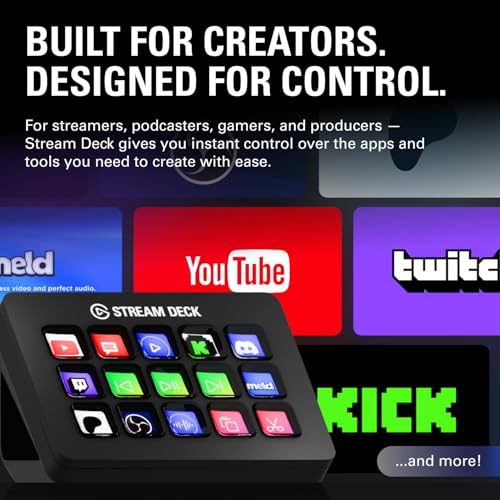
Elgato Stream Deck MK.2 – Studio Controller, 15 macro keys, trigger actions in apps and software like OBS, Twitch, YouTube and more, USB, works with Mac and PC



Key features
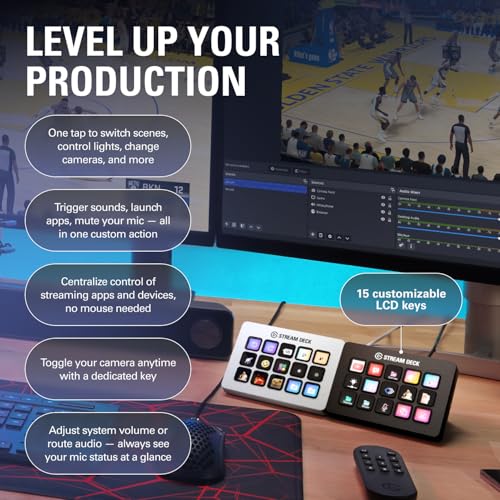
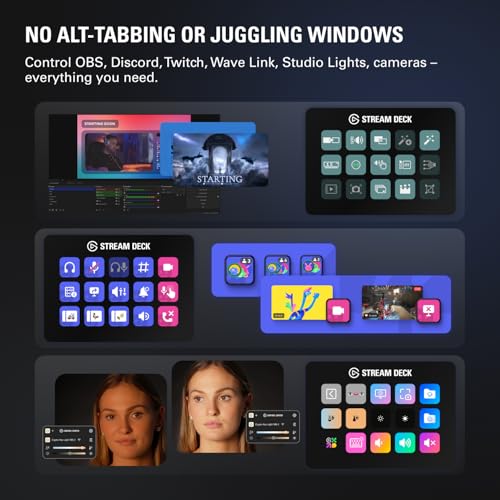
- •15 customizable LCD keys to control apps, tools and platforms
- •Switch out the removable faceplate for different designs and modification
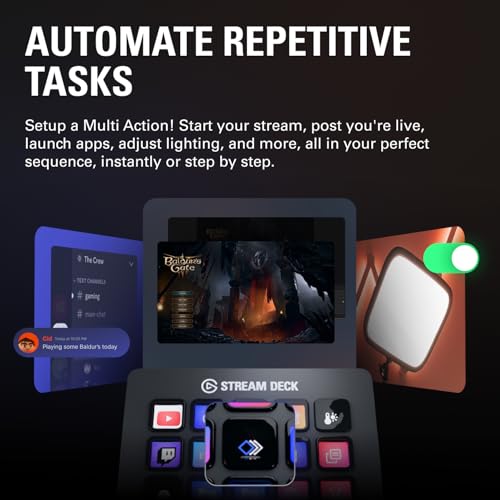
- •Easily customize keys to trigger single or multiple actions, launch social posts, adjust audio, turn on lights, and much more
- •Easily customize keys to trigger single or multiple actions, launch social posts, adjust audio, turn on lights, and much more
- •Access powerful plugins for Elgato 4KCU, OBS, Streamlabs, Twitch, YouTube, Twitter, Spotify, Philips Hue, and many more
- •Set Hotkey Actions to streamline your film editing, music production, photography workflow, etc.
Elgato Stream Deck MK.2 – Studio Controller, 15 macro keys, trigger actions in apps and software like OBS, Twitch, YouTube and more, USB, works with Mac and PC
List Price: $196.41$176.77DEALYou Save: $19.64 (10%)
Free shippingFree Returns – 30 daysFree Order CancellationSecure Payment2–3 Days DeliveryGet It October 25, 2026In Stock (10)No marketing spamNo account requiredFulfilment by FedEx / Amazon / UPS / ShipwirePayPal / Card Buyer Protection
Customer Reviews
Reviews sourced from verified Amazon purchasers4.8
out of 5
Based on 10 reviews
5★
80%
4★
20%
3★
0%
2★
0%
1★
0%
VERY versatile
Lou✓ Verified Purchase•August 7, 2023
This thing is awesome. You may want one of the bigger ones depending on your application but this works just fine for me. I use it primarily to navigate and transition through OBS while streaming and it works flawlessly. You can use this for SO many other things though. I have certain windows functions assigned so i can use it for certain PC functions. For example, one button is responsible for launching a web browser, spotify as well as a gaming launcher. All in one key press. I have functions for turning the PC off so i don't have to navigate through any menus when i want to shut down(wise to close running programs first). More importantly.. while you only have 6 buttons.. each one can be assigned to be a folder that holds 5 more actions inside. you could theoretically just keep making endless amounts of folders with no need for the bigger versions that have more buttons(preference i suppose). I've even used this to set up hot keys for games like flight sim so that functions like engine on/off ... landing gear, can all be done off the keyboard or flight sticks. awesome product.
Perfect for literally everything, NOT just streaming!
The Bowtie Artist✓ Verified Purchase•July 31, 2023
I can't even begin to tell you just how much I use this in my day-to-day. Well, actually I can, this is a review, it's kind of the point. But most people see "STREAM" deck and think "oh, this is for streaming". No, my mistaken friend, this is a multitool that is only limited to your imagination.
Got a wireless keyboard? That's cool. What happens when it runs out of battery and you need to charge it? Make a folder on the Stream Deck specifically for shortcuts like Ctrl +, Ctrl X, Shift, Alt Tab, and more, and you've got all your non-typing needs met through it.
Need some control in your life? This has plugins available through the program's built-in library for things like light control. As an example, I use Govee lights. From my Stream Deck, I can control which lights are on, what their brightness is, what their color is, and more!
I also do game development on the side. Having to type out "\n" to insert the name of the third character into text can get a little annoying every time you need to say their name. So I've got a system text button that types out fourteen different character names with a press of a button (the button in question has their face on them, too, did I mention image button customization?), as well as thirteen color codes to change the text's color mid-sentence.
Of course, you can also use this to LAUNCH programs as well. If you're like me and you have hundreds of programs and you don't have your desktop icons turned on, going into your folders or scrolling through your program bar can be a hassle. Add buttons for it! You can even set up folders to hold game series (KH or FF anyone?), a folder for emulators, you can even put in Steam games. Forget the games for a bit, literally every single "exe" file can be executed with a single press of a button.
And of course, lastly, YES I use mine for streaming too. Switching between scenes, opening up a dynamic text file to change the weekly shout-out, turning on/off my microphone, instant clips, alerts, chat commands...heck, I even have three clocks on here to show me the times of other viewers' time zones so I can stream a game THEY like when they're actually awake. And the multi-action tool allows me to create a button that does five or six different things in a row, which is perfect for if you need to put your streams into a lockdown for something serious.
All in all, I haven't found a single thing this Stream deck CAN'T do. And if there IS something, the additional add-on plugins easily fix that.
10/10 would recommend for any streamer, but also any computer user to make life so much simpler and easier.
Got a wireless keyboard? That's cool. What happens when it runs out of battery and you need to charge it? Make a folder on the Stream Deck specifically for shortcuts like Ctrl +, Ctrl X, Shift, Alt Tab, and more, and you've got all your non-typing needs met through it.
Need some control in your life? This has plugins available through the program's built-in library for things like light control. As an example, I use Govee lights. From my Stream Deck, I can control which lights are on, what their brightness is, what their color is, and more!
I also do game development on the side. Having to type out "\n" to insert the name of the third character into text can get a little annoying every time you need to say their name. So I've got a system text button that types out fourteen different character names with a press of a button (the button in question has their face on them, too, did I mention image button customization?), as well as thirteen color codes to change the text's color mid-sentence.
Of course, you can also use this to LAUNCH programs as well. If you're like me and you have hundreds of programs and you don't have your desktop icons turned on, going into your folders or scrolling through your program bar can be a hassle. Add buttons for it! You can even set up folders to hold game series (KH or FF anyone?), a folder for emulators, you can even put in Steam games. Forget the games for a bit, literally every single "exe" file can be executed with a single press of a button.
And of course, lastly, YES I use mine for streaming too. Switching between scenes, opening up a dynamic text file to change the weekly shout-out, turning on/off my microphone, instant clips, alerts, chat commands...heck, I even have three clocks on here to show me the times of other viewers' time zones so I can stream a game THEY like when they're actually awake. And the multi-action tool allows me to create a button that does five or six different things in a row, which is perfect for if you need to put your streams into a lockdown for something serious.
All in all, I haven't found a single thing this Stream deck CAN'T do. And if there IS something, the additional add-on plugins easily fix that.
10/10 would recommend for any streamer, but also any computer user to make life so much simpler and easier.
This works great - gaming
jmace57✓ Verified Purchase•June 28, 2023
I purchased this during the Amazon Prime days as it was marked down to $105. These are designed for use by YouTube streamers, but I use it for system automation and for gaming. I love the tactile buttons, and love being able to use/create icons underneath them. I have a main screen with all of my most common programs, websites and tools on it. Then sub-screens for various other tasks - one with system utilities, another for games. You can program the buttons to take actions in games - from single keystrokes to macros. There is a large StreamDeck community out there creating all sorts of plug-ins, utilities and "pages" that are free. Highly recommend.
Useful for More Than Just Gaming - Useful in the Studio, as Well
Deborah Anderson ✓ Verified Purchase•June 6, 2023
Even though this unit has several options, I have found myself starting out with the most basic, the simple website button, and even though you could do that with a simple browser bookmark, it is very convenient to use the Stream Deck to access a website (link) anytime, from any place.
For example, I have a cute button that allows me to access an emoji page so that I can add an emoji to a text, tweet (X post), or whatever with the click of Elgato Stream Deck button.
The next set of buttons will be for the OBS, LiveStreaming, Twitch, etc., as I continue to use them in my professional studio.
And, the mini allows me to travel with it, even with my laptop, programming the lower buttons to advance to the next screen with more programmable buttons, with a virtual unlimited allowable level of buttons! So, the sky is the limit.
I export my settings to my second Stream Deck so that I always have the same setup wherever I go, whether, in my office or on-the-go, I am never without my push-button options with this little unit. I don't know how I lived without it (them)!
For example, I have a cute button that allows me to access an emoji page so that I can add an emoji to a text, tweet (X post), or whatever with the click of Elgato Stream Deck button.
The next set of buttons will be for the OBS, LiveStreaming, Twitch, etc., as I continue to use them in my professional studio.
And, the mini allows me to travel with it, even with my laptop, programming the lower buttons to advance to the next screen with more programmable buttons, with a virtual unlimited allowable level of buttons! So, the sky is the limit.
I export my settings to my second Stream Deck so that I always have the same setup wherever I go, whether, in my office or on-the-go, I am never without my push-button options with this little unit. I don't know how I lived without it (them)!
needs powered usb hub when connected via usb switch
Sarutabaruta✓ Verified Purchase•May 22, 2023
Works well so far. Control software isn't a good citizen on Mac as other internet reviews state, but is otherwise serviceable.
Seems to draw a bit of power for the button displays, so be sure it's either plugged into the computer directly, or through a powered usb hub otherwise. If it cycles between on and off frequently, it probably not getting enough power.
Switching between computers works fine too. Each computer's control software determines what the buttons layout is.
Seems to draw a bit of power for the button displays, so be sure it's either plugged into the computer directly, or through a powered usb hub otherwise. If it cycles between on and off frequently, it probably not getting enough power.
Switching between computers works fine too. Each computer's control software determines what the buttons layout is.
Page 1 of 2


![Nero 11 Platinum [Old Version]](https://m.media-amazon.com/images/I/51FN826rLTL._SL500_.jpg)