CZUR Assistive Cover 13.14-inch with Adjustable Hook&Loop Splash Resistant,PVC Material Cover for CZUR Book Scanner, Office&Home-Black



Key features
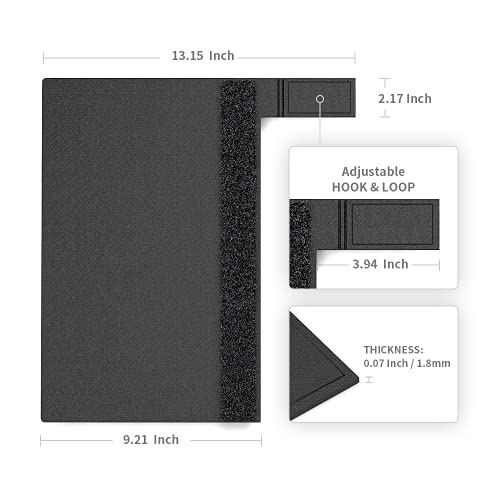
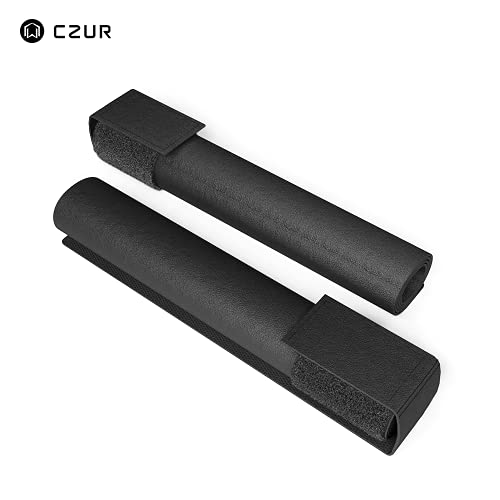
- •Dimension: Two 13.14"L x 9.21"W cover with Adjustable 3.93"L x 2.16"W Hook&Loop, allows to adjust according to the thickness of the book spine. Used Only for A4 and smaller than A4 sized books.
- •Used with CZUR Scanner: Intuitive Assistive Cover makes scanning even easier, regardless what type of books you are using. Helps to prevent the colors and edges of the back cover from interfering with the image exposure and algorithm.
- •Compact&Lightweight Design: Weighing only 0.2KG makes it portable and light weight. Handy to carry to office or travel with your CZUR Scanner.
- •Easy to Clean: This Assistive Cover is designed with durable PVC material. Splash Resistant Surface, Easy cleaning and maintenance. Just wipe with a wet cloth or paper.
- •Wide Application: Helpful when scanning books, Available for users used as mouse pad. Designed by CZUR Brand. Covered under 1 year Warranty
CZUR Assistive Cover 13.14-inch with Adjustable Hook&Loop Splash Resistant,PVC Material Cover for CZUR Book Scanner, Office&Home-Black
List Price: $59.19$53.27DEALYou Save: $5.92 (10%)
Free shippingFree Returns – 30 daysFree Order CancellationSecure Payment2–3 Days DeliveryGet It October 26, 2026In Stock (1)No marketing spamNo account requiredFulfilment by FedEx / Amazon / UPS / ShipwirePayPal / Card Buyer Protection
Customer Reviews
Reviews sourced from verified Amazon purchasers4.2
out of 5
Based on 10 reviews
5★
40%
4★
60%
3★
0%
2★
0%
1★
0%
Easy to Use. Could use More Flexible Lighting
Feuerbach✓ Verified Purchase•February 16, 2024
This scanner is easy to set up and easy to use. To set up just plug in tbe provided USB cable to the scanner and a USB port on your computer. Once hooked up I downloaded the latest drivers and software from the manufacturer's web site. They're provided on a CD that comes with the scanner but I always check websites for updates so I simply downloaded the software while I was there.
The scanner is simply a camera mounted on an L-shaped stand, the arm of which extends over the scanning area. There are two lights along the arm in additon to the camera and can be turned off independently of the canera if desired. When on, there's a knob that can be used to adjust the brightness. However, the lights only shine directly down. I've found if the document you're scanning has any sort of glosssiness to it then the lights reflect a "blind spot" off the document into the camera (reflected glare) causing part of the document to be unreadable, even with the lights at their lowest brightness. With glossy paper I need to turn off the lights completely and use differnent light sources angled from the sides. This "direct light only" configuration of the bulit-in lights is why I give this four stars instead of five.
To scan, you simply put what needs scanning under the camera and either click a button on the scanner's application or step on the provided foot pedal. I haven't uswd the foot pedal so can't comment on it. Simply clicking the button in the app works for me. The software had a lot of features I haven't used so can't comment on the siftware much. I just scan a page, turn the page, click scan, turn the page, etc until my document is fully scanned. I've used flatbed scanners in the past and this is much quicker than having to lift your document, turn the page, replace the document, etc. With this you just turn the page and click and turn and click. Makes quick work of scanning.
Each page is stored initially as a seperate image but the one feature of the software I have used is exporting to PDF. Simply select the images you want in tbe PDF and it merges them into one PDF document while also retaining the original seperate images. The software has features for cropping and rotating images, OCR conversion, and a lot more but I haven't had a need for any of those other features so I can't comment on their usefulness or accuracy.
Overall I'm very happy with the product except for having to jerry-rig alternate lighting solutions when scanning glossy paper.
The scanner is simply a camera mounted on an L-shaped stand, the arm of which extends over the scanning area. There are two lights along the arm in additon to the camera and can be turned off independently of the canera if desired. When on, there's a knob that can be used to adjust the brightness. However, the lights only shine directly down. I've found if the document you're scanning has any sort of glosssiness to it then the lights reflect a "blind spot" off the document into the camera (reflected glare) causing part of the document to be unreadable, even with the lights at their lowest brightness. With glossy paper I need to turn off the lights completely and use differnent light sources angled from the sides. This "direct light only" configuration of the bulit-in lights is why I give this four stars instead of five.
To scan, you simply put what needs scanning under the camera and either click a button on the scanner's application or step on the provided foot pedal. I haven't uswd the foot pedal so can't comment on it. Simply clicking the button in the app works for me. The software had a lot of features I haven't used so can't comment on the siftware much. I just scan a page, turn the page, click scan, turn the page, etc until my document is fully scanned. I've used flatbed scanners in the past and this is much quicker than having to lift your document, turn the page, replace the document, etc. With this you just turn the page and click and turn and click. Makes quick work of scanning.
Each page is stored initially as a seperate image but the one feature of the software I have used is exporting to PDF. Simply select the images you want in tbe PDF and it merges them into one PDF document while also retaining the original seperate images. The software has features for cropping and rotating images, OCR conversion, and a lot more but I haven't had a need for any of those other features so I can't comment on their usefulness or accuracy.
Overall I'm very happy with the product except for having to jerry-rig alternate lighting solutions when scanning glossy paper.
Fast and Easy!
Jimmy Joe✓ Verified Purchase•February 12, 2024
Until I saw one in use at the National Archives, I didn't know these existed. The person next to me scanned over 6000 items in the week I was there. I scanned (Took Pictures) with an IPad and got less than 2000. This thing is one button quick and is quicker than you can change documents. Multiple settings. It will even crop for you. The worst thing you have to do is create a folder to put your scans in. On top of that, I got an email from CZUR the day after it was delivered to me, thanking me for my purchase and giving me access to multiple training videos. Then they asked if I'd like a free gift. You bet!
Very helpful for making e-books also
June✓ Verified Purchase•February 10, 2024
It doesn't do pictures well, so if that is what you are getting it for, don't. It also doesn't acknowledge foreign language words, like ñ ç ó... things like that. You have to make sure you keep the page and the screen's view even or you'll have to rotate it later I like that you don't have to destroy the book to get a good book scan. If you have high gloss pages, then this is not the scanner for you, but otherwise it's helpful for anyone that wants a book in a scanned form on their computer. After you OCR, you do have to work on the scan, as alot of the book comes in individual text boxes. So in order for you to get a book to look like a book in WORD, you have to copy, cut, paste. I hope that makes sense. It's not as easy as the video showed, as they didn't show once you OCR. That's when the actual work is, since, essentially, you are scanning into your computer an image. Acquiring those words from that scan is where this device is useful.
Sleek and portable scanner!
Kathryn Olesko✓ Verified Purchase•January 7, 2024
The media could not be loaded. I've owned another Czur scanner, the Czur Aura Pro, for about 20 months now. Love it! As an academic I'm always scanning items for my research, teaching, and yes, even my service responsibilities. I've recommended it widely to my colleagues.
I jumped at the chance to get the Czur Shine Ultra for its expanded capabilities. It's smaller and lighter than the Czur Aura Pro (only weighs 2.2 lbs., a kilo), so it's as light and about as easy to pack as a slim notebook. Both scan up to size A3 (European paper size; slightly larger than a double sheet of paper). When the skies open for travel again, I look forward to using the Czur Shine Ultra in libraries and archives in Germany--easier to travel with than the Czur Aura Pro. I thought the Czur Aura Pro was aesthetically pleasing, but the Czur Shine Ultra is even more so! The scans are every bit as good, as is the Czur program that processes flat images. I especially like the ability to create OCR'd (searchable) PDFs, Word docs, and Excel spreadsheets from the scans that are processed first as JPGs. I work in multiple languages; the Czur Shine Ultra can OCR 180 different languages. Once the document is rendered searchable, computer search programs pick up the minutest details in the documents. There are other document editing functions, too.
Both scanners implement Czur's innovative curve flattening technology (good for books). Not even the professional Zeutschel scanners I use at the Library of Congress or in German libraries have that feature. (Nor does the Zeutschel OCR documents.)
The Czur Shine Ultra surpasses the Czur Aura Pro not only in aesthetics and portability, but also has the additional feature of recording videos in addition to flat images. Here's where the screen share function of various online meeting programs comes in. With online meeting programs you are limited to what your webcam can capture, and that usually includes you (unless you angle the webcam just so). With Czur Shine Ultra you can create or screen share a video with a book or text, pointing out the relevant parts to your audience. You can also create or screen share a video that only includes an object (see my video of a uranium glass candle holder on its side illuminated by UV light, which I demonstrate in my course on The Atomic Age).
The Czur Shine Ultra is a great scanner, with wider applicability than the Czur Aura Pro, and greater functionality. And it's easy to use. Highly recommended!
I jumped at the chance to get the Czur Shine Ultra for its expanded capabilities. It's smaller and lighter than the Czur Aura Pro (only weighs 2.2 lbs., a kilo), so it's as light and about as easy to pack as a slim notebook. Both scan up to size A3 (European paper size; slightly larger than a double sheet of paper). When the skies open for travel again, I look forward to using the Czur Shine Ultra in libraries and archives in Germany--easier to travel with than the Czur Aura Pro. I thought the Czur Aura Pro was aesthetically pleasing, but the Czur Shine Ultra is even more so! The scans are every bit as good, as is the Czur program that processes flat images. I especially like the ability to create OCR'd (searchable) PDFs, Word docs, and Excel spreadsheets from the scans that are processed first as JPGs. I work in multiple languages; the Czur Shine Ultra can OCR 180 different languages. Once the document is rendered searchable, computer search programs pick up the minutest details in the documents. There are other document editing functions, too.
Both scanners implement Czur's innovative curve flattening technology (good for books). Not even the professional Zeutschel scanners I use at the Library of Congress or in German libraries have that feature. (Nor does the Zeutschel OCR documents.)
The Czur Shine Ultra surpasses the Czur Aura Pro not only in aesthetics and portability, but also has the additional feature of recording videos in addition to flat images. Here's where the screen share function of various online meeting programs comes in. With online meeting programs you are limited to what your webcam can capture, and that usually includes you (unless you angle the webcam just so). With Czur Shine Ultra you can create or screen share a video with a book or text, pointing out the relevant parts to your audience. You can also create or screen share a video that only includes an object (see my video of a uranium glass candle holder on its side illuminated by UV light, which I demonstrate in my course on The Atomic Age).
The Czur Shine Ultra is a great scanner, with wider applicability than the Czur Aura Pro, and greater functionality. And it's easy to use. Highly recommended!
IT WORKS PRETTY GOOD detailed review
thereal_TOEBEANS✓ Verified Purchase•November 16, 2023
You have to be careful with focusing and keeping the pages still, it won't scan small papers clearly sometimes, and the light does make scanning glossy surfaces a chore... but this thing is perfectly adequate for most use-case-scenarios. If you're scanning things like 30 page comic books or manuals, this will do a phenomenal job... if not a perfect one. This isn't a miracle device. You will have errors before you get good practice. It's not *crystal* clear. But it's not a one-trick-pony either.
I've used this to scan a 500-page massive text book, paperbacks, hardcovers (easier than paperbacks for me), family photos, handwritten notes, and as a top-down webcam for teaching, all to perfectly usable success. For larger documents, if you're willing to sacrifice some resolution, you can boost the device's height on a box and get some black fabric, making the scannable area larger. OCR still works in common use.
And oh yes, something that this device excels in is it's desktop software's OCR function. *Excellent.* Those who use speech-to-text software will be *very pleased* with this device. One can simply copy and paste text right out of one's digitized books on one's computer. You will likely not be disappointed with it's OCR, for sure.
The device comes with everything you need. If your skin-tone doesn't work well with the automatic finger-removal function of the software, the box supplies you with "finger cots" which very accurately allow you to prop the book open with no fear of distracting artifacts. It comes with a foot pedal to scan the pages with, and also automatic scanning in the software which sees when you turn a page all by itself. Very nice packaging as well, very easy to understand. This company, Czur, is known for their excellent packaging.
The speed of the scanning this device can do is actually very impressive. More destructive techniques may be faster, but I've scanned a 300 page novel in 10 minutes. You can do the math there, but that's pretty darn good.
Something you may have noticed with minimal research is that this company makes other scanners that look similar. I can confirm to you that for consumer use, this scanner may have a lower resolution than the (tempting) $600+ scanner that they sell, but this model is more portable, and its resolution is *perfectly* adequate for all common users, I would say.
Do your research. Look at reviews. But if you are in need of a non-destructive book and document scanner that is portable (fits in my small backpack) and will scan pretty darn fast and in good quality, along with the best OCR software I've realistically ever used, and all for personal use, and don't need higher resolution (which most people shouldn't), this device is probably the best you can buy from Czur.
Have a nice one.
I've used this to scan a 500-page massive text book, paperbacks, hardcovers (easier than paperbacks for me), family photos, handwritten notes, and as a top-down webcam for teaching, all to perfectly usable success. For larger documents, if you're willing to sacrifice some resolution, you can boost the device's height on a box and get some black fabric, making the scannable area larger. OCR still works in common use.
And oh yes, something that this device excels in is it's desktop software's OCR function. *Excellent.* Those who use speech-to-text software will be *very pleased* with this device. One can simply copy and paste text right out of one's digitized books on one's computer. You will likely not be disappointed with it's OCR, for sure.
The device comes with everything you need. If your skin-tone doesn't work well with the automatic finger-removal function of the software, the box supplies you with "finger cots" which very accurately allow you to prop the book open with no fear of distracting artifacts. It comes with a foot pedal to scan the pages with, and also automatic scanning in the software which sees when you turn a page all by itself. Very nice packaging as well, very easy to understand. This company, Czur, is known for their excellent packaging.
The speed of the scanning this device can do is actually very impressive. More destructive techniques may be faster, but I've scanned a 300 page novel in 10 minutes. You can do the math there, but that's pretty darn good.
Something you may have noticed with minimal research is that this company makes other scanners that look similar. I can confirm to you that for consumer use, this scanner may have a lower resolution than the (tempting) $600+ scanner that they sell, but this model is more portable, and its resolution is *perfectly* adequate for all common users, I would say.
Do your research. Look at reviews. But if you are in need of a non-destructive book and document scanner that is portable (fits in my small backpack) and will scan pretty darn fast and in good quality, along with the best OCR software I've realistically ever used, and all for personal use, and don't need higher resolution (which most people shouldn't), this device is probably the best you can buy from Czur.
Have a nice one.
Page 1 of 2