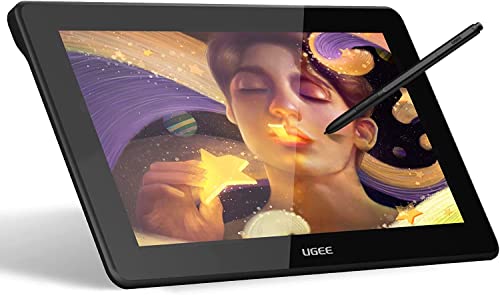
Drawing Tablet with Screen,VEIKK VK2200PRO Drawing Monitor,21.5 Inch Full-Laminated Screen,with 2 Customized Quick Dials,8 Shortcut Keys and Adjustable Stand (92% NTSC,±60° Tilt Function,120% sRGB)


Key features
- •【21.5-Inches HD Full Laminated Screen】-See more details on this pen display.The VK2200PRO drawing monitor with a large 21.5 inch full laminated screen which has no parallax and reduces reflection,this ensures the accuracy of the cursor position and the lowest parallax. Resolution 1920x1080 Full-HD IPS screen,see your creations in vibrant color on this Pen Display (16.7 million colors, 92% NTSC/120%sRGB).NOTE: VEIKK VK2200PRO drawing monitor must be connected to a device to work.
- •【2 Quick dials&8 Shortcut Keys】-Designed for productivity,the drawing monitor with two quick dials and 8 shortcut keys.The quick dials can switch 4 kinds of fuctions like canvas zoom in/out, brush zoom in/out, undo/reundo, etc.8 customizable shortcut keys,improve work efficiency.Less Noise, More Focus.
- •【Battery-free Pen and ±60°Tilt surpport】-The VK2200PRO pen display provides 2 P05 battery-free stylus pen,with 8192 levels of pressure sensitivity, ±60°tilt surpport,and 290PPS highest report rate.The pen has no battery and requires no recharging for uninterrupted use.
- •【Dual-head USB-C Design&Slim Body&Adjustable Stand】-Unlike typical pen displays,VK2200PRO drawing monitor is more thinner,thinkness only 17mm. Support USB-C to C design allows connection to other devices without an adapter. With the included adjustable stand, adjust from 15°-85°angle,very comfortable to use.
- •【Operate System & Service】-The VK2200PRO drawing monitor compatible with Win11/10/8/7, Mac OS 10.12 or later, Chrome OS 88 and above, and Linux.VEIKK provides one-year hardware warranty and lifetime free driver update, you will get professional suggestion if you meet any problem for all VEIKK drawing tablets.We are always here for our customers.
BrandVEIKK
CategoryGraphics Tablets
Size21.5 Inch
Color21.5 Pen Display-BLACK
Warranty12 months hardware warranty
Drawing Tablet with Screen,VEIKK VK2200PRO Drawing Monitor,21.5 Inch Full-Laminated Screen,with 2 Customized Quick Dials,8 Shortcut Keys and Adjustable Stand (92% NTSC,±60° Tilt Function,120% sRGB)
List Price: $538.34$484.51DEALYou Save: $53.83 (10%)
Free shippingFree Returns – 30 daysFree Order CancellationSecure Payment2–3 Days DeliveryGet It October 25, 2026In Stock (1)No marketing spamNo account requiredFulfilment by FedEx / Amazon / UPS / ShipwirePayPal / Card Buyer Protection
Customer Reviews
Reviews sourced from verified Amazon purchasers4.3
out of 5
Based on 10 reviews
5★
80%
4★
20%
3★
0%
2★
0%
1★
0%
Sleek and compact tablet monitor with extra unexpected features at a great value
Josh✓ Verified Purchase•October 27, 2023
The media could not be loaded. The very first thing I noticed when I took this product out of the box is how compact it is, it's an 11.6 inch display tablet, which is similar to tablets I've used before, but this one is considerably less bulky than those. It's very sleek and doesn't really have any wasted real-estate. This should be able to fit in a laptop bag no problem.
It's got a sleek chrome backing plate with four rubber pads so you can safely set it on a table or desk without worrying about scratching the back. I personally use a tablet stand, and the grips keep it from sliding around.
There's 6 shortcut buttons you can program on the side that don't stick out too much.
The cables slot into the left side of the tablet and consist of 1 usb-c to hdmi and one usb-c to 2x usb, which powers it. My pc has plenty of usb power to power this tablet without needing an ac adapter, but your mileage may vary.
One item of note is that the cables are somewhat short, that's perfect for if you're a laptop user or you keep your pc on your desk, but if your pc is a bit far away you may want to order an HDMI and usb extension cable. I had spare extension cables so that wasn't a huge problem.
Onto what comes in the box: You get the unit itself, of course, a drawing glove, a screen wipe, tons of nibs (like seriously, you're never going to run out of these), and TWO tablet pens with a stand. Some other companies charge out the nose for pens, so it's really nice to have two come in the box for once.
The pen itself is very stylish, it's lightweight and feels very good in the hand. There isn't an eraser end, but personally I never use those anyway.
The screen on the unit itself is bright and responsive, provided you callibrate it first, which is something you will have to do with any tablet monitor.
The pressure sensitivity on this is actually awesome, it can pick up the slightest difference in hardness, and out of my 4 hours or so of testing I've not once seen any issues with shoelacing (lines suddenly changing size) or dragging after letting go.
One thing to keep in mind, is that this is a 1080p tablet compressed into a somewhat smaller viewing space than a typical PC monitor, so you will want to set your scaling to 100% on windows for it to avoid text blur, that will be the case with any compact monitor tablet, otherwise it's image is actually pretty sharp compared to others I have used.
The colors on the tablet appear to be pretty much identical to my main screen without having to mess with settings. Many tablets have an over abundance of blue in their color gamut, so this was nice to see.
The screen feels smooth while using it but not so smooth it feels off. A feature I noticed that I didn't know about before is the ability to flip the screen in 90 degree increments in the tablet software, meaning if you were drawing a portrait, you could stand it up on its side to get more active space, which is pretty cool.
The last thing I want to touch on is its heat, or rather, it's lack thereof. I had it on for the entirety of testing time and then some and it remained cool to the touch,
so if that's anything to go by, there should be absolutely no risk of overheating.
All in all this is an excellent compact monitor tablet, for a very reasonable price, and is my favorite product I've tried from this company thus far.
I'm very impressed, and I highly recommend this.
It's got a sleek chrome backing plate with four rubber pads so you can safely set it on a table or desk without worrying about scratching the back. I personally use a tablet stand, and the grips keep it from sliding around.
There's 6 shortcut buttons you can program on the side that don't stick out too much.
The cables slot into the left side of the tablet and consist of 1 usb-c to hdmi and one usb-c to 2x usb, which powers it. My pc has plenty of usb power to power this tablet without needing an ac adapter, but your mileage may vary.
One item of note is that the cables are somewhat short, that's perfect for if you're a laptop user or you keep your pc on your desk, but if your pc is a bit far away you may want to order an HDMI and usb extension cable. I had spare extension cables so that wasn't a huge problem.
Onto what comes in the box: You get the unit itself, of course, a drawing glove, a screen wipe, tons of nibs (like seriously, you're never going to run out of these), and TWO tablet pens with a stand. Some other companies charge out the nose for pens, so it's really nice to have two come in the box for once.
The pen itself is very stylish, it's lightweight and feels very good in the hand. There isn't an eraser end, but personally I never use those anyway.
The screen on the unit itself is bright and responsive, provided you callibrate it first, which is something you will have to do with any tablet monitor.
The pressure sensitivity on this is actually awesome, it can pick up the slightest difference in hardness, and out of my 4 hours or so of testing I've not once seen any issues with shoelacing (lines suddenly changing size) or dragging after letting go.
One thing to keep in mind, is that this is a 1080p tablet compressed into a somewhat smaller viewing space than a typical PC monitor, so you will want to set your scaling to 100% on windows for it to avoid text blur, that will be the case with any compact monitor tablet, otherwise it's image is actually pretty sharp compared to others I have used.
The colors on the tablet appear to be pretty much identical to my main screen without having to mess with settings. Many tablets have an over abundance of blue in their color gamut, so this was nice to see.
The screen feels smooth while using it but not so smooth it feels off. A feature I noticed that I didn't know about before is the ability to flip the screen in 90 degree increments in the tablet software, meaning if you were drawing a portrait, you could stand it up on its side to get more active space, which is pretty cool.
The last thing I want to touch on is its heat, or rather, it's lack thereof. I had it on for the entirety of testing time and then some and it remained cool to the touch,
so if that's anything to go by, there should be absolutely no risk of overheating.
All in all this is an excellent compact monitor tablet, for a very reasonable price, and is my favorite product I've tried from this company thus far.
I'm very impressed, and I highly recommend this.
An Affordable and Functional On-Screen Drawing Tablet
Sylvia Saxon✓ Verified Purchase•October 13, 2023
Here's the bottom line: Does the VK1200 Veikk tablet provide a legitimate alternative to Wacom's Cintiq line, offering a comparable on-screen drawing experience at a vastly more affordable price point? Absolutely, yes.
Are there some things which are important to know in order to make a fully-formed opinion about whether this particular on-screen drawing tool is right for you? Also, yes.
First off, the product arrived in its own packaging without any further box or packing material, so I was slightly wary about its condition. However, upon opening the package, I found everything was in excellent shape, no damage at all.
The company who makes the Veikk tablet is generous with its accessories (see photo with chapstick for size reference!): you receive TWO stylus pens (great for artists like me who are always misplacing their stylus) as well as a flexible felt case ("pen pocket") for each, a pen holder/stand, plus 28 total extra stylus nibs (8 of which fit inside slots in the pen stand itself, making this pen stand probably the only one I won't eventually throw away). The tablet also comes with a two-fingered drawing glove for minimizing screen-smudges/smoothing your strokes, a screen cleaner cloth, and a small tool for removing/replacing the nibs. It also comes with the cords you need to get started: a USB cord for powering the tablet and an HDMI cord for getting your computer to see the tablet as another monitor. The instruction booklet implies that for some user setups, an adaptor cable (not included) may be needed, but I had no trouble getting the tablet to power on using only the included USB cord. It's refreshing to have much less cord/adapter clutter than I had with my Cintiq.
Unfortunately, despite the much less expensive cost, the Veikk is no easier than the Cintiq to set up and get to drawing, and in some ways is more challenging. First of all, there is a bit of a learning curve here, even for someone with decent computer skills and experience with other on-screen drawing tools. To get the Veikk tablet to work properly, the drivers must be downloaded and installed manually. Thankfully, there is an included card printed with the website where the drivers can be found-- just don't expect plug and play functionality.
Secondly, and perhaps more importantly, to get the pressure sensitivity to register in Photoshop with this tablet took me a couple of hours of internet research and some irritating trouble-shooting before it would function properly (This is, apparently, a fairly common problem with the Veikk tablets, though not an insurmountable one). But it could discourage those artists who are tech beginners (a shame, as in every other way, this is a GOOD tool for those who want to try an on-screen tablet for the first time and don't have the funds to afford a Cintiq or iPad/Pencil).
However, once I got past the initial set up problems, I have to say I really like how it feels to draw on this tablet!
It has a nice, lightly toothy surface that feels good to draw on, and the addition of the drawing glove keeps the screen free from hand smudges (The glove itself is a spandex stretch fabric, so should fit most hands, though I found it a bit too big for my smaller-than-average hands). The screen does pick up smudges and fingerprints easily, but they are equally easy to clean off. The tablet has six programmable buttons that by default are on the left side, but with some fiddling in the tablet settings, you can set it into left-hand mode so you can flip the tablet around to get the buttons on the right-hand side.
The matte plastic stylus itself has a nice grippy texture, but is very light. Much lighter than the iPad's Pencil, and lighter than wacom tablet pens-- perhaps the heft of an average wooden pencil. The weight took some getting used to, and both the pen and pen holder feel somewhat cheap because of how light they are, but it definitely isn't a deal-breaker for me, and after some use I like it just fine. The size of the pen feels good: thinner than the Cintiq pens, but bulkier than Apple's Pencil.
The tablet is fairly light, but thanks to the metal body it doesn't feel cheap. It's a good tablet for using in your lap, but it doesn't have any feet, a stand, or any way to set it at any angle aside from flat if you use it on a flat desk (Veikk's more pro-level tablets do provide this kind of stand however, if that's something you've gotta have). The VK1200 is an appealing size to hold, smaller than the smallest available Cintiq by 2 inches in both length and height (the VK1200 tablet is about 12.5"x7.5" and the monitor display dimensions are about 10"x5.75").
The actual drawable area is a bit smaller than this, however as any lines or strokes drawn within a 1/4 of an inch on each edge of the display will be disrupted (see the pink border area in photo of tablet screen). Additionally, I discovered that if one tries to draw a line that starts off or near the edge of the display, an odd glitch will shoot a long, straight pen stroke across the whole screen (see photo). If one tries to draw a stroke that starts in the drawable area and goes OFF the display, the line will cut short before reaching the edge of the screen. These things are frustrating on their own, but also make Full-Screen Mode in Photoshop difficult to use, especially without also having a mouse handy, as the tablet won't register the pen on the edge of the screen where you need the cursor to hover in order to pop out the hidden menus. If, however, you work in Standard Screen (with menus), or Full Screen with Menu Bar, this ~1/4 inch zone is much less of an issue and shouldn't interfere with drawing. I should also point out that my old Cintiq (can't speak for the current models) also struggles with keeping strokes smooth toward the outside edges of the drawable screen, so that part of the issue isn't unique to the Veikk. And it doesn't make the tablet unusable by any means.
IN SUMMATION:
Pros:
~Very affordable price (more than $400 less than cheapest cintiq)
~A great option for someone looking to upgrade to an on-screen drawing tablet without breaking the bank
~Sleek, attractive design, comfy size
~No bulky adapters, only two cords
~Generous with included accessories
~Toothy, satisfying drawing surface that feels good to work on
~Responsive and smooth drawing (once you get that pen pressure issue fixed)
~Good looking screen
Cons:
~Takes some trouble shooting to get pen pressure to work
~Not the best for tech beginners
~Not compatible with full-screen mode in Photoshop
Overall, the Veikk VK1200 tablet is a worthwhile purchase if you are looking to transition to on-screen drawing without having to spend nearly as much as Wacom's products demand. The drawing experience itself is just as smooth and satisfying as it is on the Cintiq, so long as you don't mind the up front investment of energy in getting everything to work properly, or if you are lucky enough to have a tech friend to help you out. :)
Are there some things which are important to know in order to make a fully-formed opinion about whether this particular on-screen drawing tool is right for you? Also, yes.
First off, the product arrived in its own packaging without any further box or packing material, so I was slightly wary about its condition. However, upon opening the package, I found everything was in excellent shape, no damage at all.
The company who makes the Veikk tablet is generous with its accessories (see photo with chapstick for size reference!): you receive TWO stylus pens (great for artists like me who are always misplacing their stylus) as well as a flexible felt case ("pen pocket") for each, a pen holder/stand, plus 28 total extra stylus nibs (8 of which fit inside slots in the pen stand itself, making this pen stand probably the only one I won't eventually throw away). The tablet also comes with a two-fingered drawing glove for minimizing screen-smudges/smoothing your strokes, a screen cleaner cloth, and a small tool for removing/replacing the nibs. It also comes with the cords you need to get started: a USB cord for powering the tablet and an HDMI cord for getting your computer to see the tablet as another monitor. The instruction booklet implies that for some user setups, an adaptor cable (not included) may be needed, but I had no trouble getting the tablet to power on using only the included USB cord. It's refreshing to have much less cord/adapter clutter than I had with my Cintiq.
Unfortunately, despite the much less expensive cost, the Veikk is no easier than the Cintiq to set up and get to drawing, and in some ways is more challenging. First of all, there is a bit of a learning curve here, even for someone with decent computer skills and experience with other on-screen drawing tools. To get the Veikk tablet to work properly, the drivers must be downloaded and installed manually. Thankfully, there is an included card printed with the website where the drivers can be found-- just don't expect plug and play functionality.
Secondly, and perhaps more importantly, to get the pressure sensitivity to register in Photoshop with this tablet took me a couple of hours of internet research and some irritating trouble-shooting before it would function properly (This is, apparently, a fairly common problem with the Veikk tablets, though not an insurmountable one). But it could discourage those artists who are tech beginners (a shame, as in every other way, this is a GOOD tool for those who want to try an on-screen tablet for the first time and don't have the funds to afford a Cintiq or iPad/Pencil).
However, once I got past the initial set up problems, I have to say I really like how it feels to draw on this tablet!
It has a nice, lightly toothy surface that feels good to draw on, and the addition of the drawing glove keeps the screen free from hand smudges (The glove itself is a spandex stretch fabric, so should fit most hands, though I found it a bit too big for my smaller-than-average hands). The screen does pick up smudges and fingerprints easily, but they are equally easy to clean off. The tablet has six programmable buttons that by default are on the left side, but with some fiddling in the tablet settings, you can set it into left-hand mode so you can flip the tablet around to get the buttons on the right-hand side.
The matte plastic stylus itself has a nice grippy texture, but is very light. Much lighter than the iPad's Pencil, and lighter than wacom tablet pens-- perhaps the heft of an average wooden pencil. The weight took some getting used to, and both the pen and pen holder feel somewhat cheap because of how light they are, but it definitely isn't a deal-breaker for me, and after some use I like it just fine. The size of the pen feels good: thinner than the Cintiq pens, but bulkier than Apple's Pencil.
The tablet is fairly light, but thanks to the metal body it doesn't feel cheap. It's a good tablet for using in your lap, but it doesn't have any feet, a stand, or any way to set it at any angle aside from flat if you use it on a flat desk (Veikk's more pro-level tablets do provide this kind of stand however, if that's something you've gotta have). The VK1200 is an appealing size to hold, smaller than the smallest available Cintiq by 2 inches in both length and height (the VK1200 tablet is about 12.5"x7.5" and the monitor display dimensions are about 10"x5.75").
The actual drawable area is a bit smaller than this, however as any lines or strokes drawn within a 1/4 of an inch on each edge of the display will be disrupted (see the pink border area in photo of tablet screen). Additionally, I discovered that if one tries to draw a line that starts off or near the edge of the display, an odd glitch will shoot a long, straight pen stroke across the whole screen (see photo). If one tries to draw a stroke that starts in the drawable area and goes OFF the display, the line will cut short before reaching the edge of the screen. These things are frustrating on their own, but also make Full-Screen Mode in Photoshop difficult to use, especially without also having a mouse handy, as the tablet won't register the pen on the edge of the screen where you need the cursor to hover in order to pop out the hidden menus. If, however, you work in Standard Screen (with menus), or Full Screen with Menu Bar, this ~1/4 inch zone is much less of an issue and shouldn't interfere with drawing. I should also point out that my old Cintiq (can't speak for the current models) also struggles with keeping strokes smooth toward the outside edges of the drawable screen, so that part of the issue isn't unique to the Veikk. And it doesn't make the tablet unusable by any means.
IN SUMMATION:
Pros:
~Very affordable price (more than $400 less than cheapest cintiq)
~A great option for someone looking to upgrade to an on-screen drawing tablet without breaking the bank
~Sleek, attractive design, comfy size
~No bulky adapters, only two cords
~Generous with included accessories
~Toothy, satisfying drawing surface that feels good to work on
~Responsive and smooth drawing (once you get that pen pressure issue fixed)
~Good looking screen
Cons:
~Takes some trouble shooting to get pen pressure to work
~Not the best for tech beginners
~Not compatible with full-screen mode in Photoshop
Overall, the Veikk VK1200 tablet is a worthwhile purchase if you are looking to transition to on-screen drawing without having to spend nearly as much as Wacom's products demand. The drawing experience itself is just as smooth and satisfying as it is on the Cintiq, so long as you don't mind the up front investment of energy in getting everything to work properly, or if you are lucky enough to have a tech friend to help you out. :)
Great value for tablet
CP✓ Verified Purchase•September 24, 2023
First of all, the tablet is placed in a protective bag separate from the additional stuff like the usb/hdmi cords and I was a pleasantly surprised that it came with two styluses! It also comes with 20+ nibs so you'll probably never run out. :)
Make sure you follow the correct instructions for set up. The instructions say to uninstall other tablet drivers so if you used something like wacom before, uninstall it just incase -- I did have both drivers running and I didn't run into any issues but of course computers can vary depending on your setup. Make sure to have both cords plugged in for it to work and you might have to register the tablet as a third monitor!
Please note that I used this on a windows 10 desktop PC, but it also works on a mac which is pretty cool! Especially since a lot of digital artists nowadays use macbooks? I do feel like the most ideal use for this tablet would be to use with a laptop since you can just easily connect and draw wherever.
I actually really like the feel of this tablet! I've tried drawing on a ipad and a surface before and they felt a bit more glassy? Too smooth whereas this has a bit more of a papery/matte feel to it. I tested drawing in SAI and Clip Studio with no issues ( like how sometimes there can be issues with pen pressure for wacom drivers ). The stylus is very light compared to the wacom styluses I've used in the past. There doesn't seem to be any parallax from what I've noticed which is fantastic! Also in general the tablet feels very sleek and the back is made out of metal which isn't typical when it comes to tablets from what I've seen.
If you're used to drawing with a normal desktop tablet like an intuos, it does take a little getting used to but of course that's normal when trying new tech.
Let's talk about one of the biggest draws--price point. At 250.00 this is much more affordable than an ipad pro which would cost around 1000.00 or more ( depending on model and you have to buy an apple pencil as well ). I think that alone makes it an easy way to test something very similar without having to shell out a lot of money. I think this would be a great investment for artists that already have a laptop and it allows them to keep using programs they're familiar with instead of being limited to apple/mac. Even for non-artists it's a cool/affordable way to have a second screen. And it's battery-less so you don't have to keep on charging it like you would an ipad or surface.
Would I recommend this to someone looking for a more affordable drawing alternative? Definitely yes!
Make sure you follow the correct instructions for set up. The instructions say to uninstall other tablet drivers so if you used something like wacom before, uninstall it just incase -- I did have both drivers running and I didn't run into any issues but of course computers can vary depending on your setup. Make sure to have both cords plugged in for it to work and you might have to register the tablet as a third monitor!
Please note that I used this on a windows 10 desktop PC, but it also works on a mac which is pretty cool! Especially since a lot of digital artists nowadays use macbooks? I do feel like the most ideal use for this tablet would be to use with a laptop since you can just easily connect and draw wherever.
I actually really like the feel of this tablet! I've tried drawing on a ipad and a surface before and they felt a bit more glassy? Too smooth whereas this has a bit more of a papery/matte feel to it. I tested drawing in SAI and Clip Studio with no issues ( like how sometimes there can be issues with pen pressure for wacom drivers ). The stylus is very light compared to the wacom styluses I've used in the past. There doesn't seem to be any parallax from what I've noticed which is fantastic! Also in general the tablet feels very sleek and the back is made out of metal which isn't typical when it comes to tablets from what I've seen.
If you're used to drawing with a normal desktop tablet like an intuos, it does take a little getting used to but of course that's normal when trying new tech.
Let's talk about one of the biggest draws--price point. At 250.00 this is much more affordable than an ipad pro which would cost around 1000.00 or more ( depending on model and you have to buy an apple pencil as well ). I think that alone makes it an easy way to test something very similar without having to shell out a lot of money. I think this would be a great investment for artists that already have a laptop and it allows them to keep using programs they're familiar with instead of being limited to apple/mac. Even for non-artists it's a cool/affordable way to have a second screen. And it's battery-less so you don't have to keep on charging it like you would an ipad or surface.
Would I recommend this to someone looking for a more affordable drawing alternative? Definitely yes!
Great display tablet for it's price
Tiffany Pham✓ Verified Purchase•September 8, 2023
Let me first start off by saying how impressed I was by the packaging. The box is very sturdy (the lid has padding to protect the tablet) and everything was packed neatly inside. When you first open the box, the VK1200 is the first thing you see and I have to say that I'm loving the minimalistic design. Super sleek! Once you lift the tablet, there is a paper and underneath that lies all the other accessories.
Just like the listing says, this product comes with: the VK1200 tablet display, hdmi cable, usb cable, replacement pen nibs, pen holder, nib remover, artist glove, cleaning cloth, 2 pen pockets, and 2 pens.
For someone who had been contemplating getting an ipad pro because I've been wanting a display tablet to draw on. I think the VK1200 is an excellent alternative because of the price, even if it is not a standalone product and needs to be plugged into a computer, but also because of the size. Personally, I haven't been outside due to Covid restrictions (besides for essentials) so the VK1200 is perfect for me since I simply keep it on my desk and draw when I need to.
Set up was a bit confusing at first (after the initial installation), but I think that was mostly because I am using a dual monitor set up and so the VK1200 is my third monitor and it messed up my settings a bit. With a bit of tweaking in the VEIKK tablet settings, however, I was able to map my VK1200 so that it is an extended monitor rather than mirroring one of my other monitors.
One issue I did run into was after I set that up, the pen calibration wasn't functioning correctly (on Windows 10). To fix the issue I had I needed to uninstall my old driver and then install the newer driver on the VEIKK website.
This is the first time I've had a display tablet so I'm still getting used to it, but so far I love it. It is so convenient to be able to see what I'm drawing directly instead of starting at a second screen. It gives me the sense of drawing traditionally since I can see my art coming to life right underneath the pen in my hand instead of just under a cursor on my screen. Another thing I've noticed is that the tablet itself seems to have a slight texture to it and that was a pleasant surprise because I fully expected there to be super smooth glass (which I don't really like). This was great since I'm used to my tablets having a slight texture to mimic a 'paper' feel.
The tablet also comes with six keys which can be customized to any shortcut you want (I changed mine to undo and redo. Haha as an artist you'll always need that ctrl+z!). You'll just have to go under the VEIKK tablet settings to change them.
Would I recommend this to others who have been looking for a display tablet? Definitely.
Just like the listing says, this product comes with: the VK1200 tablet display, hdmi cable, usb cable, replacement pen nibs, pen holder, nib remover, artist glove, cleaning cloth, 2 pen pockets, and 2 pens.
For someone who had been contemplating getting an ipad pro because I've been wanting a display tablet to draw on. I think the VK1200 is an excellent alternative because of the price, even if it is not a standalone product and needs to be plugged into a computer, but also because of the size. Personally, I haven't been outside due to Covid restrictions (besides for essentials) so the VK1200 is perfect for me since I simply keep it on my desk and draw when I need to.
Set up was a bit confusing at first (after the initial installation), but I think that was mostly because I am using a dual monitor set up and so the VK1200 is my third monitor and it messed up my settings a bit. With a bit of tweaking in the VEIKK tablet settings, however, I was able to map my VK1200 so that it is an extended monitor rather than mirroring one of my other monitors.
One issue I did run into was after I set that up, the pen calibration wasn't functioning correctly (on Windows 10). To fix the issue I had I needed to uninstall my old driver and then install the newer driver on the VEIKK website.
This is the first time I've had a display tablet so I'm still getting used to it, but so far I love it. It is so convenient to be able to see what I'm drawing directly instead of starting at a second screen. It gives me the sense of drawing traditionally since I can see my art coming to life right underneath the pen in my hand instead of just under a cursor on my screen. Another thing I've noticed is that the tablet itself seems to have a slight texture to it and that was a pleasant surprise because I fully expected there to be super smooth glass (which I don't really like). This was great since I'm used to my tablets having a slight texture to mimic a 'paper' feel.
The tablet also comes with six keys which can be customized to any shortcut you want (I changed mine to undo and redo. Haha as an artist you'll always need that ctrl+z!). You'll just have to go under the VEIKK tablet settings to change them.
Would I recommend this to others who have been looking for a display tablet? Definitely.
Worked great at first but...
AVTHEGODDESS✓ Verified Purchase•August 29, 2023
The pad was still responsive but the screen wouldn't show feed back after a week of having it.
Page 1 of 2



![Drawing Glove for Tablet,[Pink 2Pack] Palm Rejection Artist Right Hand Glove Digital Art Accessories](https://m.media-amazon.com/images/I/41Jvp6-d4oL._SL500_.jpg)