USB C Laptop Docking Station Dual Monitor HDMI for Dell/HP/Lenovo Laptop USB C Hub Multiport Adapter Dongle Dock,USB C to 2 HDMI+DisplayPort DP+Ethernet+100W USB C Power Charging Port+5USB+SD/TF+Audio


Key features
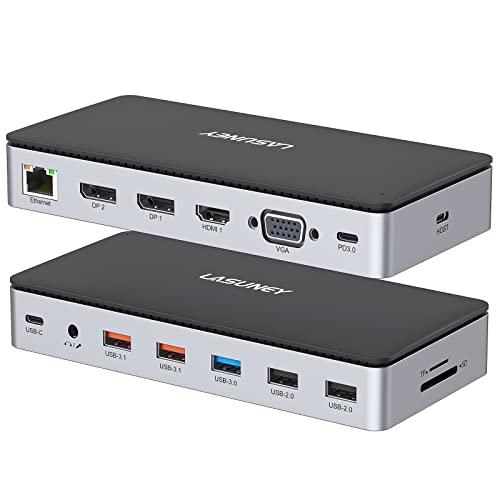
- •USB C Docking Station(13 in 1): This docking station easily convert your laptop's USB-C/thunderbolt 3/Type C Port into 13 Ports: HDMI 1 (4K@60Hz), HDMI 2 (4K@30Hz),Display Port(4K@60Hz),100W USB C Power Delivery port,Gigabit Ethernet(1Gbps) ,3 USB 3.0, 2 USB 2.0,SD/Micro SD card readers,3.5mm Mic/audio port. This laptop docking station is a great gadgets that makes your work more effective.
- •Extend more laptop monitor workspace for your laptop projects with Ultra High-definition 4K output : This docking station dual monitor support dual monitors and triple displays for Windows. While single use HDMI 1 port or displayport resolution up to 4K@60Hz, single use HDMI2 resolution up to 4K@30Hz. Dual monitors will be 4K@30Hz and 2K@60Hz(DP1.4). Triple monitors will be 1080P(DP1.4). Note:MacBook laptops only support mirror display, same image on external monitors. (The hub Not Support Using Converter)
- •More Stable Network Connection & Fast Data Transmission: The hp docking station's ethernet lan port provides up to 1000Mbps,no need driver/software, just plug and play. And this dell docking station equipped with 3 USB 3. 0 ports(speed up to 5Gbps) that allows you transfer files in seconds from your usb flash driver, usb/usb c hard disks,2 USB 2. 0(speed up to 480Mbps) that special for you to connect to the mouse/keyboard without any lags,and Convenient USB C to SD/TF card reader(speed up to 104Mbs) that allows you to quickly view your photos or videos, perfect for Photographer or Designer or Video editor,etc
- •Fast & Safe USB C Power Delivery 100W Charging Port&Audio Jack Port: This lenovo docking station support power delivery up to 100W, and safe power out (charging) is limited to 87W, worry-free about power storage.★Please make sure your device support power delivery protocol,otherwise it won't charge for your laptop. Also, this usb c hub dual hdmi have 3.5mm Mic/Audio jack for you can enjoy the music and movie without disturbing others
- •Strong Compatibility: This usb c dock dongle hub multiport adapter compatible with all laptops with thunderbolt3/4/usb-c/type c(with vidieo out put function ), such Dell Latitude 5330,5420,5430,5530,5431,5531,7330,7420,7430,7530,9420,9430,Dell Inspiron,Dell Vostro,XPS 13/15/17;HP Elitebook Zbook g7,g8, HP Probook,Lenovo t14s,Yoga 720/910/920/930,Thinkpad;Surface Pro 8/7/X/Go/Laptop 3,etc. If you are not sure if this usb c hub laptop dock docking station multiple monitor adapter work on your latop, please feel free to contact vvb service support
USB C Laptop Docking Station Dual Monitor HDMI for Dell/HP/Lenovo Laptop USB C Hub Multiport Adapter Dongle Dock,USB C to 2 HDMI+DisplayPort DP+Ethernet+100W USB C Power Charging Port+5USB+SD/TF+Audio
List Price: $90.16$81.14DEALYou Save: $9.02 (10%)
Free shippingFree Returns – 30 daysFree Order CancellationSecure Payment2–3 Days DeliveryGet It June 25, 2026In Stock (1)No marketing spamNo account requiredFulfilment by FedEx / Amazon / UPS / ShipwirePayPal / Card Buyer Protection
Customer Reviews
Reviews sourced from verified Amazon purchasers4.3
out of 5
Based on 10 reviews
5★
40%
4★
60%
3★
0%
2★
0%
1★
0%
Gets hot fast
Brandon N✓ Verified Purchase•August 16, 2023
Got this for multiple uses, use it mostly to connect phone to projector and charge at the same time. It gets hot, not sure why.
The number of ports for USB HDMI and USB-C are numerous
R. Kakarala✓ Verified Purchase•July 23, 2023
I used this as my permanent hub for home. It is used for my HP Spectre for the monitors and my CAC reader for work. It's great having one for home as well as a smaller travel one. This one allows me to also be able charge other devices while working
Works great no compatibility issues with HP or my Lenovo used for my other work
Monitors and CAC read work great and I like the slim low profile design
Works great no compatibility issues with HP or my Lenovo used for my other work
Monitors and CAC read work great and I like the slim low profile design
Worked perfectly for what we needed
Amazon Customer✓ Verified Purchase•July 14, 2023
My wife has a Dell laptop that lacked enough ports to connect all the peripherals that she needed to operate in a desktop environment. With her thunderbolt port, she was able to use this docking station to power her laptop, a second portable usb monitor, external keyboard and mouse, external laptop fan, and the docking station, with the Dell 65w power adapter.
We just bought a second one to take to a second office setup. She can leave every peripheral to the docking station at the first location, unplug once cord from the laptop, and take the laptop and plug it in at the second location that has duplicate peripherals.
No more unplugging multiple items every time she had to use her laptop elsewhere. We're very happy with this docking station so far.
We just bought a second one to take to a second office setup. She can leave every peripheral to the docking station at the first location, unplug once cord from the laptop, and take the laptop and plug it in at the second location that has duplicate peripherals.
No more unplugging multiple items every time she had to use her laptop elsewhere. We're very happy with this docking station so far.
Expensive, one defective, but has 1/8" jack
AJA✓ Verified Purchase•July 3, 2023
This was the best option for a hub that had an 1/8" jack and, while it is expensive for a simple hub, it did eventually work out.
The first one of these that came was defective, where the DP didn't work at all. I did an exchange and the second one arrived in an obviously-used condition (a scratch on it, damaged box, and had obviously been shoved back in by the previous owner). Despite the cosmetic flaw, though, the DP and all other ports worked on this one, so it's acceptable.
The first one of these that came was defective, where the DP didn't work at all. I did an exchange and the second one arrived in an obviously-used condition (a scratch on it, damaged box, and had obviously been shoved back in by the previous owner). Despite the cosmetic flaw, though, the DP and all other ports worked on this one, so it's acceptable.
Has all the ports I need for a quick disconnect of laptop
jillellen✓ Verified Purchase•June 26, 2023
I'm a graphic designer who works from home most of the time. I just replaced my desktop computer with an Acer Nitro 5 laptop in order to have the option to work somewhere other than at my desk. However, at my desk I have the laptop connected to 2 monitors, a wired keyboard and wired mouse, ethernet cable, an external camera, and wired headphones with mike. Bluetooth is great in theory, but when it doesn't work well, I get angry, so I tend to use wired peripherals. But that is a lot of stuff to unplug from the laptop in order to take it to another room! I bought the VVB 13 in 1 Hub to give me freedom of movement without all the unplugging. So far (I just received it today) it is working as expected. I'm using 4 USB ports, ethernet, the display port, an HDMI port, and the audio jack. The monitors lit up right away and I adjusted my display settings to extend them. All the USB ports are working fine. The audio jack worked with my headphones and the mike tested fine. I did have to restart the computer and go into settings to find my external camera, but it's working fine. The ethernet was not showing as connected until after I restarted the computer, and then it showed a different ethernet than it uses when plugged directly into the laptop (see photo), which is puzzling. However, it is working so I'm happy. The wi-fi is not great in my office so ethernet is a must. Another strange thing is that while I'm working, if I touch the hub for any reason, like to plug in or unplug something, my screens go dark. Then all is well once I stop touching the hub. The laptop and my monitors are plugged into a relatively new surge protector, so that is another mystery. It makes me a bit nervous. All in all, the hub is doing its job and I get to take advantage of its convenience tomorrow when I travel with my laptop.
Page 1 of 2