NodeMCU ESP8266 Development Board with 0.96 Inch OLED Display, CH340 Driver, ESP-12E WiFi Wireless Module, and Micro USB Works Great for Arduino IDE/Micropython Programming (Pin Header Soldered)



Key features
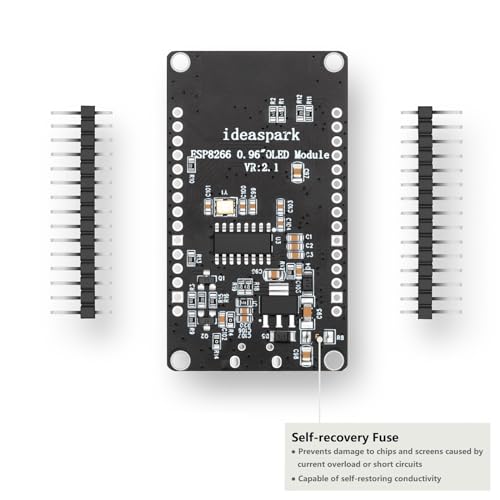
- •The ESP8266 NodeMCU board has all the features of the traditional ESP8266 module,with the same exact size and peripheral ports,offers seamless integration with a 0.96-inch OLED display, eliminating the need for frustrating wires and breadboards.Display features a high-resolution 128x64 with SSD1306 driver and is compatible with I2C,SPI interfaces. Plus,It uses Micro usb cable to connect. Say goodbye to messy setups and hello to hassle-free electronics with the ESP8266 NodeMCU board
- •This board uses I2C to connect to an OLED display via the SDA (D6 / GPIO12) and SCL (D5 / GPIO14) pins. With this board,it's easy to display a variety of information and data
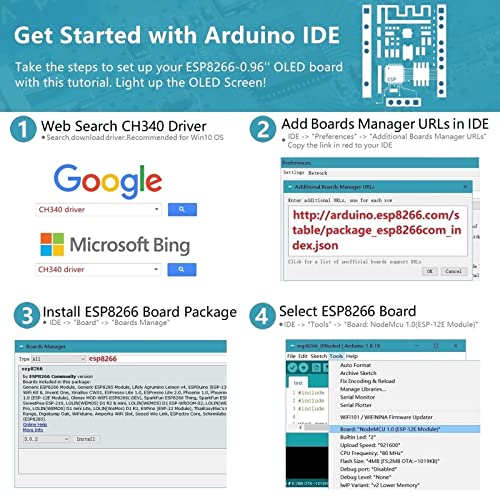
- •To install the new version driver for CH340,simply search for the keywords "CH340 Driver" on Google.com or Bing.com and follow the installation instructions provided.Recommended for Win10 Operating System
- •ESP8266 NodeMCU board is equipped with ESP-12E module,which contains the Tensilica Xtensa 32-bit LX106 RISC microprocessor powering the ESP8266 chip. This microprocessor supports RTOS and operates at a clock frequency that can be adjusted between 80MHz and 160 MHz. It also boasts 128 KB of RAM and 4MB of Flash memory, providing ample storage for data and programs. With its high processing power, built-in Wi-Fi, and Deep Sleep Operating features, It's is an excellent choice for IoT projects
- •This board is an outstanding option for various Internet of Things (IoT) projects. It can be used to display network connection status,monitor information, power levels, and other relevant data. Additionally, it's suitable for building Internet Weather Stations, News Stations, Clocks, and Other similar applications
NodeMCU ESP8266 Development Board with 0.96 Inch OLED Display, CH340 Driver, ESP-12E WiFi Wireless Module, and Micro USB Works Great for Arduino IDE/Micropython Programming (Pin Header Soldered)
List Price: $23.26$20.93DEALYou Save: $2.33 (10%)
Free shippingFree Returns – 30 daysFree Order CancellationSecure Payment2–3 Days DeliveryGet It October 25, 2026In Stock (1)No marketing spamNo account requiredFulfilment by FedEx / Amazon / UPS / ShipwirePayPal / Card Buyer Protection
Customer Reviews
Reviews sourced from verified Amazon purchasers4.3
out of 5
Based on 7 reviews
5★
71%
4★
29%
3★
0%
2★
0%
1★
0%
As shown
Gilbert Correa✓ Verified Purchase•September 8, 2023
Fun to use and program, great to use as trouble shooting tool.
Works great, follow the instructions
stampersand✓ Verified Purchase•August 15, 2023
I was lost at first because there were no instructions included with the product, but the info in the product images was perfect and easy to follow. Works great and a good price.
It's a good controller board.
Sha✓ Verified Purchase•July 18, 2023
You have to be machine-friendly before buying this. If you are not good at managing this kind of board, it's your luck and your job... Anyway, this is the Wi-Fi data sender-receiver ESP8266 chip (not visible, inside the silver one), which is contained inside ESP12F module (the silver rectangle, the seller's image shows ESP12E but I got 12F in it), which is contained by a low-cost open-source chinese controller board called NodeMCU 0.9 (not 1.0!), which is now customized by "ideaspark" with 128x64 pixel OLED display with SSD1306 driver, which is controlled by U8G2 library. The software control of entire NodeMCU can be written by Lua script or Arduino C++. So, the seller has described it in the similar way that I bought and identified each part of this board.
This small board functions well, and I felt convenient since I don't need to buy any extra display.
The only problem of NodeMCU 0.9 board size is that..... this board occupies all 10 holes on a solderless breadboard row, leaving no space for header pins. (1.0 is smaller and has no problem with it!) So, if you want to plug this board into your own breadboard, you need to prepare two breadboards connected in parallel.
This small board functions well, and I felt convenient since I don't need to buy any extra display.
The only problem of NodeMCU 0.9 board size is that..... this board occupies all 10 holes on a solderless breadboard row, leaving no space for header pins. (1.0 is smaller and has no problem with it!) So, if you want to plug this board into your own breadboard, you need to prepare two breadboards connected in parallel.
Nice little board.
Jack✓ Verified Purchase•July 8, 2023
Nice little board. Lots of support for the oled and the price is right!
Great board works well
P. Gioia✓ Verified Purchase•May 13, 2023
The esp8266 is great. I was able to get it loading examples pretty easily following the instructions. It was a little challenging to get the display to work due of lack of documentation. Using the Arduino IDE and the U8G2 library with the following works: U8G2_SSD1306_128X64_NONAME_F_SW_I2C u8g2(U8G2_R0, /* clock=*/ 14, /* data=*/ 12, /* reset=*/ U8X8_PIN_NONE); Use any of the u8g2 examples. Of course had to put two breadboards together, breaking off one power side strip to breadboard it, but that was expected.
Page 1 of 2


